
sonar服务搭建
1.下载安装包,我安装的是6.7.6版本
https://www.sonarqube.org/downloads/
2.安装前的环境要求
JDK1.8+
数据库,我用的是Mysql5.6版本
3.修改配置
打开SonarQube目录下的conf/sonar.properties文件,配置它的数据库连接,启用和配置下面的选项:
sonar.jdbc.username=root

sonar.jdbc.password=123456

sonar.jdbc.url=jdbc:mysql://localhost:3306/sonar?useUnicode=true&characterEncoding=utf8&rewriteBatchedStatements=true&useConfigs=maxPerformance
#linux版本不同时,启动es会出现错误,加入下面配置可避免
sonar.search.javaAdditionalOpts=-Dbootstrap.system_call_filter=false
修改配置文件wrapper.conf,指定jdk版本
wrapper.java.command=/usr/java/jdk1.8.0_111/bin/java
修改elasticsearch.yml配置文件,在 Memory 区域加上
bootstrap.system_call_filter:false
4.切换到bin目录下,执行,必须用非root用户启动该脚本
./sonar.sh start
因为安全问题elasticsearch 不让用root用户直接运行
创建用户

$ adduser sonarUser

为用户创建密码

$ passwd sonarUser

输入两次密码,

修改sonar的目录和用户组为sonarUser

$ chown -R sonarUser:sonarUser sonarqube-6.7.2
启动es时,还会遇到以下各种错误
max file descriptors [4096] for elasticsearch process likely too low, increase to at least [65536]

max number of threads [1024] for user [lishang] likely too low, increase to at least [2048]

解决:切换到root用户,编辑limits.conf 添加类似如下内容

vi /etc/security/limits.conf

添加如下内容:

* soft nofile 65536

* hard nofile 131072

* soft nproc 2048

* hard nproc 4096
问题三:max number of threads [1024] for user [lish] likely too low, increase to at least [2048]

解决:切换到root用户,进入limits.d目录下修改配置文件。

vi /etc/security/limits.d/90-nproc.conf

修改如下内容:

* soft nproc 1024

#修改为

* soft nproc 2048
问题四:max virtual memory areas vm.max_map_count [65530] likely too low, increase to at least [262144]

解决:切换到root用户修改配置sysctl.conf

vi /etc/sysctl.conf

添加下面配置:

vm.max_map_count=655360

并执行命令:

sysctl -p
5.使用Maven构建扫描,参考 https://docs.sonarqube.org/display/SCAN/Analyzing+with+SonarQube+Scanner+for+Maven
在Maven配置文件中加入以下配置:
<settings>

    <pluginGroups>

        <pluginGroup>org.sonarsource.scanner.maven</pluginGroup>

    </pluginGroups>

    <profiles>

        <profile>

            <id>sonar</id>

            <activation>

                <activeByDefault>true</activeByDefault>

            </activation>

            <properties>

                <!-- Optional URL to server. Default value is http://localhost:9000 -->

                <sonar.host.url>

                  http://myserver:9000

                </sonar.host.url>

            </properties>

        </profile>

     </profiles>

</settings>
使用以下命令构建:
mvn clean verify sonar:sonar
扫描小项目,可以正常上传sonarqube管理界面,但是在扫描大项目时,出现一个超时错误,判断应该时sonarqube的webservice设置过短,尝试过各种方法,未解决
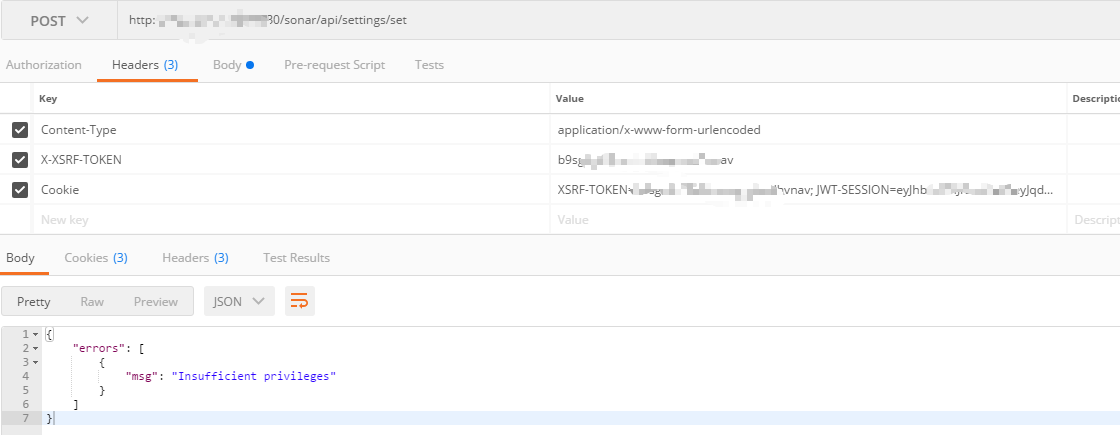
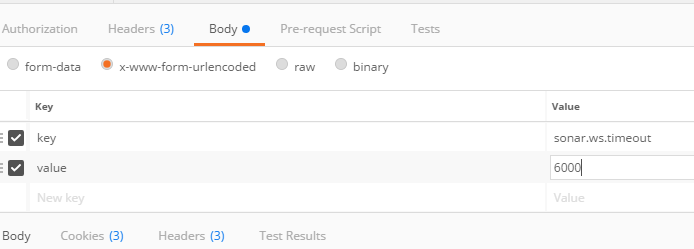
官网提示是在UI界面setting中修改配置,但未找到sonar.ws.timeout配置,于是用postman模拟请求修改该配置项,还是未解决
sonar服务搭建的更多相关文章
- 利用Sonar定制自定义JS扫描规则(一)——sonar环境搭建
接触sonar已经有段时间了,最早是在一个项目组里面听到这个框架,后来在公司持续集成活动的推动下,也逐渐学习了sonar的具体功能.sonar集成了findbugs,pmd,checkstyle各种静 ...
- 代码规范审查 -Sonar环境搭建
Sonar概述 Sonar 是一个用于代码质量管理的开放平台,可以进行代码质量的持续跟踪审查,支持的语言包含C#.java.PHP.C等.可以通过UI一睹Sonar的强大之处. Sonar安装 ...
- ServiceStack.Hello——跨平台.net REST api服务搭建
ServiceStack.Hello--跨平台.net REST api服务搭建 自己创建: https://github.com/ServiceStack/ServiceStack/wiki/Cre ...
- WCFRESTFul服务搭建及实现增删改查
WCFRESTFul服务搭建及实现增删改查 RESTful Wcf是一种基于Http协议的服务架构风格, RESTful 的服务通常是架构层面上的考虑. 因为它天生就具有很好的跨平台跨语言的集成能力 ...
- 微信小程序语音识别服务搭建全过程解析(项目开源在github)
silk v3录音转olami语音识别和语义处理的api服务(ubuntu16.04服务器上实现) ## 重要的写在前面 重要事项一: 目前本文中提到的API已支持微信小程序录音文件格式:silk v ...
- 微信小程序语音识别服务搭建全过程解析(https api开放,支持新接口mp3录音、老接口silk录音)
silk v3(或新录音接口mp3)录音转olami语音识别和语义处理的api服务(ubuntu16.04服务器上实现) 重要的写在前面 重要事项一: 所有相关更新,我优先更新到我个人博客中,其它地方 ...
- Git服务搭建及github使用教程
.pos { position: fixed; top: 35%; left: 90% } .pos a { border: 2px solid white; background: #99CCFF; ...
- eureka服务搭建
Server端 引入eureka server的maven依赖 引入依赖时无需给定eureka的版本号,maven会根据当前使用的SpringCloud版本来判断应该引入哪个版本的euraka ser ...
- NodeJs之服务搭建与数据库连接
NodeJs之服务搭建与数据库连接 一,介绍与需求分析 1.1,介绍 Node.js 是一个基于 Chrome V8 引擎的 JavaScript 运行环境. Node.js 使用了一个事件驱动.非阻 ...
随机推荐
- postman Installation has failed: There was an error while installing the application. Check the setup log for more information and contact the author
Error msg: Installation has failed: There was an error while installing the application. Check the s ...
- 折半、快排、插入排序的Java实现
插入排序 import java.util.Arrays; public class InsertionSort { /** * 对数组里面进行插入排序 * 参数1 数组 * 参数2 数组大小 */ ...
- Python----多元线性回归
多元线性回归 1.多元线性回归方程和简单线性回归方程类似,不同的是由于因变量个数的增加,求取参数的个数也相应增加,推导和求取过程也不一样.. y=β0+β1x1+β2x2+ ... +βpxp+ε 对 ...
- 微信小程序-表单笔记2
本地添加4张图片并显示至页面——组件位置.设置样式.列表渲染 Q.button是一张图片,需要实现点击这张图片后选择本地图片后显示至页面,不知道怎么让本地图片将button挤到右边 S.在wxml中 ...
- windows 监控
监控time_wait状态tcp/ip连接 > netstat -an | findstr "TIME_WAIT" 如果监控此值发现量比较大,且有类似socketExcept ...
- Java队列学习
队列是Java集合中的重要组成部分,具有先进先出的特性,使其具有广泛的应用场景,比如排队等.因此今天就来学习一下Java中的队列.本文的例子使用的Java8环境. 继承类图 学习队列,首先要知道它的类 ...
- Spring AOP 前置通知
我们使用AspectJ对Spring进行AOP操作,有两种方式,注解和XML配置方式,先在pom.xml中声明jar包 <dependencies> <dependency> ...
- 如何实现Echart不刷新页面,多语言切换下的地图数据重新加载,api请求数据加载,soketed数据实时加载
可视化项目中经常用到ecahrt,各种异步加载,连接socket,多语言切换等问题,现在汇总一下: Ecahrt初始化,全局统一init,可以初始化为0,等待后续数据操作 1.如果是api重新请求,数 ...
- Git源码管理工具使用
注明:双击tap键为自动补全操作 1.视频地址:http://www.newbieol.com/course/index_102.html 2.sourcetree是一个拥有界面的git工具吧 下载官 ...
- iptables 限制ip访问3306端口
*filter:INPUT DROP [0:0] #全部关闭:FORWARD ACCEPT [0:0]:OUTPUT ACCEPT [0:0]-A INPUT -s 172.4.4.14 -p tc ...