
ItunesConnect:"Missing Push Notification Entitlement"警告-----以及解决方法
最近开发的cordova应用,要做ios的适配,并且发布版本,但是有一次在发测试版本的时候,突然收到一封邮件警告,原文如下:
Missing Push Notification Entitlement -
Your app appears to include API used to register with the Apple Push Notification service,
but the app signature’s entitlements do not include the “aps-environment” entitlement. If your app uses the Apple Push Notification
service, make sure your App ID is enabled for Push Notification in the Provisioning Portal, and resubmit after signing your app with
a Distribution provisioning profile that includes the “aps-environment” entitlement. See “Provisioning and Development” in the Local
and Push Notification Programming Guide for more information.
If your app does not use the Apple Push Notification service, no action is required.
You may remove the API from future submissions to stop this warning. If you use a third-party framework, you may need to contact
the developer for information on removing the API.
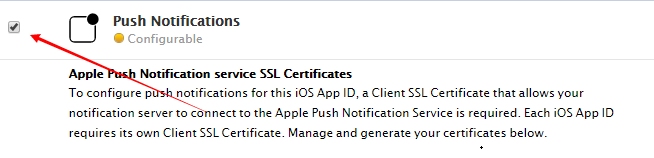
2.要是用第一种方法的话,以后要添加这个功能的时候还要重新设置,重新编辑修改app ids,然后重新生成证书,有点麻烦。相比之下,第二种方法就没有那么麻烦了,只需要在xcode中添加一句话就行(DISABLE_PUSH_NOTIFICATIONS=1),如下

ItunesConnect:"Missing Push Notification Entitlement"警告-----以及解决方法的更多相关文章
- Missing Push Notification Entitlement解决方法
原委 最近提交APP到Apple Store审核,结果很快就收到Apple很"贴心"的邮件.原文如下: Dear developer, We have discovered one ...
- Missing Push Notification Entitlement 问题
最近打包上传是遇到一个问题: 描述: Missing Push Notification Entitlement - Your app includes an API for Apple's Push ...
- IOS 提交审核,遇到Missing Push Notification Entitlement 问题。
貌似不影响提交........还是有人提交成了. 昨天晚上提交软件审核,遇到了Missing Push Notification Entitlement 的问题. 问题起因:这个版本我添加了PUSH推 ...
- git rebase与 git合并(error: failed to push some refs to)解决方法
1.遇到的问题 本地有一个git仓库,在github上新建了一个空的仓库,但是更新了REWADME.md的信息,即在github上多了一个提交. 关联远程仓库,操作顺序如下: git remote a ...
- Git missing Change-Id in commit message footer解决方法
Git missing Change-Id in commit message footer解决方法在Git向服务器提交代码时,出现如下错误missing Change-Id in commit me ...
- xcode升级到6.0以后遇到的警告错误解决方法
Xcode 升级后,常常遇到的遇到的警告.错误,解决方法 从sdk3.2.5升级到sdk 7.1中间废弃了很多的方法,还有一些逻辑关系更加严谨了.1,警告:“xoxoxoxo” is depreca ...
- sklearn.cross_validation 0.18版本废弃警告及解决方法
转载:cheneyshark 机器环境: scikit-learn==0.19.1 Python 2.7.13 train_test_split基本用法 在机器学习中,我们通常将原始数据按照比例分割为 ...
- GetDocument missing storage-class or type specifiers的解决方法
error C2143: syntax error : missing ';' before '*'error C2501: 'CTest1Doc' : missing storage-class o ...
- push到github报错解决方法
在push代码到远程仓库时,报了如下的错误: $ git push -u origin master To https://github.com/11pdg/group-buy.git ! [reje ...
随机推荐
- 【译】索引进阶(一):SQL SERVER索引介绍
[译注:此文为翻译,由于本人水平所限,疏漏在所难免,欢迎探讨指正] 原文链接:http://www.sqlservercentral.com/articles/Stairway+Series/7 ...
- nginx日志的监控【转】
第一:nginx的基础监控: 1.进程监控 2.端口监控 在这里nginx的基础监控就不详细说了,注意的是:这两个是必须要加的.并且对于zabbix而言的话,一定要加上触发器的.有问题必须报警. 第二 ...
- Nhibernate 使用 (一)
一:介绍 NHibernate 是一个基于.Net 的针对关系型数据库的对象持久化类库.Nhibernate 来源于非常优秀的基于Java的Hibernate 关系型持久化工具.NHibernate ...
- mysql中的数据类型enum和set
mysql中的字符串数据类型set,enum 原文网址: https://www.cnblogs.com/benbenzhu/p/5604598.html 1.enum 单选字符串数据类型,适合存储表 ...
- chromedriver与chrome版本映射表
问题: 利用selenium调用谷歌浏览器时报错,后发现是由于浏览器与浏览器驱动不匹配造成的 C:\Users\\Desktop\selenium>python chrome.py[9956:6 ...
- 《MySQL必知必会》整理
目录 第1章 了解数据库 1.1 数据库基础 1.1.1 什么是数据库 1.1.2 表 1.1.3 列和数据类型 1.1.4 行 1.1.5 主键 1.2 什么是SQL 第2章 MySQL简介 2.1 ...
- cache 缓存的处理
, ) { ? ? ) && ? lstorage.remove(key) : sstorage.remove(key) } /** * 更新缓存配置文件 */ Cache.proto ...
- Spring异步调用原理及SpringAop拦截器链原理
一.Spring异步调用底层原理 开启异步调用只需一个注解@EnableAsync @Target(ElementType.TYPE) @Retention(RetentionPolicy.RUNTI ...
- add, subtract, multiply, divide
加.减.乘.除:add, subtract, multiply, divide
- PostgreSQL自学笔记:3 数据库的基本操作
3 数据库的基本操作 3.1 创建数据库 3.1.1 使用对象浏览器创建数据库 [Server] -> PostgreSQL 9.6 -> 数据库,右击 -> 创建 通常: 数据库: ...