
USING KERBEROS
3.1. About Kerberos
3.1.1. How Kerberos Works
kinitprogram after the user logs in.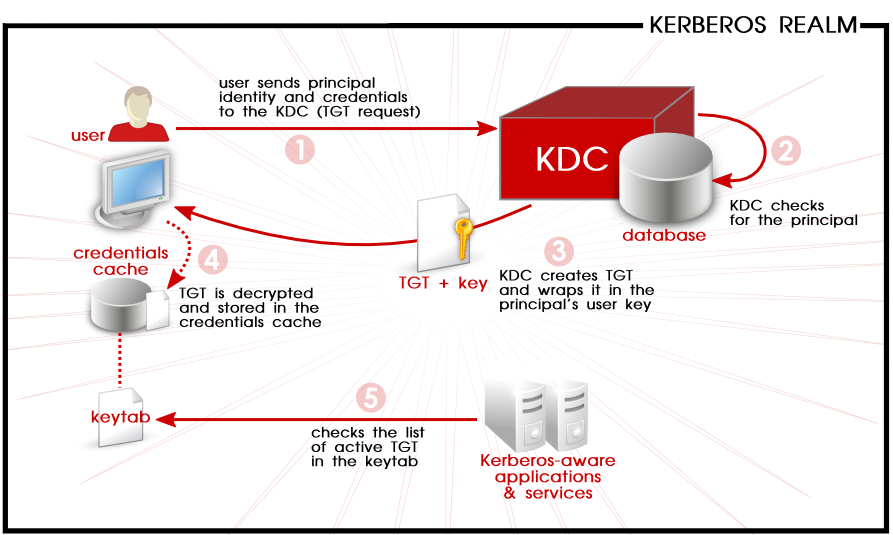
Figure 3.1. Kerberos Authentication, in Steps
kinit program on the client then decrypts the TGT using the user's key, which it computes from the user's password. The user's key is used only on the client machine and is not transmitted over the network. The ticket (or credentials) sent by the KDC are stored in a local file, the credentials cache, which can be checked by Kerberos-aware services.kinit; this is kept in a keytab.Warning
- Approximate clock synchronization between the machines on the network can be set up using a service such as
ntpd, which is documented in/usr/share/doc/ntp-version-number/html/index.html. - Both DNS entries and hosts on the network must be properly configured, which is covered in the Kerberos documentation in
/usr/share/doc/krb5-server-version-number.
3.1.2. Considerations for Deploying Kerberos
- Migrating user passwords from a standard UNIX password database, such as
/etc/passwdor/etc/shadow, to a Kerberos password database can be tedious. There is no automated mechanism to perform this task. This is covered in question 2.23 in the online Kerberos FAQ for the US Navy. - Kerberos assumes that each user is trusted but is using an untrusted host on an untrusted network. Its primary goal is to prevent unencrypted passwords from being transmitted across that network. However, if anyone other than the proper user has access to the one host that issues tickets used for authentication — the KDC — the entire Kerberos authentication system are at risk.
- For an application to use Kerberos, its source must be modified to make the appropriate calls into the Kerberos libraries. Applications modified in this way are considered to be Kerberos-aware, or kerberized. For some applications, this can be quite problematic due to the size of the application or its design. For other incompatible applications, changes must be made to the way in which the server and client communicate. Again, this can require extensive programming. Closed-source applications that do not have Kerberos support by default are often the most problematic.
- Kerberos is an all-or-nothing solution. If Kerberos is used on the network, any unencrypted passwords transferred to a non-Kerberos aware service are at risk. Thus, the network gains no benefit from the use of Kerberos. To secure a network with Kerberos, one must either use Kerberos-aware versions of all client/server applications that transmit passwords unencrypted, or not use that client/server application at all.
3.1.3. Additional Resources for Kerberos
Table 3.1. External Kerberos Documentation
| Documentation | Location |
|---|---|
| Kerberos V5 Installation Guide (in both PostScript and HTML) | /usr/share/doc/krb5-server-version-number |
| Kerberos V5 System Administrator's Guide (in both PostScript and HTML) | /usr/share/doc/krb5-server-version-number |
| Kerberos V5 UNIX User's Guide (in both PostScript and HTML) | /usr/share/doc/krb5-workstation-version-number |
| "Kerberos: The Network Authentication Protocol" webpage from MIT | http://web.mit.edu/kerberos/www/ |
| The Kerberos Frequently Asked Questions (FAQ) | http://www.cmf.nrl.navy.mil/CCS/people/kenh/kerberos-faq.html |
| Designing an Authentication System: a Dialogue in Four Scenes, originally by Bill Bryant in 1988, modified by Theodore Ts'o in 1997. This document is a conversation between two developers who are thinking through the creation of a Kerberos-style authentication system. The conversational style of the discussion makes this a good starting place for people who are completely unfamiliar with Kerberos. | http://web.mit.edu/kerberos/www/dialogue.html |
| A how-to article for kerberizing a network. | http://www.ornl.gov/~jar/HowToKerb.html |
man command_name.Table 3.2. Important Kerberos Manpages
| Manpage | Description |
|---|---|
| Client Applications | |
| kerberos | An introduction to the Kerberos system which describes how credentials work and provides recommendations for obtaining and destroying Kerberos tickets. The bottom of the man page references a number of related man pages. |
| kinit | Describes how to use this command to obtain and cache a ticket-granting ticket. |
| kdestroy | Describes how to use this command to destroy Kerberos credentials. |
| klist | Describes how to use this command to list cached Kerberos credentials. |
| Administrative Applications | |
| kadmin | Describes how to use this command to administer the Kerberos V5 database. |
| kdb5_util | Describes how to use this command to create and perform low-level administrative functions on the Kerberos V5 database. |
| Server Applications | |
| krb5kdc | Describes available command line options for the Kerberos V5 KDC. |
| kadmind | Describes available command line options for the Kerberos V5 administration server. |
| Configuration Files | |
| krb5.conf | Describes the format and options available within the configuration file for the Kerberos V5 library. |
| kdc.conf | Describes the format and options available within the configuration file for the Kerberos V5 AS and KDC. |
USING KERBEROS的更多相关文章
- Kerberos简介
Kerberos协议: Kerberos协议主要用于计算机网络的身份鉴别(Authentication), 其特点是用户只需输入一次身份验证信息就可以凭借此验证获得的票据(ticket-grantin ...
- [Kerberos] Java client访问kerberos-secured cluster
使用java client访问kerberos-secured cluster,最重要的是先从admin那里拿到可用的keytab文件,用来作认证.接下来就是调整连接的配置.以下先用连接hdfs为例进 ...
- [Kerberos] Kerberos 认证过程整理
Kerberos是一种安全认证协议,意在提供 more secure authentication simplified management of password convenience of s ...
- [Kerberos] User Ticket Management
Kerberos客户端常用命令包括 kinit, klist, kdestroy, and kpasswd,用户使用这些命令管理自己的 ticket. 此外,每台运行Kerberos的机器应该都配置/ ...
- Kerberos
一.Kerberos Concept Kerberos是一种网络认证协议,其设计目标是通过密钥系统为客户机/服务器应用程序提供强大的认证服务,为通信双方提供双向身份认证. Kerberos关键术语: ...
- Kerberos是怎么工作的?
Kerberos是一种计算机网络授权协议,用来在非安全网络中,对个人通信以安全的手段进行身份认证. 采用客户端/服务器结构,并且能够进行相互认证,即客户端和服务器端均可对对方进行身份认证. 关键要素 ...
- ldap + kerberos + google authentication 实现两步验证
第一步:ldap + kerberos 整合 ,参考之前的文章 第二步:google authentication 安装配置,参考之前的文章 第三步:整合 ldap + kerberos + goo ...
- ldap + kerberos 整合
第一部分:ldap1. 安装ldap yum install -y openldap openldap-clients openldap-servers openldap-devel 2. 配置lda ...
- Kerberos简介及常见问题
基本描述 Kerberos使用Needha-Schroeder协议作为它的基础.它使用了一个由两个独立的逻辑部分:认证服务器和票据授权服务器组成的"可信赖的第三方",术语称为密钥分 ...
- 在 Java 代码中对 Kerberos 主体进行身份验证
转载请注明出处:http://www.cnblogs.com/xiaodf/ 本文举例说明如何使用 org.apache.hadoop.security.UserGroupInformation 类在 ...
随机推荐
- asp.net core系列 39 Web 应用Razor 介绍与详细示例
一. Razor介绍 在使用ASP.NET Core Web开发时, ASP.NET Core MVC 提供了一个新特性Razor. 这样开发Web包括了MVC框架和Razor框架.对于Razor来说 ...
- hibernate易混淆点
萌新小笔记: 用过hibernate的小伙伴肯定经常看到这几个东西吧!但是初学者常常会把这几个搞不清楚:dataSource,session,sessionFactory(dataSource),hi ...
- 【ASP.NET Core快速入门】(五)命令行配置、Json文件配置、Bind读取配置到C#实例、在Core Mvc中使用Options
命令行配置 我们通过vs2017创建一个控制台项目CommandLineSample 可以看到现在项目以来的是dotnet core framework 我们需要吧asp.net core引用进来,我 ...
- 【SpringCloud】Zuul在何种情况下使用Hystrix
首先,引入spring-cloud-starter-zuul之后会间接引入: hystrix依赖已经引入,那么何种情况下使用hystrix呢? 在Zuul的自动配置类ZuulServerAutoCon ...
- 服务化改造实践 | 如何在 Dubbo 中支持 REST
什么是 REST REST 是 Roy Thomas Fielding [[1]](#fn1) 在 2000 年他的博士论文 [[2]](#fn2) “架构风格以及基于网络的软件架构设计” 中提出来的 ...
- ES6 系列之 Babel 是如何编译 Class 的(下)
前言 ES5 寄生组合式继承 function Parent (name) { this.name = name; } Parent.prototype.getName = function () { ...
- Real Developer 应该参加的硬核竞赛来了!
本文由云+社区发表 Labs Contest 竞赛简介 君君这次又来搞大事情啦,在 Function As A Service,Serverless,PaaS 大行其道的今天,你是否已经忘记了自己动手 ...
- WPF 视频教程+笔记
视频 https://www.bilibili.com/video/av46071366/ 笔记 https://www.cnblogs.com/Time_1990/p/4015716.html
- vue动画及其原理
1,vue动画的实现原理,主要是通过在不同时期给需要动画的dom元素加上css动画样式 我们以显示和隐藏动画为例 a, 需要动画的dom元素 b,点击时vue控制往vue中加的样式 2, 我们以两张 ...
- NET Core应用中使用缓存
NET Core应用中使用缓存 .NET Core针对缓存提供了很好的支持 ,我们不仅可以选择将数据缓存在应用进程自身的内存中,还可以采用分布式的形式将缓存数据存储在一个“中心数据库”中.对于分布式缓 ...