
USING KERBEROS
3.1. About Kerberos
3.1.1. How Kerberos Works
kinitprogram after the user logs in.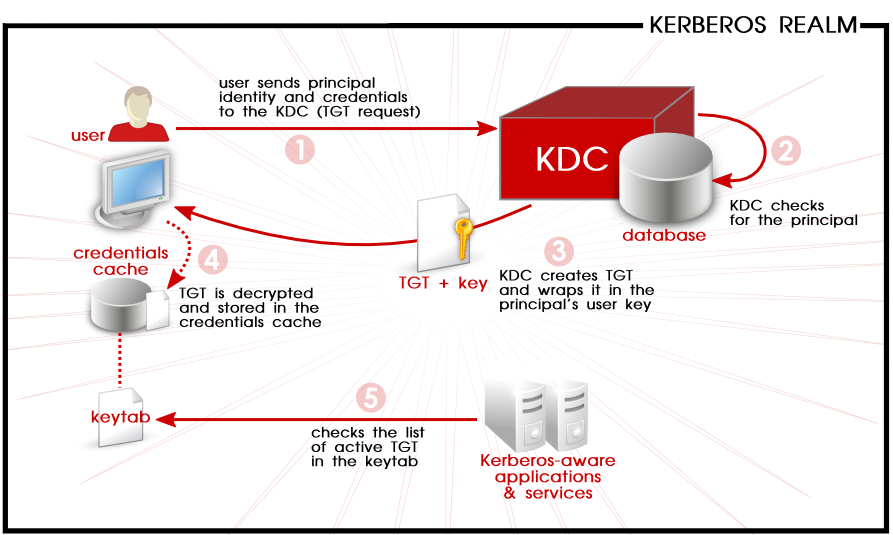
Figure 3.1. Kerberos Authentication, in Steps
kinit program on the client then decrypts the TGT using the user's key, which it computes from the user's password. The user's key is used only on the client machine and is not transmitted over the network. The ticket (or credentials) sent by the KDC are stored in a local file, the credentials cache, which can be checked by Kerberos-aware services.kinit; this is kept in a keytab.Warning
- Approximate clock synchronization between the machines on the network can be set up using a service such as
ntpd, which is documented in/usr/share/doc/ntp-version-number/html/index.html. - Both DNS entries and hosts on the network must be properly configured, which is covered in the Kerberos documentation in
/usr/share/doc/krb5-server-version-number.
3.1.2. Considerations for Deploying Kerberos
- Migrating user passwords from a standard UNIX password database, such as
/etc/passwdor/etc/shadow, to a Kerberos password database can be tedious. There is no automated mechanism to perform this task. This is covered in question 2.23 in the online Kerberos FAQ for the US Navy. - Kerberos assumes that each user is trusted but is using an untrusted host on an untrusted network. Its primary goal is to prevent unencrypted passwords from being transmitted across that network. However, if anyone other than the proper user has access to the one host that issues tickets used for authentication — the KDC — the entire Kerberos authentication system are at risk.
- For an application to use Kerberos, its source must be modified to make the appropriate calls into the Kerberos libraries. Applications modified in this way are considered to be Kerberos-aware, or kerberized. For some applications, this can be quite problematic due to the size of the application or its design. For other incompatible applications, changes must be made to the way in which the server and client communicate. Again, this can require extensive programming. Closed-source applications that do not have Kerberos support by default are often the most problematic.
- Kerberos is an all-or-nothing solution. If Kerberos is used on the network, any unencrypted passwords transferred to a non-Kerberos aware service are at risk. Thus, the network gains no benefit from the use of Kerberos. To secure a network with Kerberos, one must either use Kerberos-aware versions of all client/server applications that transmit passwords unencrypted, or not use that client/server application at all.
3.1.3. Additional Resources for Kerberos
Table 3.1. External Kerberos Documentation
| Documentation | Location |
|---|---|
| Kerberos V5 Installation Guide (in both PostScript and HTML) | /usr/share/doc/krb5-server-version-number |
| Kerberos V5 System Administrator's Guide (in both PostScript and HTML) | /usr/share/doc/krb5-server-version-number |
| Kerberos V5 UNIX User's Guide (in both PostScript and HTML) | /usr/share/doc/krb5-workstation-version-number |
| "Kerberos: The Network Authentication Protocol" webpage from MIT | http://web.mit.edu/kerberos/www/ |
| The Kerberos Frequently Asked Questions (FAQ) | http://www.cmf.nrl.navy.mil/CCS/people/kenh/kerberos-faq.html |
| Designing an Authentication System: a Dialogue in Four Scenes, originally by Bill Bryant in 1988, modified by Theodore Ts'o in 1997. This document is a conversation between two developers who are thinking through the creation of a Kerberos-style authentication system. The conversational style of the discussion makes this a good starting place for people who are completely unfamiliar with Kerberos. | http://web.mit.edu/kerberos/www/dialogue.html |
| A how-to article for kerberizing a network. | http://www.ornl.gov/~jar/HowToKerb.html |
man command_name.Table 3.2. Important Kerberos Manpages
| Manpage | Description |
|---|---|
| Client Applications | |
| kerberos | An introduction to the Kerberos system which describes how credentials work and provides recommendations for obtaining and destroying Kerberos tickets. The bottom of the man page references a number of related man pages. |
| kinit | Describes how to use this command to obtain and cache a ticket-granting ticket. |
| kdestroy | Describes how to use this command to destroy Kerberos credentials. |
| klist | Describes how to use this command to list cached Kerberos credentials. |
| Administrative Applications | |
| kadmin | Describes how to use this command to administer the Kerberos V5 database. |
| kdb5_util | Describes how to use this command to create and perform low-level administrative functions on the Kerberos V5 database. |
| Server Applications | |
| krb5kdc | Describes available command line options for the Kerberos V5 KDC. |
| kadmind | Describes available command line options for the Kerberos V5 administration server. |
| Configuration Files | |
| krb5.conf | Describes the format and options available within the configuration file for the Kerberos V5 library. |
| kdc.conf | Describes the format and options available within the configuration file for the Kerberos V5 AS and KDC. |
USING KERBEROS的更多相关文章
- Kerberos简介
Kerberos协议: Kerberos协议主要用于计算机网络的身份鉴别(Authentication), 其特点是用户只需输入一次身份验证信息就可以凭借此验证获得的票据(ticket-grantin ...
- [Kerberos] Java client访问kerberos-secured cluster
使用java client访问kerberos-secured cluster,最重要的是先从admin那里拿到可用的keytab文件,用来作认证.接下来就是调整连接的配置.以下先用连接hdfs为例进 ...
- [Kerberos] Kerberos 认证过程整理
Kerberos是一种安全认证协议,意在提供 more secure authentication simplified management of password convenience of s ...
- [Kerberos] User Ticket Management
Kerberos客户端常用命令包括 kinit, klist, kdestroy, and kpasswd,用户使用这些命令管理自己的 ticket. 此外,每台运行Kerberos的机器应该都配置/ ...
- Kerberos
一.Kerberos Concept Kerberos是一种网络认证协议,其设计目标是通过密钥系统为客户机/服务器应用程序提供强大的认证服务,为通信双方提供双向身份认证. Kerberos关键术语: ...
- Kerberos是怎么工作的?
Kerberos是一种计算机网络授权协议,用来在非安全网络中,对个人通信以安全的手段进行身份认证. 采用客户端/服务器结构,并且能够进行相互认证,即客户端和服务器端均可对对方进行身份认证. 关键要素 ...
- ldap + kerberos + google authentication 实现两步验证
第一步:ldap + kerberos 整合 ,参考之前的文章 第二步:google authentication 安装配置,参考之前的文章 第三步:整合 ldap + kerberos + goo ...
- ldap + kerberos 整合
第一部分:ldap1. 安装ldap yum install -y openldap openldap-clients openldap-servers openldap-devel 2. 配置lda ...
- Kerberos简介及常见问题
基本描述 Kerberos使用Needha-Schroeder协议作为它的基础.它使用了一个由两个独立的逻辑部分:认证服务器和票据授权服务器组成的"可信赖的第三方",术语称为密钥分 ...
- 在 Java 代码中对 Kerberos 主体进行身份验证
转载请注明出处:http://www.cnblogs.com/xiaodf/ 本文举例说明如何使用 org.apache.hadoop.security.UserGroupInformation 类在 ...
随机推荐
- JS判断客户端是否是iOS或者Android手机移动端(转载)
前言: 上午有一个移动端的项目负责人问我,在ios系统上样式出现问题,因为内核原因,我改来改去,在ios弄好了,但在安卓有问题了,突然想到了一种办法,既然ios是一种机型,安卓是一种机型,可以检测用户 ...
- 《HelloGitHub月刊》第 05 期
<HelloGitHub>第 05 期 兴趣是最好的老师,<HelloGitHub>就是帮你找到兴趣! 欢迎各路人士加入本项目,丰富月刊的内容,也可以直接在Issue(需要登录 ...
- Asp.Net Core中利用Seq组件展示结构化日志功能
在一次.Net Core小项目的开发中,掌握的不够深入,对日志记录并没有好好利用,以至于一出现异常问题,都得跑动服务器上查看,那时一度怀疑自己肯定没学好,不然这一块日志不可能需要自己扒服务器日志来查看 ...
- Asp.net Core 使用Jenkins + Dockor 实现持续集成、自动化部署(三):搭建jenkins集群环境
写在前面 大家可以看到本文的配图,左边是jenkins单机环境,右边是jenkins集群.个中区别,不言而喻,形象生动. 前面我分别介绍了.net core 程序的多种部署方式(无绝对孰优孰劣): 1 ...
- leetcode — largest-rectangle-in-histogram
import java.util.Stack; /** * * Source : https://oj.leetcode.com/problems/largest-rectangle-in-histo ...
- [一]FileDescriptor文件描述符 标准输入输出错误 文件描述符
文件描述符 当应用程序请求打开或者操作文件时,操作系统为应用程序设置一张文件列表,具体的实现形式此处不深入说明 操作系统会提供给你一个非负整数,作为一个索引号,它的作用就像地址或者说指针或者说偏移 ...
- 服务器端配置nodejs环境(使用pm2进程管理运行)
一.brew安装: 由于Mac没有装ubantu,所以不能用apt-get命令,在本地命令行下Mac安装homebrew替代: https://brew.sh 二.新开命令窗口,登录root用户,安 ...
- C#组件系列——又一款日志组件:Elmah的学习和分享
前言:好久没动笔了,都有点生疏,12月都要接近尾声,可是这月连一篇的产出都没有,不能坏了“规矩”,今天还是来写一篇.最近个把月确实很忙,不过每天早上还是会抽空来园子里逛逛.一如既往,园子里每年这个时候 ...
- 第25章 退出外部身份提供商 - Identity Server 4 中文文档(v1.0.0)
当用户注销 IdentityServer并且他们使用外部身份提供程序登录时,可能会将其重定向到注销外部提供程序.并非所有外部提供商都支持注销,因为它取决于它们支持的协议和功能. 要检测是否必须将用户重 ...
- [Go] golang缓冲通道实现资源池
go的pool资源池:1.当有多个并发请求的时候,比如需要查询数据库2.先创建一个2个容量的数据库连接资源池3.当一个请求过来的时候,去资源池里请求连接资源,肯定是空的就创建一个连接,执行查询,结束后 ...