
asp.net core 系列 11 配置configuration (下)
四. 文件配置提供程序AddIniFile、 AddXmlFile、AddJsonFile
FileConfigurationProvider 是从文件系统加载配置的基类。 以下配置提供程序专用于特定文件类型:
(1) INI 配置提供程序 IniConfigurationProvider: FileConfigurationProvider
(2) JSON 配置提供程序 JsonConfigurationProvider: FileConfigurationProvider
(3) XML 配置提供程序 XmlConfigurationProvider: FileConfigurationProvider
4.1 INI 配置提供程序
IniConfigurationProvider 在运行时从 INI 文件键值对加载配置,若要激活 INI 文件配置,请在 ConfigurationBuilder 的实例上调用 AddIniFile 扩展方法。冒号可用作 INI 文件配置中的节分隔符。下面是一个ini配置文件通用示例:
    [section0]

    key0=value

    key1=value

    [section1]

    subsection:key=value

    [section2:subsection0]

    key=value

    [section2:subsection1]

    key=value
//下面是获取各节点中的value值,需要加载的键。

    section0:key0

    section0:key1

    section1:subsection:key

    section2:subsection0:key

    section2:subsection1:key
下面示例是使用config.AddIniFile方法加载一个config.ini文件,该方法重载允许指定:(1) optional文件是否可选,(2)reloadOnChange如果文件更改,是否重载配置。IFileProvider只读该文件。
    config.SetBasePath(Directory.GetCurrentDirectory());

    config.AddIniFile("config.ini", optional: true, reloadOnChange: true);
    //OtherPages/Page1页面访问,val 值value

     string val=  Configuration.GetSection("section0").GetSection("key0").Value;

4.2 JSON 配置提供程序
JsonConfigurationProvider 在运行时期间从 JSON 文件键值对加载配置。若要激活 JSON 文件配置,请在 ConfigurationBuilder 的实例上调用 AddJsonFile 扩展方法。下面是使用config. AddJsonFile方法加载一个config.json文件,具体格式可参考appsettings.json
      config.SetBasePath(Directory.GetCurrentDirectory());

      config.AddJsonFile("config.json", optional: true, reloadOnChange: true);
效果就不再具体演示,重点讲下注意事项:使用 CreateDefaultBuilder 初始化新的 WebHostBuilder 时,会自动调用 AddJsonFile 两次。 调用该方法来从以下文件加载配置:(1)appsettings.json – 首先读取此文件。(2) appsettings.{Environment}.json。也就是说调用二次AddJsonFile后,AddJsonFile才会调用上面显示指定的config.json.
4.3 XML 配置提供程序
XmlConfigurationProvider 在运行时从 XML 文件键值对加载配置。若要激活 XML 文件配置,请在 ConfigurationBuilder 的实例上调用 AddXmlFile 扩展方法。XML文件创建配置键值对时,将忽略配置文件的根节点。 不要在文件中指定文档类型定义 (DTD) 或命名空间。
    config.SetBasePath(Directory.GetCurrentDirectory());

    config.AddXmlFile("config.xml", optional: true, reloadOnChange: true);
(1)下面是一个xml配置文件通用示例:
    <?xml version="1.0" encoding="UTF-8"?>

    <configuration>

      <section0>

        <key0>value</key0>

        <key1>value</key1>

      </section0>

      <section1>

        <key0>value</key0>

        <key1>value</key1>

      </section1>

    </configuration>

//下面是获取各节点中的value值,需要加载的键。

    section0:key0

    section0:key1

    section1:key0

    section1:key1
(2) 如果使用 name 属性来区分元素,则使用相同元素名称的重复元素可以正常工作:
    <?xml version="1.0" encoding="UTF-8"?>

    <configuration>

      <section name="section0">

        <key name="key0">value</key>

        <key name="key1">value</key>

      </section>

      <section name="section1">

        <key name="key0">value</key>

        <key name="key1">value</key>

      </section>

    </configuration>

    //下面是获取各节点中的value值,需要加载的键。

    section:section0:key:key0

    section:section0:key:key1

    section:section1:key:key0

    section:section1:key:key1
(3) 属性可用于提供值
    <?xml version="1.0" encoding="UTF-8"?>

    <configuration>

      <key attribute="value" />

      <section>

        <key attribute="value" />

      </section>

    </configuration>

    //下面是获取各属性中的value值,需要加载的键。

    key:attribute

    section:key:attribute
五. Key-per-file 配置提供程序 AddKeyPerFile
KeyPerFileConfigurationProvider 使用目录的文件作为配置键值对。 该键是文件名。 该值包含文件的内容。 Key-per-file 配置提供程序用于 Docker 托管方案。若要激活 Key-per-file 配置,请在 ConfigurationBuilder 的实例上调用 AddKeyPerFile 扩展方法。 文件的 directoryPath 必须是绝对路径。
下面示例是使用config.AddKeyPerFile方法加载一个目录文件,在使用Docker 托管时具体参考官方文档。
       config.SetBasePath(Directory.GetCurrentDirectory());

       var path = Path.Combine(Directory.GetCurrentDirectory(), "path/to/files");

        config.AddKeyPerFile(directoryPath: path, optional: true);
六. 内存配置提供程序AddInMemoryCollection
MemoryConfigurationProvider 使用内存中集合作为配置键值对。若要激活内存中集合配置,请在 ConfigurationBuilder 的实例上调用 AddInMemoryCollection 扩展方法。
       /// <summary>

        /// 构建内存对象的键值对

        /// </summary>

        public static readonly Dictionary<string, string> _dict =

         new Dictionary<string, string>

        {

            {"MemoryCollectionKey1", "value1"},

            {"MemoryCollectionKey2", "value2"}

        };

        public static IWebHostBuilder CreateWebHostBuilder(string[] args) =>

   WebHost.CreateDefaultBuilder(args)

       .ConfigureAppConfiguration((hostingContext, config) =>

       {

           config.AddInMemoryCollection(_dict);

       })

       .UseStartup<Startup>();
    //OtherPages/Page1页面访问,val 值value

    string val=Configuration.GetSection("MemoryCollectionKey1").Value

七. 读取GetValue、GetSection、GetChildren 和 Exists
7.1 GetValue
ConfigurationBinder.GetValue<T> 从具有指定键的配置中提取一个值,并将其转换为指定类型。 如果未找到该键,则重载允许你提供默认值。以下示例使用键 NumberKey 从配置中提取字符串值,键入该值作为 int,并将值存储在变量 intValue 中。 如果在配置键中找不到 NumberKey,则 intValue 会接收 99 的默认值。
var intValue = config.GetValue<int>("NumberKey", );
7.2 GetSection
IConfiguration.GetSection 使用指定的子节键提取配置子节。GetSection 永远不会返回 null。 如果找不到匹配的节,则返回空 IConfigurationSection。
 {

  "section0": {

    "key0": "value",

    "key1": "value"

  },

  "section1": {

    "key0": "value",

    "key1": "value"

  },

  "section2": {

    "subsection0" : {

      "key0": "value",

      "key1": "value"

    },

    "subsection1" : {

      "key0": "value",

      "key1": "value"

    }

  }

}
    //返回仅包含 section1 中键值对的 IConfigurationSection 对象

    var configSection = _config.GetSection("section1");

    //获取 section2:subsection0 中键的值

    var configSection = _config.GetSection("section2:subsection0");
7.3 GetChildren
    //在上面的json结构中,获取section2下面的子节点

    var configSection = _config.GetSection("section2");

    var children = configSection.GetChildren();
7.4 Exists
  //在上面的json结构中,确定配置节是否存在, 为false,是因为配置数据中没有 section2:subsection2 节点

  var sectionExists = _config.GetSection("section2:subsection2").Exists();
八. 绑定到类
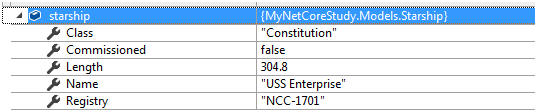
使用GetSection方法调用 Bind 可以构造 POCO 对象。POCO就是简单CLR对象(Plain Old CLR Object),这种类不继承于任何对象(或者说直接继承于Object),示例应用包含 Starship 模型 (Models/Starship.cs)。
     config.SetBasePath(Directory.GetCurrentDirectory());

     config.AddJsonFile("starship.json",false,true);
Starship实体对应JSON的 starship 节点
  {

    "starship": {

      "name": "USS Enterprise",

      "registry": "NCC-1701",

      "class": "Constitution",

      "length": 304.8,

      "commissioned": false

    },

    "trademark": "Paramount Pictures Corp. http://www.paramount.com"

  }
   // OtherPages/Page1页面绑定starship 节点到Starship实体中

       var starship = new Models.Starship();

       Configuration.GetSection("starship").Bind(starship);
总结:
Configuration配置的其它知识点如:将数组绑定至类、自定义配置提供程序、在启动期间访问配置、在 Razor Pages 页或 MVC 视图中访问配置等等, 请参考官方文档。
在Configuration配置的上下二篇中,讲到了Configuration对不同配置来源的加载和读取方法,Microsoft.Extensions.Configuration.IConfiguration中全是以Get开头的只读方法,并没有涉及到对配置来源(如json或xml文件)的增删改操作。像配置的xml文件,是否需要引入System.Xml.Linq来操作xml文件的增删改操呢?带着这个疑问在以后章节再了解。
参考文献
官方资料:asp.net core 配置
asp.net core 系列 11 配置configuration (下)的更多相关文章
- asp.net core 系列 10 配置configuration (上)
一. ASP.NET Core 中的配置概述 ASP.NET Core 中的应用配置是基于键值对,由configuration 程序提供. configuration 将从各种配置源提供程序操作键 ...
- asp.net core系列 62 CQRS架构下Equinox开源项目分析
一.DDD分层架构介绍 本篇分析CQRS架构下的Equinox开源项目.该项目在github上star占有2.4k.便决定分析Equinox项目来学习下CQRS架构.再讲CQRS架构时,先简述下DDD ...
- asp.net core系列 51 Identity 授权(下)
1.6 基于资源的授权 前面二篇中,熟悉了五种授权方式(对于上篇讲的策略授权,还有IAuthorizationPolicyProvider的自定义授权策略提供程序没有讲,后面再补充).本篇讲的授权方式 ...
- 【目录】asp.net core系列篇
随笔分类 - asp.net core系列篇 asp.net core系列 68 Filter管道过滤器 摘要: 一.概述 本篇详细了解一下asp.net core filters,filter叫&q ...
- asp.net core 系列 16 Web主机 IWebHostBuilder
一.概述 在asp.net core中,Host主机负责应用程序启动和生存期管理.host主机包括Web 主机(IWebHostBuilder)和通用主机(IHostBuilder).Web 主机是适 ...
- asp.net core 系列 14 错误处理
一.概述 本文介绍处理 ASP.NET Core 应用中常见错误的一些方法.主要是关于:开发环境异常页:非开发环境配置自定义异常处理页:配置状态代码页(没有正文响应,http状态400~599的). ...
- (11)ASP.NET Core 中的配置一(Configuration)
1.前言 ASP.NET Core在应用程序上引入Microsoft.Extensions.Configuration配置,可以支持多种方式配置,包括命令行配置.环境变量配置.文件配置.内存配置,自定 ...
- 技术的正宗与野路子 c#, AOP动态代理实现动态权限控制(一) 探索基于.NET下实现一句话木马之asmx篇 asp.net core 系列 9 环境(Development、Staging 、Production)
黄衫女子的武功似乎与周芷若乃是一路,飘忽灵动,变幻无方,但举手抬足之间却是正而不邪,如说周芷若形似鬼魅,那黄衫女子便是态拟神仙. 这段描写出自<倚天屠龙记>第三十八回. “九阴神抓”本是& ...
- asp.net core 系列之Configuration
在ASP.NET Core中的App configuration 是通过configuration providers基于key-value对建立的.Configuration providers读取 ...
随机推荐
- Linux-网络综合实验
题目要求:财务部门有俩台机器acc-1和acc-2,it部门有俩台机器it-2和it-2,要求acc机器互通,it机器互通,财务部和it部机器通过路由器互通
- Aspnet Mvc 前后端分离项目手记(二)关于token认证
在前后端分离的项目中,首先我们要解决的问题就是身份认证 以往的时候,我们使用cookie+session,或者只用cookie来保持会话. 一,先来复习一下cookie和session 首先我们来复习 ...
- Learning English with EnglishClass101.com---10 Habits of highly Effective Learners
you can find it on YouTube:Learning English with EnglishClass101.com 10 Habits of highly Effective L ...
- 2016-3-1 Mac下使用Hexo搭建Blog
一.前期准备: 1.安装Node(必须):前往Node.js官网:https://nodejs.org/en/download/下载最新版本pkg软件,点击安装即可. 2.安装Git(必须):安装 ...
- go 可变参数
go 在参数列表中使用 ... 表示可变参数,例如: import "fmt" func Minimum(first int, others ...int) int { min : ...
- windows本地用户及组的区别
Administrators(超级管理员组) 用来管理注册用户或者具有一定权限的其他管理员,维护网站的运行. Administrators中的用户对计算机/域有不受限制的完全访问权,分配给该组的默认权 ...
- vue的风格指南(强烈推荐)
1.组件文件 只要有能够拼接文件的构建系统,就把每个组件单独分成文件. 当你需要编辑一个组件或查阅一个组件的用法时,可以更快速的找到它. 2.单文件组件文件的大小写 单文件组件的文件名应该要么始终是单 ...
- echarts、higncharts折线图或柱状图显示数据为0的点
echarts.higncharts折线图或柱状图只需要后端传到前端一段json数据,接送数据的x轴与y周有对应数据,折线图或柱状图就会渲染出这数据. 比如,x轴表示美每天日期,y轴表示数量.他们的数 ...
- java课程之团队开发冲刺阶段1.1
一.今天所要完成的内容 1.实现软件添加日期的功能并生成当前所在周的功能 2.对之前的代码进行重新排版,将主函数的内容移到方法中 3.利用Android自带的左侧菜单栏实现app的整体美观
- 删除 id 列表 存进数据库
当图片写的传id的时候 用着方法存进数据库