
SQL Data Discovery and Classification
The new version of SQL Server Management Studio (v17.5) brings with it a new feature: SQL Data Discovery and Classification. You might recall that in SSMS 17.4, the Vulnerability Assessment feature was added. So, that’s two new features in the last two releases. This is the beauty of de-coupling SSMS from the SQL Server install media. We get more features, faster. But I digress.
The SQL Data Discovery and Classification feature will seem familiar to anyone working with Dynamic Data Masking in Azure. Both features use T-SQL to parse the names of columns to identify and classify the data. (This feature is also available in the Data Migration Assistant, where you can get a list of columns that would benefit from either Dynamic Data Masking or Always Encrypted.)
The SQL Data Discovery and Classification feature will help users discover, classify, and label columns that contain sensitive data. The feature also allows for the generation of reports for auditing purposes. With GDPR less than three months away, this could be the one feature that helps your company remain compliant.
Running SQL Data Discovery and Classification
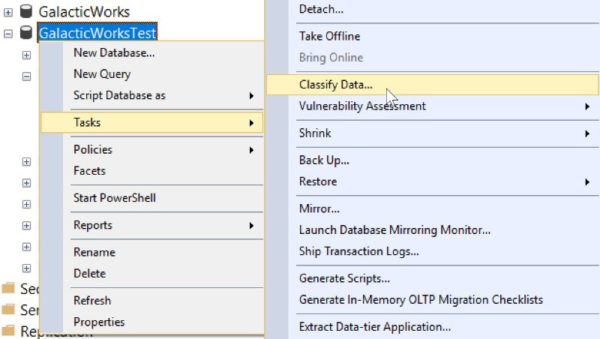
Using the Data Discovery and Classification tool is easy. Just select a database and right-click. Go to Tasks > Classify Data…. Here is an example using a test GalacticWorks database:
My GalacticWorksTest database has only one table, a copy of the AdventureWorks2012.Sales.CreditCard table. You can see the results of the scan here:
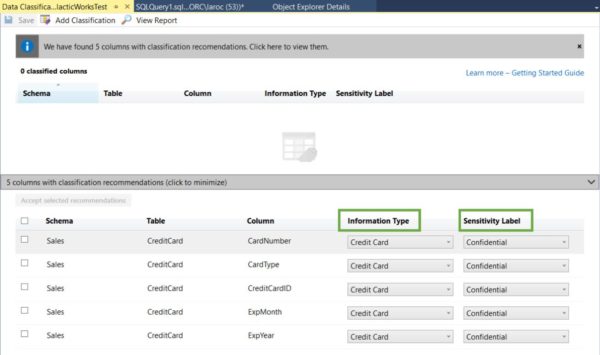
I’ve highlighted the Information Type and Sensitivity Label column headers. I want to make certain you understand these columns represent dropdown windows, allowing you to alter both as needed.
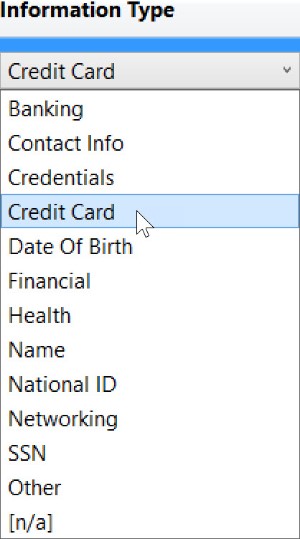
The options for Information Type are as follows: Banking, Contact Info, Credentials, Credit Card, Date Of Birth, Financial, Health, Name, National ID, Networking, SSN, Other, and [n/a]. Here’s what the drop-down looks like:
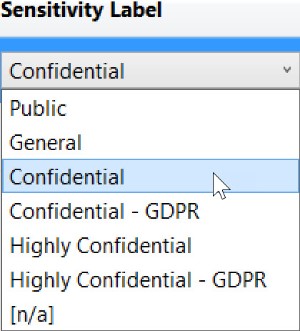
The options for Sensitivity Label are as follows: Public, General, Confidential, Confidential – GDPR, Highly Confidential, Highly Confidential – GDPR, and [n/a]. Here’s what the drop-down looks like:
SQL Data Discovery and Classification With Non-English Names
Since the feature is parsing column names, we will create a new table and use non-English names. We will also use abbreviations for column names for those of you old experienced enough to remember when abbreviations were in vogue.
OK, let’s create a new table:
CREATE TABLE [Sales].[Tarjeta](
[TarjetaCreditoID] [int] IDENTITY(1,1) NOT NULL,
[TarjetaTipo] [nvarchar](50) NOT NULL,
[TarjetaNumero] [nvarchar](25) NOT NULL,
[TARNUM] [nvarchar](25) NOT NULL,
[ExpMonth] [tinyint] NOT NULL,
[ExpYear] [smallint] NOT NULL,
[ModifiedDate] [datetime] NOT NULL,
CONSTRAINT [PK_Tarjeta_TarjetaCreditoID] PRIMARY KEY CLUSTERED
([TarjetaCreditoID] ASC
)ON [PRIMARY])
ON [PRIMARY]
GO
I’ve created a table almost identical to the Sales.CreditCard table, except that I am using Spanish names for credit (credito), card tarjeta), number (numero), and type (tipo). I’ve also added a column TARNUM, an abbreviation for the TarjetaNumero column. That’s the column that would have actual credit card numbers.
We will re-run the classification again (make sure you close the first results; otherwise, you won’t get a refresh with the new table included). Also note that I don’t need data in the table for this feature to evaluate the columns. I haven’t loaded any rows into Sales.Tarjeta, and here’s the result (I’ve scrolled down to show the three new rows):
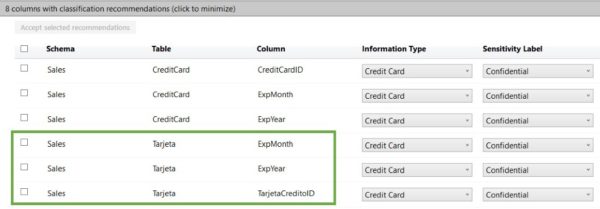
The Data Discovery and Classification tool identified three columns: ExpMonth, ExpYear, and CreditoID. However, it missed TarjetaNumero and TARNUM, which would have the actual credit card numbers. The TarjetaCreditID column has no card number, just an IDENTITY(1,1) value used for a primary key.
One last item of interest. When a column is classified, the details are stored as extended properties. Here’s an example:
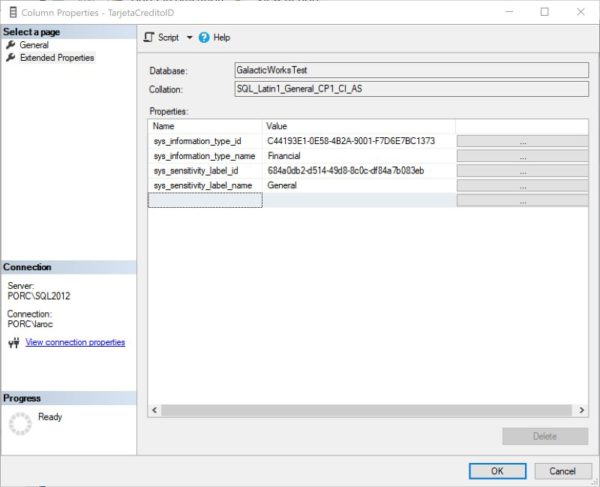
You can see that the Data Discovery and Classification feature does not flag the columns I created for this test. Because the feature focuses on keywords, it’s expected behavior that columns will be skipped. There are two reasons why. The first is the fact that the use of keywords has some cultural bias. For example, SSN is flagged as a keyword for the American Social Security Number. But in the Netherlands, it’s possible to have SOFINR as a column name abbreviation for Social Fiscal Number, and SOFINR is currently not flagged.
The second reason is that the feature only supports English, and offers partial support for a handful of non-English languages (Spanish, Portuguese, French, German, and Italian). (As I’m writing this at the SQL Konferenz in Germany, I found that Personalausweis, the name for the German Identification card, is flagged.) However, the MSDN I provided earlier makes no mention of supported languages or collations. I’m hoping that the MSDN pages get updates to reflect the languages and collations that are supported, to avoid any confusion for users.
Data Discovery and Classification Reports
Once you have reviewed and classified your data, you will want to run a report. Using AdventureWorks2008 as an example, I will accept all 39 recommendations and click Save > View Report. Here’s the result:
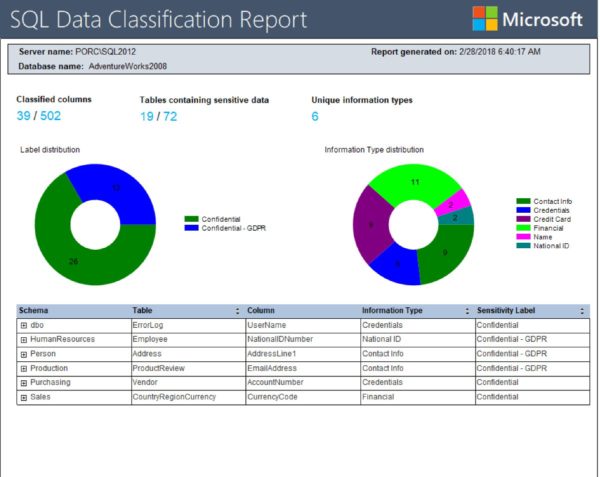
The report shows that the AdventureWorks2008 database has 39 distinct columns in 19 distinct tables that have been classified. This is the information you can now hand over to your audit team.
This report is at the database level. That means you will need to roll your own solution to get the details from many databases at the same time. It should be possible to use some Powershell voodoo to extract the data. Or, better yet, fire up PowerBI and use that to build your own dashboard.
Summary
The SQL Data Discovery and Classification feature is a great first step by Microsoft to help users understand where sensitive data may exist in their enterprise. This is also a good time to remind you why having a data dictionary is important. Even with all the right tools in place, all the right people, using all the right knowledge, you will still miss a column of sensitive data at times.
That’s because life is dirty, and so’s your data. Identifying and classifying data is not an easy task. You won’t get a perfect result with a simple right-click of a mouse. It takes diligence on the part of the data professional to curate the necessary metadata for data classification. Not every data professional has the time or patience for such efforts.
But the Data Discovery and Classification tool is a great first step forward. I can’t wait to watch this feature as it grows.
SQL Data Discovery and Classification的更多相关文章
- ref:Manual SQL injection discovery tips
ref:https://gerbenjavado.com/manual-sql-injection-discovery-tips/ Manual SQL injection discovery tip ...
- 使用Red Gate Sql Data Compare 数据库同步工具进行SQL Server的两个数据库的数据比较、同步
Sql Data Compare 是比较两个数据库的数据是否相同.生成同步sql的工具. 这一款工具由Red Gate公司出品,我们熟悉的.NET Reflector就是这个公司推出的,它的SQLTo ...
- C and SQL data types for ODBC and CLI
C and SQL data types for ODBC and CLI This topic lists the C and SQL data types for ODBC and CLI a ...
- Azure SQL Data Warehouse
Azure SQL Data Warehouse & AWS Redshift Amazon Redshift Amazon Redshift 是一种快速.完全托管的 PB 级数据仓库,可方便 ...
- Mysql ERROR 1418 (HY000): This function has none of DETERMINISTIC, NO SQL, or READS SQL DATA
ERROR 1418 (HY000): This function has none of DETERMINISTIC, NO SQL, or READS SQL DATA in its declar ...
- this function has none of deterministic, no sql,or reads sql data in its declaration and binary logging is enabled
原址:http://blog.chinaunix.net/uid-20639775-id-3031821.html This function has none of DETERMINISTI ...
- Red Gate系列之四 SQL Data Compare 10.2.0.885 Edition 数据比较同步工具 完全破解+使用教程
原文:Red Gate系列之四 SQL Data Compare 10.2.0.885 Edition 数据比较同步工具 完全破解+使用教程 Red Gate系列之四 SQL Data Compare ...
- SQL data reader reading data performance test
/*Author: Jiangong SUN*/ As I've manipulated a lot of data using SQL data reader in recent project. ...
- This function has none of DETERMINISTIC, NO SQL, or READS SQL DATA in its de 错误解决办法
这是我们开启了bin-log, 我们就必须指定我们的函数是否是1 DETERMINISTIC 不确定的2 NO SQL 没有SQl语句,当然也不会修改数据3 READS SQL DATA 只是读取数据 ...
随机推荐
- Django学习之二:Django 项目创建 和 应用创建
Django 项目创建 和 应用创建 创建一个Django项目 都是在相应平台的命令行环境下操作: 1. 进入用于存放项目的目录下 1.1 windows下切换目录:先进入具体的分区磁盘中如E盘就输入 ...
- iOS----------随机色
#define KColorRandomColor [UIColor colorWithRed:arc4random()%255/255.0 green:arc4random()%255/255.0 ...
- AndroidTV端的requestFocus()问题
每次开机盒子或者电视的时候,发现给某些控件设置请求焦点 requestFocus 会失效 最终的解决办法就是延时请求 view.postDelayed(new Runnable() { @Overri ...
- Headless Android开发板的调试及远程显示和控制
最近在调试msm8996的开发板,由于主板和LCD子板还没回来,所以先回的核心板算是个Headless的Android Device.核心板有独立供电,另外还有USB Type-C.FAN.HDMI. ...
- Andriod Studio安装教程
最近开设安卓课程,无奈于开发团队不再更新eclipse上sdk兼容问题,在eclipse上浪费了两天时间,换了Andriod Studio, Andriod Studio下载网址:http://www ...
- Error: Invoke-customs are only supported starting with Android O (--min-api 26)
项目报错: 完美解决: 在App下 gradle.build中Android标签中 添加以下内容: compileOptions { sourceCompatibility JavaVersion.V ...
- java基础知识总结一:
四种内部类 直接抛出异常 单例模式: 懒汉式单例.饿汉式单例.登记式单例 []关于内部类: []关于异常: 直接捕捉并抛出异常:不需要给异常添加名字: if(i>10)throw ...
- MySQL:1366 - Incorrect string value错误解决办法
今天使用navicat向MySQL中插入中文时,报错: - Incorrect string value:... 在我自己数据库设计之初,没有设计好字符编码格式的问题. 使用如下语句解决: alter ...
- 认识多线程中start和run方法的区别?
一.认识多线程中的 start() 和 run() 1.start(): 先来看看Java API中对于该方法的介绍: 使该线程开始执行:Java 虚拟机调用该线程的 run 方法. 结果是两个线程并 ...
- configparser_配置解析器
configparser:配置解析器 import configparser config = configparser.ConfigParser() #配置文件 config[', 'Compres ...