
Error response:/usr/bin/tf_serving_entrypoint.sh: line 3: 6 Illegal instruction (core dumped) ...
用docker部署tensorflow-serving:gpu时,参照官方文档:https://tensorflow.google.cn/tfx/serving/docker
本应该是很简单的部署,没想到会一直出现这个错误:

经过github和网上的一个朋友了解到,关键问题可能是服务器机器的cpu比较弱(原来是我的cpu确实比较弱:我是在服务器分出来的一个虚拟机上部署的,本质是一个虚拟机,不是一个实体机。)
我的解决方式:将虚拟机更换为实体机,从服务器上直接分出一块CPU供部署使用,然后就解决了这个问题。

疑问:从github中的那位朋友下面的描述看出,即使不更换cpu,似乎也能从别的方法来解决这个问题:我们上面的部署是直接pull 镜像: docker pull tensorflow/serving:latest-gpu
我是通过github文档中获取的方法:https://github.com/tensorflow/serving/blob/master/tensorflow_serving/tools/docker/Dockerfile.gpu
不是直接拉取 tensorflow/serving:latest-gpu这个镜像文件,而是通过Dockerfile.gpu,自己"做"一个镜像文件,然后拉取
1.Clone the TensorFlow Serving project
git clone https://github.com/tensorflow/serving

cd serving
2.Build an image with an optimized ModelServer
For CPU:

docker build --pull -t $USER/tensorflow-serving-devel \

  -f tensorflow_serving/tools/docker/Dockerfile.devel .
For GPU:

docker build --pull -t $USER/tensorflow-serving-devel-gpu \

  -f tensorflow_serving/tools/docker/Dockerfile.devel-gpu .
3.Build a serving image with the development image as a base
For CPU:

docker build -t $USER/tensorflow-serving \

  --build-arg TF_SERVING_BUILD_IMAGE=$USER/tensorflow-serving-devel \

  -f tensorflow_serving/tools/docker/Dockerfile .
For GPU: docker build -t $USER/tensorflow-serving-gpu \
--build-arg TF_SERVING_BUILD_IMAGE=$USER/tensorflow-serving-devel-gpu \
-f tensorflow_serving/tools/docker/Dockerfile.gpu . # Your new optimized Docker image is now$USER/tensorflow-serving-gpu, which you can use just as you would the standardtensorflow/serving:latest-gpuimage.
注意:Dockerfile.gpu这个文件里:要注意里面的CUDA,cuDNN,tensorRT,MODEL_NAME,BASE_PATH_MODEL等这些参数要一一对应好(在服务器上安装好)
第2步和第3步的时间比较长,需要耐心等待一下。
然后执行:
sudo docker image ls
就可以查看到新拉取的镜像信息:$USER/tensorflow/serving-gpu:latest 大小为2.4G左右吧(我用的是这个)
然后打开容器:
docker run --runtime=nvidia -p 8501:8501 \

  --mount type=bind,\

  source=/tmp/tfserving/serving/tensorflow_serving/servables/tensorflow/testdata/saved_model_half_plus_two_gpu,\

  target=/models/half_plus_two \

  -e MODEL_NAME=half_plus_two -t tensorflow/serving:latest-gpu &

注意:我标红的镜像要修改了,改为:$USER/tensorflow/serving-gpu:latest(每个人不一样)
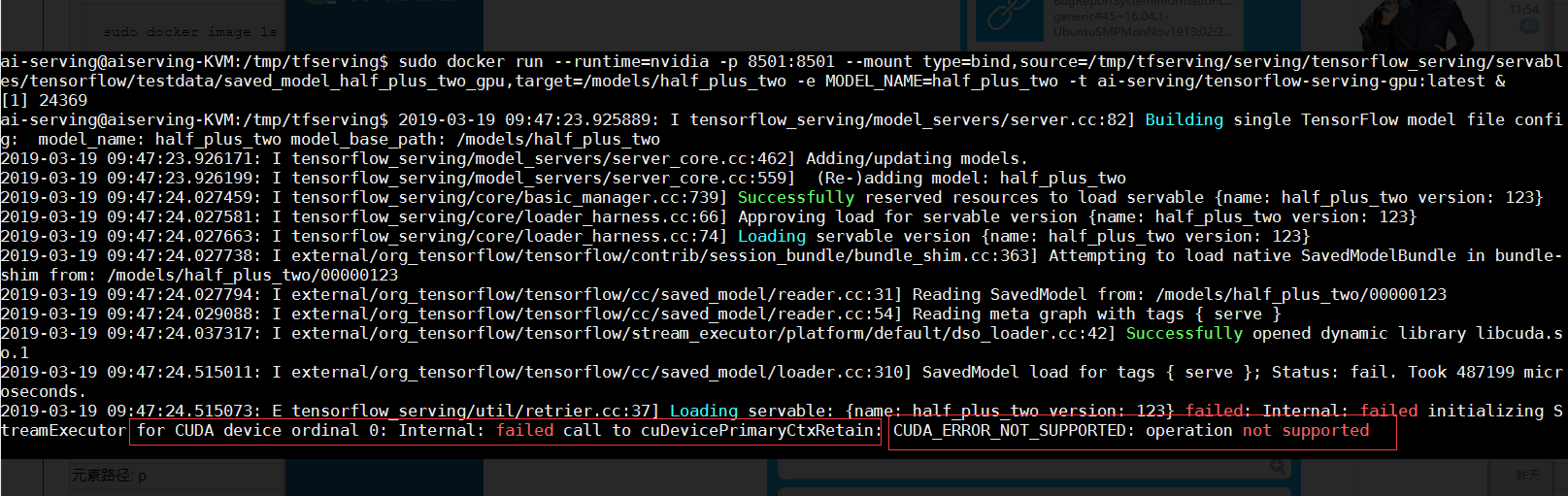
然后执行之后,显示模型获取成功了,但是出现了关于CUDA的一些问题,其实这个问题我到现在还没有解决,然后哪位朋友知道了这个如何解决,能不能告诉我一下,在下方留言和我说说呗。
Error response:/usr/bin/tf_serving_entrypoint.sh: line 3: 6 Illegal instruction (core dumped) ...的更多相关文章
- httpd: config error '*.php:/usr/bin/php-cgi' in '/etc/httpd.conf'
/********************************************************************************* * httpd: config e ...
- Mac 无法安装安装psutil 报错 error: command '/usr/bin/clang' failed with exit status 1
psutil是一个特别好用来检查系统资源的一个包, 但是 在Mac安装却总是报错 查看监控系统脚本, 点这里 mac系统版本: Macos Mojave 10.14.3 报错信息如下: WARNING ...
- python报错使用yum命令报错File "/usr/bin/yum", line 30 except KeyboardInterrupt, e: SyntaxError: invalid syntax问题
参考链接:https://blog.csdn.net/ltz150/article/details/77870735 1.背景: CentOS 7升级Python到3.6.2后,需要在/usr/bin ...
- 执行sh脚本报“/usr/bin/env: "sh\r": 没有那个文件或目录”错误
出现这个错误的原因是出错的语句后面多了“\r”这个字符,换言之,脚本文件格式的问题,我们只需要把格式改成unix即可: vi xx.sh :set ff :set ff=unix :wq!
- sublime Error executing: /usr/bin/security dump-trust-settings -d
sublime text2突然crash,无法简单粗暴的关闭,就开始认真解决这个问题. 问题: 参考文献:https://github.com/wbond/package_control/issues ...
- tomcat报错catalina.sh: line 401: /usr/java/jdk1.7.52/bin/java: No such file or directory
将生产服务器的Tomcat目录打包过来后解压后,启动Tomcat后,发现如下问题: # ./shutdown.sh Using CATALINA_BASE: /usr/local/tomcat ...
- tomcat报错catalina.sh: line 401: /usr/java/jdk1.7.52/bin/java: No such file or directory(转)
原文:https://blog.csdn.net/reblue520/article/details/52588825 将生产服务器的Tomcat目录打包过来后解压后,启动Tomcat后,发现如下问题 ...
- 【转】“/usr/bin/ld: cannot find -lz”
原文网址:http://stackoverflow.com/questions/3373995/usr-bin-ld-cannot-find-lz I am trying to compile And ...
- #!/usr/bin/env 脚本解释程序的作用
the Zimbu programming language http://www.zimbu.org/getting-started -------------------------------- ...
随机推荐
- git 学习系列(一)
目录 git 简介 git的升级 建立仓库 克隆仓库 查看主机名 查看仓库初始状态 将文件提交到暂存区 查看修改详情 提交修改 查看修改记录 查看个人配置信息(在 .gitconfig 文件中) 查看 ...
- Nesterov方法的python实现
牛顿动量法,相比于上一篇Momentum,不一样的地方是应用了临时更新 这里用python对其进行简单实现,如下: # coding=utf-8 """ 基于小批量梯度下 ...
- 关联规则之Aprior算法
关联规则挖掘在电商.零售.大气物理.生物医学已经有了广泛的应用,本篇文章将介绍一些基本知识和Aprori算法. 啤酒与尿布的故事已经成为了关联规则挖掘的经典案例,还有人专门出了一本书<啤酒与尿布 ...
- centos7 ModuleNotFoundError: No module named 'users'
centos7下运行django项目时ModuleNotFoundError: No module named 'users' 由于我的项目目录是下面这样: 因为找不到users的路径 所以在mana ...
- 96)PHP,文件上传(2)
(1)那么既然看到文件即使上传成功,但是只是在脚本周期内有效,脚本只要结束(脚本结束其实很快的),文件就会自动消失,那么怎么才能永久存储文件呢: 函数: Move_uploaded_file(上传临时 ...
- Linux SSH 使用密钥登陆
Linux SSH 使用密钥登陆 通常我们登录 Linux 服务器,我们需要使用密码进行登录,但是密码存在被暴力破解的可能. 可以将默认服务端口 22 改成其他不常用的端口. 可以设置非常复杂的密码. ...
- 以elasticsearch-hadoop 向elasticsearch 导数,丢失数据的问题排查
实际这是很久之前的问题了,当时没时间记录 这里简单回顾 项目基于 数据架构不方便说太细,最精简的 somedata-> [kafka]->spark-stream->elastics ...
- 高可用(keepalived+lvs)
博主本人平和谦逊,热爱学习,读者阅读过程中发现错误的地方,请帮忙指出,感激不尽 架构图: 本次实验严格按照下图完成 1.系统环境设置 1.1SELinux设置 vim /etc/selinux/con ...
- CF-551:部分题目总结
题目链接:http://codeforces.com/contest/1153 A .Serval and Bus pro:给出n种公交车的首班车时间和两班车之间的时间间隔,找t时间以后的第一辆车是第 ...
- java异常分析;剖析printStackTrace和fillInStackTrace
Java异常的栈轨迹(Stack Trace) 捕获到异常时,往往需要进行一些处理.比较简单直接的方式就是打印异常栈轨迹Stack Trace.说起栈轨迹,可能很多人和我一样,第一反应就是printS ...