
HttpServletResponse和HttpServletRequest的简单实用
1、HttpServletResponse
web服务器接收到客户端的http请求,针对这个请求,分别创建一一个代表请求的HttpServletRequest
对象,代表响应的- -个HttpServletResponse;
- 如果要获取客户端请求过来的参数:找HttpServletRequest
- 如果要给客户端响应一些信息: 找HttpServletResponse
响应状态码
200:请求响应成功200
3xx:请求重定向 重定向:你重新到我给你新位置去;
4xx:找不到资源404 资源不存在;
5xx:服务器代码错误500 502:网关错误
response下载文件
    @Override

    protected void doGet(HttpServletRequest req, HttpServletResponse resp) throws ServletException, IOException {

        String realPath = "D:\\IDEA\\javaweb-01-maven\\javaweb-01-maven\\javaWeb-servlet\\lession2\\target\\classes\\1.png";

        System.out.println("下载文件的路径"+realPath);

        String fileName = realPath.substring(realPath.lastIndexOf("\\") + 1);

        resp.setHeader("Content-disposition","attachment;filename="+java.net.URLEncoder.encode(fileName, "UTF-8"));

        FileInputStream in = new FileInputStream(realPath);

        int len=0;

        byte[] buffer = new byte[1024];

        ServletOutputStream out = resp.getOutputStream();

        while ((len=in.read(buffer))>0){

            out.write(buffer,0,len);

        }

        in.close();

        out.close();

    }

    @Override

    protected void doPost(HttpServletRequest req, HttpServletResponse resp) throws ServletException, IOException {

        doGet(req, resp);

    }
验证码实例
    @Override

    protected void doGet(HttpServletRequest req, HttpServletResponse resp) throws ServletException, IOException {

        resp.setHeader("refresh","3");

        BufferedImage image = new BufferedImage(80, 20, BufferedImage.TYPE_INT_RGB);

        Graphics2D g = (Graphics2D) image.getGraphics();

        g.setColor(Color.white);

        g.fillRect(0,0,80,20);

        g.setColor(Color.blue);

        g.setFont(new Font(null,Font.ITALIC,20));

        g.drawString(makeNum(),0,20);

        resp.setContentType("image/jpeg");

        resp.setDateHeader("expires",-1);

        resp.setHeader("Cache-Control","no-cache");

        resp.setHeader("pragma","no-cache");

        boolean write = ImageIO.write(image, "jpg", resp.getOutputStream());

    }

    private String makeNum(){

        Random ran=new Random();

        String num=ran.nextInt(9999999)+"";

        StringBuffer sb = new StringBuffer();

        for (int i = 0; i <7-num.length() ; i++) {

            sb.append("0");

        }

        num=sb.toString()+num;

        return num;

    }

    @Override

    protected void doPost(HttpServletRequest req, HttpServletResponse resp) throws ServletException, IOException {

        doGet(req, resp);

    }
重定向 response.sendRedirect()
    @Override

    protected void doGet(HttpServletRequest req, HttpServletResponse resp) throws ServletException, IOException {

        resp.setHeader("Location","/lession2_war/image");

        resp.setStatus(302);

        resp.sendRedirect("/lession2_war/image");

    }

    @Override

    protected void doPost(HttpServletRequest req, HttpServletResponse resp) throws ServletException, IOException {

        doGet(req, resp);

    }
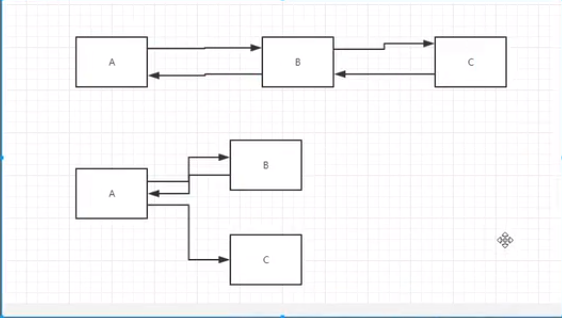
请求转发与重定向的区别:
相同点:都能实现页面跳转
不同点:请求转发不改变URL的地址 307
重定向改变URL的地址 302
2、HttpServletRequest
jsp编写form表单乱码问题解决办法
<%@ page contentType="text/html; charset=UTF-8"%>
request处理表单
<html>

<body>

<%--${pageContext.request.contextPath}代表当前的项目--%>

 <%@ page contentType="text/html; charset=UTF-8"%>

<form action="${pageContext.request.contextPath}/login" method="get">

    用户名:<input type="text" name="username"><br>

    密码:<input type="password" name="password"><br>

    <input type="submit" name="submit" value="提交">

    <input type="reset" name="reset" value="重置">

</form>

</body>

</html>
    @Override

    protected void doGet(HttpServletRequest req, HttpServletResponse resp) throws ServletException, IOException {

        System.out.println("进入请求");

        String username = req.getParameter("username");

        String password = req.getParameter("password");

        resp.sendRedirect("/lession2_war/test.jsp");//重定向到成功页面

    }

    @Override

    protected void doPost(HttpServletRequest req, HttpServletResponse resp) throws ServletException, IOException {

        super.doPost(req, resp);

    }
req.getParameter(获取单个值) req.getParameterValues(获取集合)获取前端参数
    @Override

    protected void doGet(HttpServletRequest req, HttpServletResponse resp) throws ServletException, IOException {

        req.setCharacterEncoding("utf-8");

        String username = req.getParameter("username");

        String pwd = req.getParameter("pwd");

        String[] hobbies = req.getParameterValues("hobby");

        System.out.println("============================");

        System.out.println(username);

        System.out.println(pwd);

        System.out.println(Arrays.toString(hobbies));

        System.out.println("============================");

        resp.setCharacterEncoding("UTF-8");

        req.getRequestDispatcher("success.jsp").forward(req,resp);

    }

    @Override

    protected void doPost(HttpServletRequest req, HttpServletResponse resp) throws ServletException, IOException {

        doGet(req, resp);

    }
HttpServletResponse和HttpServletRequest的简单实用的更多相关文章
- SpringMVC学习笔记九:拦截器及拦截器的简单实用
SpringMVC中的interceptor拦截器是非常重要的,它的主要作用就是拦截指定的用户请求,并进行相应的预处理和后处理. 拦截时间点在"处理器映射器根据用户提交的请求映射出所要执行的 ...
- jQuery的几种简单实用效果
许久未分享博客,或许已生疏. 闲来无事, 分享几个jQuery简单实用的效果案例 不喜勿喷... 1.页面常用的返回顶部 <!DOCTYPE html> <html lang=&qu ...
- 经验分享:10个简单实用的 jQuery 代码片段
尽管各种 JavaScirpt 框架和库层出不穷,jQuery 仍然是 Web 前端开发中最常用的工具库.今天,向大家分享我觉得在网站开发中10个简单实用的 jQuery 代码片段. 您可能感兴趣的相 ...
- 简单实用的PHP防注入类实例
这篇文章主要介绍了简单实用的PHP防注入类实例,以两个简单的防注入类为例介绍了PHP防注入的原理与技巧,对网站安全建设来说非常具有实用价值,需要的朋友可以参考下 本文实例讲述了简单实用的PHP防注 ...
- php简单实用的操作文件工具类(创建、移动、复制、删除)
php简单实用好用的文件及文件夹复制函数和工具类(创建.移动.复制.删除) function recurse_copy($src,$dst) { // 原目录,复制到的目录 $dir = opend ...
- 基于Bootstrap简单实用的tags标签插件
http://www.htmleaf.com/jQuery/ jQuery之家 自由分享jQuery.html5和css3的插件库 基于Bootstrap简单实用的tags标签插件
- C#_简单实用的翻页
简单实用的生成翻页HTML辅助类 C# using System.Text; namespace ClassLibrary { /// <summary> /// /// </sum ...
- 简单实用的Windows命令(一)
前几天新买了一台笔记本电脑,使用了一下几个简单的查看电脑配置的命令,觉得非常的不错,在此记录一下 一:运行命令的方式有两种 1:使用快捷键WIN+R,然后在弹出的“运行”对话框中输入对应的命令 2:在 ...
- 简单实用的Windows命令(二)
昨天简单的记录了几个非常简单实用的Windows命令,不过我又想起来还有两个我在实际的工作中也是经常用到的命令——PING和IPCONFIG,不过我在工作中的使用都是非常简单的,用PING命令检测对应 ...
随机推荐
- 2019-2020-1 20199325《Linux内核原理与分析》第八周作业
Linux内核如何装载和启动一个可执行程序 1.理解编译链接的过程和ELF可执行文件格式,详细内容参考本周第一节: 2.编程使用exec*库函数加载一个可执行文件,动态链接分为可执行程序装载时动态链 ...
- js 随机数生成器
title: js 随机数生成器 js 随机数生成器 js 随机数生成器 确定产生随机数的数目,最小值和最大值: 个数: 最小值: 最大值: 是否为唯一的随机数: 唯一 允许重复 点击生成产生随机数: ...
- latex-列表环境
介绍 latex 主要有三种列表环境,进行罗列的实现, 无序列表 -- itemize 有序列表 -- enumerate 描述列表 -- description 本文进行了一一介绍和演示, 同时添加 ...
- java 8 stream中的Spliterator简介
目录 简介 tryAdvance trySplit estimateSize characteristics 举个例子 总结 java 8 stream中的Spliterator简介 简介 Split ...
- 基于Atlas实现mysql读写分离
一.实验环境 主机名IP地址 master192.168.200.111 slave192.168.200.112 atlas192.168.200.113 主从复制不再赘述,链接地址:授权Atlas ...
- 在线教育项目-day05【课程分类管理-添加课程分类】
1.引入依赖 之前测试EasyExcel已经引入过了 2.利用代码生成器生成结构 我们做的只需要更改代码生成器的数据库表即可 3.运行代码生成器 4.书写代码 1.controller @RestCo ...
- 【shell】Shell变量基础及深入
1. 什么是变量 变量就是用一个固定的字符串(也可能是字符数字等的组合),替代更多更复杂的内容,这个内容里可能还会包含变量和路径,字符串等其他内容. 变量的定义是存在内存中. x=1 y=2 2. 变 ...
- Shoutem旨在成为React Native移动应用领域的WordPress
近日,Shoutem推出了新的基于React Native的应用构建器,为开发人员提供了移动应用领域的WordPress. \\ Shoutem让开发人员可以使用一个可视化环境快速创建基于React ...
- 关于IE8上传文件的一些问题
问题1: IE8下上传完文件后,对后台返回的JSON格式的数据,浏览器提示了下载该文件. 原因是因为IE8还不支持'application/json"类型的响应. 解决方法将后台返回的JSO ...
- ffmpeg+SDL2实现的音频播放器V2.0(无杂音)
1. 前言 目前为止,学习了并记录了ffmpeg+SDL2显示视频以及事件(event)的内容. 这篇中记录ffmpeg+SDL2播放音频,没加入事件处理. 接下来加入事件处理并继续学习音视频同步,再 ...