
mybatis的一堆多映射使用配置
自己仿站jeep官网在制作商城时,商品详情页面需要带着一个商品的信息,商品的配置,配置对应的颜色,商品的图片 如图

首先设计业务bean
一辆车的信息

业务一对多的大业务bean,继承Car.java
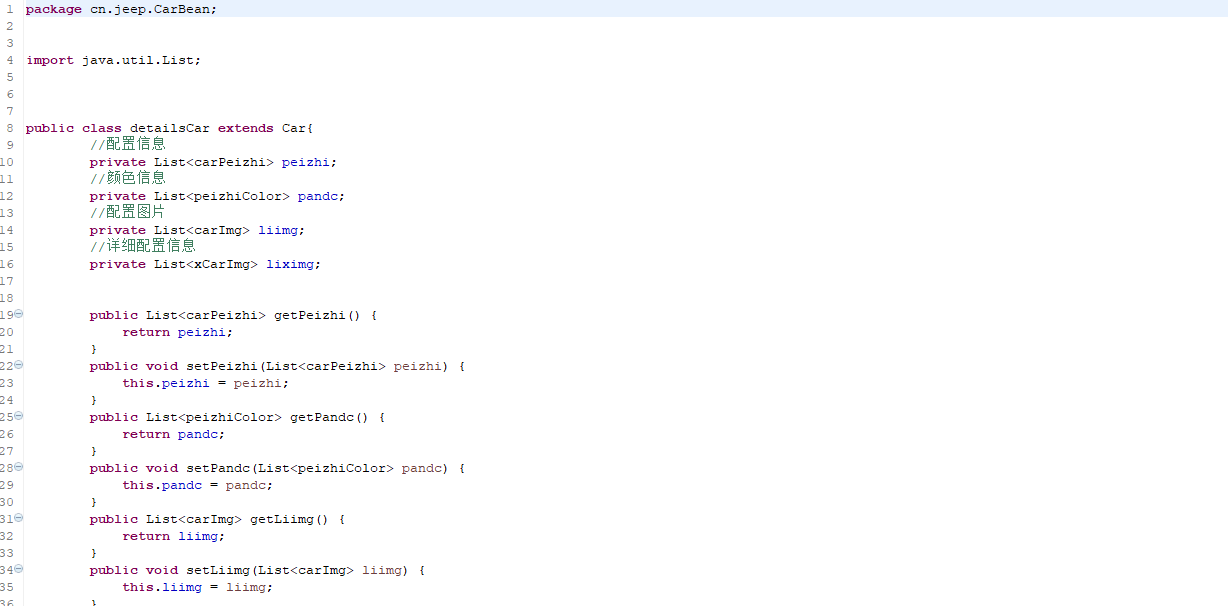
几个list的类型不做赘述,本博客主要讲映射
对应的marrp.xml中设置
创建
<resultMap type="cn.jeep.CarBean.detailsCar" id="oneCar">

          <id column="carid" jdbcType="VARCHAR" property="carid" />

        <result column="carimg" jdbcType="VARCHAR" property="carimg" />

        <result column="carname" jdbcType="VARCHAR" property="carname" />

        <result column="cartext" jdbcType="VARCHAR" property="cartext" />

        <result column="carzt" jdbcType="INTEGER" property="carzt" />

        <!-- 多表 -->

        <!-- 配置信息 -->

        <collection property="peizhi" ofType="cn.jeep.CarBean.carPeizhi" javaType="java.util.ArrayList" column="carid" select="selectPerizhi">

             <id column="zys_carpeizhi_id" jdbcType="VARCHAR" property="carid" />

            <result column="pid" jdbcType="VARCHAR" property="pid" />

            <result column="pname" jdbcType="VARCHAR" property="pname" />

            <result column="pzt" jdbcType="INTEGER" property="pzt" />

        </collection>

        <!-- 配置图片 -->

         <collection property="liimg" ofType="cn.jeep.CarBean.carImg" javaType="java.util.ArrayList" column="carid" select="selectPimg">

              <id column="carid" jdbcType="VARCHAR" property="carid" />

            <result column="carimg" jdbcType="VARCHAR" property="carimg" />

        </collection>

       <!--  详细配置图片 -->

        <collection property="liximg" ofType="cn.jeep.CarBean.xCarImg" javaType="java.util.ArrayList" column="carid" select="selectPximg">

              <id column="xcarid" jdbcType="VARCHAR" property="xcarid" />

            <result column="xcarimg" jdbcType="VARCHAR" property="xcarimg" />

        </collection>

      </resultMap>

      <!-- 多表 -->

    <!-- 配置信息 -->

      <resultMap id="perizhiMap" type="cn.jeep.CarBean.carPeizhi">

          <id column="zys_carpeizhi_id" jdbcType="VARCHAR" property="carid" />

        <result column="pid" jdbcType="VARCHAR" property="pid" />

        <result column="pname" jdbcType="VARCHAR" property="pname" />

        <result column="pzt" jdbcType="INTEGER" property="pzt" />

    </resultMap>

    <!-- 配置图片 -->

      <resultMap id="carImg" type="cn.jeep.CarBean.carImg">

              <id column="carid" jdbcType="VARCHAR" property="carid" />

            <result column="carimg" jdbcType="VARCHAR" property="carimg" />

    </resultMap>

    <!-- 详细配置图片 -->

      <resultMap id="xcarImg" type="cn.jeep.CarBean.xCarImg">

              <id column="xcarid" jdbcType="VARCHAR" property="xcarid" />

            <result column="xcarimg" jdbcType="VARCHAR" property="xcarimg" />

    </resultMap>

    <!-- 第一个配置颜色 -->

    <resultMap id="selectPcolor" type="cn.jeep.CarBean.peizhiColor">

              <id column="colorid" jdbcType="VARCHAR" property="colorid" />

            <result column="colorname" jdbcType="VARCHAR" property="colorname" />

    </resultMap>
多次尝试,常规使用的一对多映射不需要写每个bean独立的 resultMap 但是映射过程中打断点发现所有list只能取到每个的第一行数据。
      <!-- 封装大型产品详情页的业务bean -->

      <!-- 测试多字段映射===================================================  -->

      <select id="detailsCars" resultMap="oneCar">

        SELECT

        zys_cark.`carid`,

        zys_cark.`carimg`,

        zys_cark.`carname`,

        zys_cark.`cartext`,

        zys_cark.`carzt`

        from zys_cark

        WHERE zys_cark.`carid`=#{carid}

      </select>

      <!-- 配置图片 -->

      <select id="selectPerizhi" resultMap="perizhiMap">

          select * from zys_carpeizhi where zys_carpeizhi.`carid` =#{carid}

      </select>

      <!-- 详细配置 -->

      <select id="selectPimg" resultMap="carImg">

          SELECT * FROM zys_carimg WHERE carid=#{#carid}

      </select>

      <!-- 详细图片 -->

      <select id="selectPximg" resultMap="xcarImg">

          select * from zys_xcarimg where xcarid=#{carid}

      </select>

      <!-- 查一个汽车配置的颜色 -->

      <select id="selectOneColor" resultMap="selectPcolor">

          SELECT zys_pcolor.`colorid`,zys_color.`colorname`,zys_pcolor.`czt` FROM zys_carpeizhi JOIN zys_pcolor JOIN zys_color

        ON zys_carpeizhi.`pid`=zys_pcolor.`pid` AND zys_color.`colorid`=zys_pcolor.`colorid` WHERE zys_carpeizhi.`pid`=#{pid}

      </select>
mybatis的一堆多映射使用配置的更多相关文章
- 深入浅出Mybatis系列八-mapper映射文件配置之select、resultMap
注:本文转载自南轲梦 注:博主 Chloneda:个人博客 | 博客园 | Github | Gitee | 知乎 上篇<深入浅出Mybatis系列(七)---mapper映射文件配置之inse ...
- 深入浅出Mybatis系列七-mapper映射文件配置之insert、update、delete
注:本文转载自南轲梦 注:博主 Chloneda:个人博客 | 博客园 | Github | Gitee | 知乎 上篇文章<深入浅出Mybatis系列(六)---objectFactory.p ...
- 深入浅出Mybatis系列(八)---mapper映射文件配置之select、resultMap
上篇<深入浅出Mybatis系列(七)---mapper映射文件配置之insert.update.delete>介绍了insert.update.delete的用法,本篇将介绍select ...
- 深入浅出Mybatis系列(八)---mapper映射文件配置之select、resultMap good
上篇<深入浅出Mybatis系列(七)---mapper映射文件配置之insert.update.delete>介绍了insert.update.delete的用法,本篇将介绍select ...
- 深入浅出Mybatis系列(八)---mapper映射文件配置之select、resultMap[转]
上篇<深入浅出Mybatis系列(七)---mapper映射文件配置之insert.update.delete>介绍了insert.update.delete的用法,本篇将介绍select ...
- MyBatis学习之路之configuration配置
1.首先讲解的是MyBatis核心配置文件configuration.xml的配置 一个完整的configuration.xml配置顺序如下: properties,settings,typeAlia ...
- 【转载】Mybatis多参数查询映射
转载地址:http://www.07net01.com/zhishi/402787.html 最近在做一个Mybatis的项目,由于是接触不久,虽然看了一下资料,但在实际开发中还是暴 露了很多问题,其 ...
- 【mybatis深度历险系列】mybatis中的高级映射一对一、一对多、多对多
学习hibernate的时候,小编已经接触多各种映射,mybatis中映射有到底是如何运转的,今天这篇博文,小编主要来简单的介绍一下mybatis中的高级映射,包括一对一.一对多.多对多,希望多有需要 ...
- 用IntelliJ IDEA 开发Spring+SpringMVC+Mybatis框架 分步搭建四:配置springmvc
在用IntelliJ IDEA 开发Spring+SpringMVC+Mybatis框架 分步搭建三:配置spring并测试的基础上 继续进行springmvc的配置 一:配置完善web.xml文件
随机推荐
- POJ 1287 Networking 垃圾题目
Networking Time Limit: 1000MS Memory Limit: 10000K Total Submissions: 22362 Accepted: 11372 Desc ...
- Dubbo(六):zookeeper注册中心的应用
Dubbo中有一个非常本质和重要的功能,那就是服务的自动注册与发现,而这个功能是通过注册中心来实现的.而dubbo中考虑了外部许多的注册组件的实现,zk,redis,etcd,consul,eurek ...
- python的with
with 语句适用于对资源进行访问的场合,确保不管使用过程中是否发生异常都会执行必要的“清理”操作,释放资源. 比如文件使用后自动关闭.线程中锁的自动获取和释放等. with open('test.t ...
- 使用Codemirror打造Markdown编辑器
前几天突然想给自己的在线编译器加一个Markdown编辑功能,于是花了两三天敲敲打打初步实现了这个功能. 一个Markdown编辑器需要有如下常用功能: 粗体 斜体 中划线 标题 链接 图片 引用 代 ...
- C. Anton and Fairy Tale(数学推式子)
\(数学题,式子并不难推,但边界是真的烦\) \(\color{Red}{Ⅰ.其实可以发现,当m>=n时,每次都可以粮食补到n,所以一定是在第n天消耗完毕}\) \(\color{Purple} ...
- A Simple Problem with Integers 循环节 修改 平方 找规律 线段树
A Simple Problem with Integers 这个题目首先要打表找规律,这个对2018取模最后都会进入一个循环节,这个循环节的打表要用到龟兔赛跑. 龟兔赛跑算法 floyed判环算法 ...
- SpringData Redis的简单使用
SpringDate Redis是在Jedis框架的基础之上对Redis进行了高度封装,通过简单的属性配置就可以通过调用方法完成对Redis数据库的操作,而且SpringData Redis使用了连接 ...
- Go语言接口内部布局和方法集详解
1. 接口值内部布局 如果用户定义的类型实现了某个接口类型声明的一组方法,那么这个用户定义的类型的值就可以赋给这个接口类型的值.这个赋值会把用户定义的类型的值存入接口类型的值.赋值完成后得到的值称 ...
- CF-234 F. Fence DP
F. Fence 这个刷Fence的问题看到好几个了... 题意 有一个栅栏,由n块宽为1cm的木板组成,第i块木板高为hi,要给他们刷上油漆,有一桶红色的可以刷a平方厘米的油漆,一桶绿色的可以刷b平 ...
- CF #635D Xenia and Colorful Gems 枚举+二分
Xenia and Colorful Gems 题意 给出三个数组,在每个数组中选择一个数字x,y,z,,使得\((x-y)^2+(y-z)^2+(x-z)^2\)最小. 思路 我们假设x<=y ...