
pytest 多个PY文件执行共享变量及用fixture和conftest
------------恢复内容开始------------
1.pytest需要测试多个py文件,这些文件有一定的依赖关系,同时执行的时候,需要只执行一次初始化setup,结束再执行一次teardown;
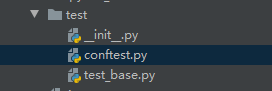
2.多个py文件需要使用pytest的conftest.py,这个文件名是固定的,在同级目录还需要__init__.py;
3.由于setup这种经典的初始化方法只支持module,class.method,function,setup
module: 一个py文件只运行一次,里面可以是class和function;
class: 每个class执行一次;
method: class里面的每个函数执行一次;
function : 每个函数执行一次(函数不在class中);
setup: 最小层级,每个函数运行一次;在allure报告中,现在在Test body中;其他级别显示在的setup中;
4.经典初始化不支持多个py初始化,只能选用fixture;
scope值 :默认是function;
session 多个py文件;
module 一个py文件里面多个class或function;
class: class级别;
function:函数级别;
由于我们是多个py所以,只能选择session;
yield 是setup和teardown分界线;
@pytest.fixture(scope="session")

def start_up_session():

    try:

        case_name = os.path.basename(__file__).replace('.py', '')

        print(case_name + " start")

        # yield 前面的是tearup的操作

        yield case_name

        # yield 后面的是teardown的操作

        print(case_name + " finish")
autouse = True fixture里面有个参数autouse,默认是Fasle没开启的,可以设置为True开启自动使用fixture功能,这样用例就不用每次都去传参了;
@pytest.fixture(scope="function", autouse=True)

def get_status():

    case_name = os.path.basename(os.path.abspath(__file__)).replace(".py", "")

    print(case_name + " begin")

    yield 1 if case_name.isalnum() else 0

    print(case_name + " finish")


# 不传参数get_tstus也会运行

def test_1():

    print(1111)

def test_name():

    print(2222)

if __name__ == "__mian__":

    pytest.main(["-s", "test_base.py"])

=========================================

============================= test session starts =============================

platform win32 -- Python 3.6.8, pytest-5.4.2, py-1.8.1, pluggy-0.13.1 -- C:\Program Files\Python36\python.exe

cachedir: .pytest_cache

metadata: {'Python': '3.6.8', 'Platform': 'Windows-10-10.0.18362-SP0', 'Packages': {'pytest': '5.4.2', 'py': '1.8.1', 'pluggy': '0.13.1'}, 'Plugins': {'allure-pytest': '2.8.13', 'cov': '2.8.1', 'forked': '1.1.3', 'html': '2.1.1', 'metadata': '1.9.0', 'ordering': '0.6', 'rerunfailures': '9.0', 'timeout': '1.3.4', 'xdist': '1.32.0'}, 'JAVA_HOME': 'C:\\Program Files\\Java\\jdk1.8.0_202'}

rootdir: F:\ShenjuCloudTest\APP

plugins: allure-pytest-2.8.13, cov-2.8.1, forked-1.1.3, html-2.1.1, metadata-1.9.0, ordering-0.6, rerunfailures-9.0, timeout-1.3.4, xdist-1.32.0

collecting ... collected 2 items

test_base.py::test_1 test_base begin

PASSED                                              [ 50%]1111

test_base finish

test_base.py::test_name test_base begin

PASSED                                           [100%]2222

test_base finish

============================== 2 passed in 0.03s ==============================

Process finished with exit code 0
autouse = True fixture里面有个参数autouse,默认是Fasle没开启的,需要显示调用;
import pytest

import os

# 默认autouse=Fasle

@pytest.fixture(scope="function")

def get_status():

    case_name = os.path.basename(os.path.abspath(__file__)).replace(".py", "")

    print(case_name + " begin")

    yield 1 if case_name.isalnum() else 0

    print(case_name + " finish")

# 显式调用

@pytest.mark.usefixtures("get_status")

def test_1():

    print(1111)

# 显式调用

@pytest.mark.usefixtures("get_status")

def test_name():

    print(2222)

if __name__ == "__mian__":

    pytest.main(["-s", "test_base.py"])
5.fixture 需要返回值:用传参数调用:在函数参数中,插入fixture的参数;
import pytest

import os

@pytest.fixture(scope="function", autouse=True)

def get_status():

    case_name = os.path.basename(os.path.abspath(__file__)).replace(".py", "")

    print(case_name + " begin")

    yield 1 if case_name.isalnum() else 0

    print(case_name + " finish")

def test_1(get_status):

    num = get_status

    assert num == 0

    print(1111)

def test_name(get_status):

    num = get_status

    assert num < 1

    print(2222)

if __name__ == "__mian__":

    pytest.main(["-s", "test_base.py"])

===================================

============================= test session starts =============================

platform win32 -- Python 3.6.8, pytest-5.4.2, py-1.8.1, pluggy-0.13.1 -- C:\Program Files\Python36\python.exe

cachedir: .pytest_cache

metadata: {'Python': '3.6.8', 'Platform': 'Windows-10-10.0.18362-SP0', 'Packages': {'pytest': '5.4.2', 'py': '1.8.1', 'pluggy': '0.13.1'}, 'Plugins': {'allure-pytest': '2.8.13', 'cov': '2.8.1', 'forked': '1.1.3', 'html': '2.1.1', 'metadata': '1.9.0', 'ordering': '0.6', 'rerunfailures': '9.0', 'timeout': '1.3.4', 'xdist': '1.32.0'}, 'JAVA_HOME': 'C:\\Program Files\\Java\\jdk1.8.0_202'}

rootdir: F:\ShenjuCloudTest\APP

plugins: allure-pytest-2.8.13, cov-2.8.1, forked-1.1.3, html-2.1.1, metadata-1.9.0, ordering-0.6, rerunfailures-9.0, timeout-1.3.4, xdist-1.32.0

collecting ... collected 2 items

test_base.py::test_1 test_base begin

PASSED                                              [ 50%]1111

test_base finish

test_base.py::test_name test_base begin

PASSED                                           [100%]2222

test_base finish
6.fixture 不需要返回值:除了用传参数调用,还可以用@pytest.mark.usefixtures();对class和函数都可以使用,记得和scope搭配;
import pytest

import os

@pytest.fixture(scope="function", autouse=True)

def get_status():

    case_name = os.path.basename(os.path.abspath(__file__)).replace(".py", "")

    print(case_name + " begin")

    yield 1 if case_name.isalnum() else 0

    print(case_name + " finish")

@pytest.mark.usefixtures("get_status")

def test_1():

    print(1111)

@pytest.mark.usefixtures("get_status")

def test_name():

    print(2222)

if __name__ == "__mian__":

    pytest.main(["-s", "test_base.py"])

=======================================

============================= test session starts =============================

platform win32 -- Python 3.6.8, pytest-5.4.2, py-1.8.1, pluggy-0.13.1 -- C:\Program Files\Python36\python.exe

cachedir: .pytest_cache

metadata: {'Python': '3.6.8', 'Platform': 'Windows-10-10.0.18362-SP0', 'Packages': {'pytest': '5.4.2', 'py': '1.8.1', 'pluggy': '0.13.1'}, 'Plugins': {'allure-pytest': '2.8.13', 'cov': '2.8.1', 'forked': '1.1.3', 'html': '2.1.1', 'metadata': '1.9.0', 'ordering': '0.6', 'rerunfailures': '9.0', 'timeout': '1.3.4', 'xdist': '1.32.0'}, 'JAVA_HOME': 'C:\\Program Files\\Java\\jdk1.8.0_202'}

rootdir: F:\ShenjuCloudTest\APP

plugins: allure-pytest-2.8.13, cov-2.8.1, forked-1.1.3, html-2.1.1, metadata-1.9.0, ordering-0.6, rerunfailures-9.0, timeout-1.3.4, xdist-1.32.0

collecting ... collected 2 items

test_base.py::test_1 test_base begin

PASSED                                              [ 50%]1111

test_base finish

test_base.py::test_name test_base begin

PASSED                                           [100%]2222

test_base finish
7. 多个py文件使用conftest.py,名字固定,不要改;
同级需要有__init__.py;
千万不要通过import导入conftest,否则每个py文件都会运行一遍conftest.py, 无法起到多个py只执行一次作用;pytest执行的时候自动去读conftest.py配置;
import pytest

import os

# conftest.py

@pytest.fixture(scope="session")

def get_status():

    case_name = os.path.basename(os.path.abspath(__file__)).replace(".py", "")

    print(case_name + " begin")

    yield 1 if case_name.isalnum() else 0

    print(case_name + " finish")
import pytest

import os

# test_base

@pytest.mark.usefixtures("get_status")

def test_1():

    print(1111)

@pytest.mark.usefixtures("get_status")

def test_name():

    print(2222)

if __name__ == "__mian__":

    pytest.main(["-s", "test_base.py"])
====================================================================
============================= test session starts =============================
platform win32 -- Python 3.6.8, pytest-5.4.2, py-1.8.1, pluggy-0.13.1 -- C:\Program Files\Python36\python.exe
cachedir: .pytest_cache
metadata: {'Python': '3.6.8', 'Platform': 'Windows-10-10.0.18362-SP0', 'Packages': {'pytest': '5.4.2', 'py': '1.8.1', 'pluggy': '0.13.1'}, 'Plugins': {'allure-pytest': '2.8.13', 'cov': '2.8.1', 'forked': '1.1.3', 'html': '2.1.1', 'metadata': '1.9.0', 'ordering': '0.6', 'rerunfailures': '9.0', 'timeout': '1.3.4', 'xdist': '1.32.0'}, 'JAVA_HOME': 'C:\\Program Files\\Java\\jdk1.8.0_202'}
rootdir: F:\ShenjuCloudTest\APP
plugins: allure-pytest-2.8.13, cov-2.8.1, forked-1.1.3, html-2.1.1, metadata-1.9.0, ordering-0.6, rerunfailures-9.0, timeout-1.3.4, xdist-1.32.0
collecting ... collected 2 items
test/test_base.py::test_1 conftest begin
PASSED [ 50%]1111
test/test_base.py::test_name PASSED [100%]2222
conftest finish
============================== 2 passed in 0.03s ==============================
Process finished with exit code 0
------------恢复内容结束------------
pytest 多个PY文件执行共享变量及用fixture和conftest的更多相关文章
- pytest文档2-用例执行
用例设计原则 1.文件名以test_******.py文件和*******_test.py 2.以test_****开头的函数 3.以Test***开头的类 4.以test_*****开头的方法 5. ...
- Pytest fixture及conftest详解
前言 fixture是在测试函数运行前后,由pytest执行的外壳函数.fixture中的代码可以定制,满足多变的测试需求,包括定义传入测试中的数据集.配置测试前系统的初始状态.为批量测试提供数据源等 ...
- pytest:conftest.py文件
一.fixture scope 为session 级别是可以跨 .py模块调用的,也就是当我们有多个 .py文件的用例时,如果多个用例只需调用一次fixture,可以将scope='session', ...
- 『德不孤』Pytest框架 — 14、Pytest中的conftest.py文件
目录 1.conftest.py文件介绍 2.conftest.py的注意事项 3.conftest.py的使用 4.不同位置conftest.py文件的优先级 5.conftest.py中Fixtu ...
- 【linux】终端直接执行py文件,不需要python命令
先将终端所在路径切换到python脚本文件的目录下然后给脚本文件运行权限,一般755就OK,如果完全是自己的私人电脑,也不做服务器什么的,给777的权限问题也不大(具体权限含义参考chmod指令的介绍 ...
- python顺序执行多个py文件
python顺序执行多个py文件 假如我要执行code目录下的python程序,假设该目录下有1.py,2.py,3.py,4.py四个文件,但是我想执行1.py,2.py,4.py,则可在该目录下创 ...
- jenkins+pytest+ allure运行多个py文件测试用例
jenkins的pytest运行多个py文件,导出allure报告方法,只需改下job的配置中的构建即可(pytest会运行指定文件下的所有test开头的py文件),如下: ...
- selenium,unittest——自动化执行多个py文件脚本并生成报告
将多个py文件的自动化脚本顺序运行,并生成报告,运行run_all_case后会自动运行文件内所有test开头的py文件并在指定文件夹report生成由脚本时间命名的报告 脚本执行后结果: 生成报告并 ...
- 整合多个py文件接口的unittest。suite执行方法
1.每个接口用例为一个.py文件.内容如下: getAdMakeMoneyList文件: # coding=utf-8import xlrdimport requestsimport unittest ...
随机推荐
- 高效、可维护、组件化的CSS
如何写出更加高效的CSS? 主要有以下四个关键点: 高效的CSS 可维护的CSS 组件化的CSS hack-free CSS 1.书写高效的CSS代码 * 使用 外联样式 替代行间 样式或者内嵌样式. ...
- 计算两点间的距离(hdu2001)
注意:在C语言中,double->lf,结果保留两位小数->0.2lf #include<stdio.h> #include<math.h> using names ...
- 【面试考】【入门】决策树算法ID3,C4.5和CART
关于决策树的purity的计算方法可以参考: 决策树purity/基尼系数/信息增益 Decision Trees 如果有不懂得可以私信我,我给你讲. ID3 用下面的例子来理解这个算法: 下图为我们 ...
- 【Mac】anaconda自定义channels
1.查看channels conda config --show channels 输出 channels: - defaults 2.添加channels conda config --add ch ...
- redis 启动停止重启
启动服务: service redis start 停止服务: service redis stop 重启服务: service redis restart
- js中时间戳和时间格式之间的转换
//时间格式转化 getNowDate(timestamp) { var date = new Date(timestamp); //时间戳为10位需*1000,时间戳为13位的话不需乘1000 va ...
- eatwhatApp开发实战(十四)
之前我们就输入框EditText做了优化,而这次,我们为app添加拨打电话的功能. 首先是布局,将activity_shop_info.xml中对应的电话那一栏进行重新设计: <Relative ...
- pandas删除DataFrame中任意字段等于'null'字符串的行
删除df中任意字段等于'null'字符串的行: df=df.astype(str)#把df所有元素转为str类型 df=df[df['A'].isin(['null','NULL'])] #找出df的 ...
- MySQL如何有效的存储IP地址
前几天,阿淼的一个朋友去面试,他回来告诉我,面试官问他 IP 地址是怎么存在数据库的?他当时也没多想,直接就回答的存字符串啊(心想:这么简单的问题,怕不是看不起我吧) 前面这段权当看看,毕竟 IP地址 ...
- Alpha冲刺 —— 5.1
这个作业属于哪个课程 软件工程 这个作业要求在哪里 团队作业第五次--Alpha冲刺 这个作业的目标 Alpha冲刺 作业正文 正文 github链接 项目地址 其他参考文献 无 一.会议内容 1.展 ...