
Asp.NetCore MVC Web 应用
Asp.NetCore MVC 与 普通的MVC 基本一致, 只是代码结构稍有改动
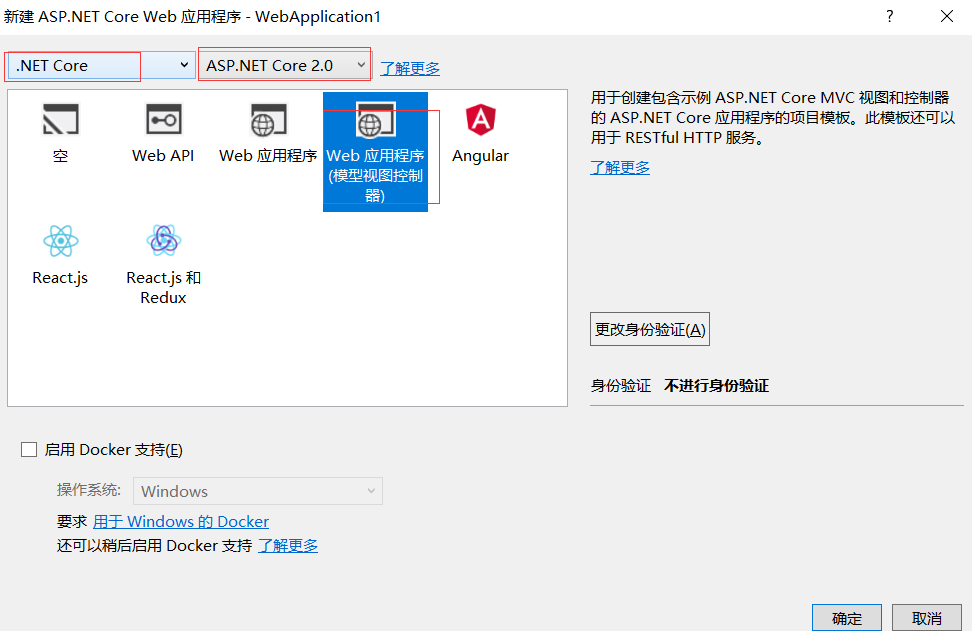
一、创建项目
1.

2.
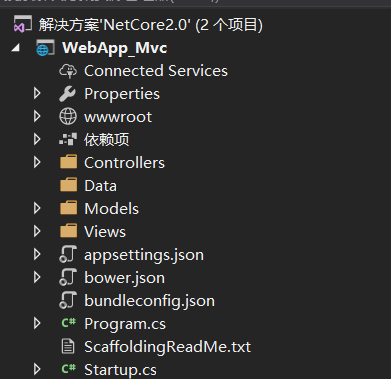
3. 项目结构
二、 构建数据模型
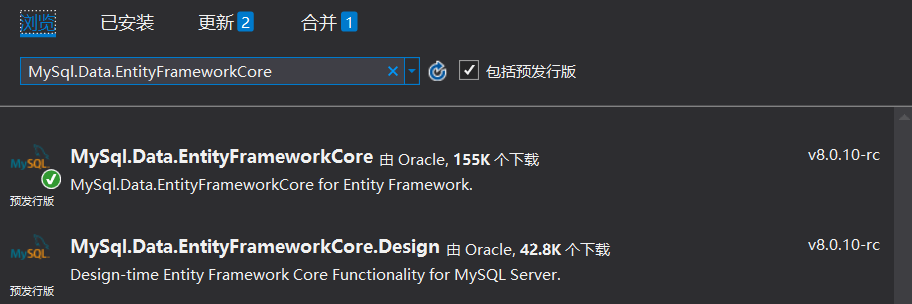
1. Startup类中配置EF Core MySql (NuGet中下载 MySql.Data.EntityFrameworkCore)
2. 使用自带的依赖注入,注册EF Core MySql
 // This method gets called by the runtime. Use this method to add services to the container.

        public void ConfigureServices(IServiceCollection services)

        {

            services.AddDbContext<MovieContext>(options =>

      options.UseMySQL(Configuration.GetConnectionString("MovieContext")));

            services.AddMvc();

        }
3. Movie 类:
    public class Movie

    {

        public int ID { get; set; }

        [Display(Name = "标题")]

        [StringLength(, MinimumLength = )]

        public string Title { get; set; }

        [Display(Name = "发布时间")]

        [DataType(DataType.Date)]

        public DateTime ReleaseDate { get; set; }

        [Display(Name = "类型")]

        public string Genre { get; set; }

        [Display(Name = "价格")]

        public decimal Price { get; set; }

    }
4. MovieContext 类:
 public class MovieContext : DbContext

    {

        public MovieContext(DbContextOptions<MovieContext> options)

                : base(options)

        {

        }

        public DbSet<Movie> Movie { get; set; }

    }
5 . 控制器:
    public class MovieController : Controller

    {

        private readonly MovieContext _context;

        public MovieController(MovieContext context)

        {

            _context = context;

        }

        public IActionResult Index()

        {

            var movies = _context.Movie.ToList();

            return View(movies);

        }

        public IActionResult Create()

        {

            return View();

        }

        //[Bind] 特性是防止过度发布的一种方法。 只应在 [Bind] 特性中包含想要更改的属性

        //ValidateAntiForgeryToken 特性用于防止请求伪造,

        [HttpPost]

        [ValidateAntiForgeryToken]

        public async Task<IActionResult> Create([Bind("ID,Title,ReleaseDate,Genre,Price")] Movie movie)

        {

            if (ModelState.IsValid)

            {

                return NotFound();

            }

            try

            {

                _context.Add(movie);

                await _context.SaveChangesAsync();

            }

            catch (DbUpdateConcurrencyException)

            {

                throw;

            }

            return RedirectToAction("Index");

        }

        public IActionResult Edit(int id)

        {

            var movie = _context.Movie.Where(i => i.ID == id).FirstOrDefault();

            return View(movie);

        }

        //[Bind] 特性是防止过度发布的一种方法。 只应在 [Bind] 特性中包含想要更改的属性

        //ValidateAntiForgeryToken 特性用于防止请求伪造,

        [HttpPost]

        [ValidateAntiForgeryToken]

        public async Task<IActionResult> Edit(int id, [Bind("ID,Title,ReleaseDate,Genre,Price")] Movie movie)

        {

            if (id != movie.ID)

            {

                return NotFound();

            }

            if (ModelState.IsValid)

            {

                try

                {

                    _context.Update(movie);

                    await _context.SaveChangesAsync();

                }

                catch (DbUpdateConcurrencyException)

                {

                    throw;

                }

                return RedirectToAction("Index");

            }

            return View(movie);

        }

    }
6. 创建视图 Create
@model WebApp_Mvc.Models.Movie

@{

    ViewData["Title"] = "Create";

}

<h2>Create</h2>

<form asp-action="Create">

    <div class="form-horizontal">

        <h4>Movie</h4>

        <hr />

        <div asp-validation-summary="ModelOnly" class="text-danger"></div>

        <input type="hidden" asp-for="ID" />

        <div class="form-group">

            <label asp-for="Title" class="col-md-2 control-label"></label>

            <div class="col-md-10">

                <input asp-for="Title" class="form-control" />

                <span asp-validation-for="Title" class="text-danger"></span>

            </div>

        </div>

        <div class="form-group">

            <label asp-for="ReleaseDate" class="col-md-2 control-label"></label>

            <div class="col-md-10">

                <input asp-for="ReleaseDate" class="form-control" />

                <span asp-validation-for="ReleaseDate" class="text-danger"></span>

            </div>

        </div>

        <div class="form-group">

            <label asp-for="Genre" class="col-md-2 control-label"></label>

            <div class="col-md-10">

                <input asp-for="Genre" class="form-control" />

                <span asp-validation-for="Genre" class="text-danger"></span>

            </div>

        </div>

        <div class="form-group">

            <label asp-for="Price" class="col-md-2 control-label"></label>

            <div class="col-md-10">

                <input asp-for="Price" class="form-control" />

                <span asp-validation-for="Price" class="text-danger"></span>

            </div>

        </div>

        <div class="form-group">

            <div class="col-md-offset-2 col-md-10">

                <input type="submit" value="Save" class="btn btn-default" />

            </div>

        </div>

    </div>

</form>

<div>

    <a asp-action="Index">Back to List</a>

</div>

@section Scripts {

    @{await Html.RenderPartialAsync("_ValidationScriptsPartial");}

}
Edit:
@model WebApp_Mvc.Models.Movie

@{

    ViewData["Title"] = "Edit";

}

<h2>Edit</h2>

<form asp-action="Edit">

    <div class="form-horizontal">

        <h4>Movie</h4>

        <hr />

        <div asp-validation-summary="ModelOnly" class="text-danger"></div>

        <input type="hidden" asp-for="ID" />

        <div class="form-group">

            <label asp-for="Title" class="col-md-2 control-label"></label>

            <div class="col-md-10">

                <input asp-for="Title" class="form-control" />

                <span asp-validation-for="Title" class="text-danger"></span>

            </div>

        </div>

        <div class="form-group">

            <label asp-for="ReleaseDate" class="col-md-2 control-label"></label>

            <div class="col-md-10">

                <input asp-for="ReleaseDate" class="form-control" />

                <span asp-validation-for="ReleaseDate" class="text-danger"></span>

            </div>

        </div>

        <div class="form-group">

            <label asp-for="Genre" class="col-md-2 control-label"></label>

            <div class="col-md-10">

                <input asp-for="Genre" class="form-control" />

                <span asp-validation-for="Genre" class="text-danger"></span>

            </div>

        </div>

        <div class="form-group">

            <label asp-for="Price" class="col-md-2 control-label"></label>

            <div class="col-md-10">

                <input asp-for="Price" class="form-control" />

                <span asp-validation-for="Price" class="text-danger"></span>

            </div>

        </div>

        <div class="form-group">

            <div class="col-md-offset-2 col-md-10">

                <input type="submit" value="Save" class="btn btn-default" />

            </div>

        </div>

    </div>

</form>

<div>

    <a asp-action="Index">Back to List</a>

</div>

@section Scripts {

    @{await Html.RenderPartialAsync("_ValidationScriptsPartial");}

}
Index:
@model List<WebApp_Mvc.Models.Movie>

@{

}

<h2>Index</h2>

<p>

    <a asp-action="Create">Create New</a>

</p>

<table class="table">

    <thead>

        <tr>

            <th>

                @Html.DisplayNameFor(model => model[0].Title)

            </th>

            <th>

                @Html.DisplayNameFor(model => model[0].ReleaseDate)

            </th>

            <th>

                @Html.DisplayNameFor(model => model[0].Genre)

            </th>

            <th>

                @Html.DisplayNameFor(model => model[0].Price)

            </th>

            <th></th>

        </tr>

    </thead>

    <tbody>

        @foreach (var item in Model)

        {

            <tr>

                <td>

                    @Html.DisplayFor(modelItem => item.Title)

                </td>

                <td>

                    @Html.DisplayFor(modelItem => item.ReleaseDate)

                </td>

                <td>

                    @Html.DisplayFor(modelItem => item.Genre)

                </td>

                <td>

                    @Html.DisplayFor(modelItem => item.Price)

                </td>

                <td>

                    <a asp-action="Edit" asp-route-id="@item.ID">Edit</a> |

                    <a asp-action="Details" asp-route-id="@item.ID">Details</a> |

                    <a asp-action="Delete" asp-route-id="@item.ID">Delete</a>

                </td>

            </tr>

        }

    </tbody>

</table>
编译运行:

Asp.NetCore MVC Web 应用的更多相关文章
- ASP.NETCORE MVC模块化
ASP.NETCORE MVC模块化编程 前言 记得上一篇博客中跟大家分享的是基于ASP.NETMVC5,实际也就是基于NETFRAMEWORK平台实现的这么一个轻量级插件式框架.那么今天我主要分享的 ...
- ASP.NET MVC Web API Post FromBody(Web API 如何正确 Post)
问题场景: ASP.NET MVC Web API 定义 Post 方法,HttpClient 使用 JsonConvert.SerializeObject 传参进行调用,比如 Web Api 中定义 ...
- ASP.NET MVC Web API For APP
近来很多大型的平台都公开了Web API.比如百度地图 Web API,做过地图相关的人都熟悉.公开服务这种方式可以使它易于与各种各样的设备和客户端平台集成功能,以及通过在浏览器中使用 JavaScr ...
- [译]ABP框架使用AngularJs,ASP.NET MVC,Web API和EntityFramework构建N层架构的SPA应用程序
本文转自:http://www.skcode.cn/archives/281 本文演示ABP框架如何使用AngularJs,ASP.NET MVC,Web API 和EntityFramework构建 ...
- 【转载】ASP.NET MVC Web API 学习笔记---联系人增删改查
本章节简单介绍一下使用ASP.NET MVC Web API 做增删改查.目前很多Http服务还是通过REST或者类似RESP的模型来进行数据操作的.下面我们通过创建一个简单的Web API来管理联系 ...
- Asp.net mvc web api 在项目中的实际应用
Asp.net mvc web api 在项目中的实际应用 前言:以下只是记录本人在项目中的应用,而web api在数据传输方面有多种实现方式,具体可根据实际情况而定! 1:数据传输前的加密,以下用到 ...
- ASP.NET MVC Web API 学习笔记---第一个Web API程序
http://www.cnblogs.com/qingyuan/archive/2012/10/12/2720824.html GetListAll /api/Contact GetListBySex ...
- 在 ASP.NET MVC Web 应用程序中输出 RSS Feeds
RSS全称Really Simple Syndication.一些更新频率较高的网站可以通过RSS让订阅者快速获取更新信息.RSS文档需遵守XML规范的,其中必需包含标题.链接.描述信息,还可以包含发 ...
- 实战 ASP.NET MVC Web API
实战 ASP.NET MVC Web API Web API 框架基于 ASP.NET MVC 框架开发,是一个面向 Http 协议的通信框架.相对于 WCF 而言,Web API 只面向于 Http ...
随机推荐
- mac自己安装python的路径
自己安装的python包的路径( 编辑器 import sys print sys.path 可以看到很多需要的东西的位置 如python的解析器等) /Library/Python/2.7/s ...
- Bootstrap-CL:徽章
ylbtech-Bootstrap-CL:徽章 1.返回顶部 1. Bootstrap 徽章(Badges) 本章将讲解 Bootstrap 徽章(Badges).徽章与标签相似,主要的区别在于徽章的 ...
- strongswan
StrongSwan is an open source IPsec-based VPN Solution. It supports both the IKEv1 and IKEv2 key exch ...
- 字符串转码 将文本转为PDF
@Test public void testBasic64Code() throws Exception { String strdata = new String("how are you ...
- 横向文本框 index获取索引 和 eq 实现
<!DOCTYPE html> <html lang="en"> <head> <meta charset="UTF-8&quo ...
- Spring cloud 分布式锁
https://github.com/easonstudy/springboot_demo study目录中
- FullBg-网页图片背景自适应大小
网页背景自适应大小jQuery插件 fullBG.js http://cbavota.bitbucket.org/fullbg/ HTML <img id="background& ...
- 转化RGB颜色为CMYK颜色
procedure RGBTOCMYK(R : byte; G : byte; B : byte; var C : byte; var M : byte; var Y : byte; var K : ...
- What I'm Researching
[What I'm Researching] 1.C++11 2.NLP 3.android dev 4.warm up 5.PageRank
- pg_hba.conf、pool_hba.conf 以及 pool_passwd 三者间的关系
pg_hba.conf.pool_hba.conf 以及 pool_passwd 三者间的关系: 1.pg_hba.conf.pool_hba.conf 以及 pool_passwd 三者关系 pg_ ...