
servlet 3.0无需配置web.xml,使用注入方式配置servlet实现登陆功能(服务器需要支持servlet3.0)

首先申明上面的报错红叉,我也不知道怎么回事.总之能运行.
新建项目时选择java EE6.0,低版本没有servlet3.0.
先看一个基本示例.
Test.java是用来测试无需配置文件,无需静态页面(jsp,html)
直接访问servlet来从服务器上获取信息.
Test.java代码
 package com.gys;

 import java.io.IOException;

 import java.io.PrintWriter;

 import javax.servlet.ServletException;

 import javax.servlet.annotation.WebServlet;

 import javax.servlet.http.HttpServlet;

 import javax.servlet.http.HttpServletRequest;

 import javax.servlet.http.HttpServletResponse;

 @WebServlet(

             name="Test",

             urlPatterns={"/test"}

         )

 public class Test extends HttpServlet{

     @Override

     protected void doPost(HttpServletRequest req, HttpServletResponse resp)

             throws ServletException, IOException {

         doGet(req, resp);

     }

     @Override

     protected void doGet(HttpServletRequest request, HttpServletResponse response)

             throws ServletException, IOException {

         response.setContentType("text/html;charset=utf-8");

         PrintWriter out=response.getWriter();

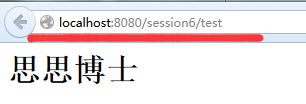
         out.println("<h1>思思博士</h1>");

     }

 }
访问结果:
看懂上面的name和urlpattern参数的,继续往下看.
servletConfigDemo.java代码
 package com.gys;

 import java.io.IOException;

 import java.util.Enumeration;

 import javax.servlet.RequestDispatcher;

 import javax.servlet.ServletConfig;

 import javax.servlet.ServletContext;

 import javax.servlet.ServletException;

 import javax.servlet.annotation.WebInitParam;

 import javax.servlet.annotation.WebServlet;

 import javax.servlet.http.HttpServlet;

 import javax.servlet.http.HttpServletRequest;

 import javax.servlet.http.HttpServletResponse;

 import javax.servlet.http.HttpSession;

 @WebServlet(

         urlPatterns={"/servletConfigDemo.do"},

         loadOnStartup=1,

         name="servletConfigDemo",

         displayName="demo",

         initParams={

                 @WebInitParam(name="success",value="success.html"),

                 @WebInitParam(name="error",value="error.html")

         }

     )

 public class servletConfigDemo extends HttpServlet{

     @Override

     protected void doPost(HttpServletRequest request, HttpServletResponse response)

             throws ServletException, IOException {

         ServletConfig config=getServletConfig();

         //1.getInitParameter(name)方法

         String success=config.getInitParameter("success");

         String error=config.getInitParameter("error");

         System.out.println("success-----"+success);

         System.out.println("errror------"+error);

         //2.getInitParameterNames方法

         Enumeration enumeration=config.getInitParameterNames();

         while(enumeration.hasMoreElements()){

             String name=(String)enumeration.nextElement();

             String value=config.getInitParameter(name);

             System.out.println("name-----"+name);

             System.out.println("value-----"+value);

         }

         //3getServletContext方法

         ServletContext servletContext=config.getServletContext();

         System.out.println("servletContext----"+servletContext);

         //4.getServletName方法

         String servletName=config.getServletName();

         System.out.println("servletName------"+servletName);

         request.setCharacterEncoding("UTF-8");

         String userId=request.getParameter("userId");

         String passwd=request.getParameter("passwd");

         //判断

         if(userId!=null&&"gys".equals(userId)&&passwd!=null&&"gys".equals(passwd)){

             HttpSession session=request.getSession();

             session.setAttribute("user", userId);

             //跳转

             RequestDispatcher requestDispatcher=request.getRequestDispatcher(success);

             requestDispatcher.forward(request, response);

         }

         else {

             //跳转

             RequestDispatcher requestDispatcher=request.getRequestDispatcher(error);

             requestDispatcher.forward(request, response);

         }

     }

 }
index.jsp
 <%@ page language="java" import="java.util.*" contentType="text/html; charset=utf-8"%>

 <%

 String path = request.getContextPath();

 String basePath = request.getScheme()+"://"+request.getServerName()+":"+request.getServerPort()+path+"/";

 %>

 <!DOCTYPE HTML PUBLIC "-//W3C//DTD HTML 4.01 Transitional//EN">

 <html>

   <head>

     <base href="<%=basePath%>">

     <title>登陆</title>

     <meta http-equiv="pragma" content="no-cache">

     <meta http-equiv="cache-control" content="no-cache">

     <meta http-equiv="expires" content="0">

     <meta http-equiv="keywords" content="keyword1,keyword2,keyword3">

     <meta http-equiv="description" content="This is my page">

     <!--

     <link rel="stylesheet" type="text/css" href="styles.css">

     -->

   </head>

   <body>

   <form action="servletConfigDemo.do" method="post">

        用户名<input type="text" value="" name="userId" /><br/>

        密码:<input type="password" name="passwd" />

        <input type="submit" value="提交" />

   </form>

   </body>

 </html>
实现登陆功能了
servlet 3.0无需配置web.xml,使用注入方式配置servlet实现登陆功能(服务器需要支持servlet3.0)的更多相关文章
- WebApplicationInitializer究 Spring 3.1之无web.xml式 基于代码配置的servlet3.0应用
本文转自http://hitmit1314.iteye.com/blog/1315816 大家应该都已经知道Spring 3.1对无web.xml式基于代码配置的servlet3.0应用.通过spri ...
- Servlet的运行流程以及web.xml文件中的几种配置方式
Servlet的运行流程: 有俩种方式: 1.创建一个包,然后在包下创建一个class,class里面需要继承httpservlet,复写service方法------>配置web.xml文件: ...
- SpringMVC4零配置--web.xml
servlet3.0+规范后,允许servlet,filter,listener不必声明在web.xml中,而是以硬编码的方式存在,实现容器的零配置. ServletContainerInitiali ...
- web.xml中servlet-mapping的配置
<servlet-mapping>元素在Servlet和URL样式之间定义一个映射.它包含了两个子元素<servlet- name>和<url-pattern>,& ...
- SpringMVC(十四):SpringMVC 与表单提交(post/put/delete的用法);form属性设置encrypt='mutilpart/form-data'时,如何正确配置web.xml才能以put方式提交表单
SpringMVC 与表单提交(post/put/delete的用法) 为了迎合Restful风格,提供的接口可能会包含:put.delete提交方式.在springmvc中实现表单以put.dele ...
- Servlet(九):web.xml文件和server.xml文件
Web.xml 文件使用总结:作用: 存储项目相关的配置信息,保护 Servlet.解耦一些数据对程序的依赖.使用位置: 每个 Web 项目中Tomcat 服务器中(在服务器目录 conf 目录中)区 ...
- SSH项目web.xml文件的常用配置【struts2的过滤器、spring监听器、解决Hibernate延迟加载问题的过滤器、解决中文乱码的过滤器】
配置web.xml(struts2的过滤器.spring监听器.解决Hibernate延迟加载问题的过滤器.解决中文乱码的过滤器) <!-- 解决中文乱码问题 --> <filter ...
- 如何把web.xml中的context-param、Servlet、Listener和Filter定义添加到SpringBoot中
把传统的web项目迁移到SpringBoot中,少不了web.xml中的context-param.Servlet.Filter和Listener等定义的迁移. 对于Servlet.Filter和Li ...
- 创建新的servlet一定要记得修改web..xml文件!!!
创建新的servlet一定要记得修改web..xml文件!!!
随机推荐
- nil 作比较时应该加上双引号 "
> type(X) nil > type(X)==nil false > type(X)=="nil" true >
- [html5]HTML5中<section>和<article>的区别
一.section元素 从字面理解就是区块.部分的意思,相对于article元素更加广泛,每个区块都可以使用,比如页面里的导航菜单.文章正文.文章的评论等. 1.section元素用于对网站或应用程序 ...
- Autofac Mvc注入
private void DependencyInjection() { var builder = new ContainerBuilder(); builder.RegisterControlle ...
- Android之修改用户头像并上传服务器(实现手机拍照和SD卡选择上传)
写了这么多个的APP,最近才把他这个功能写上来,就抽取其中的用户修改头像的相关操作这个功能写了这篇博客,来与大家分享,希望对你有所帮助. 案例包含了: Xutil图片上传 拍照和SD卡选择图片 图片缓 ...
- TCP握手及状态图
为什么需要“三次握手”? 为了解决“网络中存在延迟的重复分组”的问题,即为了防止已失效的连接请求报文段突然又传送到了服务端,因而产生错误. 例:“已失效的连接请求报文段”的产生在这样一种情况下:cli ...
- 无线基站侧的信令风暴根因——频繁的释放和连接RRC产生大量信令、设备移动导致小区重选信令增加、寻呼信令多
全局思维(核心网和无线基站侧都会有信令风暴): LTE网络系统可能出现信令风暴的原因,大致可以总结出以下几点: 1.网络架构的变化,导致4G核心网信令流量较2G/3G大幅增加 a)架构扁平化:LTE网 ...
- 前端常用框架和js插件 UI组件等
前言:写这个随笔,是记录一下工作以来用到的各种框架.以免日后忘记: JS库: 1. jquery.js 2. zepto.js ----jquery的精简版,专门用于手机上的,但是zepto主体默认是 ...
- Virtualbox安装Windows 8.1遇到0x000000C4错误解决办法 - 转
想要尝试一下 Windows 8.1 系统,又不愿意在电脑上直接安装,虚拟机提供了很好的平台.因为平时工作需要,其实电脑上装的虚拟机还是不少的,每天都要开着几个虚拟机一起用.多一个不多,于是尝试在自己 ...
- Alpha阶段第1周 Scrum立会报告+燃尽图 02
作业要求与https://edu.cnblogs.com/campus/nenu/2018fall/homework/2246相同 一.小组介绍 组长:刘莹莹 组员:朱珅莹 孙韦男 祝玮琦 王玉潘 周 ...
- 此文记录了我从研二下学期到研三上学期的找工历程,包括百度、腾讯、网易、移动、电信、华为、中兴、IBM八家企业的面试总结和心得--转
感谢电子通讯工程的研究生学长为大家整理了这么全面的求职总结,希望进入通信公司和互联网公司做非技术类岗位的学弟学妹们千万不要错过哦~ ---------------------------原文分割线-- ...