
Memo
1.Webpack: node_modules/css/index.js didn't return a function
npm install css-loader style-loader --save-dev
2.更改webpack 端口
webpack-dev-server --hot --host 127.0.0.1 --port 9999
3.jquery相关重叠造成的混乱
    <ul>

        <li>index</li>

        <li>foo</li>

        <li>foo2</li>

    </ul>

    <div id="cc">

    </div>

    <script>

        $(function(){

          $("li" ).each(function( index ) {

              $("div").append("<div>"+index+ ":"+$(this).text()+"</div>");

          });

       });

    </script>
浏览器渲染成这样:

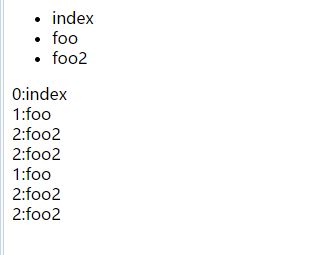
我理解就是选择器与添加元素,重叠造成的混乱
$("div").append("<div>"+index+ ":"+$(this).text()+"</div>");
明确一个ID就好了
$("#cc").append("<div>"+index+ ":"+$(this).dtext()+"</div>");
4.禁用在UC上点到图片显示看图模式
5.jquery children和find
.children( [selector ] )Returns: jQuery
Description: Get the children of each element in the set of matched elements, optionally filtered by a selector.
Given a jQuery object that represents a set of DOM elements, the .children() method allows us to search through the children of these elements in the DOM tree and construct a new jQuery object from the matching elements. The .children()method differs from .find() in that .children() only travels a single level down the DOM tree while .find() can traverse down multiple levels to select descendant elements (grandchildren, etc.) as well. Note also that like most jQuery methods, .children() does not return text nodes; to get all children including text and comment nodes, use .contents().
The .children() method optionally accepts a selector expression of the same type that we can pass to the $() function. If the selector is supplied, the elements will be filtered by testing whether they match it.
.find( selector )Returns: jQuery
Description: Get the descendants of each element in the current set of matched elements, filtered by a selector, jQuery object, or element.
Given a jQuery object that represents a set of DOM elements, the .find() method allows us to search through the descendants of these elements in the DOM tree and construct a new jQuery object from the matching elements. The .find()and .children() methods are similar, except that the latter only travels a single level down the DOM tree.
The first signature for the .find()method accepts a selector expression of the same type that we can pass to the $()function. The elements will be filtered by testing whether they match this selector.
children() 不返回文本节点
.find()和.children()方法相似,但是children()只是查找子元素,返回的是儿子辈儿的,不是后代元素,参数可选。
而find()方法是返回匹配元素集合中每个元素的后代,参数必选。find()方法只在后代中遍历,不包括自己。
if($(“table:eq(“+j+”)”).find(“tbody tr:nth-child(“+i+”)”).children(“td:nth-child(2)”).text()==”直航”)
if($(“table:eq(“+j+”)”).children(“tbody”).children(“tr:nth-child(“+i+”)”).children(“td:nth-child(2)”).text()==”直航”)
6.监测当前浏览器是否支持download属性
7.微信浏览器缓存
8.兼容trim
兼容旧环境如果 trim() 不存在,可以在所有代码前执行下面代码
if (!String.prototype.trim) {

  String.prototype.trim = function () {

    return this.replace(/^[\s\uFEFF\xA0]+|[\s\uFEFF\xA0]+$/g, '');

  };

}
9.IE10+ 半透明自动隐藏的滚动条
/* IE10+ 半透明自动隐藏的滚动条 */

@-ms-viewport {

  width: device-width;

}
CSS 自定义滚动条样式 适用于 webkit 内核浏览器
::-webkit-scrollbar 滚动条整体部分

::-webkit-scrollbar-thumb  滚动条里面的小方块,能向上向下移动(或往左往右移动,取决于是垂直滚动条还是水平滚动条)

::-webkit-scrollbar-track  滚动条的轨道(里面装有Thumb)

::-webkit-scrollbar-button 滚动条的轨道的两端按钮,允许通过点击微调小方块的位置。

::-webkit-scrollbar-track-piece 内层轨道,滚动条中间部分(除去)

::-webkit-scrollbar-corner 边角,即两个滚动条的交汇处

::-webkit-resizer 两个滚动条的交汇处上用于通过拖动调整元素大小的小控件
10.改完JS文件夹版本号真的挺重要的。今天不小心疏忽了
11.今天写按着一篇博文写vue-demo 在外部引入CSS的时候,最后发现总是报
You may need an appropriate loader to handle this file type.
我按着博主的原文看了看 对比一下,没有哪不对。但就是不行。最后发现 ,在webpack.config.js 里 这则项不对
{
test: /\\.css$/,
loader: "style!css"
},
Memo的更多相关文章
- memo的一般方法
str := '好时代卡卡卡的水平佛单师傅开锁'; Memo1.Lines.Add(str); // 在最后加一行字符串 Memo1.Lines.Delete(x); // 删除x+1行字符串 Mem ...
- 修复 XE8 Win 平台 Firemonkey Memo 卷动后会重叠的问题
问题:XE8 Firemonkey 在 Windows 平台 Memo 卷动时,在第 1 , 2 行会产生重叠现象. 更新:XE8 update 1 已经修复这个问题,无需再使用下面方法. 修改前: ...
- 修正 Memo 設定為 ReadOnly 後, 無法有複製的功能
问题:当 Memo 設定為 ReadOnly = True 後, 选取一段文字后,無法有複製的功能. 适用:XE6 Android 系统(目前 iOS 还找不到方法) 修正方法: 请将源码 FMX.P ...
- TStringList TMemo Text与Add赋值的区别 Memo.Text赋值高度注意事项,不得不知的技巧。
Memo.Text赋值高度注意事项,不得不知的技巧. list := TStringList.Create; list.Text:= str: list.Count; list.Clear; l ...
- ORA-04031 With Leak in "OBJ STAT MEMO" Allocations Seen in V$SGASTAT on 10.2.0.5 (文档 ID 1350050.1)
APPLIES TO: Oracle Server - Enterprise Edition - Version: 10.2.0.5<max_ver> and later [Relea ...
- 第一部分实现功能:使用一个TabControl和一个Memo和TDictionary类实现文本临时存储
效果图: 一期功能概要: a.双击tab关闭tab,双击tab右边空白添加tab(标题为以hhnnsszzz的时间格式命名) b.切换tab将数据存入dictionary,key为标题,value为m ...
- 问题-Fastreport4 Memo打印时中文显示不全
问题现象:在使用Fastreport4制作打印工具时,发现Memo显示中文老是显不不全. 问题原因:可能是因为字符编码的原因,希望高人指点. 问题处理:将属性font-charset设置为DEFAUL ...
- Memo打印1
Delphi 打印Memo里面的内容 实现的功能和记事本的打印的功能一样 打印保存为文件时此时的文件名如何设置? 当Memo里的文本数量巨大时 窗体正在打印会出现点数字显示问题 闪 ...
- Delphi Memo的记事本功能
Delphi Memo的记事本功能 下载地址 : http://download.csdn.net/detail/teststudio/6412883 这个代码实现了Windows ...
- Delphi TFindDialog TReplaceDialog对话框在Memo中的使用
Delphi TFindDialog TReplaceDialog对话框的使用 下载地址1: http://download.csdn.net/detail/teststudio/6408383 ...
随机推荐
- SQL汉字转拼音函数-支持首字母、全拼
SQL汉字转拼音函数-支持首字母.全拼 FROM :http://my.oschina.net/ind/blog/191659 作者不详 --方法一sqlserver汉字转拼音首字母 --调用方法 s ...
- android微信分享不出去?四步搞定!
现在做的项目中集成了友盟分享,产品要求集成微信.朋友圈.QQ.QQ空间.短信这几个分享平台.按照友盟的文档集成一切都很顺利,集成成功以后测试QQ.QQ空间.短信都没有问题,唯独微信和朋友圈一直分享不出 ...
- C# XMLDocument
今天开发一个WPF模块需要本地化保存一些用户设置,鉴于数据量不大,用XML. (要是再小的话可以用Resources 和 Settings). 清晰简短教程移步:http://bdk82924.ite ...
- IIS7.0发布Web服务器0002
asp.net发布到IIS中出现错误:处理程序“PageHandlerFactory-Integrated”在其模块列表中有一个错误模块“ManagedPipelineHandler” 分类: BS学 ...
- VSTO PowerPoint 代码删除Shape后再恢复出现无法再次获取的问题
做PowerPoint的VSTO插件项目,遇到个很奇怪的问题,当代码执行删除某些Shape时,没问题,但是操作Undo也就是恢复后,无法再次获取到之前删除的对象,这种情况只在Office2007中出现 ...
- 纵观jBPM:从jBPM3到jBPM5以及Activiti5
http://www.infoq.com/cn/articles/rh-jbpm5-activiti5/ 作者 荣浩 发布于 2010年12月28日 | 注意:GTLC全球技术领导力峰会,500+CT ...
- JS trim
JS 去掉左右两边空格 /** * 去掉左右两边空格 * @param str * @returns {*} */function myTrim(str){ return str.replace(/( ...
- JavaScript 日期选择器 Pikaday
找一些插件的过程实在太痛苦了...好容易找到一个,赶紧记录下.免得以后重复浪费时间在这上面. 插件名:Pikaday github地址:https://github.com/dbushell/Pika ...
- Android获取屏幕宽度高度
方法一: WindowManager wm = (WindowManager) this .getSystemService(Context.WINDOW_SERVICE); int width = ...
- gulp自动刷新和css、js压缩
之前搭建过Grunt,但是用起来有点繁琐,后来有人跟我说gulp更多简单.所以今天又搭建一个gulp.在使用gulp前应该有nodeJs环境,安装完nodejs后,就可以开始gulp的搭建了. 先新建 ...