
Android-Java读写文件到自身APP目录
界面:
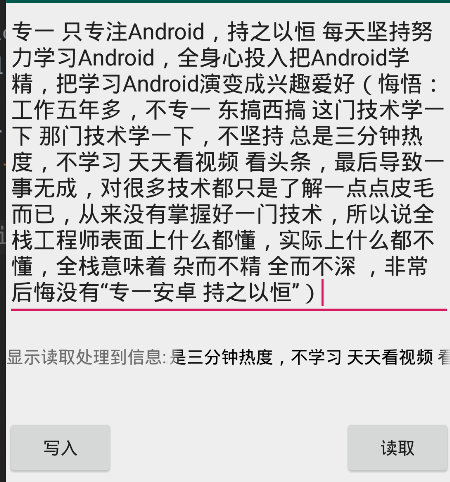
Layout:
<?xml version="1.0" encoding="utf-8"?>

<LinearLayout xmlns:android="http://schemas.android.com/apk/res/android"

    android:orientation="vertical"

    android:layout_width="match_parent"

    android:layout_height="match_parent">

    <EditText

        android:id="@+id/et_output"

        android:layout_width="match_parent"

        android:layout_height="wrap_content"

        android:hint="请写入数据到文件"

        />

    <LinearLayout

        android:layout_width="match_parent"

        android:layout_height="wrap_content"

        android:layout_marginTop="20dp">

        <TextView

            android:layout_width="wrap_content"

            android:layout_height="wrap_content"

            android:text="显示读取处理到信息:"

            />

        <TextView

            android:id="@+id/tv_input"

            android:layout_width="0dip"

            android:layout_height="wrap_content"

            android:layout_weight="1"

            android:textColor="@android:color/black"

            android:singleLine="true"

            android:ellipsize="marquee"

            android:marqueeRepeatLimit="marquee_forever"

            />

    </LinearLayout>

    <RelativeLayout

        android:layout_width="match_parent"

        android:layout_height="wrap_content"

        android:layout_marginTop="40dp">

        <Button

            android:id="@+id/bt_output"

            android:layout_width="wrap_content"

            android:layout_height="wrap_content"

            android:text="写入"

            />

        <Button

            android:id="@+id/bt_input"

            android:layout_width="wrap_content"

            android:layout_height="wrap_content"

            android:text="读取"

            android:layout_alignParentRight="true"

            />

    </RelativeLayout>

</LinearLayout>
MainActivity读写相关代码:
package liudeli.datastorage;

import android.app.Activity;

import android.os.Bundle;

import android.text.TextUtils;

import android.view.View;

import android.widget.Button;

import android.widget.EditText;

import android.widget.TextView;

import android.widget.Toast;

import java.io.BufferedReader;

import java.io.File;

import java.io.FileReader;

import java.io.FileWriter;

import java.io.IOException;

public class MainActivity3 extends Activity implements View.OnClickListener {

    @Override

    protected void onCreate(Bundle savedInstanceState) {

        super.onCreate(savedInstanceState);

        setContentView(R.layout.activity_main3);

        initViewListener();

    }

    private EditText etOutpu;

    private TextView tvInput;

    public Button btOutput, btInput;

    private void initViewListener() {

        etOutpu = findViewById(R.id.et_output);

        tvInput = findViewById(R.id.tv_input);

        btOutput = findViewById(R.id.bt_output);

        btInput = findViewById(R.id.bt_input);

        btOutput.setOnClickListener(this);

        btInput.setOnClickListener(this);

        // 让TextView获得焦点,TextView就可以滚动了

        tvInput.setSelected(true);

    }

    @Override

    protected void onDestroy() {

        super.onDestroy();

    }

    @Override

    public void onClick(View v) {

        switch (v.getId()) {

            case R.id.bt_input: {

                // Java传统方式 注意:访问自身APP到目录是不需要权限 Linux目录是以/为开头

                File file = new File("/data/data/" + getPackageName() + "/my_file.txt");

                if (!file.exists()) {

                    Toast.makeText(MainActivity3.this, "文件不存在", Toast.LENGTH_LONG).show();

                    return;

                }

                try {

                    // 使用字符读取流

                    FileReader fileReader = new FileReader(file);

                    // 为什么要用BufferedReader,因为BufferedReader有readLine()的方法

                    BufferedReader br = new BufferedReader(fileReader);

                    String result = br.readLine();

                    tvInput.setText(result + "");

                    fileReader.close();

                    br.close();

                } catch (Exception e) {

                    e.printStackTrace();

                }

                break;

            }

            case R.id.bt_output: {

                String outputStr = etOutpu.getText().toString();

                if (TextUtils.isEmpty(outputStr)) {

                    Toast.makeText(MainActivity3.this, "请输入内容!", Toast.LENGTH_SHORT).show();

                    return;

                }

                // Java传统方式 注意:访问自身APP到目录是不需要权限 Linux目录是以/为开头

                File file = new File("/data/data/" + getPackageName() + "/my_file.txt");

                try {

                    // 字符写入流

                    FileWriter fileWriter = new FileWriter(file);

                    fileWriter.write(outputStr);

                    fileWriter.close();

                } catch (IOException e) {

                    e.printStackTrace();

                }

                break;

            }

            default:

                break;

        }

    }

}
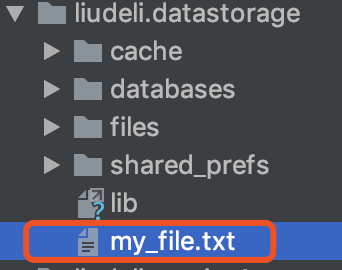
存储的目录:
Android-Java读写文件到自身APP目录的更多相关文章
- 在android中读写文件
在android中读写文件 android中只有一个盘,正斜杠/代表根目录. 我们常见的SDK的位置为:/mnt/sdcard 两种最常见的数据存储方式: 一.内存 二.本地 1.手机内部存储 2.外 ...
- Java读写文件方法总结
Java读写文件方法总结 Java的读写文件方法在工作中相信有很多的用处的,本人在之前包括现在都在使用Java的读写文件方法来处理数据方面的输入输出,确实很方便.奈何我的记性实在是叫人着急,很多时候既 ...
- Java读写文件的几种方式
自工作以后好久没有整理Java的基础知识了.趁有时间,整理一下Java文件操作的几种方式.无论哪种编程语言,文件读写操作时避免不了的一件事情,Java也不例外.Java读写文件一般是通过字节.字符和行 ...
- java读写文件大全
java读写文件大全 最初java是不支持对文本文件的处理的,为了弥补这个缺憾而引入了Reader和Writer两个类,这两个类都是抽象类,Writer中 write(char[] ch,int o ...
- 【java】java 读写文件
场景:JDK8 将上传的文件,保存到服务器 Java读写文件操作: MultipartFile file InputStream inputStream = file.getInputStream( ...
- Android的读写文件权限
设置文件生成的权限: public static boolean saveInfo( Context context, String userName, String userPass, int mo ...
- django中,如何把所有models模型文件放在同一个app目录下?
django的每个app目录下,都有自己的models.py文件. 原则上,每个app涉及的数据库,都会定义在这个文件里. 但是,有的数据库,涉及到多个app应用,不是很方便放在一个单独的app里. ...
- 转:Java读写文件各种方法及性能比较
干Java这么久,一直在做WEB相关的项目,一些基础类差不多都已经忘记.经常想得捡起,但总是因为一些原因,不能如愿. 其实不是没有时间,只是有些时候疲于总结,今得空,下定决心将丢掉的都给捡起来. 文件 ...
- Java读写文件常用方法
一.字符流:读写纯文本(txt,csv等), 1 字符流写文件主要用:FileWriter,BufferedWriter,PrintWriter 1.1 测试 FileWriter 写入 privat ...
随机推荐
- 内存泄漏检测工具VLD在VS2010中的使用举例
Visual LeakDetector(VLD)是一款用于Visual C++的免费的内存泄露检测工具.它的特点有:(1).它是免费开源的,采用LGPL协议:(2).它可以得到内存泄露点的调用堆栈,可 ...
- 峰Spring4学习(6)spring AOP的应用例子
一.AOP简介: 二.AOP实例: 三.使用的例子 需求:在student添加的前后,打印日志信息: 0)spring AOP需要引用的jar包: 1)StudentService.java接口: p ...
- appium -ios 真机连接 环境搭建
补充点一: 安装ios-deploynpm install -g ios-deploy 安装不了报错.! 后来找了找,发现sudo npm install -g ios-deploy --unsafe ...
- 第4课 Hello QT
1. QT的安装 (1)双击:qt-opensource-windows-x86-mingw492-5.6.0.exe (2)安装过程中指定QT Creator安装目录下的mingw文件夹 (3)设置 ...
- ZOJ-3230-Solving the Problems
/*ZOJ Problem Set - 3230Solving the Problems ------------------------------------------------------- ...
- 《Linux内核精髓:精通Linux内核必会的75个绝技》一HACK #2 如何编译Linux内核
HACK #2 如何编译Linux内核 本节介绍编译Linux内核的方法.当发现bug而修改源代码或者添加新功能时,就需要对内核进行重新编译,生成二进制映像文件.另外,如果想要使用发布版内核中无效的功 ...
- Solr中Facet用法和Group用法
Group分组划分结果,返回的是分组结果: Facet分组统计,侧重统计,返回的是分组后的数量: 一.Group用法: //组查询基础配置params.set(GroupParams.GROUP, & ...
- linux-修改pip源
1.进入家目录的隐藏 .pip目录下 cd ~/.pip 2.创建并修改pip.conf [global]timeout = 10 # 超时 index-url = http://mirrors.a ...
- 1.1_C语言概述
C语言概述 1.1 什么是C语言 一提到语言这个词语,自然会想到的是像英语.汉语等这样的自然语言,因为它是人和人交换信息不可缺少的工具. 而今天计算机遍布了我们生活的每一个角落,除了人和人的相互交流之 ...
- ES6系列_6之新增的数组知识
1.JSON数组格式转换 JSON的数组格式就是为了前端快速的把JSON转换成数组的一种格式,json数组格式如下: let json = { '0': '男', '1': '女', length:3 ...