
picker鼠标上下拖动选择内容
上次写这个的时候的博客:https://www.cnblogs.com/hiuman/p/7347406.html
上次是网上搜的插件,这次是自己写的。
欢迎指点~
效果图:
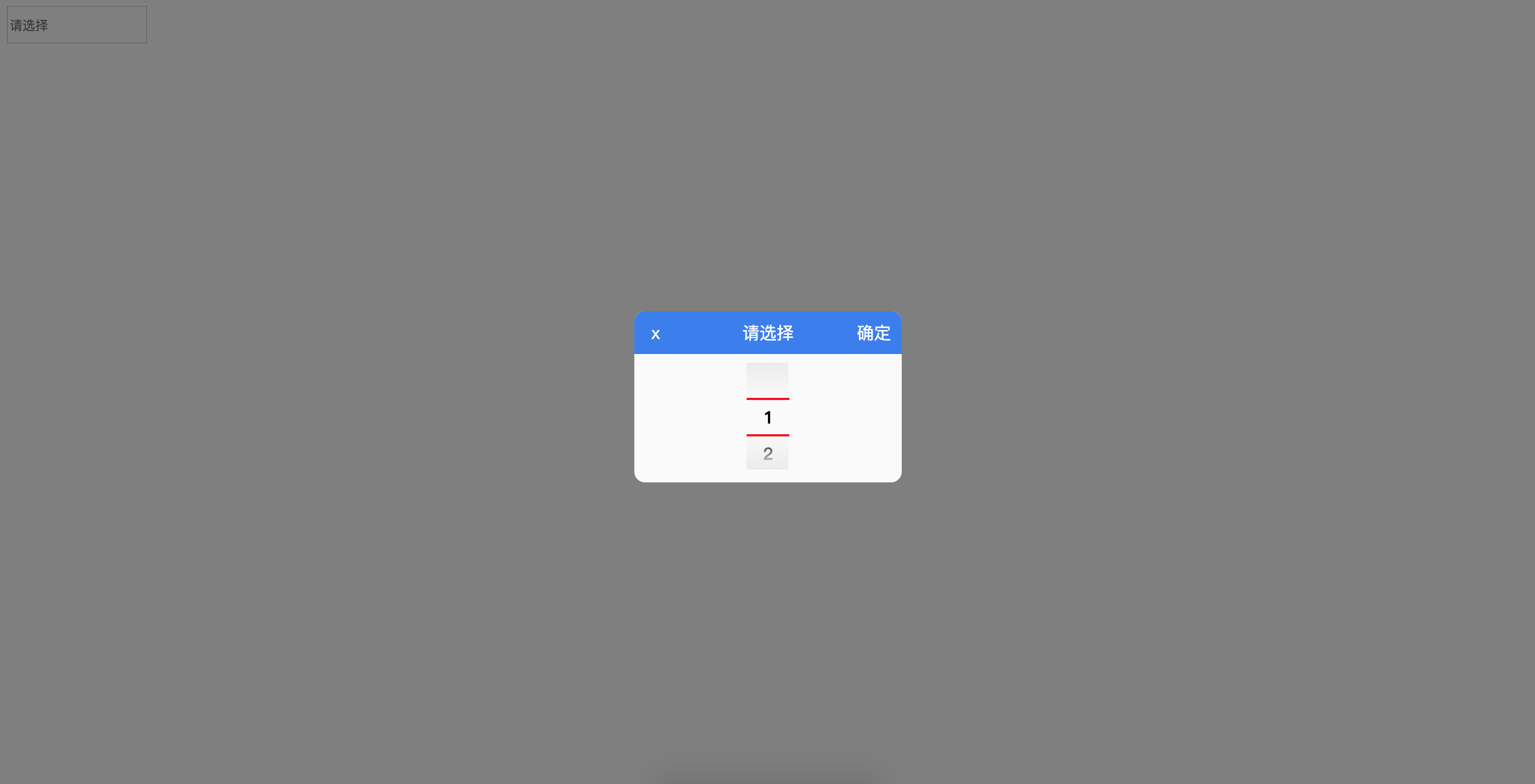
可以通过 https://littlehiuman.github.io/09-DatePicker/ 查看效果。
https://github.com/littleHiuman/littleHiuman.github.io 求点star~~~
代码如下:
css:
input {

  height: 30px;

  outline: none;

}

.fixed_bg {

  position: fixed;

  top:;

  left:;

  display: none;

  width: 100%;

  height: 100%;

  background: rgba(0, 0, 0, 0.5);

}

.fixed_bg .alert {

  position: fixed;

  top: 50%;

  left: 50%;

  overflow: hidden;

  width: 250px;

  height: 160px;

  margin-top: -75px;

  margin-left: -125px;

  border-radius: 10px;

  background: #fafafa;

}

.fixed_bg #curr {

  display: none;

}

.fixed_bg .alert_title {

  line-height: 40px;

  position: relative;

  width: 100%;

  height: 40px;

  text-align: center;

  color: #fff;

  background: #387bf0;

}

.fixed_bg .alert_sure,

.fixed_bg .alert_close {

  cursor: pointer;

  position: absolute;

}

.fixed_bg .alert_sure {

  right: 10px;

}

.fixed_bg .alert_close {

  left: 10px;

  width: 20px;

}

.fixed_bg .alert_con {

  position: relative;

  width: 100%;

  height: 120px;

}

.fixed_bg .alert_list_wrap {

  position: absolute;

  top: 8px;

  left: 50%;

  width: 40px;

  height: 100px;

  margin-left: -20px;

  overflow: hidden;

}

.fixed_bg .alert_list_curr_top,

.fixed_bg .alert_list_curr_bottom {

  position: absolute;

  width: 40px;

  height: 2px;

  background: red;

}

.fixed_bg .alert_list_curr_top {

  top: 33px;

}

.fixed_bg .alert_list_curr_bottom {

  top: 67px;

}

.fixed_bg .alert_list_msg_con {

  position: absolute;

  top: 34px;

  width: 100%;

}

.fixed_bg .alert_list_msg_con a {

  font-weight: bold;

  line-height: 34px;

  display: block;

  width: 100%;

  height: 34px;

  text-align: center;

  transition: top 2s;

}

.fixed_bg .alert_list_msg_descr {

  position: absolute;

  top:;

  left: -1px;

  width: 100%;

  height: 100%;

  background: -webkit-gradient(

    linear,

    0% 100%,

    0% 0%,

    from(rgb(235, 235, 235)),

    color-stop(0.35, rgba(235, 235, 235, 0)),

    color-stop(0.65, rgba(235, 235, 235, 0)),

    to(rgb(235, 235, 235))

  )

}
js:
var content = ''

var oInputGroup = document.getElementsByClassName('choose')

var fixed_bg = document.getElementsByClassName('fixed_bg')[0]

var alert_close = document.getElementsByClassName('alert_close')[0]

var alert_sure = document.getElementsByClassName('alert_sure')[0]

var alert_list_msg_con = document.getElementsByClassName('alert_list_msg_con')[0]

var spanCurr = document.getElementById('curr')

var eachHeight = +getComputedStyle(alert_list_msg_con.children[0], null).height.slice(0, -2)

setIndex()

for (var i = 0; i < oInputGroup.length; i++) {

  oInputGroup[i].onclick = function() {

    var _this = this

    fixed_bg.style.display = 'block'

    eventListen()

    alert_sure.onclick = function() {

      fixed_bg.style.display = 'none'

      setIndex()

      _this.value = content

    }

  }

}

alert_close.onclick = function() {

  fixed_bg.style.display = 'none'

}

function setIndex() {

  var conTop = getComputedStyle(alert_list_msg_con, null).top.slice(0, -2)

  var conIndex = -((conTop - eachHeight) / eachHeight)

  spanCurr.innerText = Math.round(conIndex)

}

function eventListen() {var sign = ''

  var sMoveStart = ''

  window.onmousedown = function(event) {

    event = event || window.event

    if (sign == 'mouseup' || sign == '') {

      sign = 'mousedown'

      sMoveStart = event.screenY

      window.onmousemove = function(event) {

        event = event || window.event

        if (sign == 'mousedown') {

          var currIndex = +spanCurr.innerText

          var currTop = -(currIndex * eachHeight) + eachHeight

          var sMoveLenth = event.screenY - sMoveStart

          var temp = currTop + sMoveLenth

          var resultIndex = Math.round(-((temp - eachHeight) / eachHeight))

          alert_list_msg_con.style.top = temp + 'px'

        }

      }

    }

    window.onmouseup = function() {

      if (sign == 'mousedown') {

        sign = 'mouseup'

        setIndex()

        var conIndex = spanCurr.innerText

        alert_list_msg_con.style.top = (-(conIndex * eachHeight) + eachHeight) + 'px'

        content = alert_list_msg_con.children[conIndex].innerText

      }

    }

  }

}
html:
<input class="choose" type="text" placeholder="请选择" />

<div class="fixed_bg">

  <div class="alert">

    <span id="curr"></span>

    <div class="alert_title">

      <span class="alert_close">x</span>

      <span>请选择</span>

      <span class="alert_sure">确定</span>

    </div>

    <div class="alert_con">

      <div class="alert_list_wrap">

        <div class="alert_list_msg_con">

          <a>1</a>

          <a>2</a>

          <a>3</a>

          <a>4</a>

          <a>5</a>

          <a>6</a>

          <a>7</a>

          <a>8</a>

        </div>

        <div class="alert_list_msg_descr"></div>

        <div class="alert_list_curr_top"></div>

        <div class="alert_list_curr_bottom"></div>

      </div>

    </div>

  </div>

</div>
picker鼠标上下拖动选择内容的更多相关文章
- JavaFX2: 鼠标拖动选择和Ctrl+Shift连续区间选择的ListView
JavaFX2的ListView中的多选没有提供鼠标拖动选择的功能,同时按下Ctrl和Shift后连续的区间选中也不支持,以下代码用于处理这两个问题,细节见代码注释: import com.sun.j ...
- JS清除选择内容的方法
本文实例讲述了JS清除选择内容的方法.分享给大家供大家参考.具体分析如下: 今天在做一个DIV拖动的效果,发现在拖动的时候会选中页面中的文本,于是找了一下JS清除选择的内容的相关信息. 在得到的结果中 ...
- [jquery]添加行内容后根据下拉菜单选择内容对比之前已有选项,若有重置再提示
今天页面上一个添加列内容时,要对选择内容与之前已有选项内容作对比,防止用户重复选择内容 页面HTML代码 <ul class="list-group xj-list-NObor xj- ...
- Qt QLineEdit 漂亮的搜索框 && 密码模式 && 格式化输入 && 提示文字 && 选择内容并移动 && 清除全部输入
先上一个漂亮的搜索框效果图, 输入搜索文本效果, 点击搜索图标效果: //实现代码 void MainWindow::iniLineEdit() { ui->lineEdit->setPl ...
- iview+vue 表格任一项实现鼠标划上显示内容
在新版本的iview中,表格新增了tooltip功能: 但做项目时并不是新的iview版本,又不想升级,如何才能实现当内容过多鼠标划上显示内容?下边是我做项目时的改动: { // fixed: 'le ...
- 简单的鼠标可拖动div 兼容IE/FF
来源:http://www.cnblogs.com/imwtr/p/4355416.html 作者: 主要思路: 一个div,注册监听onmousedown事件,然后处理获取的对象及其相关值(对象高度 ...
- bootstrap tab切换如何让鼠标移动自动切换内容
bootstrap集成了很多功能,比如nav-tabs组件,可以将相似的内容集中在一个区块中展示.bootstrap tab切换默认是要点击才会切换的,如何实现鼠标移动就自动切换呢?如下图所示,光标移 ...
- td文字过长部分显示,鼠标移动显示全部内容
只要在该td中加上title属性,鼠标移到这里就会看到全部内容, 在td中加上div,属性设置如下,就能显示宽度为200px的内容,大于则隐藏.代码如下: <td title="我是代 ...
- 网页中使用CSS和JS阻止用户选择内容
CSS实现 body{ -webkit-user-select:none; -moz-user-select:none; -ms-user-select:none; user-select:none; ...
随机推荐
- python基础训练营06
任务六 时长: 啥是佩奇代码复现 参考链接:https://mp.weixin.qq.com/s/whtJOrlegpWzgisYJabxOg 画一只佩奇: 代码: from turtle impor ...
- 解决:Unable to execute dex: GC overhead limit exceeded
转自http://blog.sina.com.cn/s/blog_6e334dc70101hnug.html Android打包时下面的错误: Unable to execute dex: GC ov ...
- Visual Studio各版本工程文件之间的转换 [转载]
原网址:http://www.cnblogs.com/jmliao/p/5594179.html Visual Studio各版本工程文件之间的转换 由于VS版本比较多,低版本无法直接打开高版本的 ...
- PHP 用Symfony VarDumper Component 调试
Symfony VarDumper 类似 php var_dump() 官方文档写的安装方法 : 按照步骤 就可以在 running any PHP code 时候使用了 In order to h ...
- 软件工程项目组Z.XML会议记录 2013/11/27
软件工程项目组Z.XML会议记录 [例会时间]2013年11月27日星期三21:00-22:00 [例会形式]小组讨论 [例会地点]学生公寓3号楼会客厅 [例会主持]罗凡 [会议记录]罗凡 会议整体流 ...
- 在easyUI开发中,出现jquery.easyui.min.js函数库问题
easyUI是jquery的一个插件,是民间的插件.easyUI使用起来很方便,里面有网页制作的最重要的三大方块:javascript代码.html代码和Css样式.我们在导入easyUI库后,可以直 ...
- ubutu下source命令问题(复制)
最近一段时间在使用Bash on Ubuntu on Windows做shell脚本调试时发现在脚本中使用source时会报错,上网查了下才了解到原来是在Ubuntu中使用的并不是bash,而是使用 ...
- nopcommerce商城系统--文档整理
原址:http://www.nopcommerce.com/documentation.aspx nopCommerce文档可以帮助您一步一步的搭建属于您自己的在线商城.根据该文档说明,您可以选择您想 ...
- penLDAP学习笔记
LDAP协议 目录是一组具有类似属性.以一定逻辑和层次组合的信息.常见的例子是通讯簿,由以字母顺序排列的名字.地址和电话号码组成.目录服务是一种在分布式环境中发现目标的方法.目录具有两个主要组成部分: ...
- Redis--各个数据类型最大存储量
原文地址:https://redis.io/topics/data-types Strings类型:一个String类型的value最大可以存储512M Lists类型:list的元素个数最多为2^3 ...