
picker鼠标上下拖动选择内容
上次写这个的时候的博客:https://www.cnblogs.com/hiuman/p/7347406.html
上次是网上搜的插件,这次是自己写的。
欢迎指点~
效果图:
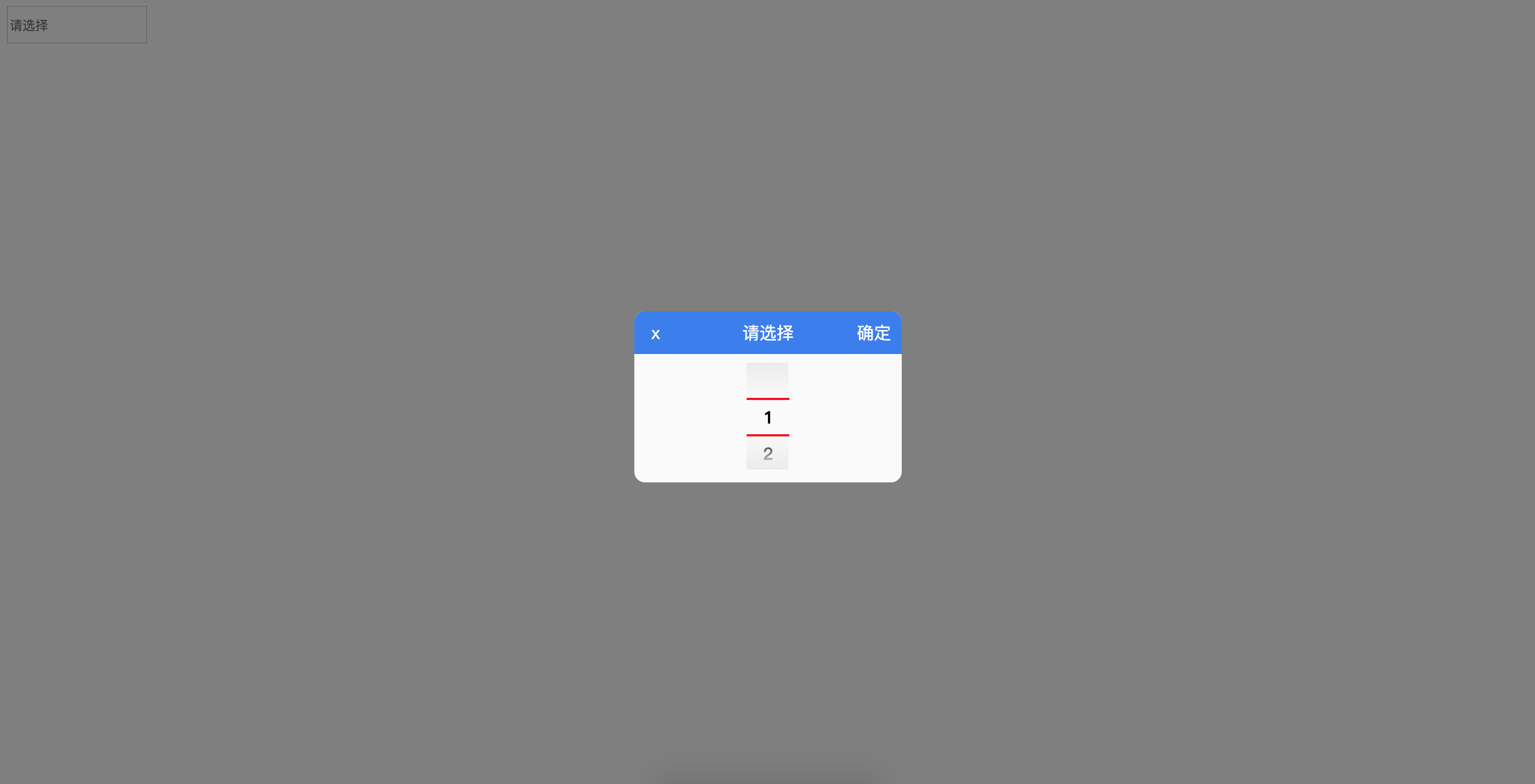
可以通过 https://littlehiuman.github.io/09-DatePicker/ 查看效果。
https://github.com/littleHiuman/littleHiuman.github.io 求点star~~~
代码如下:
css:
input {

  height: 30px;

  outline: none;

}

.fixed_bg {

  position: fixed;

  top:;

  left:;

  display: none;

  width: 100%;

  height: 100%;

  background: rgba(0, 0, 0, 0.5);

}

.fixed_bg .alert {

  position: fixed;

  top: 50%;

  left: 50%;

  overflow: hidden;

  width: 250px;

  height: 160px;

  margin-top: -75px;

  margin-left: -125px;

  border-radius: 10px;

  background: #fafafa;

}

.fixed_bg #curr {

  display: none;

}

.fixed_bg .alert_title {

  line-height: 40px;

  position: relative;

  width: 100%;

  height: 40px;

  text-align: center;

  color: #fff;

  background: #387bf0;

}

.fixed_bg .alert_sure,

.fixed_bg .alert_close {

  cursor: pointer;

  position: absolute;

}

.fixed_bg .alert_sure {

  right: 10px;

}

.fixed_bg .alert_close {

  left: 10px;

  width: 20px;

}

.fixed_bg .alert_con {

  position: relative;

  width: 100%;

  height: 120px;

}

.fixed_bg .alert_list_wrap {

  position: absolute;

  top: 8px;

  left: 50%;

  width: 40px;

  height: 100px;

  margin-left: -20px;

  overflow: hidden;

}

.fixed_bg .alert_list_curr_top,

.fixed_bg .alert_list_curr_bottom {

  position: absolute;

  width: 40px;

  height: 2px;

  background: red;

}

.fixed_bg .alert_list_curr_top {

  top: 33px;

}

.fixed_bg .alert_list_curr_bottom {

  top: 67px;

}

.fixed_bg .alert_list_msg_con {

  position: absolute;

  top: 34px;

  width: 100%;

}

.fixed_bg .alert_list_msg_con a {

  font-weight: bold;

  line-height: 34px;

  display: block;

  width: 100%;

  height: 34px;

  text-align: center;

  transition: top 2s;

}

.fixed_bg .alert_list_msg_descr {

  position: absolute;

  top:;

  left: -1px;

  width: 100%;

  height: 100%;

  background: -webkit-gradient(

    linear,

    0% 100%,

    0% 0%,

    from(rgb(235, 235, 235)),

    color-stop(0.35, rgba(235, 235, 235, 0)),

    color-stop(0.65, rgba(235, 235, 235, 0)),

    to(rgb(235, 235, 235))

  )

}
js:
var content = ''

var oInputGroup = document.getElementsByClassName('choose')

var fixed_bg = document.getElementsByClassName('fixed_bg')[0]

var alert_close = document.getElementsByClassName('alert_close')[0]

var alert_sure = document.getElementsByClassName('alert_sure')[0]

var alert_list_msg_con = document.getElementsByClassName('alert_list_msg_con')[0]

var spanCurr = document.getElementById('curr')

var eachHeight = +getComputedStyle(alert_list_msg_con.children[0], null).height.slice(0, -2)

setIndex()

for (var i = 0; i < oInputGroup.length; i++) {

  oInputGroup[i].onclick = function() {

    var _this = this

    fixed_bg.style.display = 'block'

    eventListen()

    alert_sure.onclick = function() {

      fixed_bg.style.display = 'none'

      setIndex()

      _this.value = content

    }

  }

}

alert_close.onclick = function() {

  fixed_bg.style.display = 'none'

}

function setIndex() {

  var conTop = getComputedStyle(alert_list_msg_con, null).top.slice(0, -2)

  var conIndex = -((conTop - eachHeight) / eachHeight)

  spanCurr.innerText = Math.round(conIndex)

}

function eventListen() {var sign = ''

  var sMoveStart = ''

  window.onmousedown = function(event) {

    event = event || window.event

    if (sign == 'mouseup' || sign == '') {

      sign = 'mousedown'

      sMoveStart = event.screenY

      window.onmousemove = function(event) {

        event = event || window.event

        if (sign == 'mousedown') {

          var currIndex = +spanCurr.innerText

          var currTop = -(currIndex * eachHeight) + eachHeight

          var sMoveLenth = event.screenY - sMoveStart

          var temp = currTop + sMoveLenth

          var resultIndex = Math.round(-((temp - eachHeight) / eachHeight))

          alert_list_msg_con.style.top = temp + 'px'

        }

      }

    }

    window.onmouseup = function() {

      if (sign == 'mousedown') {

        sign = 'mouseup'

        setIndex()

        var conIndex = spanCurr.innerText

        alert_list_msg_con.style.top = (-(conIndex * eachHeight) + eachHeight) + 'px'

        content = alert_list_msg_con.children[conIndex].innerText

      }

    }

  }

}
html:
<input class="choose" type="text" placeholder="请选择" />

<div class="fixed_bg">

  <div class="alert">

    <span id="curr"></span>

    <div class="alert_title">

      <span class="alert_close">x</span>

      <span>请选择</span>

      <span class="alert_sure">确定</span>

    </div>

    <div class="alert_con">

      <div class="alert_list_wrap">

        <div class="alert_list_msg_con">

          <a>1</a>

          <a>2</a>

          <a>3</a>

          <a>4</a>

          <a>5</a>

          <a>6</a>

          <a>7</a>

          <a>8</a>

        </div>

        <div class="alert_list_msg_descr"></div>

        <div class="alert_list_curr_top"></div>

        <div class="alert_list_curr_bottom"></div>

      </div>

    </div>

  </div>

</div>
picker鼠标上下拖动选择内容的更多相关文章
- JavaFX2: 鼠标拖动选择和Ctrl+Shift连续区间选择的ListView
JavaFX2的ListView中的多选没有提供鼠标拖动选择的功能,同时按下Ctrl和Shift后连续的区间选中也不支持,以下代码用于处理这两个问题,细节见代码注释: import com.sun.j ...
- JS清除选择内容的方法
本文实例讲述了JS清除选择内容的方法.分享给大家供大家参考.具体分析如下: 今天在做一个DIV拖动的效果,发现在拖动的时候会选中页面中的文本,于是找了一下JS清除选择的内容的相关信息. 在得到的结果中 ...
- [jquery]添加行内容后根据下拉菜单选择内容对比之前已有选项,若有重置再提示
今天页面上一个添加列内容时,要对选择内容与之前已有选项内容作对比,防止用户重复选择内容 页面HTML代码 <ul class="list-group xj-list-NObor xj- ...
- Qt QLineEdit 漂亮的搜索框 && 密码模式 && 格式化输入 && 提示文字 && 选择内容并移动 && 清除全部输入
先上一个漂亮的搜索框效果图, 输入搜索文本效果, 点击搜索图标效果: //实现代码 void MainWindow::iniLineEdit() { ui->lineEdit->setPl ...
- iview+vue 表格任一项实现鼠标划上显示内容
在新版本的iview中,表格新增了tooltip功能: 但做项目时并不是新的iview版本,又不想升级,如何才能实现当内容过多鼠标划上显示内容?下边是我做项目时的改动: { // fixed: 'le ...
- 简单的鼠标可拖动div 兼容IE/FF
来源:http://www.cnblogs.com/imwtr/p/4355416.html 作者: 主要思路: 一个div,注册监听onmousedown事件,然后处理获取的对象及其相关值(对象高度 ...
- bootstrap tab切换如何让鼠标移动自动切换内容
bootstrap集成了很多功能,比如nav-tabs组件,可以将相似的内容集中在一个区块中展示.bootstrap tab切换默认是要点击才会切换的,如何实现鼠标移动就自动切换呢?如下图所示,光标移 ...
- td文字过长部分显示,鼠标移动显示全部内容
只要在该td中加上title属性,鼠标移到这里就会看到全部内容, 在td中加上div,属性设置如下,就能显示宽度为200px的内容,大于则隐藏.代码如下: <td title="我是代 ...
- 网页中使用CSS和JS阻止用户选择内容
CSS实现 body{ -webkit-user-select:none; -moz-user-select:none; -ms-user-select:none; user-select:none; ...
随机推荐
- php解析二维码
第一种方法: 安装PHP扩展 php-zbarcode之前需要先安装ImageMagick.zbar 第二种方法: 不需要那么麻烦,直接使用PHP的第三方类库 下载地址:https://github. ...
- Week1 Team Homework #1 from Z.XML-总结学长经验教训
谭传奇学长: 我们的弯路可能是,一开始没有从最基础的部分开始迭代开发,一开始就想的太远了一些,每一步开的有点太大了,所以可能有些东西最后就连不上,也没有能够按时完成.如果可以先做出一个能用的版本,然后 ...
- io学习-相关文章
文章:IO编程 地址:https://www.liaoxuefeng.com/wiki/0014316089557264a6b348958f449949df42a6d3a2e542c000/00143 ...
- npm基本使用
常见的使用场景有以下几种: 允许用户从NPM服务器下载别人编写的第三方包到本地使用. 允许用户从NPM服务器下载并安装别人编写的命令行程序到本地使用. 允许用户将自己编写的包或命令行程序上传到NPM服 ...
- 【bzoj4817】[Sdoi2017]树点涂色 LCT+LCA+线段树
题目描述 给出一棵n个点,以1为根的有根树,每个点初始染有互不相同的颜色.定义一条路径的权值为路径上的颜色种类数.现有m次操作,每次操作为以下三种之一: 1 x: 把点x到根节点的路径上所有的点染上一 ...
- javascript中window.location.search方法简介
window.location.search方法是截取当前url中"?"后面的字符串,示例如下: 例如:http://www.firefoxchina.cn/?ntab截取后的字符 ...
- 【题解】CQOI2017老C的方块
网络流真的是一种神奇的算法.在一张图上面求感觉高度自动化的方案一般而言好像都是网络流的主阵地.讲真一开始看到这道题也有点懵,题面很长,感觉很难的样子.不过,仔细阅读了题意之后明白了:我们所要做的就是要 ...
- 【题解】SDOI2010地精部落
强!强!强!强!劲啊劲啊劲啊!!!洛谷P2467 非常重要的,就在于发现以下的两条性质: 1.当i与i+1不相邻时,方案数是一样的:交换这两个数,<i+1的必然<i,>i+1的必然& ...
- C&C++——extern
1.C 调用C++的函数或变量 C 调用C++的函数或变量,在C++的头文件声明为extern "C" ,C调用的时候只使用extern 声明. 可见,extern "C ...
- 运用yunwei.zip压缩包安装过程:
12 yum install lrzsz -y 13 rz 14 ll 15 unzip -o yunwei.zip 16 unzip yunwei.zip ...