
JAVA Properties配置文件的读写
通常我们就会看到一个配置文件,比如:jdbc.properties,它是以“.properties”格式结尾的。在java中,这种文件的内容以键值对<key,value>存储,通常以“=”分隔key和value,当然也可以用":"来分隔,但通常不这么干。
- 读取配置文件
这里有一个文件叫asfds.properties,里面简单的存了两个键值对,如下图所示:

读取配置文件的基本步骤是:
- 实例化一个Properties对象;
- 将要读取的文件放入数据流中;
- 调用Properties对象的load方法,将属性文件的键值对加载到Properties类对象中;
- 调用Properties对象的getProperty(String key)读入对应key的value值。
注:如果想要读取key值,可以调用Properties对象的stringPropertyNames()方法获取一个set集合,然后遍历set集合即可。
读取配置文件的方法:
     /**

      * read properties file

      * @param paramFile file path

      * @throws Exception

      */

     public static void inputFile(String paramFile) throws Exception

     {

         Properties props=new Properties();//使用Properties类来加载属性文件

         FileInputStream iFile = new FileInputStream(paramFile);

         props.load(iFile);

         /**begin*******直接遍历文件key值获取*******begin*/

         Iterator<String> iterator = props.stringPropertyNames().iterator();

         while (iterator.hasNext()){

             String key = iterator.next();

             System.out.println(key+":"+props.getProperty(key));

         }

         /**end*******直接遍历文件key值获取*******end*/

         /**begin*******在知道Key值的情况下,直接getProperty即可获取*******begin*/

         String user=props.getProperty("user");

         String pass=props.getProperty("pass");

         System.out.println("\n"+user+"\n"+pass);

         /**end*******在知道Key值的情况下,直接getProperty即可获取*******end*/

         iFile.close();

     }
- 写入配置文件
写入配置文件的基本步骤是:
- 实例化一个Properties对象;
- 获取一个文件输出流对象(FileOutputStream);
- 调用Properties对象的setProperty(String key,String value)方法设置要存入的键值对放入文件输出流中;
- 调用Properties对象的store(OutputStream out,String comments)方法保存,comments参数是注释;
写入配置文件的方法:
 /**

      *write properties file

      * @param paramFile file path

      * @throws IOException

      */

     private static void outputFile(String paramFile) throws IOException {

         ///保存属性到b.properties文件

         Properties props=new Properties();

         FileOutputStream oFile = new FileOutputStream(paramFile, true);//true表示追加打开

         props.setProperty("testKey", "value");

         //store(OutputStream,comments):store(输出流,注释)  注释可以通过“\n”来换行

         props.store(oFile, "The New properties file Annotations"+"\n"+"Test For Save!");

         oFile.close();

     }
- 测试输出
文件读取:
  @Test

    public void testInputFile(){//read properties file

        try {

            inputFile("resources/asfds.properties");

        } catch (Exception e) {

            e.printStackTrace();

        }

    }
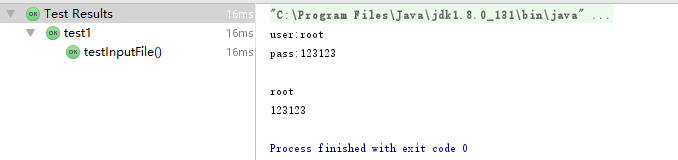
输出:
文件写入:
    @Test

    public void testOutputFile(){//write properties file

        try {

            outputFile("resources/test.properties");

        } catch (Exception e) {

            e.printStackTrace();

        }

    }
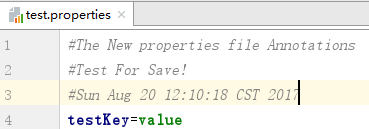
写入的文件:
JAVA Properties配置文件的读写的更多相关文章
- JSP+Java+properties+FileInputStream文件读写,JSP页面读取properties文件
String realPath = request.getRealPath("WEB-INF/classes/com/properties/devicetype.properties&quo ...
- Java properties配置文件工具类
/* * Copyright (c) 2017. Panteng.Co.Ltd All rights reserved */ import org.apache.log4j.Logger; impor ...
- Java properties配置文件
Java中的配置文件常为properties文件,格式为文本文件,文件内容的格式是“键=值”格式.注释信息使用“#”来注释. Properties类的常用方法 String getProperty(S ...
- java 顺序 读写 Properties 配置文件
java 顺序 读写 Properties 配置文件 支持中文 不乱码 java 顺序 读写 Properties 配置文件 ,java默认提供的Properties API 继承hashmap ,不 ...
- 【转】Java 读写Properties配置文件
[转]Java 读写Properties配置文件 1.Properties类与Properties配置文件 Properties类继承自Hashtable类并且实现了Map接口,也是使用一种键值对的形 ...
- Java 读写Properties配置文件
Java 读写Properties配置文件 JAVA操作properties文件 1.Properties类与Properties配置文件 Properties类继承自Hashtable类并且实现了M ...
- java 顺序 读写 Properties 配置文件 支持中文 不乱码
java 顺序 读写 Properties 配置文件 ,java默认提供的Properties API 继承hashmap ,不是顺序读写的. 特从网上查资料,顺序读写的代码,如下, import j ...
- (转)Java 读写Properties配置文件
原文:http://www.cnblogs.com/xudong-bupt/p/3758136.html 1.Properties类与Properties配置文件 Properties类继承自Hash ...
- java读写properties配置文件方法
1.Properties类 Properties类表示了一个持久的属性集.Properties可保存在流中或从流中加载,属性列表中的key和value必须是字符串. 虽然Properties类继承了j ...
随机推荐
- EasyNVR智能云终端硬件使用说明(EasyNVR无插件直播服务硬件的具体使用方法)
问题背景 随着EasyNVR硬件版本(EasyNVR硬件云终端)的发布不少客户选择了EasyNVR云终端作为产品选择,在客户收到EasyNVR云终端的时候肯定都有一个疑问,那就是如何使用手头上的这个小 ...
- 注册Asp4.0到iis
- SharePoint服务器端对象模型 之 访问文件和文件夹(Part 2)
4.添加文件夹 文件夹的创建方法在文档库和普通列表中稍有不同. 在文档库中,与一般的集合操作相同,直接使用SPFolderCollection的Add(string name)方法即可添加文件夹,例如 ...
- Anker—工作学习笔记
1.前言 最近在项目中用nginx做反向代理,需要动态生成nginx的配置.大概流程是用户在页面上新增域名.http或https协议以及端口信息,后台会根据域名自动生成一个nginx的server配置 ...
- width: 50%; display:inline-flex;
<style lang="less"> @import "../style/weui.wxss"; @wx-width: 750rpx; @wx ...
- this.$apply()
chooseVideo(e) { this.fileInfo = {} let that = this wx.chooseVideo({ sourceType: ['album', 'camera'] ...
- Python Selenium 自动化测试
本文转载 作者:灰蓝蓝蓝蓝蓝蓝链接:http://www.jianshu.com/p/5188cb3ab790來源:简书著作权归作者所有.商业转载请联系作者获得授权,非商业转载请注明出处.更多技术博客 ...
- python面试题(六)
1 异常处理写法以及如何主动跑出异常(应用场景) try: """执行语句""" except: #异常类型 ""&qu ...
- grep和正则表达式参数
一:grep参数 1,-n :显示行号 2,-o :只显示匹配的内容 3,-q :静默模式,没有任何输出,得用$?来判断执行成功没有,即有没有过滤到想要的内容 4,-l :如果匹配成功,则只将 ...
- 什么是 XML Schema(转)
什么是 XML Schema? XML Schema 的作用是定义 XML 文档的合法构建模块,类似 DTD. XML Schema 的作用: 定义可出现在文档中的元素 定义可出现在文档中的属性 定义 ...