
JAVA Properties配置文件的读写
通常我们就会看到一个配置文件,比如:jdbc.properties,它是以“.properties”格式结尾的。在java中,这种文件的内容以键值对<key,value>存储,通常以“=”分隔key和value,当然也可以用":"来分隔,但通常不这么干。
- 读取配置文件
这里有一个文件叫asfds.properties,里面简单的存了两个键值对,如下图所示:

读取配置文件的基本步骤是:
- 实例化一个Properties对象;
- 将要读取的文件放入数据流中;
- 调用Properties对象的load方法,将属性文件的键值对加载到Properties类对象中;
- 调用Properties对象的getProperty(String key)读入对应key的value值。
注:如果想要读取key值,可以调用Properties对象的stringPropertyNames()方法获取一个set集合,然后遍历set集合即可。
读取配置文件的方法:
     /**

      * read properties file

      * @param paramFile file path

      * @throws Exception

      */

     public static void inputFile(String paramFile) throws Exception

     {

         Properties props=new Properties();//使用Properties类来加载属性文件

         FileInputStream iFile = new FileInputStream(paramFile);

         props.load(iFile);

         /**begin*******直接遍历文件key值获取*******begin*/

         Iterator<String> iterator = props.stringPropertyNames().iterator();

         while (iterator.hasNext()){

             String key = iterator.next();

             System.out.println(key+":"+props.getProperty(key));

         }

         /**end*******直接遍历文件key值获取*******end*/

         /**begin*******在知道Key值的情况下,直接getProperty即可获取*******begin*/

         String user=props.getProperty("user");

         String pass=props.getProperty("pass");

         System.out.println("\n"+user+"\n"+pass);

         /**end*******在知道Key值的情况下,直接getProperty即可获取*******end*/

         iFile.close();

     }
- 写入配置文件
写入配置文件的基本步骤是:
- 实例化一个Properties对象;
- 获取一个文件输出流对象(FileOutputStream);
- 调用Properties对象的setProperty(String key,String value)方法设置要存入的键值对放入文件输出流中;
- 调用Properties对象的store(OutputStream out,String comments)方法保存,comments参数是注释;
写入配置文件的方法:
 /**

      *write properties file

      * @param paramFile file path

      * @throws IOException

      */

     private static void outputFile(String paramFile) throws IOException {

         ///保存属性到b.properties文件

         Properties props=new Properties();

         FileOutputStream oFile = new FileOutputStream(paramFile, true);//true表示追加打开

         props.setProperty("testKey", "value");

         //store(OutputStream,comments):store(输出流,注释)  注释可以通过“\n”来换行

         props.store(oFile, "The New properties file Annotations"+"\n"+"Test For Save!");

         oFile.close();

     }
- 测试输出
文件读取:
  @Test

    public void testInputFile(){//read properties file

        try {

            inputFile("resources/asfds.properties");

        } catch (Exception e) {

            e.printStackTrace();

        }

    }
输出:
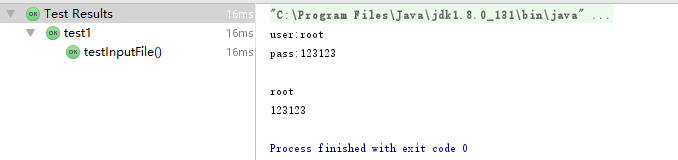
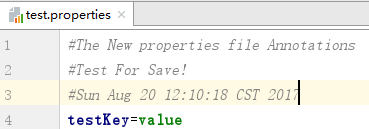
文件写入:
    @Test

    public void testOutputFile(){//write properties file

        try {

            outputFile("resources/test.properties");

        } catch (Exception e) {

            e.printStackTrace();

        }

    }
写入的文件:
JAVA Properties配置文件的读写的更多相关文章
- JSP+Java+properties+FileInputStream文件读写,JSP页面读取properties文件
String realPath = request.getRealPath("WEB-INF/classes/com/properties/devicetype.properties&quo ...
- Java properties配置文件工具类
/* * Copyright (c) 2017. Panteng.Co.Ltd All rights reserved */ import org.apache.log4j.Logger; impor ...
- Java properties配置文件
Java中的配置文件常为properties文件,格式为文本文件,文件内容的格式是“键=值”格式.注释信息使用“#”来注释. Properties类的常用方法 String getProperty(S ...
- java 顺序 读写 Properties 配置文件
java 顺序 读写 Properties 配置文件 支持中文 不乱码 java 顺序 读写 Properties 配置文件 ,java默认提供的Properties API 继承hashmap ,不 ...
- 【转】Java 读写Properties配置文件
[转]Java 读写Properties配置文件 1.Properties类与Properties配置文件 Properties类继承自Hashtable类并且实现了Map接口,也是使用一种键值对的形 ...
- Java 读写Properties配置文件
Java 读写Properties配置文件 JAVA操作properties文件 1.Properties类与Properties配置文件 Properties类继承自Hashtable类并且实现了M ...
- java 顺序 读写 Properties 配置文件 支持中文 不乱码
java 顺序 读写 Properties 配置文件 ,java默认提供的Properties API 继承hashmap ,不是顺序读写的. 特从网上查资料,顺序读写的代码,如下, import j ...
- (转)Java 读写Properties配置文件
原文:http://www.cnblogs.com/xudong-bupt/p/3758136.html 1.Properties类与Properties配置文件 Properties类继承自Hash ...
- java读写properties配置文件方法
1.Properties类 Properties类表示了一个持久的属性集.Properties可保存在流中或从流中加载,属性列表中的key和value必须是字符串. 虽然Properties类继承了j ...
随机推荐
- mysql导出csv文件
SELECT * FROM (select 'id','url','大分类','分类','贴吧名称','关注用户数','帖子数量','简介','帖子名称','楼主ID','发表时间','采集时间',' ...
- AtCoder Express(数学+二分)
D - AtCoder Express Time limit : 2sec / Memory limit : 256MB Score : 400 points Problem Statement In ...
- CSS3随意记录
1.注释 注释语法:/* 注解注释内容 */ 2.带有透明度 rgba(255,0,0,0.5);rgba(0,255,0,0.5);rgba(0,0,255,0.5); 0.5就带有透明的,介于0和 ...
- TFS二次开发-基线文件管理器(4)-标签的创建
上一节已经完成了源码文件的读取,如果要将已经选择的文件保存为一个标签(Lable).在VS我们只能对一个目录做标签,非常的不方便.如果用下面的方法,将选择的文件路径保存为一个List在打标签,就非常的 ...
- jQuery-PHP跨域请求数据
jQuery: //获取域名 function getDomain(url){ var a = document.createElement('a'); a.href = url; url=a.hos ...
- MySQL 二进制日志的结构
MySQL5.0引入了一个新的binlog格式,也就是binlog format 4,,binlog format 4是专门为扩展设计的.binlog事件由4部分组成 1 通用头 包含事件的基本信息, ...
- shutil 模块 高级的文件、文件夹、压缩包 处理模块
高级的文件.文件夹.压缩包 处理模块 # 将文件内容拷贝到另一个文件中 shutil.copyfileobj(fsrc, fdst[, length]) import shutil shutil.co ...
- [转] CentOS---网络配置详解
原文地址: http://blog.chinaunix.net/uid-26495963-id-3230810.html 一.配置文件详解在RHEL或者CentOS等Redhat系的Linux系统里, ...
- python read文件的r和rb的区别
r,rb,w,wb 那么在读写文件时,有无b标识的的主要区别在哪里呢? 1.文件使用方式标识 'r':默认值,表示从文件读取数据. 'w':表示要向文件写入数据,并截断以前的内容 'a':表示要向文件 ...
- Django序列化
一.Django序列化 1.序列化应用场景 1.关于Django中的序列化主要应用在将数据库中检索的数据返回给客户端用户,由于httpresponse只能返回字符串或者是字节,而从数据库 ...