1.功能简介
在一个项目中,是通过小组成员共同开发的,难以避免的是当项目功能集成的时候会出现很多兼容性问题,开发讲究高内聚低耦合,利用Command、Tool和Control的使用,可以提升集成的效率,PIE SDK包含大量的已经封装好的Command和Tool,调用简单易于实现,调试方便。
什么时候会用到Command?Command,命令,功能不需要鼠标和地图进行交互,例如全图显示,点击按钮地图接收到命令会自动全图显示;而Tool(工具)则相反,需要鼠标和地图进行交互,例如地图的漫游功能,拉框放大功能等,需要鼠标在地图上操作才会做出反应。
Control是包含了控件的Command,比如比例尺控制按钮、图像透明度控制按钮,通过操作Control中的控件即可实现地图的操作。
下面具体介绍组件式开发中如何调用PIE SDK的Command和Tool,以及Control的拓展应用。
2.功能实现说明
2.1. 实现思路及原理说明
|
Command的调用
|
|
第一步
|
New一个Command对象
|
|
第二步
|
绑定地图,传递地图控件对象(创建插件对象OnCreate)
|
|
第三步
|
调用OnClick方法
|
|
Tool的调用
|
|
第一步
|
New一个Tool对象
|
|
第二步
|
绑定地图,传递地图控件对象,(需将Tool对象转化成ICommand,调用OnCreate方法)
|
|
第三步
|
设置地图当前的Tool为new的新的Tool
|
|
Command的拓展
|
|
第一步
|
新建一个Command的类,继承PIE.Control.BaseCommand
|
|
第二步
|
重写OnCreate(),OnClick()方法
|
|
第三步
|
调用:根据上面的Command调用方法进行调用
|
|
Tool的拓展
|
|
第一步
|
新建Tool的类,继承PIE.Controls.BaseTool
|
|
第二步
|
根据需求可以重写MouseDown,MouseMove,MoudeUp等鼠标事件
|
|
第三步
|
调用:根据表格上面的Tool的调用方式进行调用
|
|
Control的拓展
|
|
第一步
|
新建一个Control的类,并继承PIE.Controls.BaseCommandControl
|
|
第二步
|
根据需求重写Control对象,绑定地图控件对象OnCreate,Enabled属性等
|
|
第三步
|
调用:根据Control新建的控件类型A在界面上也设计一个相同的控件B,在调用的时候将B于A进行关联即可
|
2.2. 核心接口与方法
|
接口/类
|
方法/属性
|
说明
|
|
PIE.SystemUI.ICommand
|
OnClick
|
点击事件
|
|
OnCreate
|
创建插件对象
|
|
PIE. lContros
|
FullExtentCommand
|
全图显示命令
|
|
PanTool
|
漫游工具
|
|
PIE.Controls. BaseCommand
|
OnCreate
|
创建插件对象
|
|
OnClick
|
点击事件
|
|
PIE.Controls. BaseTool
|
OnMouseDown
|
鼠标按下事件
|
|
OnMouseMove
|
鼠标移动事件
|
|
OnMouseUp等
|
鼠标弹起事件
|
|
PIE.Controls. BaseCommandControl
|
Control
|
Control对象
|
2.3. 示例代码
|
项目路径
|
百度云盘地址下/PIE示例程序/ 06.Command、Tool、Control的调用和扩展
|
|
数据路径
|
百度云盘地址下/PIE示例数据/栅格数据/04.World/World.tif
|
|
视频路径
|
百度云盘地址下/PIE视频教程/06.Command、Tool、Control的调用和扩展.avi
|
|
示例代码
|
 FormMain.cs:

 /// <summary>

 /// Command调用——全图显示为例

 /// </summary>

 /// <param name="sender"></param>

 /// <param name="e"></param>

 private void btn_Command_Click(object sender, EventArgs e)

 {

     PIE.SystemUI.ICommand cmd = new PIE.Controls.FullExtentCommand();

     cmd.OnCreate(mapControlMain);

     cmd.OnClick();

 }

 /// <summary>

 /// Tool调用——以漫游为例

 /// </summary>

 /// <param name="sender"></param>

 /// <param name="e"></param>

 private void btn_Tool_Click(object sender, EventArgs e)

 {

     PIE.SystemUI.ITool tool = new PIE.Controls.PanTool();

     (tool as ICommand).OnCreate(mapControlMain);

     mapControlMain.CurrentTool = tool;

 }

 /// <summary>

 /// Command调用自定义拓展(如何自己写Command,一加载数据为例)

 /// </summary>

 /// <param name="sender"></param>

 /// <param name="e"></param>

 private void btn_CommandEx_Click(object sender, EventArgs e)

 {

     PIE.SystemUI.ICommand cmd = new Oper.AddDataCommand();

     cmd.OnCreate(mapControlMain);

     cmd.OnClick();

 }

 /// <summary>

 /// Tool调用自定义拓展(如何自己写Tool——以绘制面元素为例)

 /// </summary>

 /// <param name="sender"></param>

 /// <param name="e"></param>

 private void btn_ToolEx_Click(object sender, EventArgs e)

 {

     PIE.SystemUI.ITool tool = new Oper.DrawElementTool(mapControlMain);

     (tool as ICommand).OnCreate(mapControlMain);

     mapControlMain.CurrentTool = tool;

 }

 /// <summary>

 /// Control的拓展(以比例尺Control为例)

 /// </summary>

 /// <param name="sender"></param>

 /// <param name="e"></param>

 private void tbn_ControlEx_Click(object sender, EventArgs e)

 {

     Oper.MapScaleCommandControl mapScaleComtrol= new Oper.MapScaleCommandControl();

 mapScaleComtrol.Control = this.combox_MapScale;//将界面的比例尺控件与mapScaleControl绑定

     mapScaleComtrol.OnCreate(mapControlMain);

 }

 拓展类:

  using PIE.Carto;

 using PIE.Controls;

 using System;

 using System.Collections.Generic;

 using System.Linq;

 using System.Text;

 using System.Windows.Forms;

 namespace CommandAndToolDemo.Oper

 {

 class AddDataCommand : BaseCommand

 {

 /// <summary>

 /// 构造函数

 /// </summary>

 public AddDataCommand()

 {

     this.Caption = "加载数据";

     this.ToolTip = "加载数据";

     this.Checked = true;

     this.Enabled = false;

     // this.Image = "";

     this.Name = "加载数据";

 }

 /// <summary>

 /// 创建插件对象

 /// </summary>

 /// <param name="hook"></param>

 public override void OnCreate(object hook)

 {

     if (hook == null) return;

     if (!(hook is PIE.Carto.IPmdContents)) return;

     this.Enabled = true;

     m_Hook = hook;

     m_HookHelper.Hook = hook;

 }

 /// <summary>

 /// 点击事件

 /// </summary>

 public override void OnClick()

 {

     OpenFileDialog openDialog = new OpenFileDialog();

     openDialog.Title = "加载数据";

 openDialog.Filter = "Raster File|*.img;*.tif;*.dat;*.tiff|Shape File|*.shp|所有文件|*.*";

     if (openDialog.ShowDialog() != DialogResult.OK) return;

     ILayer layer = LayerFactory.CreateDefaultLayer(openDialog.FileName);

     if (layer == null) return;

     m_HookHelper.ActiveView.FocusMap.AddLayer(layer);

     m_HookHelper.ActiveView.PartialRefresh(ViewDrawPhaseType.ViewAll);

 }

 }

 }

 using PIE.AxControls;

 using PIE.Carto;

 using PIE.Display;

 using PIE.Geometry;

 using System;

 using System.Collections.Generic;

 using System.Linq;

 using System.Text;

 using System.Windows.Forms;

 namespace CommandAndToolDemo.Oper

 {

 class DrawElementTool : PIE.Controls.BaseTool

 {

 #region 成员变量

 /// <summary>

 /// 面元素

 /// </summary>

 ///

 IPolygonElement m_PolygonEle = null;

 /// <summary>

 /// MapControl对象

 /// </summary>

 IMapControl m_MapControl = null;

 #endregion

 /// <summary>

 ///构造函数

 /// </summary>

 /// <param name="mapControl"></param>

 public DrawElementTool(IMapControl mapControl)

 {

     // this.Cursor = "";//鼠标样式

     m_MapControl = mapControl;

 }

 /// <summary>

 /// 鼠标点击事件

 /// </summary>

 /// <param name="sender"></param>

 /// <param name="e"></param>

 public override void OnMouseDown(object sender, System.Windows.Forms.MouseEventArgs e)

 {

     if (e.Button == MouseButtons.Left)//左键

     {

         if (m_MapControl == null) return;

         m_PolygonEle = new PolygonElement();

         IPolygon polygon = m_MapControl.TrackPolygon();

         m_PolygonEle.Symbol = SystemSymbolSetting.Instance.DefaultFillSymbol;

         m_PolygonEle.Geometry = polygon as IGeometry;

         m_HookHelper.ActiveView.GraphicsContainer.AddElement(m_PolygonEle);

         m_HookHelper.ActiveView.PartialRefresh(ViewDrawPhaseType.ViewAll);

     }

 }

 }

 }

 using System;

 using System.Collections.Generic;

 using System.Linq;

 using System.Text;

 namespace CommandAndToolDemo.Oper

 {

 class MapScaleCommandControl : PIE.Controls.BaseCommandControl

 {

 #region 成员变量

 /// <summary>

 /// ToolStripComboBox

 /// </summary>

 private System.Windows.Forms.ToolStripComboBox m_ToolStripComboxItem = null;

 #endregion

 /// <summary>

 /// 构造函数

 /// </summary>

 public MapScaleCommandControl()

 {

     this.Caption = "";

     this.Name = "";

     this.Checked = false;

     this.Enabled = false;

 }

 /// <summary>

 /// Control

 /// </summary>

 public override object Control

 {

     get

     {

         return m_ToolStripComboxItem;

     }

     set

     {

         m_ToolStripComboxItem = value as System.Windows.Forms.ToolStripComboBox;

     }

 }

 /// <summary>

 /// 是否可用

 /// </summary>

 public override bool Enabled

 {

     get

     {

  if (m_Hook == null || m_HookHelper.ActiveView.FocusMap.LayerCount < ) return false;

         return true;

     }

     protected set

     {

         base.Enabled = value;

     }

 }

 /// <summary>

 /// 创建插件对象

 /// </summary>

 /// <param name="hook"></param>

 public override void OnCreate(object hook)

 {

     if (hook == null) return;

     if (!(hook is PIE.Carto.IPmdContents)) return;

     this.Enabled = true;

     m_Hook = hook;

     m_HookHelper.Hook = hook;

     if (m_ToolStripComboxItem == null) return;

     System.Windows.Forms.ToolStripComboBox comboxItem=this.m_ToolStripComboxItem as System.Windows.Forms.ToolStripComboBox;

     if (comboxItem==null)return;

         comboxItem.Items.Add("1:500");

         comboxItem.Items.Add("1:1000");

         comboxItem.Items.Add("1:5000");

         comboxItem.Items.Add("1:10000");

         comboxItem.Items.Add("1:50000");

         comboxItem.Items.Add("1:100000");

         comboxItem.Items.Add("1:500000");

         comboxItem.Items.Add("1:1000000");

     comboxItem.TextChanged-=comboxItem_TextChanged;

     comboxItem.TextChanged+=comboxItem_TextChanged;

 }

 /// <summary>

 /// 比例尺文本变化事件

 /// </summary>

 /// <param name="sender"></param>

 /// <param name="e"></param>

 void comboxItem_TextChanged(object sender, EventArgs e)

 {

     //获取选中的比例尺

     string strScale = m_ToolStripComboxItem.Text.ToString();

     int count = strScale.Length;

     if (count < ) return;

     string str = strScale.Substring(,count-);

     double scale = Convert.ToDouble(str);

     if (scale < ) return;

     //改变地图的比例尺并更新

     m_HookHelper.ActiveView.DisplayTransformation.MapScale = scale;

     m_HookHelper.ActiveView.PartialRefresh(PIE.Carto.ViewDrawPhaseType.ViewAll);

 }

 /// <summary>

 /// 点击事件

 /// </summary>

 public override void OnClick()

 {

     base.OnClick();

 }

 }

 }
|
2.4. 示例截图
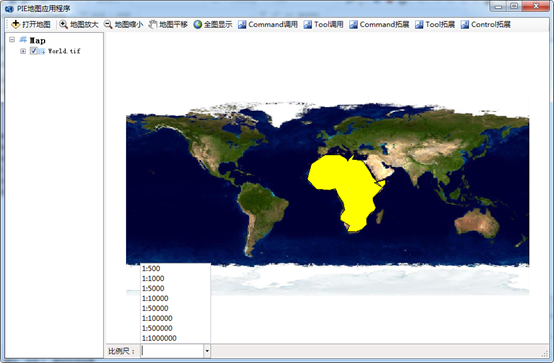
注:上图显示了Command拓展(以加载数据为例),Tool拓展(以绘制面元素为例),Control拓展(以比例尺为例)的应用
- PIE SDK Command&&Tool工具命令一览表
PIE SDK Command&&Tool工具命令一览表 编号 模板 名称(中文) Command&Tool 程序集 备注 1 数据管理 加载栅格数据 PIE.Controls ...
- PIE SDK 文章目录索引
1.PIE SDK介绍 1.1. PIE软件介绍 1.2. PIE SDK介绍 1.3. PIE支持项目介绍 1.4. PIE.NET-SDK插件式二次开发介绍 1.5. PIE.NET-S ...
- PIE SDK组件式开发综合运用示例
1. 功能概述 关于PIE SDK的功能开发,在我们的博客上已经分门别类的进行了展示,点击PIESat博客就可以访问,为了初学者入门,本章节将对从PIE SDK组件式二次开发如何搭建界面.如何综合开发 ...
- PIE SDK算法的同步调用
1. 算法功能简介 同步调用一旦开始,调用者必须等到方法调用返回后,才能继续后续的行为. PIE SDK支持算法功能的执行,下面对算法的同步调用功能进行介绍. 2. 算法功能实现说明 2. ...
- PIE SDK算法的异步调用
1.算法功能简介 异步方法一旦开始,方法调用就会立即返回,调用者就可以继续后续的操作.异步方法通常会在另外一个线程中,“真实”地执行着.整个过程,不会阻碍调用者的工作. PIE SDK支持算法功能的执 ...
- PIE SDK地图范围设置
1.功能简介 地图范围设置主要就是对图层的地图浏览控制,例如地图的放大.缩小.漫游.全图显示.1:1视图.比例尺等功能,能更好的与地图有一个互动的地图浏览体验.PIE SDK对地图范围设置主要利用IC ...
- PIE SDK与OpenCV结合说明文档
1.功能简介 OpenCV是基于BSD许可(开源)发行的跨平台计算机视觉库,可以运行在Linux.Windows.Android和Mac OS操作系统上.它轻量级而且高效——由一系列 C 函数和少量 ...
- PIE SDK专题制图打开模板
1. 功能简介 在PIE SDK中,所有的制图元素.视图范围以及排版等都可以保存成一个模板,以供多次重复使用.使用时只需要打开该模板,加载相应数据,就可以直接出图了,省去了重复制作图幅的麻烦,方 ...
- PIE SDK专题制图保存模板
1. 功能简介 在PIE SDK中,所有的制图元素.视图范围以及排版等都可以保存成一个模板,以供多次重复使用.使用模板时只需要打开该模板,加载相应数据,就可以直接出图,省去了重复制作图幅的麻烦, ...
随机推荐
- 数据结构 Merge合并排序
using System; using System.Collections.Generic; using System.Linq; using System.Text; using System.T ...
- OVS的初始配置
1.去掉bridge模块,为下面用OVS的模块奠定基础 rmmod bridge .insmod datapath/linux/openvswitch_mod.ko .insmod datapath/ ...
- js实现选项卡切换
<!DOCTYPE html><html><head lang="en"> <meta charset="UTF-8" ...
- servlet-向页面输出中文出现乱码处理方式
package cn.lijun .content; import java.io.IOException;import java.io.PrintWriter; import javax.servl ...
- JAVA WEB第0课
在这学期内要掌握JAVA WAB高级网站开发的所有知识,并可以实际运用到.每周将花费20小时左右的时间来学习此门课程,每一天,在当天其他课程任务完成后将开始学习该课程,具体时间要看当天 ...
- P1001
原创 问题描述: 当两个比较大的整数相乘时,可能会出现数据溢出的情形.为避免溢出,可以采用字符串的方法来实现两个大数之间的乘法. 具体来说,首先以字符串的形式输入两个整数,每个整数的长度不会超过8位, ...
- svm的第一个实例
用的数据集是uci机器学习库的数据 ‘iris.data’ from sklearn import svm import csv from sklearn.model_selection import ...
- 基于任务的异步编程模式(TAP)
异步编程是C#5.0的一个重要改进,提供两个关键字:async和await.使用异步编程,方法的调用是在后台运行(通常在线程或任务的帮助下),但不会阻塞调用线程.异步模式分为3种:异步模式.基于事件的 ...
- p2p_server
以太坊系列之十九 对p2p模块server的理解 type transport interface { // The two handshakes. doEncHandshake(prv *ecdsa ...
- C# 密封(2)
上一章节说到 sealed 作用于类,那么sealed 作用到方法和成员上面该如何呢. 在C# 中 Sealed作用于方法必须是重写之后的方法.也就是override+sealed.在之后别的类在继 ...
