
数据库——MySQL——单表查询
单表查询语法:
SELECT 字段1,字段2... FROM 表名

                  WHERE 条件

                  GROUP BY field

                  HAVING 筛选

                  ORDER BY field

                  LIMIT 限制条数
关键字的执行顺序:
这个是非常重要的,不了解以后会有很多坑。
1.form        找到表:from

2.where        拿着where指定的约束条件,去文件/表中取出一条条记录

3.group by    将取出的一条条记录进行分组group by,如果没有group by,则整体作为一组

4.having        将分组的结果进行having过滤

5.select        执行select

6.distinct        去重

7.order by     将结果按条件排序:order by

8.limit        限制结果的显示条数
准备数据源
建立一个名为student的学生表,下面是他们的字段名及字段类型表。

create table student(

id int not null unique auto_increment,

name varchar(20) not null,

sex enum('male','female') not null default 'male',

age int(3) unsigned not null default 28,

birthday date not null,

class_id int

);
建表代码
效果图:

insert into student(name,sex,age,birthday,class_id) values

('成龙','male',48,'',1),

('歪歪','female',48,'',2),

('丫丫','female',38,'',2),

('丁丁','female',18,'',2),

('星星','female',18,'',2),

('格格','female',28,'',2),

('张野','male',28,'',3),

('程咬金','male',18,'',3),

('程咬银','female',18,'',3),

('程咬铜','male',18,'',3),

('程咬铁','female',18,'',3);
数据代码
效果图:
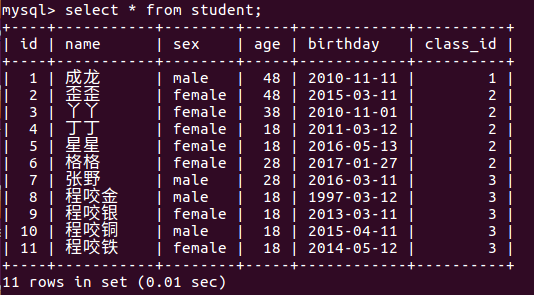
普通查询
# 简单查询

select * from student;    # 查询表中所有记录

select name, age from student;    # 查询表中的name和age字段

# 去重查询

select distinct age from student;    # 去重查询表中所有人的年龄

# 查询加四则运算

select name, age-1 from student;    # 这样查询出来的为两个字段,字段名分别为name和age-1,age-1字段中值为原始年龄-1

select name, age-1 as 年龄减一 from student;    # 查询同上,默认的age-1字段名改成了年龄减一。

# 定义显示格式

# ----------concat()函数用于连接字符串

select concat("姓名:",name,"  年龄",age+1)as 显示  from student;

# ----------concat_ws()第一个参数为分隔符

select concat_ws("__",name, age) as 显示 from student;

# ----------结合case语句

select

(

case

when name="成龙" then

name

when name = "丫丫" then

concat(name,"_美女")

else

concat(name,"_凡人")

end

)as new_name

from student;
where约束查询
where语句中可以使用:
- 比较运算符:>,<,>=,<=,<>,!=
- between 80 and 100,值在80到100之间
- is null,判断某个字段是否为NUll不能用等号,要用is。空字符串并不是null。
- in(10,20,30),值是10或者20或者30
- like "张%",模糊查询,找"张"开头的。
- %:表示任意0个或多个字符。可匹配任意类型和长度的字符
- _:表示任意单个字符
- [ ]:表示括号内所列字符中的一个(类似正则表达式)。
- [^ ]:表示不在括号所列之内的单个字符。
# 单条件查询

select name from student where age>20;

# 多条件查询

select name from student where age>20 and sex="male";

# 关键字between .. and ..

select name from student where age between 20 and 40;

# 关键字is null

select class_id from student where class_id is null;

select class_id from student where class_id is not null;

# 关键字in

select name from student where age in (18, 20, 38);

select name from student where age not in (18, 20, 38);

# 模糊查询

select * from student where name like "成%";
group by 分组查询
首先要明确一点,分组是在where之后进行的。
分组是按照某个相同的字段进行归类。比如:班级,性别。
注意:
当我们进行分组之后,只能查询分组字段,想要获取组内其他相关信息,需要借助函数。
# 当我们进行分组之后,只能查询分组字段,想要获取组内其他相关信息,需要借助函数。

# GROUP BY关键字和GROUP_CONCAT()函数一起使用

select class_id, group_concat(name)as 组内名字 from student group by class_id;

# GROUP BY与聚合函数一起使用

select class_id, group_concat(name)as 组内名字, count(*)as 组人数 from student group by class_id;
常用的聚合函数:
COUNT(),MAX(),MIN(), AVG(),SUM()
having过滤
#!!!执行优先级从高到低:where > group by > having

#1. Where 发生在分组group by之前,因而Where中可以有任意字段,但是绝对不能使用聚合函数。

#2. Having发生在分组group by之后,因而Having中可以使用分组的字段,无法直接取到其他字段,可以使用聚合函数
order by 排序
# 按单列排序

    select * from student  order by age;        # 默认升序

    select * from student  order by age ASC;    # 升序排列

    select * from student  order by age DESC;    # 降序排列

# 按多列排序

先按照age升序排序,如果年纪相同,则按照名字降序排序

    select * from student

        order by age, name desc;
注:因为ordery by 在分组之后,所以也可以用分组的聚合函数。
limit限制查询的记录数
     select * from student

      LIMIT 3;                    #默认初始位置为0

     select * from student

        LIMIT 0,5; #从第0开始,即先查询出第一条,然后包含这一条在内往后查5条

    select * from student

        LIMIT 5,5; #从第5开始,即先查询出第6条,然后包含这一条在内往后查5条
使用正则表达式查询
select * from student regexp "^成";
数据库——MySQL——单表查询的更多相关文章
- MySQL数据库之单表查询中关键字的执行顺序
目录 MySQL数据库之单表查询中关键字的执行顺序 1 语法顺序 2 执行顺序 3 关键字使用语法 MySQL数据库之单表查询中关键字的执行顺序 1 语法顺序 select distinct from ...
- MySQL数据库语法-单表查询练习
MySQL数据库语法-单表查询练习 作者:尹正杰 版权声明:原创作品,谢绝转载!否则将追究法律责任. 本篇博客主要是对聚合函数和分组的练习. 一.数据表和测试数据准备 /* @author :yinz ...
- python 3 mysql 单表查询
python 3 mysql 单表查询 1.准备表 company.employee 员工id id int 姓名 emp_name varchar 性别 sex enum 年龄 age int 入职 ...
- Mysql 单表查询-排序-分页-group by初识
Mysql 单表查询-排序-分页-group by初识 对于select 来说, 分组聚合(((group by; aggregation), 排序 (order by** ), 分页查询 (limi ...
- Mysql 单表查询 子查询 关联查询
数据准备: ## 学院表create table department( d_id int primary key auto_increment, d_name varchar(20) not nul ...
- Mysql 单表查询where初识
Mysql 单表查询where初识 准备数据 -- 创建测试库 -- drop database if exists student_db; create database student_db ch ...
- mysql数据库之单表查询多表查询
单表查询 前期表准备 create table emp( id int not null unique auto_increment, name varchar(20) not null, sex e ...
- mysql数据库之单表查询
单标查询 单表查询语句 关键字执行的优先级 简单查询 where约束 group by 聚合函数 HAVING过滤 order by 查询排序 LIMIT限制查询的记录数 使用正则表达式查询 单表查询 ...
- python开发mysql:单表查询&多表查询
一 单表查询,以下是表内容 一 having 过滤 1.1 having和where select * from emp where id > 15; 解析过程;from > where ...
随机推荐
- [shell基础]——echo命令
echo命令:在shell中主要用于输出 1. -n 不换行的显示结果(默认是换行的) 2. -e " " 支持双引号中使用一些特殊字符 常用的特殊字符有 \a 发出警告 ...
- RequireJS 2.0 正式发布
就在前天晚上RequireJS发布了一个大版本,直接从version1.0.8升级到了2.0.随后的几小时James Burke又迅速的将版本调整为2.0.1,当然其配套的打包压缩工具r.js也同时升 ...
- ES6 克隆对象
浅克隆:只能克隆原始对象自身的值,不能克隆它继承的值 方法一: function clone(origin) { return Object.assign({}, origin); } 方法二: fu ...
- shell命令修改文件内容
有个 test.txt 文件内容为 hello tom,现在修改成 hello jerry,并保存到test2.txt sed 's/tom/jerry/g' test.txt >test2. ...
- (三)PHP网页架站
目前,Windows下已经有集成的PHP网页架站工具,例如:AppServ.WampServer.这些软件将Apache.PHP.MySQL.phpMyAdmin集成到一起,极大地方便了开发者架站.但 ...
- 将金额数字转换为大写汉字的js函数
//将金额数字转换为大写汉字的函数 function convertCurrency(money) { //汉字的数字 var cnNums = new Array('零', '壹', '贰', '叁 ...
- html相对定位绝对定位
孔子说:“温故而知新,可以为师矣.”这几天参加了一个免费的前端课,每天晚上都有直播,讲解一个独立的案例.在听前端基础的时候,发现自己有不少东西没学会,平时在学校虽说html也写了不少,但有好大一部分都 ...
- JavaScript简易动画
<p id="s">fly</p> <script> function move(){ var id=document.getElementBy ...
- CentOS安装chrome-浏览器
首先,在CentOS中安装软件,通过yum命令来安装软件,就要在系统中的软件源中添加软件源节点,即在目录./etc/yum.repos.d/下的CentOS-Base.repo文件中做修改:在控制台C ...
- EBS登陆界面IE显示异常
使用在IE浏览登陆EBS时: 在登陆界面,登录和取消的按钮显示异常: 在进入HOME界面时,显示的职责全为undefined. 原因: 由于IE版本的兼容性. 解决方法: 浏览器 菜单->工具- ...