
C# 热水器
需求分析:现在有一个烧水器假设水温升高到100度为开水请用设计程序模拟整个烧水的过程,打开热水器,当水温达到95度时报警器开始发出警报,水温达到100度时,断开热水器电源。
我们使用常规的思维去分析这个需求,不就一个开关控制,一个警报吗?不假思索代码就好了,我们来看看下面的垃圾代码啊。
using System;

using System.Collections.Generic;

using System.Linq;

using System.Text;

using System.Threading.Tasks;

using System.Threading;

namespace heater

{

    class Program

    {

        static int tempture = ;

        /// <summary>

        /// 开关

        /// </summary>

        class Switcher

        {

             public void SwitchOn()

            {

                Console.WriteLine("热水器被打开");

            }

            public void SwitchOff()

            {

                Console.WriteLine("热水器被关闭");

            }

        }

        /// <summary>

        /// 热水器

        /// </summary>

        class Heater

        {

            public  void BoidWater()

            {

                int i = ;

                for (i = ; i <= ; i++)

                {

                    tempture = i;

                    Thread.Sleep( / (i + ));

                    if (tempture <  && tempture %  == )

                    {

                        Console.WriteLine("烧水中...");

                    }

                    else

                    {

                        MakeAlerm(tempture);

                        ShowTempture(tempture);

                    }

                }

            }

            public static void MakeAlerm(int tem)

            {

                if (tem > )

                {

                    Console.WriteLine("报警器:“嘀嘀嘀,水快烧开了.....”");

                }

            }

            private static void ShowTempture(int tempture)

            {

                if (tempture > )

                {

                    if (tempture == )

                    {

                        Console.WriteLine("\n水真的开了\n");

                    }

                    else

                    {

                        Console.WriteLine("水的温度是:{0}\n", tempture);

                    }

                }

            }

        }

        static void Main(string[] args)

        {

            Heater heater = new Heater();

            Switcher switcher = new Switcher();

            switcher.SwitchOn();

            heater.BoidWater();

            switcher.SwitchOff();

            Console.ReadLine();

        }

    }

}
不信你就看截图:应该还满足需求吧.
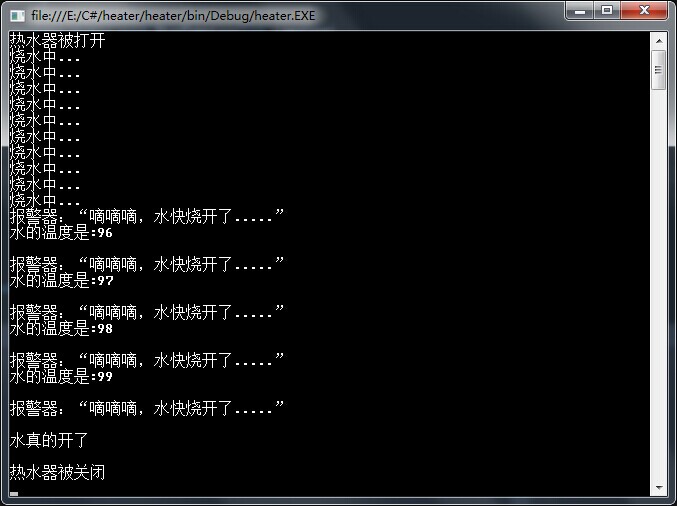
这样写我根本就没动脑子,说实话连垃圾都不如,没一点价值,完全以一个码农去完成了。现在我们换个思维去思考,设计模式中是不是有一种叫做观察者模式的,我们可不可以借助观察者模式去试下呢?既然是观察者模式肯定有像观察者一样的对象,我感觉此处的观察者就是热水器,它实时监控着水温,而水温是其他事件的触发者,下面我们看看这次写的代码:
observer.cs
using System;

using System.Collections.Generic;

using System.Linq;

using System.Text;

using System.Threading.Tasks;

using System.Threading;

namespace oberver

{

    //开关

    public class  Switch

    {

        public void SwitchOn(int tempture)

        {

            if (tempture <= 0)

            {

                Console.WriteLine("热水器被打开");

            }

        }

        public void Switchoff(int tempture)

        {

            if (tempture >= 100)

            {

                Console.WriteLine("热水器被关闭");

            }

        }

    }

    //热水器

    public class Heater

    {

        private int tempture;

        public delegate void BoildHander(int param); //声明委托

        public event BoildHander BoilEvent;           //声明事件

        //烧水

        public void BoilWater()

        {

            if (BoilEvent != null)

            {

                BoilEvent(tempture);

            }

            for (int i = 0; i <= 100; i++)

            {

                tempture = i;

                Thread.Sleep(1000 / (i + 1));

                if (i % 10 == 0 && i<100)

                {

                    Console.WriteLine("烧水中...");

                }

                //Console.WriteLine("烧水中,温度:{0}'",tempture);

                if (tempture > 95)

                {

                    if (BoilEvent != null) //如果有注册事件

                    {

                        BoilEvent(tempture);//调用所有注册时间的方法

                    }

                }

            }

        }

    }

    //警报器

    public class Alarm

    {

        public void MakeAlert(int tempture)

        {

            if (tempture >= 96)

            {

                Console.WriteLine("嘀嘀嘀,水已经{0}度了\n", tempture);

            }

        }

    }

    //显示器

    public class Display

    {

        public static void ShowMsg(int tem)

        {

            if (tem == 100)

            {

                Console.WriteLine("水烧开了,当前温度是:{0}度\n", tem);

            }

        }

    }

    class Progrm

    {

        static void Main(string[] args)

        {

            Switch switcher = new Switch();
            Heater heater = new Heater();

            Alarm alarm = new Alarm();

            heater.BoilEvent += switcher.SwitchOn; //注册事件

            heater.BoilEvent += alarm.MakeAlert;   //注册事件

            //heater.BoilEvent += (new Alarm()).MakeAlert; //匿名对象注册方法

            heater.BoilEvent += Display.ShowMsg; //注册方法

            heater.BoilEvent += switcher.Switchoff;

            heater.BoilWater(); //开始烧水

            Console.Read();

        }

    }

}
此次运行结果:

同样的功能,不一样的代码,后者是不是有种高大上的感觉。
C# 热水器的更多相关文章
- C#学习笔记(11)——深入事件,热水器案例
说明(2017-6-14 15:04:13): 1. 热水器案例,为了便于理解,采用了蹩脚但直观的英文命名,哼哼. heater类,加热,声明一个委托,定义一个委托事件: using System; ...
- 重温Observer模式--热水器·改
引言 在 C#中的委托和事件 一文的后半部分,讲述了Observer(观察者)模式,并使用委托和事件实现了这个模式.实际上,不使用委托和事件,一样可以实现Observer模式.在本文中,我将使用GOF ...
- .NET面试题系列[7] - 委托与事件
委托和事件 委托在C#中具有无比重要的地位. C#中的委托可以说俯拾即是,从LINQ中的lambda表达式到(包括但不限于)winform,wpf中的各种事件都有着委托的身影.C#中如果没有了事件,那 ...
- Linux下UPnP sample分析
一.UPnP简介 UPnP(Universal Plug and Play)技术是一种屏蔽各种数字设备的硬件和操作系统的通信协议.它是一种数字网络中间件技术,建立在TCP/IP.HTTP协 ...
- 安卓APP与智能硬件相结合的简易方案
第1章 概 述 (作者小波QQ463431476) (来源http://blog.chinaaet.com/zhaocundang/p/5100017645博客) (来源 http://www. ...
- C# 中的委托和事件
觉得这篇文章写的非常好,大神之作,由简入繁,对我这种初学者来说帮忙很大,特此留存下. 摘自:http://tracefact.net/CSharp-Programming/Delegates-and- ...
- 《.NET之美》消息及勘误
<.NET之美>消息及勘误 编辑最终还是采用了<.NET之美>作为书名,尽管我一直觉得这个名字有点文艺了,而更倾向于使用<.NET专题解析>这个名称. 目前已经可以 ...
- Alljoyn瘦客户端库介绍(官方文档翻译 下)
由于其他事情耽误,这个翻译现在才完成.接上篇—— 4 瘦客户端核心库架构 由于AllJoyn瘦客户端核心库(AJTCL)必须运行在那些功耗受限.计算能力有限.资源紧缺的设备上,因此它无法像运行在通用型 ...
- C# ~ 从 委托事件 到 观察者模式 - Observer
委托和事件的部分基础知识可参见 C#/.NET 基础学习 之 [委托-事件] 部分: 参考 [1]. 初识事件 到 自定义事件: [2]. 从类型不安全的委托 到 类型安全的事件: [3]. 函数指针 ...
随机推荐
- Java之Static静态修饰符详解
Java之Static静态修饰符详解 Java之Static静态修饰符详解 一.特点 1.随着类的加载而加载,随着类的消失而消失,生命周期最长 2.优先于对象存在 3.被所有类的对象共享 4.可以直接 ...
- 零拷贝概念 -- linux内核
零拷贝(zero-copy) 备快速网络接口的主要技术. 零拷贝技术通过降低或消除关键通信路径影响速率的操作,降低传输数据的操作系统开销和协议处理开销,从而有效提高通信性能,实现快速传输数据. 零拷贝 ...
- android 中使用缓存加载数据
最近app快完工了,但是很多列表加载,新闻咨询等数据一直从网络请求,速度很慢,影响用户体验,所以寻思用缓存来加载一些更新要求不太高的数据 废话不多说,上代码 欢迎转载,但请保留文章原始出处:) 博客 ...
- eclipse中Java代码导入包,出现main.java前缀
1.工程右击,按照下图指示的选择 2.按照下图,进行删除选中项,然后点击OK保存
- IOS 开发调试方法
0.警告 尽量一个警告都不要有 1.错误 1)红色提示 编译过不去的原因大部分是语法,检查括号的匹配,变量名称,作用域范围 2)编译可以通过,可以运行 a.运行过程中程序崩溃 在debug区域的右侧, ...
- 常用的方法,读取XML节点并赋值给List集合
一.前言 很多时候也可以直接在XML文件中配置好节点,在程序需要用到的时候,修改XML文件并不需要重新编译,这里是在极光推送中拿出来的一部分代码.代码简单,大家直接看例子吧. 二.实现过程 1.新创建 ...
- (整理)ubuntu 的 相关知识(来自 鸟哥的私房菜)
1. Linux 文件权限概念 $ ls 察看文件的指令 $ ls -al 出所有的文件详细的权限与属性 (包含隐藏档,就是文件名第一个字符为『 . 』的文件) 在你第一次以root身份登入Linux ...
- android 开发环境搭建 (转)
最近由于工作中要负责开发一款Android的App,之前都是做JavaWeb的开发,Android开发虽然有所了解,但是一直没有搭建开发环 境去学习,Android的更新速度比较快了,Android1 ...
- [C++程序设计]基于对象的程序设计 基于对象的程序设计
1. 面向对象分析(object oriented analysis,OOA)2. 面向对象设计(object oriented design,OOD)3. 面向对象编程(object oriente ...
- text-overflow 文字溢出时的设置
text-overflow : clip | ellipsis clip: 不显示省略标记(...),而是简单的裁切. ellipsis: 当对象内文本溢出时显示省略标记(...) 设置或检索是否使用 ...