
iOS 7 - Auto Layout on iOS Versions prior to 6.0
链接地址:http://stackoverflow.com/questions/18735847/ios-7-auto-layout-on-ios-versions-prior-to-6-0

|
I have an iOS app that worked well on all devices in iOS 6. I recently upgraded my xcode to version 5.0 and tried to build the same app for iOS 7 on an iPhone 5. On building the app, the xCode upgraded something in the code settings, but failed to build with errors. On the iPad XIB, I get an error : "Illegal Configuration : Auto Layout on iOS Versions prior to 6.0". I tried enabling and disabling the "Use Autolayout" checkbox in the File Inspector, but it didn't work. Please help me fixing this issue. |
|||||||||||||||||||||
|

|
Your problem is that the "Deployment Target" for your project is "5.0" and you are using a feature that isn't available for iOS 5. Check the "General" tab for your build target
and update it to at least 6.0 to use Auto Layout
|
|||||||||
|

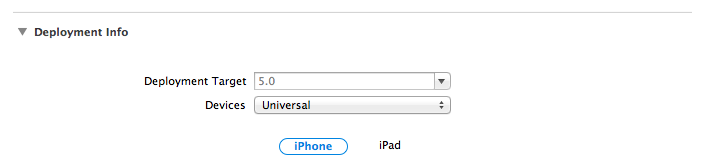


|
In your .xib file in Xcode 5, click on the offending control. Go to the properties menu on the right and click on the "File Inspector" tab. It is the tab that looks like a sheet of paper. On that tab, there is a section called "Interface Builder Document". Make sure "Builds for" property is set for "iOS 6.0 and Later". If none of the other fixes above have worked, this is likely your culprit. |
|||||||||||||||||
|

|
There is very simple fix. You have just to uncheck "Use Auto Layout" in General tab. More information http://shreekantpawar.com/2012/12/20/simple-solution-to-auto-layout-on-ios-versions-prior-to-6-0-error-in-mac-osx-10-7-and-later/ |
|||||||||||||||||
|

|
Assuming you are actually targeting only iOS 6.0+, it sounds like an issue related to upgrading Xcode. Sometimes, things can go awry when transitioning to a newer Xcode version. Here are some general tips you can try:
|
|||||||||||||
|

|
Autolayout is a feature of iOS6.0 and later, If you need to support iOS 5, don't use auto layout. Please go through above doc, and check "What's new in iOS6.0" and serach for "Auto layout" |
|||

|
This works for me..please try from classname.xib file in Xcode 5, tap on the offending control. tap on "File Inspector" tab. On that tab,Make sure "Builds for" property is set for "iOS 6.0 and Later".This will help you :) |
|||
|
The problem may be because of target version in of your project,it may be 5.0 i guess.There is a solution for this problem step1.Select your project step2.select the General tab step3.change the project deployment target. |

iOS 7 - Auto Layout on iOS Versions prior to 6.0的更多相关文章
- uistepper on ios versions prior to 5.0
xcode5 打开运行就出现这个错误 uistepper on ios versions prior to 5.0 直接在General -->Deployment Info -->Dep ...
- iOS Programming Auto Layout: Programmatic Constraints 自动布局:通过编程限制
iOS Programming Auto Layout: Programmatic Constraints 1. However, if your views are created in co ...
- [Android开发学iOS系列] Auto Layout
[Android开发学iOS系列] Auto Layout 内容: 介绍什么是Auto Layout. 基本使用方法 在代码中写约束的方法 Auto Layout的原理 尺寸和优先级 Auto Lay ...
- iOS 8 Auto Layout界面自动布局系列2-使用Xcode的Interface Builder添加布局约束
http://blog.csdn.net/pucker/article/details/41843511 上一篇文章<iOS 8界面自动布局系列-1>简要介绍了iOS界面布局方式的前世今生 ...
- Auto Layout 在iOS屏幕适配中的使用
前几天在做iOS屏幕的适配,也就是让同样的UI控件的布局在不同屏幕的iOS设备上面都正确显示,storyBoard就无可避免的用到了Auto Layout.在这个过程中,我发现要熟练掌握Auto La ...
- 【转 iOS 8 Auto Layout界面自动布局系列2-使用Xcode的Interface Builder添加布局约束
原文网址:http://blog.csdn.net/pucker/article/details/41843511 上一篇文章<iOS 8界面自动布局系列-1>简要介绍了iOS界面布局方式 ...
- iOS 8 Auto Layout界面自动布局系列5-自身内容尺寸约束、修改约束、布局动画
首先感谢众多网友的支持,最近我实在是事情太多,所以没有写太多.不过看到大家的反馈和评价,我还是要坚持挤出时间给大家分享我的经验.如果你对我写的东西有任何建议.意见或者疑问,请到我的CSDN博客留言: ...
- (iOS)使用auto layout进行复杂布局时,UILabel的相关trick
本文转载至 http://blog.csdn.net/madongchunqiu/article/details/47960745 本文首发于CSDN:http://blog.csdn.net/ma ...
- IOS使用Auto Layout中的VFL适配
做登录页面,之前做都是用frame做,今天想着用Auto Layout中的VFL来做.觉得做的效果还是可以的(自恋一下下). 首先看下效果图和标记图 自己在做的过程中也遇到了好多问题,不过也一个一个的 ...
随机推荐
- 禁止apache显示目录索引
1)修改目录配置: 复制代码 代码如下: <Directory "D:/Apache/blog.phpha.com">Options Indexes FollowSym ...
- PHP自学之路-----javascript基础入门
Javascript概述: Javascript是基于对象和事件的脚本语言.特点; 1.安全性(不允许直接访问本地硬盘),它可以做的就是信息的动态交互. 2.跨平台性. JavaScript与HTML ...
- [译]Stairway to Integration Services Level 11 - 日志配置
介绍 在前一个章节我们讨论了事先行为,分享了如何操作默认的行为和时间冒泡,并且介绍了父子模型. 本文中,我们会配置SSIS日志. 进行简单及高级日志配置,存储,和检索的实验.并且生成自定义日志信息. ...
- [译]Stairway to Integration Services Level 6 - SSIS 工作流管理基础
简介 在之前的章节中,我们学习了增量载入数据. 本文中.我们通过优先约束(Precedence Constraints)来管理SSIS的工作流. 添加一个SSIS包 图 1 将新建的Package1. ...
- 使用uWSGI+nginx部署Django项目
最近使用django写了一些项目,不过部署到服务器上碰到一些问题,还有静态文件什么的一堆问题,这里总结一下碰到的问题和解决方案,总体思路是按照官方文档走的. 原文地址:http://uwsgi-doc ...
- C++之类的静态变量
成员变量 通过对象名能够访问public成员变量 每个对象都可以有只属于自己的成员变量 成员变量不能在对象之间共享 类的静态成员 静态成员变量 存储在 全局数据区 #include<std ...
- C++ Input & Output
1.C++ I/O各类之间的继承关系图 参考网址: http://www.cplusplus.com/reference/iolibrary/ Note: 在程序中包含iostream文件将自动创建8 ...
- IE 兼容性问题
1.IE6-IE7 可能会有2个class属性,真TMD蛋疼,一个是初始的,后来的是js赋值的 2.不同浏览器的标签默认的margin和padding不同 解决方法: * { margin:0; pa ...
- WebRTC–getUserMedia & Canvas
下面是一个使用getUserMedia接口和Canvas的drawImage方法实现的截图功能(截取视频中的一帧). 基本思路是这样子的: getUserMedia获取一个MediaStream, s ...
- python异常处理URLError,HTTPError,Wrapping,
们在使用爬虫来抓取网页内容的时候,HTTP异常是必须要注意的一项,所以本文,我们来详细探寻一下HTTP异常处理的相关内容,通过一些具体的实例来分析一下,非常的简单,但是却很实用. 先来说一说HTT ...