
通过布局文件来显示ListView内容并注册 ListView事件
1:layout/vlist.xml是我们的布局文件,在这里一定要对首节点加上
android:descendantFocusability="blocksDescendants" 这一属性,如果不加这一属性那么ListView就会获取不到点击事件。
<?xml version="1.0" encoding="utf-8"?>

<LinearLayout xmlns:android="http://schemas.android.com/apk/res/android"

    android:layout_width="match_parent"

    android:layout_height="match_parent"

    android:orientation="horizontal"

    android:descendantFocusability="blocksDescendants" >

    <ImageView

        android:id="@+id/imgNf"

        android:layout_width="wrap_content"

        android:layout_height="wrap_content"/>

    <TextView

        android:id="@+id/titleNf"

        android:layout_width="wrap_content"

        android:layout_height="wrap_content"

        android:textIsSelectable="true"/>

</LinearLayout>
2:activity_main.xml
<RelativeLayout xmlns:android="http://schemas.android.com/apk/res/android"

    xmlns:tools="http://schemas.android.com/tools"

    android:layout_width="match_parent"

    android:layout_height="match_parent">

    <ListView

        android:id="@+id/lvList"

        android:layout_width="match_parent"

        android:layout_height="wrap_content"></ListView>

</RelativeLayout>
3:MainActivity.java
public class MainActivity extends Activity {

    private List<Map<String,Object>>list=null;

    @Override

    protected void onCreate(Bundle savedInstanceState) {

        super.onCreate(savedInstanceState);

        setContentView(R.layout.activity_main);

        ListView lv=(ListView)findViewById(R.id.lvList);

        lv.setAdapter(initAdapter());

        //注册点击事件

        lv.setOnItemClickListener(new OnItemClickListener(){

            @Override

            public void onItemClick(AdapterView<?> arg0, View arg1, int arg2, long arg3) {

                String title=list.get(arg2).get("title").toString();

                Toast.makeText(MainActivity.this, title, Toast.LENGTH_SHORT).show();

            }

        });

    }

    public SimpleAdapter initAdapter(){

        SimpleAdapter simpleAdapter=new SimpleAdapter(

                MainActivity.this,

                getData(),

                R.layout.vlist,

                new String[]{"title","img"},

                new int[]{R.id.titleNf,R.id.imgNf});

        return simpleAdapter;

    }

    private List<Map<String,Object>>getData(){

        list=new ArrayList<Map<String,Object>>();

        Map<String,Object>map=new HashMap<String,Object>();

        map.put("title", "This is a test 1");

        map.put("img",R.drawable.ic_launcher);

        list.add(map);

        map=new HashMap<String,Object>();

        map.put("title", "This is a test 2");

        map.put("img",R.drawable.ic_launcher);

        list.add(map);

        return list;

    }

}
4:效果
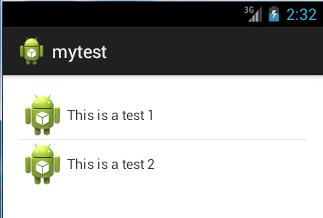
点击第二行数据后:

通过布局文件来显示ListView内容并注册 ListView事件的更多相关文章
- pycharm设置文件中显示模板内容
pycharm中设置自己的文件模板 File>>Settings>>Editor>>File and Code Templates 选择文件类型或者输入文件类型 ...
- ifrem上传文件后显示
ifrem上传文件后显示 1.上传文件按钮 <a class="btn btn-primary pull-right" id="data-upload&quo ...
- Android学习---ListView和Inflater的使用,将一个布局文件转化为一个对象
本文将介绍ListView和Inflater的使用,将接上一篇文章内容. 一.什么是ListView? 在android开发中ListView是比较常用的控件,ListView 控件可使用四种不同视图 ...
- 自定义ListView适配器Adapter引用布局文件的情况下实现点击列表项时背景颜色为灰色
listview控件设置适配器的时候,如果使用自定义的adapter,比如MyArrayAdapter extends ArrayAdapter<String> 如果listitem布局文 ...
- Android如何在一个线性布局里完美显示两个listview啊?
复写一个listView ,在你布局文件中使用此view: <ScrollView android:layout_width="fill_parent" android:la ...
- 安卓---achartengine图表----简单调用----使用view显示在自己的布局文件中----actionBar的简单设置
AChartEngine 是一个安卓系统上制作图表的框架,关于它的介绍大家可以百度,也可以参考下面这篇博客http://blog.csdn.net/lk_blog/article/details/76 ...
- 编程检查d:\test.txt文件是否存在,若在则显示该文件的名称和内容。
下面放两种方法 老师写的: import java.io.File; import java.io.FileInputStream; import java.io.FileNotFoundExcept ...
- 【转】 C# ListView实例:文件图标显示
[转] C# ListView实例:文件图标显示 说明:本例将目录中的文件显示在窗体的ListView控件中,并定义了多种视图浏览.通过调用Win32库函数实现图标数据的提取. 主程序: 大图标: 列 ...
- androidstudio新建项目中在布局文件中不显示title的方法
在androidstudio新建项目的时候,在布局文件里有时候会出现如下情况: 上面的标题栏非常碍眼,要想隐藏标题栏的话,可以在Manifest文件的theme标签里进行配置,自定义一个theme,加 ...
随机推荐
- MyBatis insert后返回自增字段的值
如下情况适用支持自增的DB,如MySQL.其他情况参见:MyBatis魔法堂:Insert操作详解(返回主键.批量插入) 1.model public class UserInfo { private ...
- rsyslog 直接kill进程,在重新启动会全部发送日志
<pre name="code" class="html">jrhapt11:/root# ps -ef | grep rsyslog root 8 ...
- 【HDOJ】1224 Free DIY Tour
DP. #include <cstdio> #include <cstring> #include <cstdlib> #include <algorithm ...
- 【转】【教程】office 2013 & visio 2013的激活
原文网址:http://zhan.renren.com/sola86?gid=3602888498037097351&checked=true 1.下载安装文件 office和visio都有两 ...
- 微信、QQ和手机号之间不得不说的故事!
发文字,发图片,发心情,视频聊天,查看附近的人,微信能干的事情QQ都可以,那么它们有什么区别,我QQ用得好好的为什么要我联系人都导到微信去?我们很早就有了QQ,但是在QQ时代,我们虽然用QQ发消息聊天 ...
- 为兴趣求职:如何学习UI框架,请将你的看法观点写在评论下面
前言:此篇文章是就我女朋友的求职和前端学习经历而写,希望得到UI前辈的热心指点,不胜感激涕零! 地理坐标: 中国,四川,成都 求职经历: 她之前找过两份工作,第一份是金融销售专员,第二份是汽车保险.她 ...
- 动态sql语句
当需要根据外部输入的参数来决定要执行的SQL语句时,常常需要动态来构造SQL查询语句,个人觉得用得比较多的地方就是执行搜索查询的SQL语句.对于搜索,可能要根据搜索条件判断来动态执行SQL语句. 在S ...
- CASE工具
1.Rational Rose和PowerDesigner建模工具 作为世界最著名的两大CASE工具,Rational Rose和PowerDesigner的名声可谓如雷贯耳.Rose是当时全球最大的 ...
- AvalonEdit 移除自身ScrollViewer (可配合外部自定义ScrollViewer 使用)
http://community.sharpdevelop.net/forums/p/11977/42764.aspx#42764 1: <Style TargetType="{x:T ...
- ORACLE CASE WHEN 及 SELECT CASE WHEN的使用方法
CASE 语句 CASE selector WHEN value1 THEN action1; WHEN value2 THEN action2; WHEN value3 THEN act ...