
iOS开发中地图开发的简单应用
iOS上使用地图比Android要方便,只需要新建一个MKMapView,addSubView即可。这次要实现的效果如下:
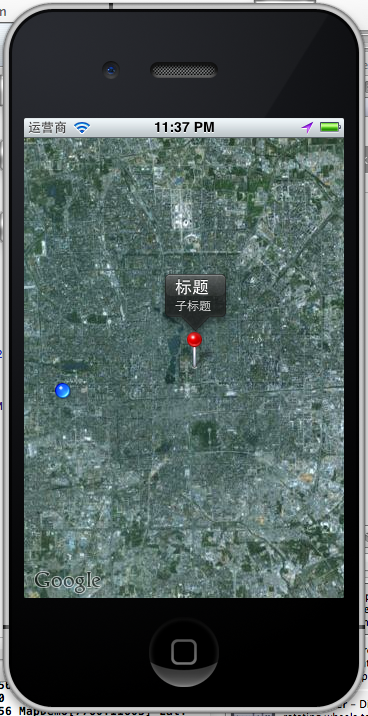
有标注(大头针),定位,地图。
1、添加地图
1.1 新一个Single View app ,选择默认项,创建后,在ViewController.h
- #import <UIKit/UIKit.h>
- #import <MapKit/MapKit.h>
- #import <CoreLocation/CoreLocation.h>
- @interface ViewController : UIViewController
- <MKMapViewDelegate, CLLocationManagerDelegate> {
- MKMapView *map;
- CLLocationManager *locationManager;
- }
- @end
1.2在ViewController.m中添加
- - (void)viewDidLoad
- {
- map = [[MKMapView alloc] initWithFrame:[self.view bounds]];
- map.showsUserLocation = YES;
- map.mapType = MKMapTypeSatellite;
- [self.view addSubview:map];
- [super viewDidLoad];
- // Do any additional setup after loading the view, typically from a nib.
- }
运行:
OMG,看到的是世界地图。怎么定位到指定的位置呢?比如定位回来伟大的祖国首都?
这里map.mapType =MKMapTypeSatellite;我用到是卫星地图,可以使用标准的地图,
map.mapType =MKMapTypeStandard;

注意,如果此时你编译有错误,请拉到博客最后查看 :5、 遇到的问题
2、定位到指定经纬度
- CLLocationCoordinate2D coords = CLLocationCoordinate2DMake(39.915352,116.397105);
- float zoomLevel = 0.02;
- MKCoordinateRegion region = MKCoordinateRegionMake(coords, MKCoordinateSpanMake(zoomLevel, zoomLevel));
- [map setRegion:[map regionThatFits:region] animated:YES];
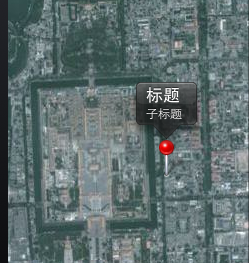
这样,就我们就定位的了故宫了。

3、添加标注大头针
3.1 新建一个标注类:CustomAnnotation
按Command+N,继承NSObject。在CustomAnnotation.h 和CustomAnnotation.m文件添加如下代码:
- #import <Foundation/Foundation.h>
- #import <MapKit/MapKit.h>
- @interface CustomAnnotation : NSObject
- <MKAnnotation>
- {
- CLLocationCoordinate2D coordinate;
- NSString *title;
- NSString *subtitle;
- }
- -(id) initWithCoordinate:(CLLocationCoordinate2D) coords;
- @property (nonatomic, readonly) CLLocationCoordinate2D coordinate;
- @property (nonatomic, retain) NSString *title;
- @property (nonatomic, retain) NSString *subtitle;
- @end
- #import "CustomAnnotation.h"
- @implementation CustomAnnotation
- @synthesize coordinate, title, subtitle;
- -(id) initWithCoordinate:(CLLocationCoordinate2D) coords
- {
- if (self = [super init]) {
- coordinate = coords;
- }
- return self;
- }
- @end
3.1 使用大头针,
新建个方法添加大头针的
- -(void)createAnnotationWithCoords:(CLLocationCoordinate2D) coords {
- CustomAnnotation *annotation = [[CustomAnnotation alloc] initWithCoordinate:
- coords];
- annotation.title = @"标题";
- annotation.subtitle = @"子标题";
- [map addAnnotation:annotation];
- }
调用
- CLLocationCoordinate2D coords = CLLocationCoordinate2DMake(39.915352,116.397105);
- float zoomLevel = 0.02;
- MKCoordinateRegion region = MKCoordinateRegionMake(coords, MKCoordinateSpanMake(zoomLevel, zoomLevel));
- [map setRegion:[map regionThatFits:region] animated:YES];
- [self createAnnotationWithCoords:coords];
这样我们就把大头针定位在故宫了
4、定位到当前位置并获取当前经纬度
前面我们已经添加了locationManager,现在在DidViewLoad里直接调用
- locationManager = [[CLLocationManager alloc] init];
- locationManager.delegate = self;
- [locationManager startUpdatingLocation];
实现协议方法收到定位成功后的经纬度
- - (void)locationManager:(CLLocationManager *)manager didUpdateToLocation:(CLLocation *)newLocation fromLocation:(CLLocation *)oldLocation {
- [locationManager stopUpdatingLocation];
- NSString *strLat = [NSString stringWithFormat:@"%.4f",newLocation.coordinate.latitude];
- NSString *strLng = [NSString stringWithFormat:@"%.4f",newLocation.coordinate.longitude];
- NSLog(@"Lat: %@ Lng: %@", strLat, strLng);
- }
- - (void)locationManager:(CLLocationManager *)manager didFailWithError:(NSError *)error {
- NSLog(@"locError:%@", error);
- }

运行,允许获取当前位置,打印log
- 2012-06-28 23:58:32.237 MapDemo[8202:11603] Lat: 39.9011 Lng: 116.3000
如果不允许:打印出错误日志
- 2012-06-28 23:25:03.109 MapDemo[7531:11603] locError:Error Domain=kCLErrorDomain Code=1 "The operation couldn’t be completed. (kCLErrorDomain error 1.)"
定位后,移动到当前位置:
- - (void)locationManager:(CLLocationManager *)manager didUpdateToLocation:(CLLocation *)newLocation fromLocation:(CLLocation *)oldLocation {
- [locationManager stopUpdatingLocation];
- NSString *strLat = [NSString stringWithFormat:@"%.4f",newLocation.coordinate.latitude];
- NSString *strLng = [NSString stringWithFormat:@"%.4f",newLocation.coordinate.longitude];
- NSLog(@"Lat: %@ Lng: %@", strLat, strLng);
- CLLocationCoordinate2D coords = CLLocationCoordinate2DMake(newLocation.coordinate.latitude,newLocation.coordinate.longitude);
- float zoomLevel = 0.02;
- MKCoordinateRegion region = MKCoordinateRegionMake(coords,MKCoordinateSpanMake(zoomLevel, zoomLevel));
- [map setRegion:[map regionThatFits:region] animated:YES];
- }
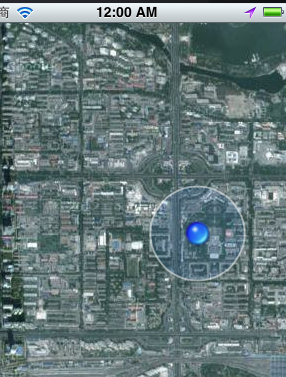
定位到了当前位置。
5、会遇到的问题:
运行是发现了编译错误:
Undefined symbols for architecture i386:
"_CLLocationCoordinate2DMake", referenced from:
-[ViewController viewDidLoad] in ViewController.o
-[ViewController locationManager:didUpdateToLocation:fromLocation:] in ViewController.o
"_OBJC_CLASS_$_MKMapView", referenced from:
objc-class-ref in ViewController.o
"_OBJC_CLASS_$_CLLocationManager", referenced from:
objc-class-ref in ViewController.o
ld: symbol(s) not found for architecture i386
clang: error: linker command failed with exit code 1 (use -v to see invocation)
这是为什么呢?没有添加对应的FrameWork。我使用的是4.3.2版本的XCode,添加方法如下:
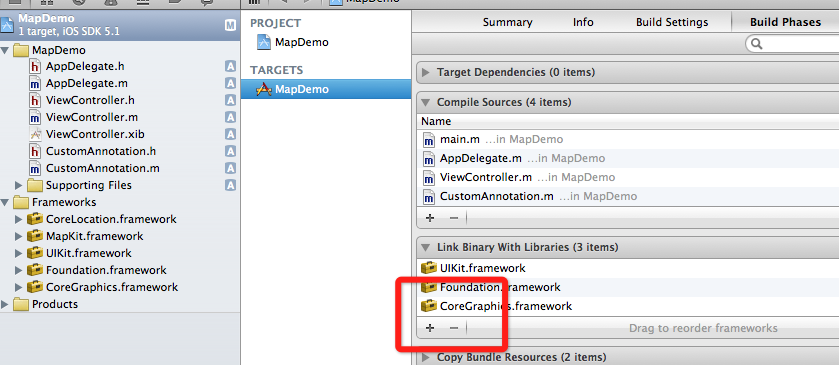
选择项目,TARGETS ,点加号,添加两个framework
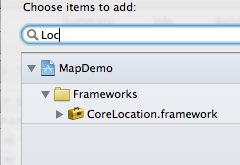
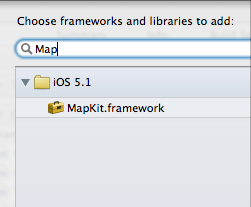
就好了。
如何发送IOS模拟器经纬度?
5.0以上的模拟器才能用这个功能,打开模拟:
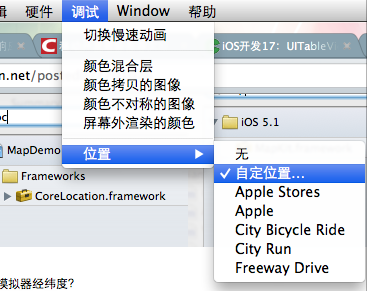
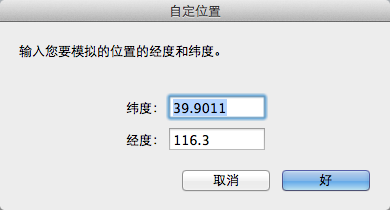
这样就能发送模拟的当前位置了。
iOS开发中地图开发的简单应用的更多相关文章
- spring注解开发中常用注解以及简单配置
一.spring注解开发中常用注解以及简单配置 1.为什么要用注解开发:spring的核心是Ioc容器和Aop,对于传统的Ioc编程来说我们需要在spring的配置文件中邪大量的bean来向sprin ...
- cocos2dx之lua项目开发中MVC框架的简单应用
**************************************************************************** 时间:2015-03-31 作者:Sharin ...
- iOS开发中地图与定位
不管是QQ还是微信的移动client都少不了定位功能,之前在微信demo中没有加入定位功能,今天就写个定位的小demo来了解一下定位和地图的东西. 地图和定位看上去是挺高大上一东西.其有使用方法比Ta ...
- iOS开发系列--网络开发
概览 大部分应用程序都或多或少会牵扯到网络开发,例如说新浪微博.微信等,这些应用本身可能采用iOS开发,但是所有的数据支撑都是基于后台网络服务器的.如今,网络编程越来越普遍,孤立的应用通常是没有生命力 ...
- GIS开发离线地图应用-初识gis
http://www.cnblogs.com/kevin-zlg/p/4611671.html 最新公司需要做一个基于gis地图的应用系统,由于之前公司项目中的电子地图模块都是我开发的,所以这个新系统 ...
- android定位和地图开发实例
在android开发中地图和定位是很多软件不可或缺的内容,这些特色功能也给人们带来了很多方便. 首先介绍一下地图包中的主要类: MapController : 主要控制地图移动,伸缩,以某个GPS坐标 ...
- android开发中的5种存储数据方式
数据存储在开发中是使用最频繁的,根据不同的情况选择不同的存储数据方式对于提高开发效率很有帮助.下面笔者在主要介绍Android平台中实现数据存储的5种方式. 1.使用SharedPreferences ...
- Android 开发中 SQLite 数据库的使用
SQLite 介绍 SQLite 一个非常流行的嵌入式数据库,它支持 SQL 语言,并且只利用很少的内存就有很好的性能.此外它还是开源的,任何人都可以使用它.许多开源项目((Mozilla, PHP, ...
- 在Android 开发中使用 SQLite 数据库笔记
SQLite 介绍 SQLite 一个非常流行的嵌入式数据库,它支持 SQL 语言,并且只利用很少的内存就有很好的性能.此外它还是开源的,任何人都可以使用它.许多开源项目((Mozilla, PH ...
随机推荐
- C++内联函数与宏定义
用内联取代宏: 1.内联可调试: 2.可进行类型安全检查或自动类型转换: 3.可访问成员变量. 另外,定义在类声明中的成员函数自动转化为内联函数. 文章(一) 内联函数与宏定义 在C中,常用预处理语句 ...
- codeforces 622F. The Sum of the k-th Powers 拉格朗日插值法
题目链接 求sigma(i : 1 to n)i^k. 为了做这个题这两天真是补了不少数论, 之前连乘法逆元都不知道... 关于拉格朗日插值法, 我是看的这里http://www.guokr.com/ ...
- WebAppScaner
https://www.ohloh.net/p/simple-scan/ https://code.google.com/p/skipfish/ http://code.google.com/p/wa ...
- CreateFile,ReadFile等API详解(或者说MSDN的翻译)
一.*****CreateFile***** 这个函数可以创建或打开一个对象的句柄,凭借此句柄就可以控制这些对象:控制台对象.通信资源对象.目录对象(只能打开).磁盘设备对象.文件对象.邮槽对象.管道 ...
- [置顶] LED办公楼宇照明节能方案及城市夜景照明节能方案
LED照明办公楼宇节能方案 .通用标准灯头,可直接替换现有卤素灯.白炽灯.荧光灯.
- PHP中用到的一些字符串函数
/*常用的字符串输出函数 * * echo() 输出字符串 * print() 输出一个或多个字符串 * die() 输出一条信息,并退出当前脚本 * printf() ...
- JNI(2)
JNI(2) 访问字段和方法 JNI允许本地代码访问java 对象的字段和方法. 调用需要两个步骤: 例如调用cls类的f方法, 1. 获取方法ID jmethodID mid = env->G ...
- 原生JS实现字符串分割
window.onload = function(){ var str = 'abc,dbc,qqq,aaa'; var sp = split(str,',')//与字符串的分隔符要一直. alert ...
- 杭电oj A + B Again
A + B Again Time Limit: 1000/1000 MS (Java/Others) Memory Limit: 32768/32768 K (Java/Others) Tota ...
- C函数调用与栈
这篇blog试图说明这么一个问题,当一个c函数被调用时,一个栈帧(stack frame)是如何被建立,又如何被消除的.这些细节跟操作系统平台及编译器的实现有关,下面的描述是针对运行在Linux的gc ...