
xcode -饼状进度条
界面搭建
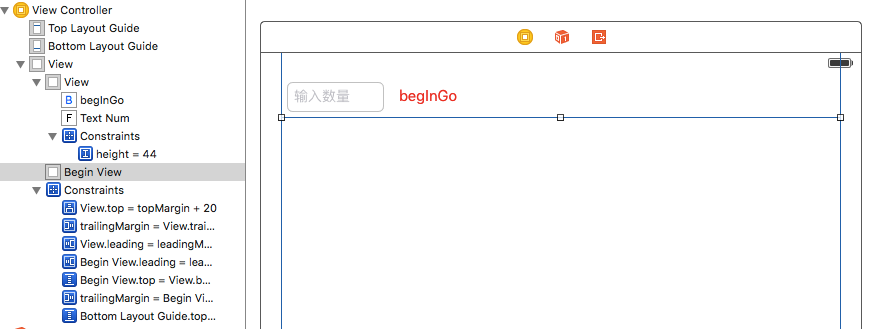
创建一个画饼状的类 eatView 集成UIView
#import "eatView.h"

@implementation eatView

// Only override drawRect: if you perform custom drawing.

// An empty implementation adversely affects performance during animation.

- (void)drawRect:(CGRect)rect {

    //创建一个园的风格数组

    NSArray * arr = @[@,@,@,@,@,@,@,@,@,@];

    //计算园的中心点

    CGPoint center = CGPointMake(rect.size.width * 0.5, rect.size.height * 0.5);

    //园的半径

    CGFloat radius = rect.size.width * 0.5 ;

    //开始位置

    CGFloat startA = ;

    //结束位置

    CGFloat endA = ;

    CGFloat angle = ;

    //设置uiView的背景颜色

    self.backgroundColor=[UIColor clearColor];

    //遍历园等分的数组

    for (NSNumber *num in arr) {

        //计算开始位置

        startA = endA;

        //计算弧度

        angle = num.intValue / 100.0 * M_PI *;

        //结束位置

        endA =startA + angle;

        //创建画笔

        UIBezierPath * path = [UIBezierPath bezierPathWithArcCenter:center radius:radius startAngle:startA endAngle:endA clockwise:YES];

        //画一条连接中心的线

        [path addLineToPoint:center];

        //设置随机颜色

        [[self randomColor]set];

        [path fill];

    }

    //创建一个定时器

    CADisplayLink * link =[CADisplayLink displayLinkWithTarget:self selector:@selector(click)];

    //加入主运行时

    [link addToRunLoop:[NSRunLoop mainRunLoop] forMode:NSDefaultRunLoopMode];

    //创建一个定时器

//    [NSTimer scheduledTimerWithTimeInterval:1/50.0 target:self selector:@selector(click) userInfo:nil repeats:YES];

}

/**

 生产随机颜色

 */

- (UIColor *)randomColor{

    return [UIColor colorWithRed:arc4random_uniform()/255.0 green:arc4random_uniform()/255.0 blue:arc4random_uniform()/255.0 alpha:];

}

/**

 重绘图行

 */

-(void)click{

    [self setNeedsDisplay];

}

@end
脱线 一根UITextField 另一根UIView
@property (weak, nonatomic) IBOutlet UITextField *textNum;
@property (weak, nonatomic) IBOutlet UIView *beginView;
拖线 UIButton 点击方法 - (IBAction)beginGoBtn:(id)sender
#import "ViewController.h"

#import "eatView.h"

@interface ViewController ()

@property (weak, nonatomic) IBOutlet UITextField *textNum;

@property (weak, nonatomic) IBOutlet UIView *beginView;

@end

@implementation ViewController

- (void)viewDidLoad {

    [super viewDidLoad];

    // Do any additional setup after loading the view, typically from a nib.

}

- (void)didReceiveMemoryWarning {

    [super didReceiveMemoryWarning];

    // Dispose of any resources that can be recreated.

}

- (IBAction)beginGoBtn:(id)sender {

    //释放加载过得UIview 不然又内存问题

    for (UIView * vol in self.beginView.subviews) {

        [vol removeFromSuperview];

    }
   //关闭键盘

    [self.view endEditing:YES];

    int count=self.textNum.text.intValue;

    for (int i=0; i<count; i++) {

        eatView * eatV = [[eatView alloc]init];

        // 按钮尺寸

        CGFloat optionW = 50;

        CGFloat optionH = 50;

        // 按钮之间的间距

        CGFloat margin = 5;

        // 控制器view的宽度

        CGFloat viewW = self.beginView.frame.size.width;

        // 总列数

        int totalColumns = 6;

        // 最左边的间距 = 0.5 * (控制器view的宽度 - 总列数 * 按钮宽度 - (总列数 - 1) * 按钮之间的间距)

        CGFloat leftMargin = (viewW - totalColumns * optionW - margin * (totalColumns - 1)) * 0.5;

        int col = i % totalColumns;

        // 按钮的x = 最左边的间距 + 列号 * (按钮宽度 + 按钮之间的间距)

        CGFloat optionX = leftMargin + col * (optionW + margin);

        int row = i / totalColumns;

        // 按钮的y = 行号 * (按钮高度 + 按钮之间的间距)

        CGFloat optionY = row * (optionH + margin);

        eatV.frame = CGRectMake(optionX, optionY, optionW, optionH);

        [self.beginView addSubview:eatV];

    }

}

@end
效果图:
xcode -饼状进度条的更多相关文章
- highcharts 折线,饼状,条状综合图
完整代码如下: <head> <meta http-equiv="Content-Type" content="text/html; charset=u ...
- css 3 制作水波状进度条
效果图如下 : 代码如下: <!DOCTYPE html> <html> <head> <meta charset="UTF-8"> ...
- 第二百四十一节,Bootstrap进度条媒体对象和 Well 组件
第二百四十一节,Bootstrap进度条媒体对象和 Well 组件 学习要点: 1.Well 组件 2.进度条组件 3.媒体对象组件 本节课我们主要学习一下 Bootstrap 的三个组件功能:Wel ...
- ios swift 实现饼状图进度条,swift环形进度条
ios swift 实现饼状图进度条 // // ProgressControl.swift // L02MyProgressControl // // Created by plter on 7/2 ...
- PSP 进度条 柱状图 饼状图
9号 类别 开始时间 结束时间 间隔 净时间 燃尽图 8::00 8:20 0 20分钟 站立会议 8:20 8:50 0 30分钟 读构建之法 9:20 13:20 120分钟 120分钟 四人小组 ...
- HTML5-svg圆形饼状图进度条实现原理
<svg width="440" height="440" viewbox="0 0 440 440"> <circle ...
- css3实现饼状图进度及环形进度条
1 <!-- 饼图 --> <div class="pie"></div> <hr /> <!-- 环形图 --> &l ...
- [Xcode 实际操作]四、常用控件-(12)环形进度条控件的使用
目录:[Swift]Xcode实际操作 本文将演示环形进度条控件的使用. 在项目导航区,打开视图控制器的代码文件[ViewController.swift] import UIKit class Vi ...
- Qt之QRoundProgressBar(圆形进度条)
简述 QRoundProgressBar类能够实现一个圆形进度条,继承自QWidget,并且有和QProgressBar类似的API接口. 简述 详细说明 风格 颜色 字体 共有函数 共有槽函数 详细 ...
随机推荐
- Qt 中程序自动重启
参照至 dbzhang老师的博文,记录于此....... 要想理解重启,先得看看Qt程序怎么退出! 1.退出 int main(int argc, char** argv) { QApplicatio ...
- HDU 5700 区间交(线段树)
[题目链接] http://acm.hdu.edu.cn/showproblem.php?pid=5700 [题目大意] 给出一个长度为n的数列和m个区间,现在求k个区间,使得他们的区间交内的数列项和 ...
- ubuntu texlive 中文的配置方法
\documentclass[12pt]{article} \usepackage{CJKutf8} \usepackage{indentfirst}%设置第一段缩进,英语中从第二段才有缩进 \use ...
- centos6.5 Eclipse C/C++开发环境及项目创建测试
1,新建C++ project
- AU3学习笔记
目录 1. AU3是什么?能做什么? 2. 乱学AU3中的命令(语言相关)? 3. 通过简单示例学习AU3? 4. 正则表达式的学习(对大小写敏感) 5.对于GUI的相关学习 1. AU ...
- Unable to open ...\tools\capture\allegro.cfg for reading
采用Capture CIS 当生成网表.误: Unable to open ...\tools\capture\allegro.cfg for reading. Please correct the ...
- DQL
DQL(Data QueryLanguage) 基本格式 select * from 表名 对于列进行限制 格式一:取指定列 select 列1,列2 from 表名 格式二:为列起别名的三种表示法, ...
- JS 精粹(一)
先说说JS是容易被误解的语言的观点.从名字上来看,"Java"这似乎暗示着这门语言与Java的关系:好像这门语言是Java的子集,或比Java弱.但实际与Java并无关系,如果说非 ...
- Programming C#.Interfaces
类实现一个接口时,它必须实现该接口的所有部分(方法和属性等),效果相当于类要表明:“我同意履行这个接口所定义的协定.” 从抽象类继承实现了“is-a(是一种)”关系,实现接口时一种“implement ...
- HTTP填坑
HTTP知识填坑 .note-content {font-family: "Helvetica Neue",Arial,"Hiragino Sans GB",& ...