
Flink系列之Time和WaterMark
当数据进入Flink的时候,数据需要带入相应的时间,根据相应的时间进行处理。
让咱们想象一个场景,有一个队列,分别带着指定的时间,那么处理的时候,需要根据相应的时间进行处理,比如:统计最近五分钟的访问量,那么就需要知道数据到来的时间。五分钟以内的数据将会被计入,超过五分钟的将会计入下一个计算窗口。
那么Flink的Time分为三种:
ProcessingTime : 处理时间,即算子处理数据的机器产生的时间,数据的流程一般是Source -> Transform (Operator,即算子) -> Sink(保存数据)。ProcessingTime出现在Transform,算子计算的点。这个比较好生成,数据一旦到了算子就会生成。如果在分布式系统中或异步系统中,对于一个消息系统,有的机器处理的块,有的机器消费的慢,算子和算子之间的处理速度,还有可能有些机器出故障了,ProcessingTime将不能根据时间产生决定数据的结果,因为什么时候到了算子才会生成这个时间。
EventTime : 事件时间,此事件一般是产生数据的源头生成的。带着event time的事件进入flink的source之后就可以把事件事件进行提取,提取出来之后可以根据这个时间处理需要一致性和决定性的结果。比如,计算一个小时或者五分钟内的数据访问量。当然数据的EventTime可以是有序的,也可以是无序的。有序的数据大家比较好理解,比如,第一秒到第一条,第二秒到第二条数据。无序的数据,举个例子要计算五秒的数据,假如现在为10:00:00, 那么数据EventTime在[10:00:00 10:00:05), [10:00:05 10:00:10),加入一条数据是04秒产生的,那么由于机器处理的慢,该数据在08秒的时候到了,这个时候我们理解该数据就是无序的。可以通过WaterMark的机制处理无序的数据,一会儿咱们在文章中继续解释。
IngestionTime : 摄入时间,即数据进入Flink的Source的时候计入的时间。相对于以上两个时间,IngestionTime 介于 ProcessingTime 和 EventTime之间,相比于ProcessingTime,生成的更加方便快捷,ProcessingTime每次进入一个Operator(算子,即map、flatMap、reduce等)都会产生一个时间,而IngestionTime在进入Flink的时候就产生了timestamp。相比于eventTime,它不能处理无序的事件,因为每次进入source产生的时间都是有序的,IngestionTime也无须产生WaterMark,因为会自动生成。
如果大家还不是特别理解的话,咱们从官网拿一张图来展示,这个会比较一目了然。
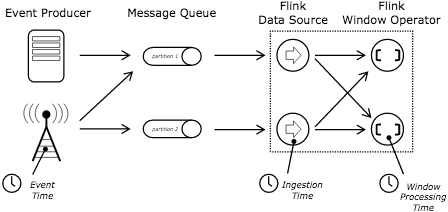
Event Producer 产生数据,这个时候就带上EventTime了,这个时候比如用户访问的记录,访问的时间就是EventTime。然后放入了MessageQueue-消息队列,进入到Flink Source的时候可以生成IngetionTime,也就是被Flink "吞" 进入时的时间,可以这么理解一下。然后由Source再进入到Operator-算子,也就是将数据进行转换,如Map, FlatMap等操作,这个时候每进入一个Operator都会生成一个时间即ProcessingTime。
IngestionTime和ProcessingTime都是生成的,所以时间是升序的,里边的时间戳timestamp和水位线Watermark都是自动生成的,所以不用考虑这个。而EventTime与其他两个有些差异,它可以是升序的,也可以不是无序的。
假如一个消息队列来了带着事件时间,时间为: 1, 2,3,4, 5。 这个加入是数据过来的时间顺序,如果需要统计2秒之间的数据的话,那么就会产生的窗口数据为[1,2], [3,4] [5],这个有序时间。
多数情况下,从消息队列过来的数据一般时间一般没有顺序。比如过来的数据事件时间为 1,3,2,4,5,那么我们想要正确2秒的数据,我们就需要引入Watermark, 水位线一说,这个水位线的含义就是当数据达到了这个水位线的时候才触发真正的数据统计,对于窗口来讲,也就是将窗口进行关闭然后进行统计。假如我们允许最大的延迟时间为1秒,那么这些数据将会分成:
1, 3, 2 | 水位线 | 4,5 | 水位线 |
1 -> 分到1-2的窗口中。
3 -> 新创建一个窗口(3-4),然后分到3-4的窗口中。
2 -> 分到1-2的窗口看。
水位线 -> 进行窗口统计和数据汇总。
4 -> 分到3-4的窗口。
5 -> 新建一个窗口(5-6),然后分配到新窗口中。
不知道这样写大家能不能理解呢,如果觉得有问题的话可以给我留言。
上面的这样是延迟数据的处理机制,当然还有并行流处理的情况,这种情况下有的数据慢,有的数据快,那么eventTime小的数据会先流到下一个算子上,下面事件时间14和29在到window的时候,那么14会先流到window进行处理,
在Source之后会产生对应的watermark,不同的source接入不同的数据将会分别产生对应的watermark,当然watermark也需要遵循着从小到大进行触发,保证数据的正确处理。
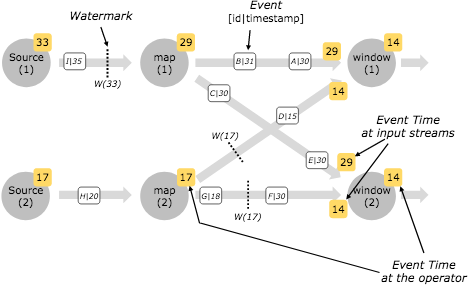
Watermark的设定:
一种是Punctuated Watermark, 翻译过来应该是“间断的水位线”,咱们来看下原文
To generate watermarks whenever a certain event indicates that a new watermark might be generated, use AssignerWithPunctuatedWatermarks. For this class Flink will first call the extractTimestamp(...) method to assign the element a timestamp, and then immediately call the checkAndGetNextWatermark(...) method on that element.
如果数据是间断性的,那么可以使用这个作为产生watermark的方式。如果一直有数据且EventTime是递增的话,那么每条数据就会产生一条数据,这种情况下会对系统造成负载,所以连续产生数据的情况下使用这种不合适。这个方法首先调用的是extractTimestamp用于抽取时间戳,checkAndGetNextWatermark用于检查和生成下一个水位线。
第二种是Periodic Watermark,翻译过来是“周期性水位线”,看下原文
AssignerWithPeriodicWatermarks assigns timestamps and generates watermarks periodically (possibly depending on the stream elements, or purely based on processing time).
周期性的获取timestamp和生成watermark。可以依赖流元素的时间,比如EventTime或者ProcessingTime。这个接口先调用extractTimestamp方法获取timestamp,接着调用getCurrentWatermark生成相应的时间戳。
这种周期性水位线有如下三种实现:
1)AscendingTimestampExtractor,如果数据产生的时间是升序的,可以使用这个实现获取timestamp和生成watermark。这种情况下,如果有数据升序中有小于当前时间戳的事件时,比如1,2,3,2,4,在这种情况下数据2将会丢失。丢失的数据可以通过sideOutputLateData获取到。
2)BoundedOutOfOrdernessTimestampExtractor,如果数据是无需的,可以使用这个实现,指定相应的延迟时间。
3)IngestionTimeExtractor, 这个是当指定时间特性为IngestionTime时,直接生成时间戳和获取水印。
下面写一个例子,进一步加深理解。以下是通过建立一个socket服务端,通过数据数据进行数据展示,数据分为word和时间戳来演示,首先指定时间特性为EventTime,默认的时间特性为ProcessingTime。将单词和时间戳进行解析拆分进行FlatMap进行数据解析成WordCount类,分配时间戳和生成水印,按word字段进行拆分,统计5秒钟的滚动窗口数据做reduce,最后是打印和输出。
package com.hqs.flink;

import org.apache.flink.api.common.functions.FlatMapFunction;

import org.apache.flink.api.common.functions.ReduceFunction;

import org.apache.flink.streaming.api.TimeCharacteristic;

import org.apache.flink.streaming.api.datastream.DataStream;

import org.apache.flink.streaming.api.environment.StreamExecutionEnvironment;

import org.apache.flink.streaming.api.functions.AssignerWithPeriodicWatermarks;

import org.apache.flink.streaming.api.watermark.Watermark;

import org.apache.flink.streaming.api.windowing.assigners.TumblingEventTimeWindows;

import org.apache.flink.streaming.api.windowing.time.Time;

import org.apache.flink.util.Collector;

import javax.annotation.Nullable;

/**

 * @author huangqingshi

 * @Date 2020-01-11

 */

public class SocketEventTime {

    public static void main(String[] args) throws Exception{

        //创建env

        StreamExecutionEnvironment env = StreamExecutionEnvironment.getExecutionEnvironment();

        //设置流的时间特性,

        env.setStreamTimeCharacteristic(TimeCharacteristic.EventTime);

        //设置并行度

        env.setParallelism(1);

        //设置监听localhost:9000端口,以回车分割

        DataStream<String> text = env.socketTextStream("localhost", 9000, "\n");

        DataStream<SocketWindowCount.WordCount> wordCountStream = text.

                flatMap(new FlatMapFunction<String, SocketWindowCount.WordCount>() {

                    @Override

                    public void flatMap(String value, Collector<SocketWindowCount.WordCount> out) throws Exception {

                        String[] args = value.split(",");

                        out.collect(SocketWindowCount.WordCount.of(args[0], args[1]));

                    }

                }).

                assignTimestampsAndWatermarks(new AssignerWithPeriodicWatermarks<SocketWindowCount.WordCount>() {

                    long currentTimeStamp = 0L;

                    //允许的最大延迟时间,单位为毫秒

                    long maxDelayAllowed = 0L;

                    long currentWaterMark;

                    @Nullable

                    @Override

                    public Watermark getCurrentWatermark() {

                        currentWaterMark = currentTimeStamp - maxDelayAllowed;

//                        System.out.println("当前waterMark:" + currentWaterMark);

                        return new Watermark(currentWaterMark);

                    }

                    @Override

                    public long extractTimestamp(SocketWindowCount.WordCount wordCount, long l) {

                        long timeStamp = Long.parseLong(wordCount.timestamp);

                        currentTimeStamp = Math.max(currentTimeStamp, timeStamp);

                        System.out.println("Key:" + wordCount.word + ",EventTime:" + timeStamp + ",前一条数据的水位线:" + currentWaterMark

                                + ",当前水位线:" + (currentTimeStamp - maxDelayAllowed));

                        return timeStamp;

                    }

                });

        DataStream<SocketWindowCount.WordCount> windowsCounts = wordCountStream.

                keyBy("word").

        window(TumblingEventTimeWindows.of(Time.seconds(5))).

                        reduce(new ReduceFunction<SocketWindowCount.WordCount>() {

                            @Override

                            public SocketWindowCount.WordCount reduce(SocketWindowCount.WordCount wordCount, SocketWindowCount.WordCount t1) throws Exception {

//                                System.out.println("reduce:" + wordCount.timestamp + "," + t1.timestamp);

                                t1.timestamp = wordCount.timestamp + "," + t1.timestamp;

                                return t1;

                            }

                        });

        //将结果集进行打印

        windowsCounts.print();

        //提交所设置的执行

        env.execute("EventTime Example");

    }

    public static class WordCount {

        public String word;

        public String timestamp;

        public static SocketWindowCount.WordCount of(String word, String timestamp) {

            SocketWindowCount.WordCount wordCount = new SocketWindowCount.WordCount();

            wordCount.word = word;

            wordCount.timestamp = timestamp;

            return wordCount;

        }

        @Override

        public String toString() {

            return "word:" + word + " timestamp:" + timestamp;

        }

    }

}
使用nc命令建立一个socket连接并且输入数据,前边为单词,后边为timestamp时间戳,大家可以转换为时间:
huangqingshideMacBook-Pro:~ huangqingshi$ nc -lk

hello,

hello,

hello,

hello,

hello,

hello,

hello,

hello,

hello,

hello,

hello,

hello,
输出的结果如下,从上边我们看到最大延迟时间maxDelayAllowed为0秒,也就意味着采用升序的获取,等于使用AscendingTimestampExtractor,每来一条数据即生成一个时间戳和水位。因为中间有一条数据为155350318700,小于上边的数据,所以这条数据丢失了。当5秒的时候触发一个window时间,即数据的结果输出。
Key:hello,EventTime:,前一条数据的水位线:,当前水位线:

Key:hello,EventTime:,前一条数据的水位线:,当前水位线:

Key:hello,EventTime:,前一条数据的水位线:,当前水位线:

Key:hello,EventTime:,前一条数据的水位线:,当前水位线:

Key:hello,EventTime:,前一条数据的水位线:,当前水位线:

Key:hello,EventTime:,前一条数据的水位线:,当前水位线:

word:hello timestamp:,,,,

Key:hello,EventTime:,前一条数据的水位线:,当前水位线:

Key:hello,EventTime:,前一条数据的水位线:,当前水位线:

Key:hello,EventTime:,前一条数据的水位线:,当前水位线:

Key:hello,EventTime:,前一条数据的水位线:,当前水位线:

Key:hello,EventTime:,前一条数据的水位线:,当前水位线:

Key:hello,EventTime:,前一条数据的水位线:,当前水位线:

word:hello timestamp:,,,,
下面咱们调整下最大延迟时间代码:
//允许的最大延迟时间,单位为毫秒

long maxDelayAllowed = 5000L;
咱们来看下输出的结果,这次数据有了上边丢失的数据了。
Key:hello,EventTime:,前一条数据的水位线:-,当前水位线:

Key:hello,EventTime:,前一条数据的水位线:,当前水位线:

Key:hello,EventTime:,前一条数据的水位线:,当前水位线:

Key:hello,EventTime:,前一条数据的水位线:,当前水位线:

Key:hello,EventTime:,前一条数据的水位线:,当前水位线:

Key:hello,EventTime:,前一条数据的水位线:,当前水位线:

Key:hello,EventTime:,前一条数据的水位线:,当前水位线:

Key:hello,EventTime:,前一条数据的水位线:,当前水位线:

Key:hello,EventTime:,前一条数据的水位线:,当前水位线:

Key:hello,EventTime:,前一条数据的水位线:,当前水位线:

Key:hello,EventTime:,前一条数据的水位线:,当前水位线:

Key:hello,EventTime:,前一条数据的水位线:,当前水位线:

Key:hello,EventTime:,前一条数据的水位线:,当前水位线:

word:hello timestamp:,,,,,
下面咱们来分析下上面的结果,第一条数据的时间为45秒整,上边的数据基本上是连续的,只有一条数据 1553503187000为47秒的时候出现了乱序中。再来回忆一下上边的代码,上边的数据延迟为5秒,统计的数据为5秒的滚动窗口的数据,将时间戳合起来。
那么第一个汇总的窗口为[2019-03-25 16:39:45 2019-03-25 16:39:50),那么数据在什么时间触发窗口呢,也就是在输入1553503195000的时候进行的窗口汇总, 这条数据的时间为2019-03-25 16:39:55,水位线为2019-03-25 16:39:50,由此我们得出结论:
当统计时间window窗口中有数据的时候,watermark时间 >= 窗口的结束时间时进行触发。
如果想使用IngestionTime设置为时间特性的话,只需要更改几行代码即可。
env.setStreamTimeCharacteristic(TimeCharacteristic.IngestionTime);

DataStream<SocketWindowCount.WordCount> wordCountStream = text.

                flatMap(new FlatMapFunction<String, SocketWindowCount.WordCount>() {

                    @Override

                    public void flatMap(String value, Collector<SocketWindowCount.WordCount> out) throws Exception {

                        String[] args = value.split(",");

                        out.collect(SocketWindowCount.WordCount.of(args[], args[]));

                    }

                }).

                assignTimestampsAndWatermarks(new IngestionTimeExtractor<>());

 DataStream<SocketWindowCount.WordCount> windowsCounts = wordCountStream.

                keyBy("word").

                timeWindow(Time.seconds(5L)).

                reduce(new ReduceFunction<SocketWindowCount.WordCount>() {

                    @Override

                    public SocketWindowCount.WordCount reduce(SocketWindowCount.WordCount wordCount, SocketWindowCount.WordCount t1) throws Exception {

//                                System.out.println("reduce:" + wordCount.timestamp + "," + t1.timestamp);

                        t1.timestamp = wordCount.timestamp + "," + t1.timestamp;

                        return t1;

                    }

                });
如果要使用ProcessingTime,同理把时间特性改一下即可。完整的代码如下,红色的代码为改变的代码。
package com.hqs.flink;

import org.apache.flink.api.common.functions.FlatMapFunction;

import org.apache.flink.api.common.functions.ReduceFunction;

import org.apache.flink.streaming.api.TimeCharacteristic;

import org.apache.flink.streaming.api.datastream.DataStream;

import org.apache.flink.streaming.api.environment.StreamExecutionEnvironment;

import org.apache.flink.streaming.api.functions.AssignerWithPeriodicWatermarks;

import org.apache.flink.streaming.api.functions.IngestionTimeExtractor;

import org.apache.flink.streaming.api.watermark.Watermark;

import org.apache.flink.streaming.api.windowing.assigners.TumblingEventTimeWindows;

import org.apache.flink.streaming.api.windowing.assigners.TumblingProcessingTimeWindows;

import org.apache.flink.streaming.api.windowing.time.Time;

import org.apache.flink.util.Collector;

import javax.annotation.Nullable;

import java.sql.Timestamp;

/**

 * @author huangqingshi

 * @Date 2020-01-11

 */

public class SocketIngestionTime {

    public static void main(String[] args) throws Exception {

        //创建env

        StreamExecutionEnvironment env = StreamExecutionEnvironment.getExecutionEnvironment();

        //设置流的时间特性,

        env.setStreamTimeCharacteristic(TimeCharacteristic.ProcessingTime);

        //设置并行度

        env.setParallelism(1);

        //设置监听localhost:9000端口,以回车分割

        DataStream<String> text = env.socketTextStream("localhost", 9000, "\n");

        DataStream<SocketWindowCount.WordCount> wordCountStream = text.

                flatMap(new FlatMapFunction<String, SocketWindowCount.WordCount>() {

                    @Override

                    public void flatMap(String value, Collector<SocketWindowCount.WordCount> out) throws Exception {

                        String[] args = value.split(",");

                        out.collect(SocketWindowCount.WordCount.of(args[0], args[1]));

                    }

                });

        DataStream<SocketWindowCount.WordCount> windowsCounts = wordCountStream.

                keyBy("word").

                window(TumblingProcessingTimeWindows.of(Time.seconds(5))).

                reduce(new ReduceFunction<SocketWindowCount.WordCount>() {

                    @Override

                    public SocketWindowCount.WordCount reduce(SocketWindowCount.WordCount wordCount, SocketWindowCount.WordCount t1) throws Exception {

//                                System.out.println("reduce:" + wordCount.timestamp + "," + t1.timestamp);

                        t1.timestamp = wordCount.timestamp + "," + t1.timestamp;

                        return t1;

                    }

                });

        //将结果集进行打印

        windowsCounts.print();

        //提交所设置的执行

        env.execute("EventTime Example");

    }

    public static class WordCount {

        public String word;

        public String timestamp;

        public static SocketWindowCount.WordCount of(String word, String timestamp) {

            SocketWindowCount.WordCount wordCount = new SocketWindowCount.WordCount();

            wordCount.word = word;

            wordCount.timestamp = timestamp;

            return wordCount;

        }

        @Override

        public String toString() {

            return "word:" + word + " timestamp:" + timestamp;

        }

    }

}
好了,如果有什么问题,可以留言或加我微信与我联系。

Flink系列之Time和WaterMark的更多相关文章
- Flink系列(0)——准备篇(流处理基础)
Apache Flink is a framework and distributed processing engine for stateful computations over unbound ...
- Flink系列之流式
本文仅是自己看书.学习过程中的个人总结,刚接触流式,视野面比较窄,不喜勿喷,欢迎评论交流. 1.为什么是流式? 为什么是流式而不是流式系统这样的词语?流式系统在我的印象中是相对批处理系统而言的,用来处 ...
- Flink的时间类型和watermark机制
一FlinkTime类型 有3类时间,分别是数据本身的产生时间.进入Flink系统的时间和被处理的时间,在Flink系统中的数据可以有三种时间属性: Event Time 是每条数据在其生产设备上发生 ...
- flink中对于window和watermark的一些理解
package com.chenxiang.flink.demo; import java.io.IOException; import java.net.ServerSocket; import j ...
- Flink系列之1.10版流式SQL应用
随着Flink 1.10的发布,对SQL的支持也非常强大.Flink 还提供了 MySql, Hive,ES, Kafka等连接器Connector,所以使用起来非常方便. 接下来咱们针对构建流式SQ ...
- Flink中的window、watermark和ProcessFunction
一.Flink中的window 1,window简述 window 是一种切割无限数据为有限块进行处理的手段.Window 是无限数据流处理的核心,Window 将一个无限的 stream 拆分成有 ...
- Apache Flink系列(1)-概述
一.设计思想及介绍 基本思想:“一切数据都是流,批是流的特例” 1.Micro Batching 模式 在Micro-Batching模式的架构实现上就有一个自然流数据流入系统进行攒批的过程,这在一定 ...
- Flink系列之状态及检查点
Flink不同于其他实时计算的框架之处是它可以提供针对不同的状态进行编程和计算.本篇文章的主要思路如下,大家可以选择性阅读. 1. Flink的状态分类及不同点. 2. Flink针对不同的状态进行编 ...
- flink系列-10、flink保证数据的一致性
本文摘自书籍<Flink基础教程> 一.一致性的三种级别 当在分布式系统中引入状态时,自然也引入了一致性问题.一致性实际上是“正确性级别”的另一种说法,即在成功处理故障并恢复之后得到的结果 ...
随机推荐
- Activiti7工作流+SpringBoot
文章目录 一. Activiti相关概念 1. Activiti介绍 2. 核心类 2.1 ProcessEngine 2.2 服务(Service)类 2.2.1 TaskService 2.2.2 ...
- js点击按钮为元素随机字体颜色和背景色
文章地址 https://www.cnblogs.com/sandraryan/ 写两个button和一个div,点击按钮分别改变背景色和前景色(字体颜色).产生的是一个随机颜色. <!DOCT ...
- netstat 显示当前网络连接的统计信息
C:\Users\Administrator\Desktop\hsqldb-2.3.2\data>netstat -h Displays protocol statistics and curr ...
- Django入门2--Django的应用和开发第一个Template
Django创建应用的命令: 应用的目录: 开发第一个Template:
- spring json 返回中文乱码
如前台显示的json数据中的中文为???,则可尝试以下方法. 方法一(推荐):在@RequestMapping中添加 produces={"text/html;charset=UTF-8; ...
- HashMap和HashSet的使用,区别。集合,Array、Collection(List/Set/Queue)、Map
HashMap和HashSet的区别 HashMap和HashSet的区别是Java面试中最常被问到的问题.如果没有涉及到Collection框架以及多线程的面试,可以说是不完整.而Collectio ...
- 本地安装配置redis
Windows中redis的下载及安装.设置 本文是转载自:https://www.cnblogs.com/jylee/p/9844965.html 下载地址: https://github.co ...
- javascript基础的一些总结
一 闭包 各种专业文献上的"闭包"(closure)定义非常抽象,很难看懂.我的理解是,闭包就是能够读取其他函数内部变量的函数. 由于在Javascript语言中,只有函数内部的子 ...
- ZR7.26
7.26 A 并查集维护,时间复杂度我写的貌似不大对,先鸽一鸽 B 敦爷:\(w\)是这个区间的最大值当且仅当他是这个区间内最大的 我们发现结合昨天课件内的并查集 发现我们每次不断合并的本质是把所有\ ...
- Oracle生成批量清空表数据脚本
select 'DELETE FROM ' || a.table_name || '; --' || a.comments from user_tab_comments a where a.table ...