
Node.js实操练习(一)之Node.js+MySQL+RESTful
前言
最近学习了一下node.js相关的内容,在这里初步做个小总结,说实话关于本篇博客的相关内容,自己很久之前就已经有过学习,但是你懂的,“好记性不如烂笔筒”,学过的东西不做笔记的话,很容易就会忘记的一干二净,往往的结果就是自己又要重头开始学习,这是一个非常痛苦的过程。没有办法,为了重新捡起自己曾经学过的内容,决定写下这篇博客来回顾自己所学的知识。
本章目标
Node.js后端
- 学会使用node.js操作MySQL实现简单的增删查改
- 学会使用RESTful风格定义接口
前端
- 学会使用vue2整合Ajax
- 学会使用vue2整合axios
项目搭建
MySQL数据库
数据库脚本
创建鲜花信息表,添加鲜花编号,鲜花名称,鲜花价格,鲜花用途,鲜花花材,鲜花花语等字段。在这里我们就直接使用SQL脚本来创建数据表和添加一些测试数据。
CREATE table flowerinfo

(

    fid BIGINT auto_increment PRIMARY key not NULL COMMENT"编号",

    fname varchar(20) not null COMMENT"名称",

    fprice DECIMAL(16,2)  COMMENT"价格",

    fsituation varchar(20) not null COMMENT"使用节日",

    fuse varchar(20) not null COMMENT"鲜花用途",

    fhc varchar(20) not null COMMENT"鲜花花材",

    fword varchar(50) COMMENT"花语"

)COMMENT"鲜花信息表"

INSERT into flowerinfo(fname,fprice,fhc,fuse,fsituation,fword)

VALUES("一生一世",200,"玫瑰,香槟","爱情鲜花","情人节","你是我一生一世唯一的爱人,我会好好珍惜你"),

("祝福你",300,"玫瑰,香槟","爱情鲜花","情人节,母亲节,父亲节","我把我最真诚的祝福送给你,祝你天天开心"),

("一生一世",200,"玫瑰,香槟","爱情鲜花","情人节","你是我一生一世唯一的爱人,我会好好珍惜你"),

("祝福你",300,"玫瑰,香槟","爱情鲜花","情人节,母亲节,父亲节","我把我最真诚的祝福送给你,祝你天天开心")
结果:

Node.js后端项目搭建
1、搭建node.js项目
搭建node.js项目的过程我就直接省略了,具体如何搭建node.js项目大家可以自行百度或者后期我会添加相关内容的博客方便大家学习。搭建好的项目结构如下:
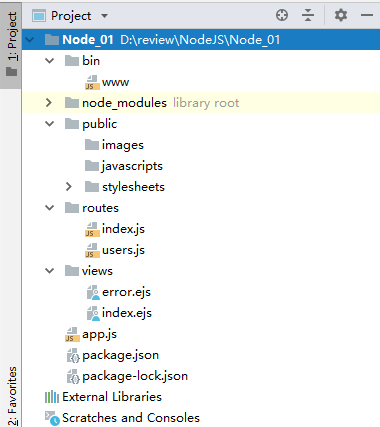
2、安装mysql依赖
既然我们需要操作mysql,那么我们肯定需要安装相关的依赖,在这里介绍三种方法安装mysql依赖。
方式一:
cnpm install mysql //使用淘宝镜像依赖mysql
方式二:
npm install mysql --save // 当前项目安装mysql依赖
方式三:
npm install mysql -g //全局安装mysql依赖
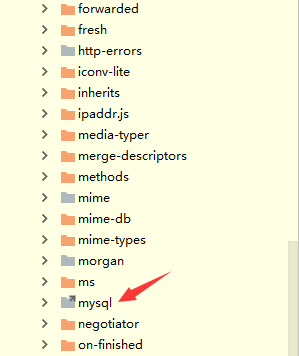
选择任意以上一种方法安装都可以,安装完成之后,我们确认一下是否真的安装成功,找到目录node_modules,这里是查看我们安装的所有依赖,可以看到mysql依赖成功了。
3、编写RESTful风格的接口
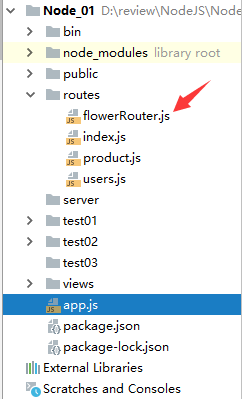
找到目录结构routes,新建flowerRouter.js文件。目录结构如下:
一、建立node.js和mysql数据库的连接
let express=require('express'); //  引入express依赖

let mysql=require('mysql')  //  引入mysql依赖

let router=express.Router();

let connection=mysql.createConnection({

    host: 'localhost',   //主机名

    user:'root',    //账号

    password:'123456',    //密码

    database:'flower'   //连接的数据库名称

});

connection.connect();   //建立连接
第一步的话主要式建立起node.js和mysql之间的桥梁。部分参数说明如下:
| 参数 | 描述 |
| host | 主机地址 (默认:localhost) |
| user | 用户名 |
| password | 密码 |
| port | 端口号 (默认:3306) |
| database | 数据库名称 |
| charset | 连接字符集(默认:'UTF8_GENERAL_CI',注意字符集的字母都要大写) |
| localAddress | 此IP用于TCP连接(可选) |
| socketPath | 连接到unix域路径,当使用 host 和 port 时会被忽略 |
| timezone | 时区(默认:'local') |
| connectTimeout | 连接超时(默认:不限制;单位:毫秒) |
| stringifyObjects | 是否序列化对象 |
| typeCast | 是否将列值转化为本地JavaScript类型值 (默认:true) |
| queryFormat | 自定义query语句格式化方法 |
| supportBigNumbers | 数据库支持bigint或decimal类型列时,需要设此option为true (默认:false) |
| bigNumberStrings | supportBigNumbers和bigNumberStrings启用 强制bigint或decimal列以JavaScript字符串类型返回(默认:false) |
| dateStrings | 强制timestamp,datetime,data类型以字符串类型返回,而不是JavaScript Date类型(默认:false) |
| debug | 开启调试(默认:false) |
| multipleStatements | 是否许一个query中有多个MySQL语句 (默认:false) |
| flags | 用于修改连接标志 |
| ssl | 使用ssl参数(与crypto.createCredenitals参数格式一至)或一个包含ssl配置文件名称的字符串,目前只捆绑Amazon RDS的配置文件 |
具体参数信息请前往:https://github.com/mysqljs/mysql
二、添加数据接口和SQL语句
//  添加鲜花信息

router.post('/addFlower',(req,res,next)=>{

    let fname=req.body.fname;  //名称

    let fprice=req.body.fprice;//  价格

    let fsituation=req.body.fsituation;    //节日

    let fuse=req.body.fuse;    //  用途

    let fhc=req.body.fhc;      //  花材

    let fword=req.body.fword;  //花语

    let addsql="insert into flowerinfo(fid,fname,fprice,fsituation,fuse,fhc,fword)values(0,?,?,?,?,?,?)";

    let addsqlParams=[fname,fprice,fsituation,fuse,fhc,fword];

    connection.query(addsql,addsqlParams,(err,result)=>{

        if(err){

            throw err;

            return;

        }

        res.send('添加成功!');

    })

})
三、修改数据接口和SQL语句
//  修改鲜花信息

router.put('/updateFlower',(req,res,next)=>{

    let id=req.body.fid;

    let fname=req.body.fname;  //名称

    let fprice=req.body.fprice;//  价格

    let fsituation=req.body.fsituation;    //节日

    let fuse=req.body.fuse;    //  用途

    let fhc=req.body.fhc;      //  花材

    let fword=req.body.fword;   //花语

    let updatesql='update flowerinfo set fname=?,fprice=?,fsituation=?,fuse=?,fhc=?,fword=? where fid=?';

    let updatesqlParams=[fname,fprice,fsituation,fuse,fhc,fword,id]

    connection.query(updatesql,updatesqlParams,(err,result)=>{

        if (err){

            throw  err;

            return false

        }

        res.send('修改成功!');

    })

})
四、查询全部数据接口和SQL语句
//  查询全部鲜花信息

router.get('/getAllFlower',(req,res,next)=>{

    connection.query('select * from flowerinfo',(err,result)=>{

        if(err){

            throw  err;

            return;

        }

        res.send(result);

    })

});
五、查询单条数据接口和SQL语句
//  根据鲜花编号查询鲜花信息

router.get('/findFlowerById',(req,res,next)=>{

    let id=req.query.id;

    let selectsql='select * from flowerinfo where fid=?';

    let selctParams=[id];

    connection.query(selectsql,selctParams,(err,result)=>{

        if (err){

            throw  err

        }

        res.send(result);

    })

})
六、删除数据接口和SQL语句
//  删除鲜花信息

router.delete('/deleteFlower',(req,res,next)=>{

    let id=req.body.id;

    let deletesql="delete from flowerinfo where fid=?";

    let deletesqlParams=[id];

    connection.query(deletesql,deletesqlParams,(err,result)=>{

        if(err){

            throw  err;

            return false;

        }

        res.send('删除成功!');

    })

})

module.exports=router;
七、全部代码:
let express=require('express'); //  引入express依赖

let mysql=require('mysql')  //  引入mysql依赖

let router=express.Router();

let connection=mysql.createConnection({

    host: 'localhost',   //主机名

    user:'root',    //账号

    password:'123456',    //密码

    database:'flower'   //连接的数据库名称

});

connection.connect();   //建立连接

//  查询全部鲜花信息

router.get('/getAllFlower',(req,res,next)=>{

    connection.query('select * from flowerinfo',(err,result)=>{

        if(err){

            throw  err;

            return;

        }

        res.send(result);

    })

});

//  添加鲜花信息

router.post('/addFlower',(req,res,next)=>{

    let fname=req.body.fname;  //名称

    let fprice=req.body.fprice;//  价格

    let fsituation=req.body.fsituation;    //节日

    let fuse=req.body.fuse;    //  用途

    let fhc=req.body.fhc;      //  花材

    let fword=req.body.fword;  //花语

    let addsql="insert into flowerinfo(fid,fname,fprice,fsituation,fuse,fhc,fword)values(0,?,?,?,?,?,?)";

    let addsqlParams=[fname,fprice,fsituation,fuse,fhc,fword];

    connection.query(addsql,addsqlParams,(err,result)=>{

        if(err){

            throw err;

            return;

        }

        res.send('添加成功!');

    })

})

//  根据鲜花编号查询鲜花信息

router.get('/findFlowerById',(req,res,next)=>{

    let id=req.query.id;

    let selectsql='select * from flowerinfo where fid=?';

    let selctParams=[id];

    connection.query(selectsql,selctParams,(err,result)=>{

        if (err){

            throw  err

        }

        res.send(result);

    })

})

//  修改鲜花信息

router.put('/updateFlower',(req,res,next)=>{

    let id=req.body.fid;

    let fname=req.body.fname;  //名称

    let fprice=req.body.fprice;//  价格

    let fsituation=req.body.fsituation;    //节日

    let fuse=req.body.fuse;    //  用途

    let fhc=req.body.fhc;      //  花材

    let fword=req.body.fword;   //花语

    let updatesql='update flowerinfo set fname=?,fprice=?,fsituation=?,fuse=?,fhc=?,fword=? where fid=?';

    let updatesqlParams=[fname,fprice,fsituation,fuse,fhc,fword,id]

    connection.query(updatesql,updatesqlParams,(err,result)=>{

        if (err){

            throw  err;

            return false

        }

        res.send('修改成功!');

    })

})

//  删除鲜花信息

router.delete('/deleteFlower',(req,res,next)=>{

    let id=req.body.id;

    let deletesql="delete from flowerinfo where fid=?";

    let deletesqlParams=[id];

    connection.query(deletesql,deletesqlParams,(err,result)=>{

        if(err){

            throw  err;

            return false;

        }

        res.send('删除成功!');

    })

})

module.exports=router;
这里有个重大的bug,就是我们连接完之后没有关闭连接,这样就会资源的浪费,占用cpu。这里大家可以想办法去解决,由于我们这里是测试的,所以没有设置关闭连接。
注意:结尾一定要写module.exports=router
4、注册router和设置跨域请求
找到目录结构下的app.js文件注册路由和跨域请求设置。

app.js文件代码
var createError = require('http-errors');

var express = require('express');

var path = require('path');

var cookieParser = require('cookie-parser');

var logger = require('morgan');

var indexRouter = require('./routes/index');

var usersRouter = require('./routes/users');

var productRouter=require('./routes/product');

var flowerRouter=require('./routes/flowerRouter')

var app = express();

// view engine setup

app.set('views', path.join(__dirname, 'views'));

app.set('view engine', 'ejs');

app.use(logger('dev'));

app.use(express.json());

app.use(express.urlencoded({ extended: false }));

app.use(cookieParser());

app.use(express.static(path.join(__dirname, 'public')));

//  设置跨域请求

app.all('*', function(req, res, next) {

    res.header("Access-Control-Allow-Origin", "*");

    res.header("Access-Control-Allow-Headers", "content-type");

    res.header("Access-Control-Allow-Methods", "PUT,POST,GET,DELETE,OPTIONS");

    res.header("X-Powered-By", ' 3.2.1');

    res.header("Content-Type", "application/json;charset=utf-8");

    if(req.method == "OPTIONS") {

        res.send("200");

    } else {

        next();

    }

});

app.use('/', indexRouter);

app.use('/users', usersRouter);

app.use('/product',productRouter);

app.use('/flower',flowerRouter);

// catch 404 and forward to error handler

app.use(function(req, res, next) {

  next(createError(404));

});

// error handler

app.use(function(err, req, res, next) {

  // set locals, only providing error in development

  res.locals.message = err.message;

  res.locals.error = req.app.get('env') === 'development' ? err : {};

  // render the error page

  res.status(err.status || 500);

  res.render('error');

});

module.exports = app;
红色标注的表示新增的路由注册和添加的跨域请求。
跨域代码:
//  设置跨域请求

app.all('*', function(req, res, next) {

    res.header("Access-Control-Allow-Origin", "*");

    res.header("Access-Control-Allow-Headers", "content-type");

    res.header("Access-Control-Allow-Methods", "PUT,POST,GET,DELETE,OPTIONS");

    res.header("X-Powered-By", ' 3.2.1');

    res.header("Content-Type", "application/json;charset=utf-8");

    if(req.method == "OPTIONS") {

        res.send("200");

    } else {

        next();

    }

});
前端
前端方面主要使用两种方法操作数据,一种是ajax,另一种是axios,将所需要用到的插件引入。目录结构如下:

在这里我们引入的vue.js,axios,jQuey,以及新建两个html文件,为了方便命名上已经规定了。接下来就是数据操作了。
vue2整合ajax
一、查询全部鲜花信息
<!DOCTYPE html>

<html lang="en">

<head>

    <meta charset="UTF-8">

    <title>ajax和vue操作mysql</title>

</head>

<body>

<div id="app">

    <table border="1" width="800px" style="margin: 0 auto" cellspacing="0" cellpadding="0">

        <tr>

            <td>编号</td>

            <td>名称</td>

            <td>价格</td>

            <td>使用节日</td>

            <td>鲜花用途</td>

            <td>鲜花花材</td>

            <td>花语</td>

            <td>操作</td>

        </tr>

            <template v-for="(item,index) of flowerArray">

                <tr>

                    <td>{{index+1}}</td>

                    <td>{{item.fname}}</td>

                    <td>{{item.fprice}}</td>

                    <td>{{item.fsituation}}</td>

                    <td>{{item.fuse}}</td>

                    <td>{{item.fhc}}</td>

                    <td>{{item.fword}}</td>

                    <td>

                        <input type="button" :data-id="item.fid" value="删除" @click="deleteFlower(item.fid)">

                        <input type="button" :data-id="item.fid" value="修改" @click="findFlowerById(item.fid)">

                    </td>

                </tr>

            </template>

    </table>

    <form>

        名称:

        <input type="text" v-model="fname"><br>

        价格:

        <input type="text" v-model="fprice"><br>

        节日:

        <input type="text" v-model="fsituation"><br>

        用途:

        <input type="text" v-model="fuse"><br>

        花材:

        <input type="text" v-model="fhc"><br>

        花语:

        <input type="text" v-model="fword"><br>

        <span style="color: red">{{result}}</span><br>

        <input type="button" @click="addFlower" value="添加鲜花">

        <input type="button" @click="updateFlower" value="修改鲜花">

    </form>

</div>

<script src="javascripts/jquery-3.3.1.min.js"></script>

<script src="javascripts/vue.js"></script>

<script>

    var vm=new Vue({

        el:'#app',

        data:{

            fid:'',

            fname:'',

            fprice:'',

            fsituation:'',

            fuse:'',

            fhc:'',

            fword:'',

            result:'',

            flowerArray:[],

        },

        mounted(){

            this.findAllFlower();

        },

        methods:{

          findFlowerById:function (id) {    //根据编号查询鲜花信息

          },

            deleteFlower:function (id) {    //删除鲜花信息

            },

            addFlower:function () {         //  添加鲜花信息

            },

            updateFlower:function (id) {      //  修改鲜花信息

            },

            findAllFlower:function () { //  查询全部鲜花信息

                $.ajax({

                    url:'http://localhost:3000/flower/getAllFlower',

                    type:"GET",

                    dataType:"json"

                }).done((data)=>{

                    this.flowerArray=data;

                })

            }

        },

    })

</script>

</body>

</html>
二、根据条件查询鲜花信息
<!DOCTYPE html>

<html lang="en">

<head>

    <meta charset="UTF-8">

    <title>ajax和vue操作mysql</title>

</head>

<body>

<div id="app">

    <table border="1" width="800px" style="margin: 0 auto" cellspacing="0" cellpadding="0">

        <tr>

            <td>编号</td>

            <td>名称</td>

            <td>价格</td>

            <td>使用节日</td>

            <td>鲜花用途</td>

            <td>鲜花花材</td>

            <td>花语</td>

            <td>操作</td>

        </tr>

            <template v-for="(item,index) of flowerArray">

                <tr>

                    <td>{{index+1}}</td>

                    <td>{{item.fname}}</td>

                    <td>{{item.fprice}}</td>

                    <td>{{item.fsituation}}</td>

                    <td>{{item.fuse}}</td>

                    <td>{{item.fhc}}</td>

                    <td>{{item.fword}}</td>

                    <td>

                        <input type="button" :data-id="item.fid" value="删除" @click="deleteFlower(item.fid)">

                        <input type="button" :data-id="item.fid" value="修改" @click="findFlowerById(item.fid)">

                    </td>

                </tr>

            </template>

    </table>

    <form>

        名称:

        <input type="text" v-model="fname"><br>

        价格:

        <input type="text" v-model="fprice"><br>

        节日:

        <input type="text" v-model="fsituation"><br>

        用途:

        <input type="text" v-model="fuse"><br>

        花材:

        <input type="text" v-model="fhc"><br>

        花语:

        <input type="text" v-model="fword"><br>

        <span style="color: red">{{result}}</span><br>

        <input type="button" @click="addFlower" value="添加鲜花">

        <input type="button" @click="updateFlower" value="修改鲜花">

    </form>

</div>

<script src="javascripts/jquery-3.3.1.min.js"></script>

<script src="javascripts/vue.js"></script>

<script>

    var vm=new Vue({

        el:'#app',

        data:{

            fid:'',

            fname:'',

            fprice:'',

            fsituation:'',

            fuse:'',

            fhc:'',

            fword:'',

            result:'',

            flowerArray:[],

        },

        mounted(){

            this.findAllFlower();

        },

        methods:{

          findFlowerById:function (id) {    //根据编号查询鲜花信息

              this.fid=id;

              $.ajax({

                  url:'http://localhost:3000/flower/findFlowerById',

                  type:'GET',

                  data:{id:id}

              }).done((data)=>{

                  this.fname=data[0].fname;

                  this.fprice=data[0].fprice;

                  this.fsituation=data[0].fsituation;

                  this.fuse=data[0].fuse;

                  this.fhc=data[0].fhc;

                  this.fword=data[0].fword;

              })

          },

            deleteFlower:function (id) {    //删除鲜花信息

            },

            addFlower:function () {         //  添加鲜花信息

            },

            updateFlower:function (id) {      //  修改鲜花信息

            },

            findAllFlower:function () { //  查询全部鲜花信息

                $.ajax({

                    url:'http://localhost:3000/flower/getAllFlower',

                    type:"GET",

                    dataType:"json"

                }).done((data)=>{

                    this.flowerArray=data;

                })

            }

        },

    })

</script>

</body>

</html>
三、添加鲜花信息
<!DOCTYPE html>

<html lang="en">

<head>

    <meta charset="UTF-8">

    <title>ajax和vue操作mysql</title>

</head>

<body>

<div id="app">

    <table border="1" width="800px" style="margin: 0 auto" cellspacing="0" cellpadding="0">

        <tr>

            <td>编号</td>

            <td>名称</td>

            <td>价格</td>

            <td>使用节日</td>

            <td>鲜花用途</td>

            <td>鲜花花材</td>

            <td>花语</td>

            <td>操作</td>

        </tr>

            <template v-for="(item,index) of flowerArray">

                <tr>

                    <td>{{index+1}}</td>

                    <td>{{item.fname}}</td>

                    <td>{{item.fprice}}</td>

                    <td>{{item.fsituation}}</td>

                    <td>{{item.fuse}}</td>

                    <td>{{item.fhc}}</td>

                    <td>{{item.fword}}</td>

                    <td>

                        <input type="button" :data-id="item.fid" value="删除" @click="deleteFlower(item.fid)">

                        <input type="button" :data-id="item.fid" value="修改" @click="findFlowerById(item.fid)">

                    </td>

                </tr>

            </template>

    </table>

    <form>

        名称:

        <input type="text" v-model="fname"><br>

        价格:

        <input type="text" v-model="fprice"><br>

        节日:

        <input type="text" v-model="fsituation"><br>

        用途:

        <input type="text" v-model="fuse"><br>

        花材:

        <input type="text" v-model="fhc"><br>

        花语:

        <input type="text" v-model="fword"><br>

        <span style="color: red">{{result}}</span><br>

        <input type="button" @click="addFlower" value="添加鲜花">

        <input type="button" @click="updateFlower" value="修改鲜花">

    </form>

</div>

<script src="javascripts/jquery-3.3.1.min.js"></script>

<script src="javascripts/vue.js"></script>

<script>

    var vm=new Vue({

        el:'#app',

        data:{

            fid:'',

            fname:'',

            fprice:'',

            fsituation:'',

            fuse:'',

            fhc:'',

            fword:'',

            result:'',

            flowerArray:[],

        },

        mounted(){

            this.findAllFlower();

        },

        methods:{

          findFlowerById:function (id) {    //根据编号查询鲜花信息

          },

            deleteFlower:function (id) {    //删除鲜花信息

            },

            addFlower:function () {         //  添加鲜花信息

                $.ajax({

                    url:'http://localhost:3000/flower/addFlower',

                    type:'POST',

                    data:{

                        fname:this.fname,

                        fprice:this.fprice,

                        fsituation:this.fsituation,

                        fuse:this.fuse,

                        fhc:this.fhc,

                        fword:this.fword,

                    }

                }).done((data)=>{

                })

            },

            updateFlower:function (id) {      //  修改鲜花信息

            },

            findAllFlower:function () { //  查询全部鲜花信息

                $.ajax({

                    url:'http://localhost:3000/flower/getAllFlower',

                    type:"GET",

                    dataType:"json"

                }).done((data)=>{

                    this.flowerArray=data;

                })

            }

        },

    })

</script>

</body>

</html>
四、修改鲜花信息
<!DOCTYPE html>

<html lang="en">

<head>

    <meta charset="UTF-8">

    <title>ajax和vue操作mysql</title>

</head>

<body>

<div id="app">

    <table border="1" width="800px" style="margin: 0 auto" cellspacing="0" cellpadding="0">

        <tr>

            <td>编号</td>

            <td>名称</td>

            <td>价格</td>

            <td>使用节日</td>

            <td>鲜花用途</td>

            <td>鲜花花材</td>

            <td>花语</td>

            <td>操作</td>

        </tr>

            <template v-for="(item,index) of flowerArray">

                <tr>

                    <td>{{index+1}}</td>

                    <td>{{item.fname}}</td>

                    <td>{{item.fprice}}</td>

                    <td>{{item.fsituation}}</td>

                    <td>{{item.fuse}}</td>

                    <td>{{item.fhc}}</td>

                    <td>{{item.fword}}</td>

                    <td>

                        <input type="button" :data-id="item.fid" value="删除" @click="deleteFlower(item.fid)">

                        <input type="button" :data-id="item.fid" value="修改" @click="findFlowerById(item.fid)">

                    </td>

                </tr>

            </template>

    </table>

    <form>

        名称:

        <input type="text" v-model="fname"><br>

        价格:

        <input type="text" v-model="fprice"><br>

        节日:

        <input type="text" v-model="fsituation"><br>

        用途:

        <input type="text" v-model="fuse"><br>

        花材:

        <input type="text" v-model="fhc"><br>

        花语:

        <input type="text" v-model="fword"><br>

        <span style="color: red">{{result}}</span><br>

        <input type="button" @click="addFlower" value="添加鲜花">

        <input type="button" @click="updateFlower" value="修改鲜花">

    </form>

</div>

<script src="javascripts/jquery-3.3.1.min.js"></script>

<script src="javascripts/vue.js"></script>

<script>

    var vm=new Vue({

        el:'#app',

        data:{

            fid:'',

            fname:'',

            fprice:'',

            fsituation:'',

            fuse:'',

            fhc:'',

            fword:'',

            result:'',

            flowerArray:[],

        },

        mounted(){

            this.findAllFlower();

        },

        methods:{

          findFlowerById:function (id) {    //根据编号查询鲜花信息

              this.fid=id;

              $.ajax({

                  url:'http://localhost:3000/flower/findFlowerById',

                  type:'GET',

                  data:{id:id}

              }).done((data)=>{

                  this.fname=data[0].fname;

                  this.fprice=data[0].fprice;

                  this.fsituation=data[0].fsituation;

                  this.fuse=data[0].fuse;

                  this.fhc=data[0].fhc;

                  this.fword=data[0].fword;

              })

          },

            deleteFlower:function (id) {    //删除鲜花信息

            },

            addFlower:function () {         //  添加鲜花信息

            },

            updateFlower:function (id) {      //  修改鲜花信息

                $.ajax({

                    url:'http://localhost:3000/flower/updateFlower',

                    type:'PUT',

                    data:{

                        fid:this.fid,

                        fname:this.fname,

                        fprice:this.fprice,

                        fsituation:this.fsituation,

                        fuse:this.fuse,

                        fhc:this.fhc,

                        fword:this.fword,

                    },

                }).done((data)=>{

                })

            },

            findAllFlower:function () { //  查询全部鲜花信息

                $.ajax({

                    url:'http://localhost:3000/flower/getAllFlower',

                    type:"GET",

                    dataType:"json"

                }).done((data)=>{

                    this.flowerArray=data;

                })

            }

        },

    })

</script>

</body>

</html>
五、删除鲜花信息
<!DOCTYPE html>

<html lang="en">

<head>

    <meta charset="UTF-8">

    <title>ajax和vue操作mysql</title>

</head>

<body>

<div id="app">

    <table border="1" width="800px" style="margin: 0 auto" cellspacing="0" cellpadding="0">

        <tr>

            <td>编号</td>

            <td>名称</td>

            <td>价格</td>

            <td>使用节日</td>

            <td>鲜花用途</td>

            <td>鲜花花材</td>

            <td>花语</td>

            <td>操作</td>

        </tr>

            <template v-for="(item,index) of flowerArray">

                <tr>

                    <td>{{index+1}}</td>

                    <td>{{item.fname}}</td>

                    <td>{{item.fprice}}</td>

                    <td>{{item.fsituation}}</td>

                    <td>{{item.fuse}}</td>

                    <td>{{item.fhc}}</td>

                    <td>{{item.fword}}</td>

                    <td>

                        <input type="button" :data-id="item.fid" value="删除" @click="deleteFlower(item.fid)">

                        <input type="button" :data-id="item.fid" value="修改" @click="findFlowerById(item.fid)">

                    </td>

                </tr>

            </template>

    </table>

    <form>

        名称:

        <input type="text" v-model="fname"><br>

        价格:

        <input type="text" v-model="fprice"><br>

        节日:

        <input type="text" v-model="fsituation"><br>

        用途:

        <input type="text" v-model="fuse"><br>

        花材:

        <input type="text" v-model="fhc"><br>

        花语:

        <input type="text" v-model="fword"><br>

        <span style="color: red">{{result}}</span><br>

        <input type="button" @click="addFlower" value="添加鲜花">

        <input type="button" @click="updateFlower" value="修改鲜花">

    </form>

</div>

<script src="javascripts/jquery-3.3.1.min.js"></script>

<script src="javascripts/vue.js"></script>

<script>

    var vm=new Vue({

        el:'#app',

        data:{

            fid:'',

            fname:'',

            fprice:'',

            fsituation:'',

            fuse:'',

            fhc:'',

            fword:'',

            result:'',

            flowerArray:[],

        },

        mounted(){

            this.findAllFlower();

        },

        methods:{

          findFlowerById:function (id) {    //根据编号查询鲜花信息

          },

            deleteFlower:function (id) {    //删除鲜花信息

                $.ajax({

                    url:'http://localhost:3000/flower/deleteFlower',

                    type:"DELETE",

                    data:{

                        id:id

                    },

                }).done((data)=>{

                })

            },

            addFlower:function () {         //  添加鲜花信息

            },

            updateFlower:function (id) {      //  修改鲜花信息

            },

            findAllFlower:function () { //  查询全部鲜花信息

                $.ajax({

                    url:'http://localhost:3000/flower/getAllFlower',

                    type:"GET",

                    dataType:"json"

                }).done((data)=>{

                    this.flowerArray=data;

                })

            }

        },

    })

</script>

</body>

</html>
六、全部代码
<!DOCTYPE html>

<html lang="en">

<head>

    <meta charset="UTF-8">

    <title>ajax和vue操作mysql</title>

</head>

<body>

<div id="app">

    <table border="1" width="800px" style="margin: 0 auto" cellspacing="0" cellpadding="0">

        <tr>

            <td>编号</td>

            <td>名称</td>

            <td>价格</td>

            <td>使用节日</td>

            <td>鲜花用途</td>

            <td>鲜花花材</td>

            <td>花语</td>

            <td>操作</td>

        </tr>

            <template v-for="(item,index) of flowerArray">

                <tr>

                    <td>{{index+1}}</td>

                    <td>{{item.fname}}</td>

                    <td>{{item.fprice}}</td>

                    <td>{{item.fsituation}}</td>

                    <td>{{item.fuse}}</td>

                    <td>{{item.fhc}}</td>

                    <td>{{item.fword}}</td>

                    <td>

                        <input type="button" :data-id="item.fid" value="删除" @click="deleteFlower(item.fid)">

                        <input type="button" :data-id="item.fid" value="修改" @click="findFlowerById(item.fid)">

                    </td>

                </tr>

            </template>

    </table>

    <form>

        名称:

        <input type="text" v-model="fname"><br>

        价格:

        <input type="text" v-model="fprice"><br>

        节日:

        <input type="text" v-model="fsituation"><br>

        用途:

        <input type="text" v-model="fuse"><br>

        花材:

        <input type="text" v-model="fhc"><br>

        花语:

        <input type="text" v-model="fword"><br>

        <span style="color: red">{{result}}</span><br>

        <input type="button" @click="addFlower" value="添加鲜花">

        <input type="button" @click="updateFlower" value="修改鲜花">

    </form>

</div>

<script src="javascripts/jquery-3.3.1.min.js"></script>

<script src="javascripts/vue.js"></script>

<script>

    var vm=new Vue({

        el:'#app',

        data:{

            fid:'',

            fname:'',

            fprice:'',

            fsituation:'',

            fuse:'',

            fhc:'',

            fword:'',

            result:'',

            flowerArray:[],

        },

        mounted(){

            this.findAllFlower();

        },

        methods:{

          findFlowerById:function (id) {    //根据编号查询鲜花信息

              this.fid=id;

              $.ajax({

                  url:'http://localhost:3000/flower/findFlowerById',

                  type:'GET',

                  data:{id:id}

              }).done((data)=>{

                  this.fname=data[0].fname;

                  this.fprice=data[0].fprice;

                  this.fsituation=data[0].fsituation;

                  this.fuse=data[0].fuse;

                  this.fhc=data[0].fhc;

                  this.fword=data[0].fword;

              })

          },

            deleteFlower:function (id) {    //删除鲜花信息

                $.ajax({

                    url:'http://localhost:3000/flower/deleteFlower',

                    type:"DELETE",

                    data:{

                        id:id

                    },

                }).done((data)=>{

                })

            },

            addFlower:function () {         //  添加鲜花信息

                $.ajax({

                    url:'http://localhost:3000/flower/addFlower',

                    type:'POST',

                    data:{

                        fname:this.fname,

                        fprice:this.fprice,

                        fsituation:this.fsituation,

                        fuse:this.fuse,

                        fhc:this.fhc,

                        fword:this.fword,

                    }

                }).done((data)=>{

                })

            },

            updateFlower:function (id) {      //  修改鲜花信息

                $.ajax({

                    url:'http://localhost:3000/flower/updateFlower',

                    type:'PUT',

                    data:{

                        fid:this.fid,

                        fname:this.fname,

                        fprice:this.fprice,

                        fsituation:this.fsituation,

                        fuse:this.fuse,

                        fhc:this.fhc,

                        fword:this.fword,

                    },

                }).done((data)=>{

                })

            },

            findAllFlower:function () { //  查询全部鲜花信息

                $.ajax({

                    url:'http://localhost:3000/flower/getAllFlower',

                    type:"GET",

                    dataType:"json"

                }).done((data)=>{

                    this.flowerArray=data;

                })

            }

        },

    })

</script>

</body>

</html>
vue2整合axios
为了更加方便的实现功能和理解,在这里我分步骤为大家讲解。争取有一个好的效果。vue整合axios其实和vue整合ajax差不多,如果想学习axios的相关文章,可以参考我的这一篇博客https://www.cnblogs.com/jjgw/p/12079892.html,这里面涉及关于axios的使用大部分讲解的都非常详细。欢迎大家评论和提出问题。
一、查询全部鲜花信息
<!DOCTYPE html>

<html lang="en">

<head>

    <meta charset="UTF-8">

    <title>axios和vue操作mysql</title>

</head>

<body>

<div id="app">

    <table border="1" width="800px" style="margin: 0 auto" cellspacing="0" cellpadding="0">

        <tr>

            <td>编号</td>

            <td>名称</td>

            <td>价格</td>

            <td>使用节日</td>

            <td>鲜花用途</td>

            <td>鲜花花材</td>

            <td>花语</td>

            <td>操作</td>

        </tr>

        <template v-for="(item,index) of flowerArray">

            <tr>

                <td>{{index+1}}</td>

                <td>{{item.fname}}</td>

                <td>{{item.fprice}}</td>

                <td>{{item.fsituation}}</td>

                <td>{{item.fuse}}</td>

                <td>{{item.fhc}}</td>

                <td>{{item.fword}}</td>

                <td>

                    <input type="button" :data-id="item.fid" value="删除" @click="deleteFlower(item.fid)">

                    <input type="button" :data-id="item.fid" value="修改" @click="findFlowerById(item.fid)">

                </td>

            </tr>

        </template>

    </table>

    <form>

        名称:

        <input type="text" v-model="fname"><br>

        价格:

        <input type="text" v-model="fprice"><br>

        节日:

        <input type="text" v-model="fsituation"><br>

        用途:

        <input type="text" v-model="fuse"><br>

        花材:

        <input type="text" v-model="fhc"><br>

        花语:

        <input type="text" v-model="fword"><br>

        <span style="color: red">{{result}}</span><br>

        <input type="button" @click="addFlower" value="添加鲜花">

        <input type="button" @click="updateFlower" value="修改鲜花">

    </form>

</div>

<script src="javascripts/vue.js"></script>

<script src="javascripts/axios.js"></script>

<script>

    var vm=new Vue({

        el:'#app',

        data:{

            fid:'',

            fname:'',

            fprice:'',

            fsituation:'',

            fuse:'',

            fhc:'',

            fword:'',

            result:'',

            flowerArray:[],

        },

        mounted(){

            this.findAllFlower();

        },

        methods:{

            findFlowerById:function (id) {    //根据编号查询鲜花信息

            },

            deleteFlower:function (id) {    //删除鲜花信息

            },

            addFlower:function () {         //  添加鲜花信息

            },

            updateFlower:function (id) {      //  修改鲜花信息

            },

            findAllFlower:function () { //  查询全部鲜花信息

                axios({

                    url:'http://localhost:3000/flower/getAllFlower',

                    method:"GET",

                    dataType:"json"

                }).then((data)=>{

                    this.flowerArray=data.data;

                })

            }

        },

    })

</script>

</body>

</html>
二、根据条件查询鲜花信息
<!DOCTYPE html>

<html lang="en">

<head>

    <meta charset="UTF-8">

    <title>axios和vue操作mysql</title>

</head>

<body>

<div id="app">

    <table border="1" width="800px" style="margin: 0 auto" cellspacing="0" cellpadding="0">

        <tr>

            <td>编号</td>

            <td>名称</td>

            <td>价格</td>

            <td>使用节日</td>

            <td>鲜花用途</td>

            <td>鲜花花材</td>

            <td>花语</td>

            <td>操作</td>

        </tr>

        <template v-for="(item,index) of flowerArray">

            <tr>

                <td>{{index+1}}</td>

                <td>{{item.fname}}</td>

                <td>{{item.fprice}}</td>

                <td>{{item.fsituation}}</td>

                <td>{{item.fuse}}</td>

                <td>{{item.fhc}}</td>

                <td>{{item.fword}}</td>

                <td>

                    <input type="button" :data-id="item.fid" value="删除" @click="deleteFlower(item.fid)">

                    <input type="button" :data-id="item.fid" value="修改" @click="findFlowerById(item.fid)">

                </td>

            </tr>

        </template>

    </table>

    <form>

        名称:

        <input type="text" v-model="fname"><br>

        价格:

        <input type="text" v-model="fprice"><br>

        节日:

        <input type="text" v-model="fsituation"><br>

        用途:

        <input type="text" v-model="fuse"><br>

        花材:

        <input type="text" v-model="fhc"><br>

        花语:

        <input type="text" v-model="fword"><br>

        <span style="color: red">{{result}}</span><br>

        <input type="button" @click="addFlower" value="添加鲜花">

        <input type="button" @click="updateFlower" value="修改鲜花">

    </form>

</div>

<script src="javascripts/vue.js"></script>

<script src="javascripts/axios.js"></script>

<script>

    var vm=new Vue({

        el:'#app',

        data:{

            fid:'',

            fname:'',

            fprice:'',

            fsituation:'',

            fuse:'',

            fhc:'',

            fword:'',

            result:'',

            flowerArray:[],

        },

        mounted(){

            this.findAllFlower();

        },

        methods:{

            findFlowerById:function (id) {    //根据编号查询鲜花信息

                this.fid=id;

                axios({

                    url:'http://localhost:3000/flower/findFlowerById',

                    type:'GET',

                    params:{id:id}

                }).then((data)=>{

                    this.fname=data.data[0].fname;

                    this.fprice=data.data[0].fprice;

                    this.fsituation=data.data[0].fsituation;

                    this.fuse=data.data[0].fuse;

                    this.fhc=data.data[0].fhc;

                    this.fword=data.data[0].fword;

                })

            },

            deleteFlower:function (id) {    //删除鲜花信息

            },

            addFlower:function () {         //  添加鲜花信息

            },

            updateFlower:function (id) {      //  修改鲜花信息

            },

            findAllFlower:function () { //  查询全部鲜花信息

                axios({

                    url:'http://localhost:3000/flower/getAllFlower',

                    method:"GET",

                    dataType:"json"

                }).then((data)=>{

                    this.flowerArray=data.data;

                })

            }

        },

    })

</script>

</body>

</html>
三、添加鲜花信息
<!DOCTYPE html>

<html lang="en">

<head>

    <meta charset="UTF-8">

    <title>axios和vue操作mysql</title>

</head>

<body>

<div id="app">

    <table border="1" width="800px" style="margin: 0 auto" cellspacing="0" cellpadding="0">

        <tr>

            <td>编号</td>

            <td>名称</td>

            <td>价格</td>

            <td>使用节日</td>

            <td>鲜花用途</td>

            <td>鲜花花材</td>

            <td>花语</td>

            <td>操作</td>

        </tr>

        <template v-for="(item,index) of flowerArray">

            <tr>

                <td>{{index+1}}</td>

                <td>{{item.fname}}</td>

                <td>{{item.fprice}}</td>

                <td>{{item.fsituation}}</td>

                <td>{{item.fuse}}</td>

                <td>{{item.fhc}}</td>

                <td>{{item.fword}}</td>

                <td>

                    <input type="button" :data-id="item.fid" value="删除" @click="deleteFlower(item.fid)">

                    <input type="button" :data-id="item.fid" value="修改" @click="findFlowerById(item.fid)">

                </td>

            </tr>

        </template>

    </table>

    <form>

        名称:

        <input type="text" v-model="fname"><br>

        价格:

        <input type="text" v-model="fprice"><br>

        节日:

        <input type="text" v-model="fsituation"><br>

        用途:

        <input type="text" v-model="fuse"><br>

        花材:

        <input type="text" v-model="fhc"><br>

        花语:

        <input type="text" v-model="fword"><br>

        <span style="color: red">{{result}}</span><br>

        <input type="button" @click="addFlower" value="添加鲜花">

        <input type="button" @click="updateFlower" value="修改鲜花">

    </form>

</div>

<script src="javascripts/vue.js"></script>

<script src="javascripts/axios.js"></script>

<script>

    var vm=new Vue({

        el:'#app',

        data:{

            fid:'',

            fname:'',

            fprice:'',

            fsituation:'',

            fuse:'',

            fhc:'',

            fword:'',

            result:'',

            flowerArray:[],

        },

        mounted(){

            this.findAllFlower();

        },

        methods:{

            findFlowerById:function (id) {    //根据编号查询鲜花信息

            },

            deleteFlower:function (id) {    //删除鲜花信息

            },

            addFlower:function () {         //  添加鲜花信息

                axios({

                    url:'http://localhost:3000/flower/addFlower',

                    method:'POST',

                    data:{

                        fname:this.fname,

                        fprice:this.fprice,

                        fsituation:this.fsituation,

                        fuse:this.fuse,

                        fhc:this.fhc,

                        fword:this.fword,

                    }

                }).then((data)=>{

                    this.result=data.data;

                })

            },

            updateFlower:function (id) {      //  修改鲜花信息

            },

            findAllFlower:function () { //  查询全部鲜花信息

                axios({

                    url:'http://localhost:3000/flower/getAllFlower',

                    method:"GET",

                    dataType:"json"

                }).then((data)=>{

                    this.flowerArray=data.data;

                })

            }

        },

    })

</script>

</body>

</html>
四、修改鲜花信息
<!DOCTYPE html>

<html lang="en">

<head>

    <meta charset="UTF-8">

    <title>axios和vue操作mysql</title>

</head>

<body>

<div id="app">

    <table border="1" width="800px" style="margin: 0 auto" cellspacing="0" cellpadding="0">

        <tr>

            <td>编号</td>

            <td>名称</td>

            <td>价格</td>

            <td>使用节日</td>

            <td>鲜花用途</td>

            <td>鲜花花材</td>

            <td>花语</td>

            <td>操作</td>

        </tr>

        <template v-for="(item,index) of flowerArray">

            <tr>

                <td>{{index+1}}</td>

                <td>{{item.fname}}</td>

                <td>{{item.fprice}}</td>

                <td>{{item.fsituation}}</td>

                <td>{{item.fuse}}</td>

                <td>{{item.fhc}}</td>

                <td>{{item.fword}}</td>

                <td>

                    <input type="button" :data-id="item.fid" value="删除" @click="deleteFlower(item.fid)">

                    <input type="button" :data-id="item.fid" value="修改" @click="findFlowerById(item.fid)">

                </td>

            </tr>

        </template>

    </table>

    <form>

        名称:

        <input type="text" v-model="fname"><br>

        价格:

        <input type="text" v-model="fprice"><br>

        节日:

        <input type="text" v-model="fsituation"><br>

        用途:

        <input type="text" v-model="fuse"><br>

        花材:

        <input type="text" v-model="fhc"><br>

        花语:

        <input type="text" v-model="fword"><br>

        <span style="color: red">{{result}}</span><br>

        <input type="button" @click="addFlower" value="添加鲜花">

        <input type="button" @click="updateFlower" value="修改鲜花">

    </form>

</div>

<script src="javascripts/vue.js"></script>

<script src="javascripts/axios.js"></script>

<script>

    var vm=new Vue({

        el:'#app',

        data:{

            fid:'',

            fname:'',

            fprice:'',

            fsituation:'',

            fuse:'',

            fhc:'',

            fword:'',

            result:'',

            flowerArray:[],

        },

        mounted(){

            this.findAllFlower();

        },

        methods:{

            findFlowerById:function (id) {    //根据编号查询鲜花信息

                this.fid=id;

                axios({

                    url:'http://localhost:3000/flower/findFlowerById',

                    type:'GET',

                    params:{id:id}

                }).then((data)=>{

                    this.fname=data.data[0].fname;

                    this.fprice=data.data[0].fprice;

                    this.fsituation=data.data[0].fsituation;

                    this.fuse=data.data[0].fuse;

                    this.fhc=data.data[0].fhc;

                    this.fword=data.data[0].fword;

                })

            },

            deleteFlower:function (id) {    //删除鲜花信息

            },

            addFlower:function () {         //  添加鲜花信息

            },

            updateFlower:function (id) {      //  修改鲜花信息

                axios({

                    url:'http://localhost:3000/flower/updateFlower',

                    method:'PUT',

                    data:{

                        fid:this.fid,

                        fname:this.fname,

                        fprice:this.fprice,

                        fsituation:this.fsituation,

                        fuse:this.fuse,

                        fhc:this.fhc,

                        fword:this.fword,

                    },

                }).then((data)=>{

                    this.result=data.data;

                })

            },

            findAllFlower:function () { //  查询全部鲜花信息

                axios({

                    url:'http://localhost:3000/flower/getAllFlower',

                    method:"GET",

                    dataType:"json"

                }).then((data)=>{

                    this.flowerArray=data.data;

                })

            }

        },

    })

</script>

</body>

</html>
五、删除鲜花信息
<!DOCTYPE html>

<html lang="en">

<head>

    <meta charset="UTF-8">

    <title>axios和vue操作mysql</title>

</head>

<body>

<div id="app">

    <table border="1" width="800px" style="margin: 0 auto" cellspacing="0" cellpadding="0">

        <tr>

            <td>编号</td>

            <td>名称</td>

            <td>价格</td>

            <td>使用节日</td>

            <td>鲜花用途</td>

            <td>鲜花花材</td>

            <td>花语</td>

            <td>操作</td>

        </tr>

        <template v-for="(item,index) of flowerArray">

            <tr>

                <td>{{index+1}}</td>

                <td>{{item.fname}}</td>

                <td>{{item.fprice}}</td>

                <td>{{item.fsituation}}</td>

                <td>{{item.fuse}}</td>

                <td>{{item.fhc}}</td>

                <td>{{item.fword}}</td>

                <td>

                    <input type="button" :data-id="item.fid" value="删除" @click="deleteFlower(item.fid)">

                    <input type="button" :data-id="item.fid" value="修改" @click="findFlowerById(item.fid)">

                </td>

            </tr>

        </template>

    </table>

    <form>

        名称:

        <input type="text" v-model="fname"><br>

        价格:

        <input type="text" v-model="fprice"><br>

        节日:

        <input type="text" v-model="fsituation"><br>

        用途:

        <input type="text" v-model="fuse"><br>

        花材:

        <input type="text" v-model="fhc"><br>

        花语:

        <input type="text" v-model="fword"><br>

        <span style="color: red">{{result}}</span><br>

        <input type="button" @click="addFlower" value="添加鲜花">

        <input type="button" @click="updateFlower" value="修改鲜花">

    </form>

</div>

<script src="javascripts/vue.js"></script>

<script src="javascripts/axios.js"></script>

<script>

    var vm=new Vue({

        el:'#app',

        data:{

            fid:'',

            fname:'',

            fprice:'',

            fsituation:'',

            fuse:'',

            fhc:'',

            fword:'',

            result:'',

            flowerArray:[],

        },

        mounted(){

            this.findAllFlower();

        },

        methods:{

            findFlowerById:function (id) {    //根据编号查询鲜花信息

            },

            deleteFlower:function (id) {    //删除鲜花信息

                axios({

                    url:'http://localhost:3000/flower/deleteFlower',

                    method:"DELETE",

                    data:{

                        id:id

                    },

                }).then((data)=>{

                    this.result=data.data;

                })

            },

            addFlower:function () {         //  添加鲜花信息

            },

            updateFlower:function (id) {      //  修改鲜花信息

            },

            findAllFlower:function () { //  查询全部鲜花信息

                axios({

                    url:'http://localhost:3000/flower/getAllFlower',

                    method:"GET",

                    dataType:"json"

                }).then((data)=>{

                    this.flowerArray=data.data;

                })

            }

        },

    })

</script>

</body>

</html>
六、全部代码
<!DOCTYPE html>

<html lang="en">

<head>

    <meta charset="UTF-8">

    <title>axios和vue操作mysql</title>

</head>

<body>

<div id="app">

    <table border="1" width="800px" style="margin: 0 auto" cellspacing="0" cellpadding="0">

        <tr>

            <td>编号</td>

            <td>名称</td>

            <td>价格</td>

            <td>使用节日</td>

            <td>鲜花用途</td>

            <td>鲜花花材</td>

            <td>花语</td>

            <td>操作</td>

        </tr>

        <template v-for="(item,index) of flowerArray">

            <tr>

                <td>{{index+1}}</td>

                <td>{{item.fname}}</td>

                <td>{{item.fprice}}</td>

                <td>{{item.fsituation}}</td>

                <td>{{item.fuse}}</td>

                <td>{{item.fhc}}</td>

                <td>{{item.fword}}</td>

                <td>

                    <input type="button" :data-id="item.fid" value="删除" @click="deleteFlower(item.fid)">

                    <input type="button" :data-id="item.fid" value="修改" @click="findFlowerById(item.fid)">

                </td>

            </tr>

        </template>

    </table>

    <form>

        名称:

        <input type="text" v-model="fname"><br>

        价格:

        <input type="text" v-model="fprice"><br>

        节日:

        <input type="text" v-model="fsituation"><br>

        用途:

        <input type="text" v-model="fuse"><br>

        花材:

        <input type="text" v-model="fhc"><br>

        花语:

        <input type="text" v-model="fword"><br>

        <span style="color: red">{{result}}</span><br>

        <input type="button" @click="addFlower" value="添加鲜花">

        <input type="button" @click="updateFlower" value="修改鲜花">

    </form>

</div>

<script src="javascripts/vue.js"></script>

<script src="javascripts/axios.js"></script>

<script>

    var vm=new Vue({

        el:'#app',

        data:{

            fid:'',

            fname:'',

            fprice:'',

            fsituation:'',

            fuse:'',

            fhc:'',

            fword:'',

            result:'',

            flowerArray:[],

        },

        mounted(){

            this.findAllFlower();

        },

        methods:{

            findFlowerById:function (id) {    //根据编号查询鲜花信息

                this.fid=id;

                axios({

                    url:'http://localhost:3000/flower/findFlowerById',

                    type:'GET',

                    params:{id:id}

                }).then((data)=>{

                    console.log(data.data[0].fname);

                    this.fname=data.data[0].fname;

                    this.fprice=data.data[0].fprice;

                    this.fsituation=data.data[0].fsituation;

                    this.fuse=data.data[0].fuse;

                    this.fhc=data.data[0].fhc;

                    this.fword=data.data[0].fword;

                })

            },

            deleteFlower:function (id) {    //删除鲜花信息

                axios({

                    url:'http://localhost:3000/flower/deleteFlower',

                    method:"DELETE",

                    data:{

                        id:id

                    },

                }).then((data)=>{

                    this.result=data.data;

                })

            },

            addFlower:function () {         //  添加鲜花信息

                axios({

                    url:'http://localhost:3000/flower/addFlower',

                    method:'POST',

                    data:{

                        fname:this.fname,

                        fprice:this.fprice,

                        fsituation:this.fsituation,

                        fuse:this.fuse,

                        fhc:this.fhc,

                        fword:this.fword,

                    }

                }).then((data)=>{

                    this.result=data.data;

                })

            },

            updateFlower:function (id) {      //  修改鲜花信息

                axios({

                    url:'http://localhost:3000/flower/updateFlower',

                    method:'PUT',

                    data:{

                        fid:this.fid,

                        fname:this.fname,

                        fprice:this.fprice,

                        fsituation:this.fsituation,

                        fuse:this.fuse,

                        fhc:this.fhc,

                        fword:this.fword,

                    },

                }).then((data)=>{

                    this.result=data.data;

                })

            },

            findAllFlower:function () { //  查询全部鲜花信息

                axios({

                    url:'http://localhost:3000/flower/getAllFlower',

                    method:"GET",

                    dataType:"json"

                }).then((data)=>{

                    this.flowerArray=data.data;

                })

            }

        },

    })

</script>

</body>

</html>
Node.js实操练习(一)之Node.js+MySQL+RESTful的更多相关文章
- 【强烈推荐,超详细,实操零失误】node.js安装 + npm安装教程 + Vue开发环境搭建
node.js安装 + npm安装教程 + Vue开发环境搭建 [强烈推荐,超详细,实操零失误] 原博客园地址:https://www.cnblogs.com/goldlong/p/8027997.h ...
- k8s搭建实操记录干货二(node)
#注:172.16.110.111为master,172.16.110.112\114为node1\node2(kubeadm join部分要等master完成后手工操作,其它可执行本脚本一键安装) ...
- 前端实操案例丨如何实现JS向Vue传值
摘要:项目开发过程中,组件通过render()函数渲染生成,并在组件内部定义了自定义拖拽指令.自定义拖拽指令规定了根据用户可以进行元素拖拽.缩放等一系列逻辑处理的动作. 本文分享自华为云社区<[ ...
- [Node.js] 00 - Where do we put Node.js
Ref: 前后端分离的思考与实践(五篇软文) 其实就是在吹淘宝自己的Midway-ModelProxy架构. 第一篇 起因 为了提升开发效率,前后端分离的需求越来越被重视, 同一份数据接口,我们可以定 ...
- Node.app – 用于 iOS App 开发的 Node.js 解释器
Node.app 是用于 iOS 开发的 Node.js 解释器,它允许最大的代码重用和快速创新,占用资源很少,为您的移动应用程序提供 Node.js 兼容的 JavaScript API.你的客户甚 ...
- JS一般般的网页重构可以使用Node.js做些什么(转)
一.非计算机背景前端如何快速了解Node.js? 做前端的应该都听过Node.js,偏开发背景的童鞋应该都玩过. 对于一些没有计算机背景的,工作内容以静态页面呈现为主的前端,可能并未把玩过Node.j ...
- nw.js桌面程序自动更新(node.js表白记)
Hello Google Node.js 一个基于Google V8 的JavaScript引擎. 一个伟大的端至端语言,或许我对你的热爱源自于web这门极富情感的技术吧! 注: 光阴似水,人生若梦, ...
- node源码详解(三)—— js代码在node中的位置,process、require、module、exports的由来
本作品采用知识共享署名 4.0 国际许可协议进行许可.转载保留声明头部与原文链接https://luzeshu.com/blog/nodesource3 本博客同步在https://cnodejs.o ...
- node.js 之 Hello,World in Node !
创建一个js文件,把下面的内容粘贴进去,命名为helloworld.js. //加载 http 模块 var http = require("http"); //创建 http 服 ...
随机推荐
- Linux 内核释放函数和 kobject 类型
讨论中仍然缺失的一个重要事情是当一个 kobject 的引用计数到 0 时会发生什么. 创建 kobject 的代码通常不知道什么时候要发生这个情况; 如果它知道, 在第一位使用一个引 用计数就没有意 ...
- 快排java代码
定一个基准位,递归左右两边排序. public void fun(){ int arr[] = {2,3,4,5,6,7,822,3,4,5,8,6,5,4,2,1}; //System.out.pr ...
- onload事件属性,JQ中的load,ready方法
onload事件属性,JQ中的load,ready方法 前言 页面中的很多操作,需要我们在所需资源下载完成后,才可以进行操作,而资源没有及时下载,我们进行操作的话,是会报错.因此我们需要熟练掌握哪些事 ...
- 10款Web前端工具
10款让Web前端开发人员生活更轻松的实用工具.每个Web开发人员都有自己的工具箱,这样工作中碰到的每个问题都有一个好的解决方案供选择. 对于每一项工作,开发人员需要特定的辅助工具,所以如果下面这些工 ...
- [译] 重新思考 1 号进程 / Rethinking PID 1
By Lennart Poettering 译 SReadFox 原文链接:http://0pointer.de/blog/projects/systemd.html 译注:笔者大约在 2011 年读 ...
- hibernate_检索策略
一.概述 检索策略分三大块,类级别检索策略和关联级别检测策略. 类级别检索策略:get.load. 关联级别检索策略:order.getCustomer().getName() 上面这两种应该是看得懂 ...
- 91.requests&BeautifulSoup
转载:https://www.cnblogs.com/wupeiqi/articles/6283017.html equests Python标准库中提供了:urllib.urllib2.httpli ...
- TypeScript躬行记(7)——命名空间
TypeScript中的命名空间可将那些具有内在联系的接口.类或对象等代码组织在一起,既能隔离作用域,也能避免命名冲突,并且使得代码结构清晰,更易追踪.在命名空间内部,所有实体部分默认都是私有的,需要 ...
- jsp页面获取当前系统时间
value="<% out.print(new java.text.SimpleDateFormat("yyyy-MM-dd hh:mm:ss").format(n ...
- MySQL数据库性能优化:表、索引、SQL等
一.MySQL 数据库性能优化之SQL优化 注:这篇文章是以 MySQL 为背景,很多内容同时适用于其他关系型数据库,需要有一些索引知识为基础 优化目标 减少 IO 次数IO永远是数据库最容易瓶颈的地 ...