
关于整合ssh中的细节03
关于spring中提供的一些工具类和监听介绍
一、spring提供了一个HibernateTemplate类
①HibernateTemplate类:
用于操作PO对象,类似Hibernate Session对象。这个是整合的一个小变化,底层用的还是session但是他将读取配置文件的事情交给了这个类;来操作
这个类里面的方法和session里面的方法十分相似,所以整合时我们常常会使用这个类!
public class UserDaoImpl implements UserDao {

    //需要spring注入模板

    private HibernateTemplate hibernateTemplate;

    public void setHibernateTemplate(HibernateTemplate hibernateTemplate) {

        this.hibernateTemplate = hibernateTemplate;

    }

    @Override

    public void save(User user) {

        this.hibernateTemplate.save(user);

    }

}
②HibernateDaoSupport类
HibernateDaoSupport类是用来简化上面的操作,上面的HibernateTemplate这个类的实例需要我们手动去spring中注入。而HibernateDaoSupport类中已经包含了创建HibernateTemplate的代码,我们只需要继承这个类然后只需要去注入SessionFactory即可
<!-- 3 dao -->

    <bean id="userDao" class="com.itheima.dao.impl.UserDaoImpl">

        <property name="sessionFactory" ref="sessionFactory"></property>

    </bean>
③如果删除hibernate.cfg.xml配置文件怎么去配置hibernate所需要的东西
在spring中有相应的配置来配置hibernate所需要的东西。如下代码,我们使用特殊的LocalSessionFactoryBean来创建特殊的bean,使用这个类我们创建出SessionFactory
然后在SessionFactory里面配置我们hibernate中所需要的配置!
<!-- 1.3配置 LocalSessionFactoryBean,获得SessionFactory

        * configLocation确定配置文件位置

            <property name="configLocation" value="classpath:hibernate.cfg.xml"></property>

        1)dataSource 数据源

        2)hibernateProperties hibernate其他配置项

        3) 导入映射文件

            mappingLocations ,确定映射文件位置,需要“classpath:” ,支持通配符 【】

                <property name="mappingLocations" value="classpath:com/itheima/domain/User.hbm.xml"></property>

                <property name="mappingLocations" value="classpath:com/itheima/domain/*.hbm.xml"></property>

            mappingResources ,加载执行映射文件,从src下开始 。不支持通配符*

                <property name="mappingResources" value="com/itheima/domain/User.hbm.xml"></property>

            mappingDirectoryLocations ,加载指定目录下的,所有配置文件

                <property name="mappingDirectoryLocations" value="classpath:com/itheima/domain/"></property>

            mappingJarLocations , 从jar包中获得映射文件

    -->

    <bean id="sessionFactory" class="org.springframework.orm.hibernate3.LocalSessionFactoryBean">

        <property name="dataSource" ref="dataSource"></property>

        <property name="hibernateProperties">

            <props>

                <prop key="hibernate.dialect">org.hibernate.dialect.MySQL5Dialect</prop>

                <prop key="hibernate.show_sql">true</prop>

                <prop key="hibernate.format_sql">true</prop>

                <prop key="hibernate.hbm2ddl.auto">update</prop>

                <prop key="hibernate.current_session_context_class">thread</prop>

            </props>

        </property>

        <property name="mappingLocations" value="classpath:com/itheima/domain/*.hbm.xml"></property>

    </bean>
二、spring中关于struts的整合
整合struts只有两种方式:
①在spring中使用IOC来给Action动作类中注入UserService的实例
<!-- 6 配置action -->

    <bean id="userAction" class="com.itheima.web.action.UserAction" scope="prototype">

        <property name="userService" ref="userService"></property>

    </bean>
然后对应着struts.xml配置中指定动作类
<struts>

    <!-- 开发模式 -->

    <constant name="struts.devMode" value="true" />

    <package name="default" namespace="/" extends="struts-default">

        <!-- 底层自动从spring容器中通过名称获得内容, getBean("userAction") -->

        <action name="userAction_*" class="userAction" method="{1}">

            <result name="success">/messag.jsp</result>

        </action>

    </package>
②我们不在spring中注入UserService的实例。(那问题来了,谁给我们创建UserService的实例,不实例化则不能使用其对象方法)
如图可看见struts.xml还是按照正常的方式编写
<package name="default" namespace="/" extends="struts-default">

        <!-- 底层自动从spring容器中通过名称获得内容, getBean("userAction") -->

        <action name="userAction_*" class="com.itheima.web.action.UserAction" method="{1}">

            <result name="success">/messag.jsp</result>
那么谁给注入UserService的实例呢?
分析:
1. struts 配置文件
default.properties ,常量配置文件
struts-default.xml ,默认核心配置文件
struts-plugins.xml ,插件配置文件
struts.xml,自定义核心配置文件
常量的使用,后面配置项,将覆盖前面的。
2.default.properties ,此配置文件中确定 按照【名称】自动注入
/org/apache/struts2/default.properties

3.当整合struts-plugins.xml ,struts整合spring
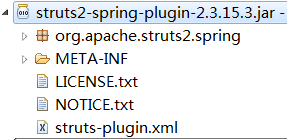
<constant name="struts.objectFactory" value="spring" />
struts的action将由spring创建
但前提是:Action类中,必须提供service名称与 spring配置文件一致。(如果名称一样,将自动注入)

总结,之后action有spring创建,并按照名称自动注入
三、如何使spring整合到web项目中
当项目创建时我们想要它在请求前加载完成spring的配置文件
又想要在项目之后创建,则我们可以想到配置web.xml
spring提供了一个监听器ContextLoaderListener上下问加载监听器,当服务器启动时会加载web.xml则这个监听也将会被加载,但是这个监听默认指向的是WEB-INF下所以我们还需要配置指定路径classpath:applicationContext.xml,这样当服务启动后就会加载spring的配置文件
web.xml配置
<!-- 1 确定spring xml位置 -->

  <context-param>

      <param-name>contextConfigLocation</param-name>

      <param-value>classpath:applicationContext.xml</param-value>

  </context-param>

  <!-- 2 spring监听器 -->

  <listener>

      <listener-class>org.springframework.web.context.ContextLoaderListener</listener-class>

  </listener>

  <!-- 3 struts 前端控制器 -->

  <filter>

      <filter-name>struts2</filter-name>

      <filter-class>org.apache.struts2.dispatcher.ng.filter.StrutsPrepareAndExecuteFilter</filter-class>

  </filter>

  <filter-mapping>

      <filter-name>struts2</filter-name>

      <url-pattern>/*</url-pattern>

  </filter-mapping>
关于整合ssh中的细节03的更多相关文章
- 【转】SSH中 整合spring和proxool 连接池
[摘要:比来做的一个项目中应用到了毗邻池技巧,大概我们人人比拟认识的开源毗邻池有dbcp,c3p0,proxool.对那三种毗邻池来讲,从机能战失足率来讲,proxool轻微比前两种好些.本日我首要简 ...
- .net到Java那些事儿--整合SSH
一.介绍 整体介绍分成两个部分,第一.net转到Java的原因,第二开发SSH时候的环境介绍: .net到Java的原因: .net开发也将近快3年的样子,加上现在的老东家换过 ...
- Maven02——回顾、整合ssh框架、分模块开发、私服
1 回顾 1.1 Maven的好处 节省空间 对jar包做了统一管理 依赖管理 一键构建 可跨平台 应用在大型项目可提高开发效率 1.2 Maven安装部署配置 1.3 Maven的仓库 本地仓库 远 ...
- MAVEN_day03 整合SSH框架
一.整合SSH工程环境准备 1.创建MAVEN工程>>添加>>"web.xml"文件解决工程红色叹号. new Maven Project>>在 ...
- maven整合ssh框架笔记
具体工程会上传文件sshpro <?xml version="1.0" encoding="UTF-8"?> <web-app xmlns:x ...
- Maven项目整合SSH框架
---------------------siwuxie095 Maven 项目整合 SSH 框架 创建 ...
- Struts2,Spring3,Hibernate4整合--SSH框架
Struts2,Spring3,Hibernate4整合--SSH框架(学习中) 一.包的导入 1.Spring包 2.Hibernate 包 3.struts 包 (还欠 struts2-sprin ...
- Maven 整合SSH框架
1. 传递依赖冲突 1.1 传递依赖:A(项目)依赖B,B依赖C(1.1版本),B是A的直接依赖,C是A的传递依赖; A(项目)又依赖D,D依赖C(1.2版本),此时,C有两个版本,产生冲突; 1.2 ...
- 调试SPRING MVC(或者整合SSH)的时候遇到了org/objectweb/asm/Type
调试SPRING MVC(或者整合SSH)的时候遇到了org/objectweb/asm/Type 解决方法1: 原因是Spring中的cglib-nodep-2.x.x.jar与Hibernate中 ...
随机推荐
- toj 3761 Egg Problem (好题~~)
Egg Problem 时间限制(普通/Java):1000MS/3000MS 运行内存限制:65536KByte总提交: 22 测试通过: 7 描述 There is a very interest ...
- python网络爬虫(二)requests库的基本介绍和使用
一.requests库的七个重要方法 (1)最常用方法:requests.get(url,params=None,**kwargs)//对应HTTP协议的GET()操作 (请求获得URL位置的资源) ...
- ACP知识总结
由于ACP是一个敏捷开发的系统性知识,下面只针对我自身学习的知识总结,若需要完整的考试学习资料,可评论区或私聊我拿. 敏捷估计与规划.png ACP知识点锦集.png 敏捷项目软件总结.p ...
- mysql 的root 用户无法授权,navicat 远程授权提示1044解决方案
先看解决方案 #------------mysql root 用户无法赋权问题解决 -------- ,登录 mysql -u root -p ,use mysql; 选择mysql数据库 ,执行以下 ...
- 「Flink」Flink的状态管理与容错
在Flink中的每个函数和运算符都是有状态的.在处理过程中可以用状态来存储数据,这样可以利用状态来构建复杂操作.为了让状态容错,Flink需要设置checkpoint状态.Flink程序是通过chec ...
- hyper-v安装ubuntu18的全过程+踩过的坑(win10家庭版)
一.背景介绍(作者的闲言闲语,可跳过) 最近新购入小米笔记本pro15增强版,想在笔记本上装ubuntu18的系统. 最开始尝试了双系统的方法,但是安装完之后不能wifi上网,显卡MX250不能适配, ...
- Kong Gateway - 11 基于网关服务的ACL访问控制列表 黑名单
Kong Gateway - 11 基于网关服务的ACL访问控制列表 黑名单 同一服务名称 book 不允许即创建白名单访问控制列表又创建黑名单访问控制列表 启用服务的白名单&黑名单配置文件时 ...
- JAVA中级开发应该掌握的小知识点
一.悲观锁.乐观锁的区别: 悲观锁:一段执行逻辑加上悲观锁,不同线程同时执行,只有一个线程可以执行,其他线程在入口处等待,直到锁被释放.乐观锁:一段执行逻辑加上乐观锁,不同线程同时执行,可以同时进入执 ...
- 为spring cloud config实现刷新动态掉的坑
正常搭建配置中心,网上教程多,这里不讨论,只记坑也是为了后来者少花时间在这里,由于是当时研究了好久才写的文章,所以只能提供问题的原因,当然会给出印证的思路,闲话不多说进入正题! 版本spring bo ...
- Spring Mvc Http 400 Bad Request问题排查
如果遇到了Spring MVC报错400,而且没有返回任何信息的情况下该如何排查问题? 问题描述 一直都没毛病的接口,今天测试的时候突然报错400 Bad Request,而且Response没有返回 ...