
springcloud复习1
1.SpringCloud是什么?
SpringCloud=分布式微服务架构下的一站式解决方案,是各个微服务架构落地技术的集合体,俗称微服务全家桶。
2.SpringCloud和SpringBoot是什么关系?
SpringBoot专注于快速方便的开发单个个体微服务。
SpringCloud是关注全局的微服务协调整理治理框架,它将SpringBoot开发的一个个单体微服务整合并管理起来,
为各个微服务之间提供,配置管理、服务发现、断路器、路由、微代理、事件总线、全局锁、决策竞选、分布式会话等等集成服务
SpringBoot可以离开SpringCloud独立使用开发项目,但是SpringCloud离不开SpringBoot,属于依赖的关系.
SpringBoot专注于快速、方便的开发单个微服务个体,SpringCloud关注全局的服务治理框架。
3.SpringCloud VS DUBBO对比
3.1最大区别:SpringCloud抛弃了Dubbo的RPC通信,采用的是基于HTTP的REST方式。
严格来说,这两种方式各有优劣。虽然从一定程度上来说,后者牺牲了服务调用的性能,
但也避免了上面提到的原生RPC带来的问题。而且REST相比RPC更为灵活,
服务提供方和调用方的依赖只依靠一纸契约,不存在代码级别的强依赖,
这在强调快速演化的微服务环境下,显得更加合适。
3.2品牌机与组装机的区别
3.3社区支持与更新力度
4.项目初步搭建模块概况:
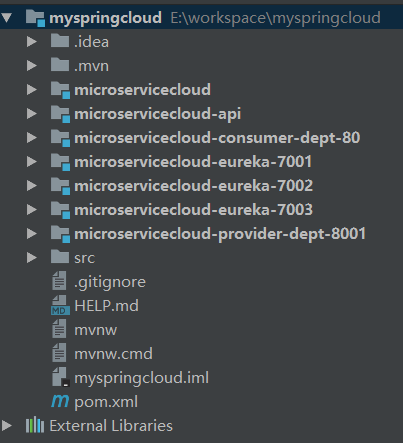
1.microservicecloud ,父工程, 所有模块都继承它,类似抽象父类。
2.micorservicecloud-api, 封装的整体Entity/接口/公共配置等。
3.microservicecloud-consumer-dept-80,微服务调用的客户端
4.microservicecloud-provider-dept-8001 微服务提供端
5.microservicecloud-eureka-7001,7002,7003 服务的注册中心与发现(已集群)
5.客户端大概配置:
主启动类:
@SpringBootApplication
@EnableEurekaClient
public class Consumer80 {
   public static void main(String[] args) {
      SpringApplication.run(Consumer80.class, args);
   }
}
application.yml配置:
server:
  port: 80

eureka:
  client:
    register-with-eureka: false
    service-url:
      defaultZone: http://eureka7001.com:7001/eureka/,http://eureka7002.com:7002/eureka/,http://eureka7003.com:7003/eureka/
config配置类:
@Configuration
public class ConfigBean //boot -->spring   applicationContext.xml --- @Configuration配置   ConfigBean = applicationContext.xml
{
   @Bean
   @LoadBalanced
   public RestTemplate getRestTemplate()
   {
      return new RestTemplate();
   }

}

//@Bean
//public UserServcie getUserServcie()
//{
// return new UserServcieImpl();
//}
// applicationContext.xml == ConfigBean(@Configuration)
//<bean id="userServcie" class="com.hourui.UserServiceImpl">
controller层:
@RestController
public class DeptController_Consumer {

   //private static final String REST_URL_PREFIX = "http://localhost:8001";
   private static final String REST_URL_PREFIX = "http://MICROSERVICECLOUD-DEPT";

   /**
    * 使用 使用restTemplate访问restful接口非常的简单粗暴无脑。 (url, requestMap,
    * ResponseBean.class)这三个参数分别代表 REST请求地址、请求参数、HTTP响应转换被转换成的对象类型。
    */
   @Autowired
   private RestTemplate restTemplate;

   @RequestMapping(value = "/consumer/dept/add")
   public boolean add(Dept dept)
   {
      return restTemplate.postForObject(REST_URL_PREFIX + "/dept/add", dept, Boolean.class);
   }

   @RequestMapping(value = "/consumer/dept/get/{id}")
   public Dept get(@PathVariable("id") Long id)
   {
      return restTemplate.getForObject(REST_URL_PREFIX + "/dept/get/" + id, Dept.class);
   }

   @SuppressWarnings("unchecked")
   @RequestMapping(value = "/consumer/dept/list")
   public List<Dept> list()
   {
      return restTemplate.getForObject(REST_URL_PREFIX + "/dept/list", List.class);
   }

   // 测试@EnableDiscoveryClient,消费端可以调用服务发现
   @RequestMapping(value = "/consumer/dept/discovery")
   public Object discovery()
   {
      return restTemplate.getForObject(REST_URL_PREFIX + "/dept/discovery", Object.class);
   }
}
6.服务端大概配置:
主启动类:
@SpringBootApplication
@EnableEurekaClient //本服务启动后会自动注册进eureka服务中
@EnableDiscoveryClient //服务发现
public class Prodiver8001 {
   public static void main(String[] args) {
      SpringApplication.run(Prodiver8001.class, args);
   }
}
application.yml配置:
server:
  port: 8001

mybatis:
  config-location: classpath:mybatis/mybatis.cfg.xml        # mybatis配置文件所在路径
  type-aliases-package: com.hourui.springcloud.entities    # 所有Entity别名类所在包
  mapper-locations:
  - classpath:mybatis/mapper/**/*.xml                       # mapper映射文件

spring:
   application:
    name: microservicecloud-dept
   datasource:
    type: com.alibaba.druid.pool.DruidDataSource            # 当前数据源操作类型
    driver-class-name: org.gjt.mm.mysql.Driver              # mysql驱动包
    url: jdbc:mysql://localhost:3306/cloudDB01              # 数据库名称
    username: root
    password: root
    dbcp2:
      min-idle: 5                                           # 数据库连接池的最小维持连接数
      initial-size: 5                                       # 初始化连接数
      max-total: 5                                          # 最大连接数
      max-wait-millis: 200                                  # 等待连接获取的最大超时时间

eureka:
  client: #客户端注册进eureka服务列表内
    service-url:
      defaultZone: http://eureka7001.com:7001/eureka/,http://eureka7002.com:7002/eureka/,http://eureka7003.com:7003/eureka/
  instance:
    instance-id: microservicecloud-dept8001
    prefer-ip-address: true     #访问路径可以显示IP地址
info:
  app.name: hourui-microservicecloud
  company.name: www.hourui.com
  build.artifactId: $project.artifactId$
  build.version: $project.version$
controller层:
@RestController
public class DeptController {

   @Autowired
   private DeptService service;

   @Autowired
   private DiscoveryClient client;

   @RequestMapping(value = "/dept/add", method = RequestMethod.POST)
   public boolean add(@RequestBody Dept dept)
   {
      return service.add(dept);
   }

   @RequestMapping(value = "/dept/get/{id}", method = RequestMethod.GET)
   public Dept get(@PathVariable("id") Long id)
   {
      return service.get(id);
   }

   @RequestMapping(value = "/dept/list", method = RequestMethod.GET)
   public List<Dept> list()
   {
      return service.list();
   }

   // @Autowired
   //  private DiscoveryClient client;
   @RequestMapping(value = "/dept/discovery", method = RequestMethod.GET)
   public Object discovery()
   {
      List<String> list = client.getServices();
      System.out.println("**********" + list);

      List<ServiceInstance> srvList = client.getInstances("MICROSERVICECLOUD-DEPT");
      for (ServiceInstance element : srvList) {
         System.out.println(element.getServiceId() + "\t" + element.getHost() + "\t" + element.getPort() + "\t"
               + element.getUri());
      }
      return this.client;
   }

}
7.注册中心大概配置:
主启动类:
@SpringBootApplication
@EnableEurekaServer // EurekaServer服务器端启动类,接受其它微服务注册进来
public class eureka7001 {
   public static void main(String[] args) {
      SpringApplication.run(eureka7001.class, args);
   }
}
application.yml配置:
server:
  port: 7001

eureka:
  instance:
    hostname: eureka7001.com #eureka服务端的实例名称
  client:
    register-with-eureka: false     #false表示不向注册中心注册自己。
    fetch-registry: false     #false表示自己端就是注册中心,我的职责就是维护服务实例,并不需要去检索服务
    service-url:
       #defaultZone: http://${eureka.instance.hostname}:${server.port}/eureka/       #设置与Eureka Server交互的地址查询服务和注册服务都需要依赖这个地址(单机)。
       defaultZone: http://eureka7002.com:7002/eureka/,http://eureka7003.com:7003/eureka/
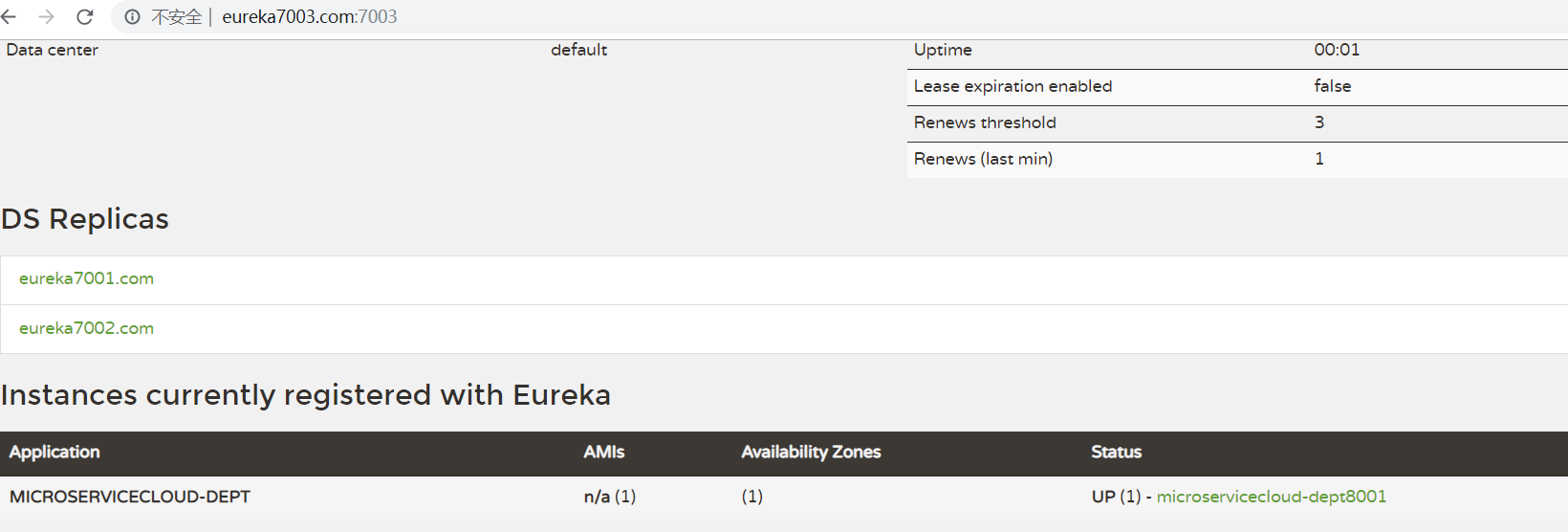
8.整合完成后最终显示结果图:
Ribbon负载均衡
官网资料 https://github.com/Netflix/ribbon/wiki/Getting-Started
Spring Cloud Ribbon是基于Netflix Ribbon实现的一套客户端负载均衡的工具。
简单的说,Ribbon是Netflix发布的开源项目,主要功能是提供客户端的软件负载均衡算法,将Netflix的中间层服务连接在一起。Ribbon客户端组件提供一系列完善的配置项如连接超时,重试等。简单的说,就是在配置文件中列出Load Balancer(简称LB)后面所有的机器,Ribbon会自动的帮助你基于某种规则(如简单轮询,随机连接等)去连接这些机器。我们也很容易使用Ribbon实现自定义的负载均衡算法
主启动类:
@SpringBootApplication
@EnableEurekaClient
@RibbonClient(name="MICROSERVICECLOUD-DEPT",configuration=MySelfRule.class)  //这里自定义了Ribbon的算法
public class Consumer80 {
   public static void main(String[] args) {
      SpringApplication.run(Consumer80.class, args);
   }
}
application.yml配置:
server:
  port: 80

eureka:
  client:
    register-with-eureka: false
    service-url:
      defaultZone: http://eureka7001.com:7001/eureka/,http://eureka7002.com:7002/eureka/,http://eureka7003.com:7003/eureka/
config配置类:
@Configuration
public class ConfigBean
{
   @Bean
   @LoadBalanced
   public RestTemplate getRestTemplate()
   {
      return new RestTemplate();
   }

   @Bean
   public IRule myRule()
   {
      //return new RoundRobinRule();
      return new RandomRule();//达到的目的,用我们重新选择的随机算法替代默认的轮询。
      //return new RetryRule();
   }

}
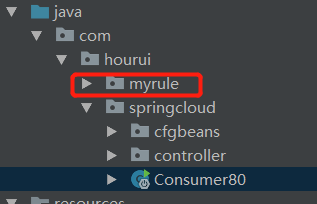
自定义Ribbon算法的2个类,需要注意的是,不能被主启动类扫描到,跟它并列关系:
@Configuration
public class MySelfRule
{
   @Bean
   public IRule myRule()
   {
      //return new RandomRule();// Ribbon默认是轮询,我自定义为随机
      //return new RoundRobinRule();//
      return new RandomRule_ZY();// 我自定义为每台机器5次
   }
}
public class RandomRule_ZY extends AbstractLoadBalancerRule
{

   // total = 0 // 当total==5以后,我们指针才能往下走,
   // index = 0 // 当前对外提供服务的服务器地址,
   // total需要重新置为零,但是已经达到过一个5次,我们的index = 1
   // 分析:我们5次,但是微服务只有8001 8002 8003 三台,OK?

   private int total = 0;           // 总共被调用的次数,目前要求每台被调用5次
   private int currentIndex = 0;  // 当前提供服务的机器号

   public Server choose(ILoadBalancer lb, Object key)
   {
      if (lb == null) {
         return null;
      }
      Server server = null;

      while (server == null) {
         if (Thread.interrupted()) {
            return null;
         }
         List<Server> upList = lb.getReachableServers();
         List<Server> allList = lb.getAllServers();

         int serverCount = allList.size();
         if (serverCount == 0) {
            /*
             * No servers. End regardless of pass, because subsequent passes only get more
             * restrictive.
             */
            return null;
         }

//       int index = rand.nextInt(serverCount);// java.util.Random().nextInt(3);
//       server = upList.get(index);

            if(total < 5)
            {
               server = upList.get(currentIndex);
               total++;
            }else {
               total = 0;
               currentIndex++;
               if(currentIndex >= upList.size())
               {
                 currentIndex = 0;
               }
            }

         if (server == null) {
            /*
             * The only time this should happen is if the server list were somehow trimmed.
             * This is a transient condition. Retry after yielding.
             */
            Thread.yield();
            continue;
         }

         if (server.isAlive()) {
            return (server);
         }

         // Shouldn't actually happen.. but must be transient or a bug.
         server = null;
         Thread.yield();
      }

      return server;

   }

   @Override
   public Server choose(Object key)
   {
      return choose(getLoadBalancer(), key);
   }

   @Override
   public void initWithNiwsConfig(IClientConfig clientConfig)
   {
      // TODO Auto-generated method stub
   }

}
controller层:
@RestController
public class DeptController_Consumer
{
   //private static final String REST_URL_PREFIX = "http://localhost:8001";
   //可以直接调用服务而不用再关心地址和端口号
   private static final String REST_URL_PREFIX = "http://MICROSERVICECLOUD-DEPT";

   /**
    * 使用 使用restTemplate访问restful接口非常的简单粗暴无脑。 (url, requestMap,
    * ResponseBean.class)这三个参数分别代表 REST请求地址、请求参数、HTTP响应转换被转换成的对象类型。
    */
   @Autowired
   private RestTemplate restTemplate;

   @RequestMapping(value = "/consumer/dept/add")
   public boolean add(Dept dept)
   {
      return restTemplate.postForObject(REST_URL_PREFIX + "/dept/add", dept, Boolean.class);
   }

   @RequestMapping(value = "/consumer/dept/get/{id}")
   public Dept get(@PathVariable("id") Long id)
   {
      return restTemplate.getForObject(REST_URL_PREFIX + "/dept/get/" + id, Dept.class);
   }

   @SuppressWarnings("unchecked")
   @RequestMapping(value = "/consumer/dept/list")
   public List<Dept> list()
   {
      return restTemplate.getForObject(REST_URL_PREFIX + "/dept/list", List.class);
   }
   // 测试@EnableDiscoveryClient,消费端可以调用服务发现
   @RequestMapping(value = "/consumer/dept/discovery")
   public Object discovery()
   {
      return restTemplate.getForObject(REST_URL_PREFIX + "/dept/discovery", Object.class);
   }
}
总结:Ribbon其实就是一个软负载均衡的客户端组件,
他可以和其他所需请求的客户端结合使用,和eureka结合只是其中的一个实例。
Feign负载均衡
官网解释:
http://projects.spring.io/spring-cloud/spring-cloud.html#spring-cloud-feign
Feign是一个声明式WebService客户端。使用Feign能让编写Web Service客户端更加简单, 它的使用方法是定义一个接口,然后在上面添加注解,同时也支持JAX-RS标准的注解。Feign也支持可拔插式的编码器和解码器。Spring Cloud对Feign进行了封装,使其支持了Spring MVC标准注解和HttpMessageConverters。Feign可以与Eureka和Ribbon组合使用以支持负载均衡。
Feign是一个声明式的Web服务客户端,使得编写Web服务客户端变得非常容易,
只需要创建一个接口,然后在上面添加注解即可。
参考官网:https://github.com/OpenFeign/feign
Feign能干什么
Feign旨在使编写Java Http客户端变得更容易。
前面在使用Ribbon+RestTemplate时,利用RestTemplate对http请求的封装处理,形成了一套模版化的调用方法。但是在实际开发中,由于对服务依赖的调用可能不止一处,往往一个接口会被多处调用,所以通常都会针对每个微服务自行封装一些客户端类来包装这些依赖服务的调用。所以,Feign在此基础上做了进一步封装,由他来帮助我们定义和实现依赖服务接口的定义。在Feign的实现下,我们只需创建一个接口并使用注解的方式来配置它(以前是Dao接口上面标注Mapper注解,现在是一个微服务接口上面标注一个Feign注解即可),即可完成对服务提供方的接口绑定,简化了使用Spring cloud Ribbon时,自动封装服务调用客户端的开发量。
Feign集成了Ribbon
利用Ribbon维护了MicroServiceCloud-Dept的服务列表信息,并且通过轮询实现了客户端的负载均衡。而与Ribbon不同的是,通过feign只需要定义服务绑定接口且以声明式的方法,优雅而简单的实现了服务调用
主启动类:
@SpringBootApplication
@EnableEurekaClient
@EnableFeignClients
public class Feign80 {
   public static void main(String[] args) {
      SpringApplication.run(Feign80.class, args);
   }
}
application.yml配置:
server:
  port: 80

feign:
  hystrix:
    enabled: true

eureka:
  client:
    register-with-eureka: false
    service-url:
      defaultZone: http://eureka7001.com:7001/eureka/,http://eureka7002.com:7002/eureka/,http://eureka7003.com:7003/eureka/
controller层:
@RestController
public class DeptController_Consumer
{
   @Autowired
   private DeptClientService service;

   @RequestMapping(value = "/consumer/dept/get/{id}")
   public Dept get(@PathVariable("id") Long id)
   {
      return this.service.get(id);
   }

   @RequestMapping(value = "/consumer/dept/list")
   public List<Dept> list()
   {
      return this.service.list();
   }

   @RequestMapping(value = "/consumer/dept/add")
   public Object add(Dept dept)
   {
      return this.service.add(dept);
   }
}
service层:
@FeignClient(value = "MICROSERVICECLOUD-DEPT",fallbackFactory=DeptClientServiceFallbackFactory.class)
public interface DeptClientService
{
    @RequestMapping(value = "/dept/get/{id}", method = RequestMethod.GET)
    public Dept get(@PathVariable("id") long id);

    @RequestMapping(value = "/dept/list", method = RequestMethod.GET)
    public List<Dept> list();

    @RequestMapping(value = "/dept/add", method = RequestMethod.POST)
    public boolean add(Dept dept);
}
@Component // 不要忘记添加,不要忘记添加,这里的用法就是AOP切面方式
public class DeptClientServiceFallbackFactory implements FallbackFactory<DeptClientService>
{
   @Override
   public DeptClientService create(Throwable throwable)
   {
      return new DeptClientService() {
         @Override
         public Dept get(long id)
         {
            return new Dept().setDeptno(id).setDname("该ID:" + id + "没有没有对应的信息,Consumer客户端提供的降级信息,此刻服务Provider已经关闭")
                  .setDb_source("no this database in MySQL");
         }

         @Override
         public List<Dept> list()
         {
            return null;
         }

         @Override
         public boolean add(Dept dept)
         {
            return false;
         }
      };
   }
}
springcloud复习1的更多相关文章
- springcloud复习2
Hystrix断路器 Hystrix是一个用于处理分布式系统的延迟和容错的开源库,在分布式系统里,许多依赖不可避免的会调用失败,比如超时.异常等,Hystrix能够保证在一个依赖出问题的情况下,不会导 ...
- 每天学点SpringCloud(五):如何使用高可用的Eureka
前几篇文章我们讲了一下Eureka的基础使用,但是呢有一个很重要的问题,我们讲的都是单机版的情况,如果这个时候Eureka服务挂了的话,那么我们的服务提供者跟服务消费者岂不是都废了?服务提供者和消费者 ...
- 基于Prometheus搭建SpringCloud全方位立体监控体系
前提 最近公司在联合运维做一套全方位监控的系统,应用集群的技术栈是SpringCloud体系.虽然本人没有参与具体基础架构的研发,但是从应用引入的包和一些资料的查阅大致推算出具体的实现方案,这里做一次 ...
- SpringCloud基础教程学习记录
这个学习记录是学习自翟永超前辈的SpringCloud的基础教程. 自己写这个教程的目的主要是在于,想要更凝练总结一些其中的一些实用点,顺便做个汇总,这样自己在复习查看的时候更加方便,也能顺着自己的思 ...
- 微服务SpringCloud之服务注册与发现
在找.net core 微服务框架时发现了Steeltoe开源项目,它可以基于Spring Cloud实现.net core和.net Framework的微服务.正好之前也有学习过SpringBo ...
- 那些年,想和你一起认识的SpringCloud Eureka
前几天鲁班LB跟我说:你玩把游戏都要半个钟啦,为何不用这时间来看看书,如果涨工资还可以帮我买个皮肤. 面对如此合理的这需求,但我不以为然,事实上并不是我不想学习,而是 ↓ 实力不允许呀~ 直到有一天, ...
- SpringCloud之Hystrix-Dashboard监控,以及踩的坑...
前言: 最近刚入职,公司使用了SpringCloud,之前有了解过SpringCloud,但是长时间不去搭建不去使用很容易就忘了,因此空闲时间重新复习一下SpringCloud.但是之前开的Sprin ...
- Java架构笔记:用JWT对SpringCloud进行认证和鉴权
写在前面 喜欢的朋友可以关注下专栏:Java架构技术进阶.里面有大量batj面试题集锦,还有各种技术分享,如有好文章也欢迎投稿哦. image.png JWT(JSON WEB TOKEN)是基于RF ...
- 2020年SpringCloud 必知的18道面试题
今天跟大家分享下SpringCloud常见面试题的知识. 1.什么是Spring Cloud? Spring cloud流应用程序启动器是基于Spring Boot的Spring集成应用程序,提供与外 ...
随机推荐
- 【codeforces 789A】Anastasia and pebbles
[题目链接]:http://codeforces.com/contest/789/problem/A [题意] 有n种物品,每种物品有wi个; 你有两个口袋,每个口袋最多装k个物品; 且口袋里面只能装 ...
- 几种常见排序算法的基本介绍,性能分析,和c语言实现
本文介绍6种常见的排序算法,以及他们的原理,性能分析和c语言实现: 为了能够条理清楚,本文所有的算法和解释全部按照升序排序进行 首先准备一个元素无序的数组arr[],数组的长度为length,一个交换 ...
- H3C调试信息输出的例子
- JavaScript中的forEach
语法:array.forEach(callbackfn[, thisArg]) 参数说明: array1 必需. 一个数组对象. callbackfn 必需. 一个接受最多三个参数的函数. 对 ...
- linux安装python3.*,更换Python2.*
下载并解压:Python-3.5.7.tgz [root@AH-aQYWTYSJZX01 python3]# ll total 20268 -rw-r----- 1 temp01 temp01 207 ...
- Apache的DBUtils框架学习(转)
一.commons-dbutils简介 commons-dbutils 是 Apache 组织提供的一个开源 JDBC工具类库,它是对JDBC的简单封装,学习成本极低,并且使用dbutils能极大简化 ...
- Mybatis与Spring集成(易百教程)
整个Mybatis与Spring集成示例要完成的步骤如下: 1.示例功能描述 2.创建工程 3.数据库表结构及数据记录 4.实例对象 5.配置文件 6.测试执行,输出结果 1.示例功能描述 在本示例中 ...
- 前端——css属性方法
目录 标签快捷写法 宽和高 字体 1.文字字体 2.字体大小 3.字体粗细 4.字体颜色 5.字体对齐 6.文字下划线控制 7.文字首行缩进 8.字体英文换大写 背景属性 1.背景颜色 2.背景图片 ...
- iOS @property、@synthesize和@dynamic
@property @property的本质: @property = ivar(实例变量) + getter/setter(存取方法); 在正规的 Objective-C 编码风格中,存取方法有着严 ...
- JAVA异常类Throwable解析
在 Java 中,所有的异常都有一个共同的祖先java.lang包中的 Throwable类. Throwable: 有两个重要的子类:Exception(异常) 和 Error(错误) :二者都是 ...