
SpringBoot安全管理--(一)SpringSecurity基本配置
简介:
Spring Boot针对Spring Security提供了自动化配置方案,因此可以使Spring Security非常容易地整合进Spring Boot项目中,这也是在Spring Boot项目中使用Spring Security的优势。
1.添加依赖
pom.xml
     <dependency>

            <groupId>org.springframework.boot</groupId>

            <artifactId>spring-boot-starter-security</artifactId>

        </dependency>

        <dependency>

            <groupId>org.springframework.boot</groupId>

            <artifactId>spring-boot-starter-web</artifactId>

        </dependency>
spring-boot-starter-security添加依赖后项目中所有资源都被保护起来了
2/添加hello接口
@RestController

public class HelloController {

@GetMapping("/hello")

    public String hello() {

        String user = methodService.user();

        return user;

    }

}
3.启动项目
访问:http://localhost:8080/hello
项目自动跳转到这个由spring security提供的页面
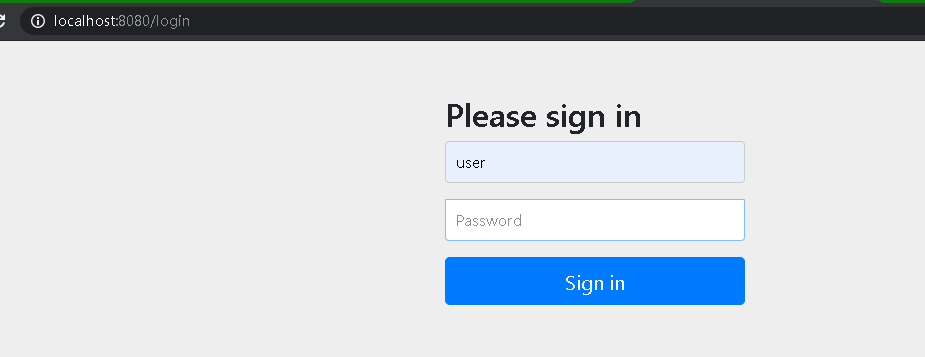
默认用户名user,密码:控制台随机字符串

登陆后:

4.更多:
也可以配置默认的用户名和密码还有用户角色
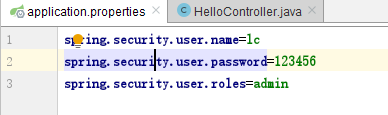
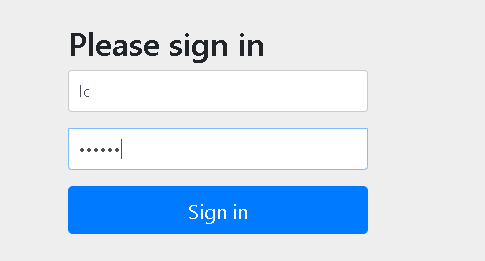
重启-登陆,可以看到用户名密码等已经被更改

基于内存的认证:
当然,开发者也可以自定义类继承自WebSecurityConfigurerAdapter,进而实现对Spring Security更多的自定义配置,例如基于内存的认证,配置方式如下:

自定义类继承WebSecurityConfigurerAdapter类,重写configure方法,在其中增加了两个用户,配置用户名,密码,角色。
至于加密,使用了NoOpPasswordEncoder即不加密
HttpSecurity
虽然现在可以实现认证功能,但是受保护的资源都是默认的,而且也不能根据实际情况进行角色管理,如果要实现这些功能,就需要重写WebSecurityConfigurerAdapter 中的另一个方法configure,参数可以看到是HttpSecurity.
在第一个configure方法中添加3个角色,root拥有admin和dba,admin拥有admin,user,cc拥有user
在第二个configure方法中,调用authorizeRequests方法开启HttpSecurity配置,
.antMatchers("/admin/**")
               .hasRole("ADMIN")

表示访问/admin/路径的必须要admin角色,后面两个也一样道理。
          .anyRequest()

                .authenticated()
表示除了前面定义的url,后面的都得认证后访问(登陆后访问)
          .formLogin()

                .loginProcessingUrl("/url")

                .permitAll()
表示开启表单登陆,就是一开始看到的登陆界面,登陆url为/login,permitAll表示和登陆相关的接口不需要认证
          .csrf()

                .disable();
表示关闭csrf(Cross-site request forgery)
@Configuration

public class MyWebSecurityConfig extends WebSecurityConfigurerAdapter {

    @Bean

    PasswordEncoder passwordEncoder(){

        return NoOpPasswordEncoder.getInstance();

    }

    @Override

    protected void configure(AuthenticationManagerBuilder auth) throws Exception {

       auth.inMemoryAuthentication()

               .withUser("root").password("123").roles("ADMIN","DBA")

               .and()

               .withUser("admin").password("123").roles("ADMIN","USER")

               .and()

               .withUser("cc").password("123").roles("USER");

    }

    @Override

    protected void configure(HttpSecurity http) throws Exception {

        http.authorizeRequests()

                .antMatchers("/admin/**")

                .hasRole("ADMIN")


          .antMatchers("/user/**")

                .access("hasAnyRole('ADMIN','USER')")


          .antMatchers("/db/**")

                .access("hasAnyRole('ADMIN') and  hasRole('DBA')")


          .anyRequest()

                .authenticated()

                .and()


          .formLogin()

                .loginProcessingUrl("/url")

                .permitAll()

                .and()


          .csrf()

                .disable();

    }

}
在controller:上面的配置,url为/admin/的需要由admin角色,/user/的需要admin或者user都可,/db/的需要admin和dba角色才可以
  @GetMapping("/admin/hello")

    public String hello2(){

        return "admin";

    }

   @GetMapping("/db/hello")

    public String hello3(){

        return "db";

    }

   @GetMapping("/user/hello")

    public String hello4(){

        return "user";

    }
登陆表单详细配置:
迄今为止,登录表单一直使用Spring Security提供的页面,登录成功后也是默认的页面跳转,但是,前后端分离正在成为企业级应用开发的主流,在前后端分离的开发方式中,前后端的数据交互通过JSON进行,这时,登录成功后就不是页面跳转了,而是一段JSON提示。要实现这些功能,只需要继续完善上文的配置,代码如下:
@Configuration

public class MyWebSecurityConfig extends WebSecurityConfigurerAdapter {

    @Bean

    PasswordEncoder passwordEncoder() {

        return NoOpPasswordEncoder.getInstance();

    }

    @Override

    protected void configure(AuthenticationManagerBuilder auth) throws Exception {

        auth.inMemoryAuthentication()

                .withUser("root").password("123").roles("ADMIN", "DBA")

                .and()

                .withUser("admin").password("123").roles("ADMIN", "USER")

                .and()

                .withUser("sang").password("123").roles("USER");

    }

    @Override

    protected void configure(HttpSecurity http) throws Exception {

        http.authorizeRequests()

                .antMatchers("/admin/**")

                .hasRole("ADMIN")

                .antMatchers("/user/**")

                .access("hasAnyRole('ADMIN','USER')")

                .antMatchers("/db/**")

                .access("hasRole('ADMIN') and hasRole('DBA')")

                .anyRequest()

                .authenticated()


         .and()

                .formLogin()

                .loginPage("/login_page")                      //登陆页面

                .loginProcessingUrl("/login")          //登陆请求处理接口

                .usernameParameter("name")             //默认用户名,密码

                .passwordParameter("passwd")

                .successHandler(new AuthenticationSuccessHandler() {            //登陆成功后

                    @Override

                    public void onAuthenticationSuccess(HttpServletRequest req,

                                                        HttpServletResponse resp,

                                                        Authentication auth)    //当前用户登陆信息

                            throws IOException {

                        Object principal = auth.getPrincipal();

                        resp.setContentType("application/json;charset=utf-8");

                        PrintWriter out = resp.getWriter();

                        resp.setStatus(200);

                        Map<String, Object> map = new HashMap<>();

                        map.put("status", 200);

                        map.put("msg", principal);

                        ObjectMapper om = new ObjectMapper();

                        out.write(om.writeValueAsString(map));

                        out.flush();

                        out.close();

                    }

                })

                .failureHandler(new AuthenticationFailureHandler() {         //登陆失败后

                    @Override

                    public void onAuthenticationFailure(HttpServletRequest req,

                                                        HttpServletResponse resp,

                                                        AuthenticationException e)  //获取登陆失败原因

                            throws IOException {

                        resp.setContentType("application/json;charset=utf-8");

                        PrintWriter out = resp.getWriter();

                        resp.setStatus(401);

                        Map<String, Object> map = new HashMap<>();

                        map.put("status", 401);

                        if (e instanceof LockedException) {

                            map.put("msg", "账户被锁定,登录失败!");

                        } else if (e instanceof BadCredentialsException) {

                            map.put("msg", "账户名或密码输入错误,登录失败!");

                        } else if (e instanceof DisabledException) {

                            map.put("msg", "账户被禁用,登录失败!");

                        } else if (e instanceof AccountExpiredException) {

                            map.put("msg", "账户已过期,登录失败!");

                        } else if (e instanceof CredentialsExpiredException) {

                            map.put("msg", "密码已过期,登录失败!");

                        } else {

                            map.put("msg", "登录失败!");

                        }

                        ObjectMapper om = new ObjectMapper();

                        out.write(om.writeValueAsString(map));

                        out.flush();

                        out.close();

                    }

                })

                .permitAll()

                .and()

                .logout()                      //开启注销登陆

                .logoutUrl("/logout")           //注销登陆请求url

                .clearAuthentication(true)      //清除身份信息

                .invalidateHttpSession(true)     //session失效

                .addLogoutHandler(new LogoutHandler() {  //注销处理

                    @Override

                    public void logout(HttpServletRequest req,

                                       HttpServletResponse resp,

                                       Authentication auth) {

                    }

                })

                .logoutSuccessHandler(new LogoutSuccessHandler() {     //注销成功处理

                    @Override

                    public void onLogoutSuccess(HttpServletRequest req,

                                                HttpServletResponse resp,

                                                Authentication auth)

                            throws IOException {

                        resp.sendRedirect("/login_page");              //跳转到自定义登陆页面

                    }

                })

                .and()

                .csrf()

                .disable();

    }

}
多个HttpSecurity,并且加密,方法安全
配置多个httpSecurity不需要继承WebSecurityConfigurerAdapter,内部类去继承即可,使用@Configuration和@Order注解优先配置
@Configuration
@EnableGlobalMethodSecurity(prePostEnabled = true,securedEnabled = true)
//prePostEnabled=true会解锁@PreAuthorize和@PostAuthorize两个注解,顾名思义,@PreAuthorize注解会在方法执行前进行验证,而@PostAuthorize 注解在方法执行后进行验证。
//securedEnabled=true会解锁@Secured注解。
public class MultiHttpSecurityConfig{ @Bean PasswordEncoder passwordEncoder() { return new BCryptPasswordEncoder(); } @Autowired protected void configure(AuthenticationManagerBuilder auth) throws Exception { auth.inMemoryAuthentication() .withUser("root") .password("$2a$10$RMuFXGQ5AtH4wOvkUqyvuecpqUSeoxZYqilXzbz50dceRsga.WYiq")  //密码已经加密 .roles("ADMIN", "DBA") .and() .withUser("admin") .password("$2a$10$RMuFXGQ5AtH4wOvkUqyvuecpqUSeoxZYqilXzbz50dceRsga.WYiq") .roles("ADMIN", "USER") .and() .withUser("sang") .password("$2a$10$eUHbAOMq4bpxTvOVz33LIehLe3fu6NwqC9tdOcxJXEhyZ4simqXTC") .roles("USER"); }

    @Configuration

    @Order(1)

    public static class AdminSecurityConfig

            extends WebSecurityConfigurerAdapter{

        @Override

        protected void configure(HttpSecurity http) throws Exception {

            http.antMatcher("/admin/**").authorizeRequests()           //该类配置url为/admin/

                    .anyRequest().hasRole("ADMIN");

        }

    }

    @Configuration

    public static class OtherSecurityConfig

            extends WebSecurityConfigurerAdapter{

        @Override

        protected void configure(HttpSecurity http) throws Exception {

            http.authorizeRequests()

                    .anyRequest().authenticated()

                    .and()

                    .formLogin()

                    .loginProcessingUrl("/login")

                    .permitAll()

                    .and()

                    .csrf()

                    .disable();

        }

    }

}
@Service

public class MethodService {

    @Secured("ROLE_ADMIN")       //访问此方法需要ADMIN角色

    public String admin() {

        return "hello admin";

    }

    @PreAuthorize("hasRole('ADMIN') and hasRole('DBA')")  //访问此方法需要ADMIN且DBA

    public String dba() {

        return "hello dba";

    }

    @PreAuthorize("hasAnyRole('ADMIN','DBA','USER')")    //三个都行

    public String user() {

        return "user";

    }

}
SpringBoot安全管理--(一)SpringSecurity基本配置的更多相关文章
- SpringBoot 安全管理(一)
SpringBoot 安全管理(一) 一.springSecurity入门 添加依赖 <dependency> <groupId>org.springframework.boo ...
- springboot+mybatis+SpringSecurity 实现用户角色数据库管理(一)
本文使用springboot+mybatis+SpringSecurity 实现用户权限数据库管理 实现用户和角色用数据库存储,而资源(url)和权限的对应采用硬编码配置. 也就是角色可以访问的权限通 ...
- SpringSecurity相关配置【SpringSecurityConfig】
SpringSecurity的配置相对来说有些复杂,如果是完整的bean配置,则需要配置大量的bean,所以xml配置时使用了命名空间来简化配置,同样,spring为我们提供了一个抽象类WebSecu ...
- springboot 文件上传大小配置
转自:https://blog.csdn.net/shi0299/article/details/69525848 springboot上传文件大小的配置有两种,一种是设置在配置文件里只有两行代码,一 ...
- java框架之SpringBoot(5)-SpringMVC的自动配置
本篇文章内容详细可参考官方文档第 29 节. SpringMVC介绍 SpringBoot 非常适合 Web 应用程序开发.可以使用嵌入式 Tomcat,Jetty,Undertow 或 Netty ...
- ELK+SpringBoot+Logback离线安装及配置
ELK+SpringBoot+Logback 离线安装及配置 版本 v1.0 编写时间 2018/6/11 编写人 xxx 目录 一. ELK介绍2 二. 安装环境2 三. Elasticse ...
- SpringBoot入门之基于Druid配置Mybatis多数据源
上一篇了解了Druid进行配置连接池的监控和慢sql处理,这篇了解下使用基于基于Druid配置Mybatis多数据源.SpringBoot默认配置数据库连接信息时只需设置url等属性信息就可以了,Sp ...
- SpringBoot中使用UEditor基本配置(图文详解)
SpringBoot中使用UEditor基本配置(图文详解) 2018年03月12日 10:52:32 BigPotR 阅读数:4497 最近因工作需要,在自己研究百度的富文本编辑器UEditor ...
- SpringBoot整合MyBatis之xml配置
现在业界比较流行的数据操作层框架 MyBatis,下面就讲解下 Springboot 如何整合 MyBatis,这里使用的是xml配置SQL而不是用注解.主要是 SQL 和业务代码应该隔离,方便和 D ...
- SpringBoot Beans管理和自动配置
原 SpringBoot Beans管理和自动配置 火推 02 2017年12月20日 21:37:01 阅读数:220 SpringBoot Beans管理和自动配置 @SpringBootAppl ...
随机推荐
- json的结构和表示方式(对象object、数组array)
json简单说就是javascript中的对象和数组,所以这两种结构就是对象和数组两种结构,通过这两种结构可以表示各种复杂的结构 1.对象:对象在js中表示为“{}”括起来的内容,数据结构为 {key ...
- Python3之MySQL操作
1.安装pymysql PyMySQL 是在 Python3.x 版本中用于连接 MySQL 服务器的一个库,在使用之前需要进行安装,可以使用以下命令安装最新版的 PyMySQL: 1).在cmd命令 ...
- Shell字符串比较相等、不相等方法小结【转】
#!/bin/sh #测试各种字符串比较操作. #shell中对变量的值添加单引号,爽引号和不添加的区别:对类型来说是无关的,即不是添加了引号就变成了字符串类型, #单引号不对相关量进行替换,如不对$ ...
- linux--->阿里云centos6.9安装yii2报错
阿里云centos6.9安装yii2报错 错误显示:Warning: require(/vendor/autoload.php): failed to open stream: No such fil ...
- Nginx(二) 常用配置
全局配置段 # 允许运行nginx服务器的用户和用户组 user www-data; # 并发连接数处理(进程数量),跟cpu核数保存一致: worker_processes auto; # 存放 n ...
- JWT | io.jsonwebtoken.security.WeakKeyException: The signing key's size is 1024 bits which is not se
背景 今天集成JWT的时候,选用了PS256算法,在用使用PGP KEY作为私钥JWT进行签名的时候,报了如下错误: "C:\Program Files\Java\jdk1.8.0_161\ ...
- JVM 面试题汇总
JVM 面试题汇总 1.什么是 JVM?它有什么作用? 答:JVM 是 Java Virtual Machine(Java 虚拟机)的缩写,顾名思义它是一个虚拟计算机,也是 Java 程序能够实现跨平 ...
- Java爬虫框架之WebMagic
一.介绍 WebMagic是一个简单灵活的Java爬虫框架.基于WebMagic,你可以快速开发出一个高效.易维护的爬虫. 二.如何学习 1.查看官网 官网地址为:http://webmagic.io ...
- javaIO编码详解
原创 输出流 有哪些构造方法可以在参数上设置编码格式 PrintStream(File file, String csn) PrintStream(String fileName, String cs ...
- 死磕mysql(5)
高性能mysql --查看隐藏的库//use mysql --创建新用户//create user 'new'@'localhost' identified by ''; --创建用户 '用户名'@' ...