
.net core 3.0一个记录request和respose的中间件
参考资料
https://www.cnblogs.com/wybin6412/p/10944077.html
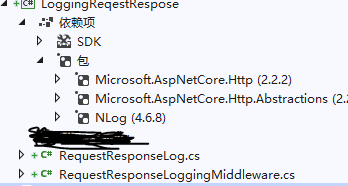
RequestResponseLog.cs
using System;

using System.Collections.Generic;

using System.Linq;

using System.Text;

namespace LogRequestMiddleware

{

    public class RequestResponseLog

    {

        public string Url { get; set; }

        public IDictionary<string, string> Headers { get; set; } = new Dictionary<string, string>();

        public string Method { get; set; }

        public string RequestBody { get; set; }

        public string ResponseBody { get; set; }

        public DateTime ExcuteStartTime { get; set; }

        public DateTime ExcuteEndTime { get; set; }

        public override string ToString()

        {

            string headers = "[" + string.Join(",", this.Headers.Select(i => "{" + $"\"{i.Key}\":\"{i.Value}\"" + "}")) + "]";

            return $"Url: {this.Url},\r\nHeaders: {headers},\r\nMethod: {this.Method},\r\nRequestBody: {this.RequestBody},\r\nResponseBody: {this.ResponseBody},\r\nExcuteStartTime: {this.ExcuteStartTime.ToString("yyyy-MM-dd HH:mm:ss.fff")},\r\nExcuteStartTime: {this.ExcuteEndTime.ToString("yyyy-MM-dd HH:mm:ss.fff")}";

        }

    }

}
RequestResponseLoggingMiddleware.cs
using Microsoft.AspNetCore.Builder;

using Microsoft.AspNetCore.Http;

using System;

using System.Collections.Generic;

using System.IO;

using System.Linq;

using System.Text;

using System.Threading.Tasks;

using Microsoft.AspNetCore.Http.Internal;

using NLog;

namespace LogRequestMiddleware

{

    public class RequestResponseLoggingMiddleware

    {

        private readonly RequestDelegate _next;

        private RequestResponseLog _logInfo;

        public RequestResponseLoggingMiddleware(RequestDelegate next)

        {

            _next = next;

        }

        public async Task Invoke(HttpContext context)

        {

            _logInfo = new RequestResponseLog();

            HttpRequest request = context.Request;

            _logInfo.Url = request.Path.ToString();

            _logInfo.Headers = request.Headers.ToDictionary(k => k.Key, v => string.Join(";", v.Value.ToList()));

            _logInfo.Method = request.Method;

            _logInfo.ExcuteStartTime = DateTime.Now;

            //获取request.Body内容

            if (request.Method.ToLower().Equals("post"))

            {

                request.EnableBuffering(); //启用倒带功能,就可以让 Request.Body 可以再次读取

                Stream stream = request.Body;

                byte[] buffer = new byte[request.ContentLength.Value];

                stream.Read(buffer, , buffer.Length);

                _logInfo.RequestBody = Encoding.UTF8.GetString(buffer);

                request.Body.Position = ;

            }

            else if (request.Method.ToLower().Equals("get"))

            {

                _logInfo.RequestBody = request.QueryString.Value;

            }

            //获取Response.Body内容

            var originalBodyStream = context.Response.Body;

            using (var responseBody = new MemoryStream())

            {

                context.Response.Body = responseBody;

                await _next(context);

                _logInfo.ResponseBody = await FormatResponse(context.Response);

                _logInfo.ExcuteEndTime = DateTime.Now;

                 Logger Logger = LogManager.GetCurrentClassLogger();

                 //log

                Logger.Info($"VisitLog: {_logInfo.ToString()}");

                //Logger.LogInfo();

                await responseBody.CopyToAsync(originalBodyStream);

            }

        }

        private async Task<string> FormatResponse(HttpResponse response)

        {

            response.Body.Seek(, SeekOrigin.Begin);

            var text = await new StreamReader(response.Body).ReadToEndAsync();

            response.Body.Seek(, SeekOrigin.Begin);

            return text;

        }

    }

    public static class RequestResponseLoggingMiddlewareExtensions

    {

        public static IApplicationBuilder UseRequestResponseLogging(this IApplicationBuilder builder)

        {

            return builder.UseMiddleware<RequestResponseLoggingMiddleware>();

        }

    }

}
sartup.cs
app.UseRequestResponseLogging();
一般来说,会遇到一个错误是包2.2的版本与.net core 3.0版本不一致
request.EnableRewind (); //这个方法无法使用
你可以用这个request.EnableBuffering();
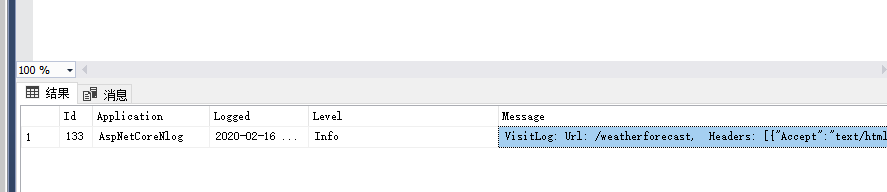
VisitLog: Url: /weatherforecast,
Headers: [{"Accept":"text/html,application/xhtml+xml,application/xml;q=0.9,image/webp,image/apng,*/*;q=0.8,application/signed-exchange;v=b3;q=0.9"},{"Accept-Encoding":"gzip, deflate, br"},{"Accept-Language":"zh,en-US;q=0.9,en;q=0.8"},{"Connection":"close"},{"Host":"localhost:44307"},{"User-Agent":"Mozilla/5.0 (Windows NT 10.0; Win64; x64) AppleWebKit/537.36 (KHTML, like Gecko) Chrome/80.0.3987.100 Safari/537.36 Edg/80.0.361.53"},{"upgrade-insecure-requests":"1"},{"sec-fetch-dest":"document"},{"sec-fetch-site":"none"},{"sec-fetch-mode":"navigate"},{"sec-fetch-user":"?1"}],
Method: GET,
RequestBody: ?ID=9,
ResponseBody: [{"date":"2020-02-17T17:35:39.6927261+08:00","temperatureC":-9,"temperatureF":16,"summary":"Chilly"},{"date":"2020-02-18T17:35:39.6928616+08:00","temperatureC":22,"temperatureF":71,"summary":"Chilly"},{"date":"2020-02-19T17:35:39.6928634+08:00","temperatureC":34,"temperatureF":93,"summary":"Mild"},{"date":"2020-02-20T17:35:39.692864+08:00","temperatureC":28,"temperatureF":82,"summary":"Balmy"},{"date":"2020-02-21T17:35:39.6928647+08:00","temperatureC":-5,"temperatureF":24,"summary":"Freezing"}],
ExcuteStartTime: 2020-02-16 17:35:39.676,
ExcuteStartTime: 2020-02-16 17:35:39.708
.net core 3.0一个记录request和respose的中间件的更多相关文章
- ASP.NET Core 1.0 开发记录
官方资料: https://github.com/dotnet/core https://docs.microsoft.com/en-us/aspnet/core https://docs.micro ...
- ASP.NET Core 5.0 中读取Request中Body信息
ASP.NET Core 5.0 中读取Request中Body信息 记录一下如何读取Request中Body信息 public class ValuesController : Controller ...
- ASP.NET Core 3.0 一个 jwt 的轻量角色/用户、单个API控制的授权认证库
目录 说明 一.定义角色.API.用户 二.添加自定义事件 三.注入授权服务和中间件 三.如何设置API的授权 四.添加登录颁发 Token 五.部分说明 六.验证 说明 ASP.NET Core 3 ...
- ASP.NET 5 RC1 升级 ASP.NET Core 1.0 RC2 记录
升级文档: Migrating from DNX to .NET Core Migrating from ASP.NET 5 RC1 to ASP.NET Core 1.0 RC2 Migrating ...
- ASP.NET Core 2.0 中读取 Request.Body 的正确姿势
原文:ASP.NET Core 中读取 Request.Body 的正确姿势 ASP.NET Core 中的 Request.Body 虽然是一个 Stream ,但它是一个与众不同的 Stream ...
- ASP.NET Core 1.0 静态文件、路由、自定义中间件、身份验证简介
概述 ASP.NET Core 1.0是ASP.NET的一个重要的重新设计. 例如,在ASP.NET Core中,使用Middleware编写请求管道. ASP.NET Core中间件对HttpCon ...
- .net core 2.0学习记录(一):搭建一个.Net Core网站项目
.Net Core开发可以使用Visual Studio 2017或者Visual Studio Code,下面使用Visual Studio 2017搭建一个.net Core MVC网站项目. 一 ...
- .net core 2.0学习记录(三):内置IOC与DI的使用
本篇的话介绍下IOC和ID的含义以及如何使用.Net Core中的DI. 一.我是这么理解IOC和DI的: IOC:没有用IOC之前是直接new实例来赋值,使用IOC之后是通过在运行的时候根据配置来实 ...
- .net core 2.0学习记录(四):Middleware使用以及模拟构建Middleware(RequestDelegate)管道
.net Core中没有继续沿用以前asp.net中的管道事件,而是开发了一个新的管道(Middleware): public class MiddlewareDemo { private reado ...
随机推荐
- IDEA启动报错Plugin Error Problems found loading plugins的解决办法
错误描述 今天启动项目时发现IDEA控制台出错,tomcat的标志变成问号,启动不了服务器 Problems found loading plugins: Plugin "Persisten ...
- spring中创建bean对象的三种方式以及作用范围
时间:2020/02/02 一.在spring的xml配置文件中创建bean对象的三种方式: 1.使用默认构造函数创建.在spring的配置文件中使用bean标签,配以id和class属性之后,且没有 ...
- vscode 调试 react 项目
主要分为以下三个步骤 安装 debug for chrome 配置 launch.json 文件 配置内容如下 { "version": "0.2.0", &q ...
- LoadRunner参数传递给参数
需求:使用随机函数时,需要参数化某个参数,并且后面的步骤需要使用这个参数. 方法: lr_save_string 该函数主要是将程序中的常量或变量保存为lr中的参数 lr_eval_string 从参 ...
- Android Webview实现有道电子词典
毕业设计android电子词典,先实现的一个小小的demo. 所谓的毕业设计就是用最短的时间学习一门语言,做出一个小的project. activity_main.xml <LinearLayo ...
- pandas使用的25个技巧
本文翻译自https://nbviewer.jupyter.org/github/justmarkham/pandas-videos/blob/master/top_25_pandas_trick ...
- 用tensorflow构建神经网络学习简单函数
目标是学习\(y=2x+3\) 建立一个5层的神经网络,用平方误差作为损失函数. 代码如下: import tensorflow as tf import numpy as np import tim ...
- CCF_ 201512-3_画图
直接模拟就行了,注意坐标系方向与平常数组不一样,填充操作用深搜和广搜都可以,这里用了广搜. #include<iostream> #include<cstdio> #inclu ...
- ionic2的返回按钮的编辑问题
ionic2 返回按钮 首先可以在 app.module.ts 文件中配置. @NgModule 中的 imports 属性的 IonicModule.forRoot 第二个参数,如下: IonicM ...
- mapreduce清洗数据
继上篇 MapReduce清洗数据 package mapreduce; import java.io.IOException; import org.apache.hadoop.conf.Confi ...