
Cisco AP-了解AP镜像
Understanding Access Point OS Images
Introduction
All Cisco Aironet 802.11a/b/g/n and 11ac Wave 1 wireless access points and bridges currently being shipped run IOS, except for the OEAP602.
The newer 11ac Wave 2 APs, including the 1800, 2800 and 3800 series, run AP-COS.
Note: Some very old, no longer supported, Cisco access points ran VxWorks, such as the Aironet 342 and the 1010/1020 lightweight APs.
Access Point IOS is distributed as a tar file. These tar files can be downloaded from cisco.com SDS; lightweight IOS images (k9w8) are also bundled in the WLC software images (.aes.)
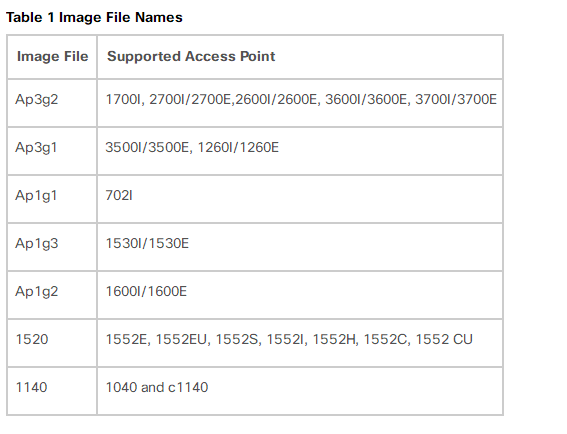
The AP image names include the following components:
platform-featureset-tar.version.tar
• platform- the access point hardware model or family supported by the image
○ ap1g1 - 700 series (702w beginning with 15.2(4)JB5)
○ ap1g2 - 1600 series
○ ap1g3 - 1530 series, AP803 embedded in IR829 router
○ ap1g4 - 1850/1830/1810 series (COS not IOS)
○ ap1g5 - 1800/1815/1540 series (COS not IOS)
○ ap3g1 - 3500/1260 series
○ ap3g2 - 3700/3600/2700/2600/1700 series (up through 8.4/15.3(3)JE branch)
○ ap3g3 - 3800/2800/1560 series (COS not IOS)
○ ap802 - AP embedded in 819, 812, 886VA-W/887VA-W, and C88x routers
○ ap801 - AP embedded in 861W, 891W, 1911W routers and most 88xW routers
○ apw5100 - Rockwell Stratix 5100 WAPAK9, WAPCK9, WAPEK9, WAPZK9
○ c3700 - 1700/2700/3700 series APs (8.5/15.3(3)JF and above)
○ c1570 - 1570 series outdoor APs
○ c1550 - 1550 (128MB model) series outdoor APs
○ c1520 - 1520 and 1550 (64MB model) series mesh APs
○ c1410 - BR1410
○ c1310 - BR1310
○ c1250 - 1250 series APs
○ c1240 - 1240 series APs
○ c1200 - 1200 series (1200/1210/1220/1230)
○ c1140 - 1140 and 1040 series APs
○ c1130 - 1130 series APs
○ c1100 - 1100 series APs (i.e. the AP1121)
○ c520 - 521 AP
○ c350 - 350 series APs
• featureset- the set of software features supported by the image - one of:
○ k9w7 - autonomous (or "site survey") IOS (not available with COS)
○ k9w8 - full lightweight IOS/COS (this is what is bundled in the WLC .aes image, and is factory installed on "mesh" APs)
○ rcvk9w8 - lightweight recovery image - this is factory installed on lightweight APs, unless a "mesh" image is specified; it lacks radio firmware (not available with COS)
○ boot - bootloader image (not IOS) - normally installed by manufacturing and not updated in the field
• version- the IOS version
○ There is a 1:1 mapping between the lightweight OS software version (such as 12.4(23c)JA) and the CUWN version (such as 7.0.98.0)
§ see the Wireless Solutions Software Compatibility Matrix on CCO
Example:
c1240-k9w7-tar.124-25d.JA1.tar
• Platform: c1240: 1240 series AP
• Featureset: k9w7: autonomous IOS
• Version: 124-25d.JA1: 12.4(25d)JA1
As AP IOS is always distributed as a tar file, the AP cannot directly execute such a file (thus, if you were to copy c1240-k9w7-tar.124-25d.JA1.tar directly onto AP flash, and then try to boot it, this could not work.) The tar file contains, in addition to the IOS image proper, the radio firmware files, the HTML GUI files (if present), and various other files.
The AP IOS tar file must be unbundled into AP flash using the archive exec command (this is done in an automated fashion when a lightweight AP is upgraded after joining a WLC.)
Example:
AP1260#archive download-sw /overwrite tftp://10.95.42.136/ap3g1-k9w7-tar.124-25d.JA1
After unbundling, the IOS image itself be in a file called flash:/platform-featureset-mx.version/platform-featureset-mx.version - for example, flash:/c1240-k9w7-mx.124-25d.JA1/c1240-k9w7-mx.124-25d.JA1. The AP is configured to boot this image if the bootloader BOOT environmental variable is set accordingly.
To see what IOS image the AP is configured to boot, examine the BOOT variable.
Example:
AP3502i#more flash:/env_vars | include BOOT
BOOT=flash:/ap3g1-k9w8-mx.152-2.JA/ap3g1-k9w8-mx.152-2.JA
To change the BOOT variable, use the IOS config mode boot system command.
Example:
AP3502i(config)#boot system flash:/ap3g1-k9w8-mx.124-25e.JA2/ap3g1-k9w8-mx.124-25e.JA2
Cisco AP-了解AP镜像的更多相关文章
- Cisco AP-ROMMON升级AP镜像
Rommon is Cisco bootloader for their Router devices >>>ROMMON是思科设备的引导加载程序while U-boot is a ...
- Cisco 12系列 AP 初始化配置-1-安装IOS
12系列AP虽然已经淘汰了,但是像我们这种没钱的公司用了10年却还是在用,好在它还有学习的价值,还是可以从12系列AP看出一些思科部署无线的思路吧. 首先吐槽一下国内常说的胖.瘦AP的这种说法,因为用 ...
- Cisco AP-胖瘦AP的转换
一.瘦AP到胖AP的转换:1.登录到LAP协商的WLC2.从LAP模式恢复到胖AP,输入下面命令:config ap tftp tftp_server_ip filename ap_name注意:需要 ...
- Cisco 12系列 AP 初始化配置-2-初始化配置
用于SSH登陆这个设备 bridge irb bridge 1 route ip 开启路由功能 interface BVI1 ip address 10.15.106.44 255.255.255. ...
- Sum of AP series——AP系列之和
A series with same common difference is known as arithmetic series. The first term of series is 'a' ...
- Cisco Spectrum Expert(Wave2 AP)
在一些版本中,我们可能会发现,AP16,26或AP17,27,37等支持Spectrum Expert Connect (即SE-Connect),该模式可以让AP将频谱分析所述数据发送到对应的分析仪 ...
- Cisco AP-格式化AP
故障情况:APC11-AP04#sho capwap ip config LWAPP Static IP ConfigurationIP Address 172.17.239.204I ...
- Cisco AP-如何识别思科胖瘦AP
思科的胖瘦AP识别的方式不止一种,这里简单的总结一些我了解到的方式: 1.根据思科AP的型号 这个和思科不同时期的产品有关系,老一点的和新一些的AP命名上存在差别,这里简单举例: 类型1:AIR-LA ...
- 胖AP与瘦AP区别
一.胖AP组网方案 1.漫游问题 用户从一个胖AP的覆盖区域走到另一个胖AP的覆盖区域,会重新连接信号强的一个胖AP,重新进行认证,重新获取IP地址,存在断网现象: 2.无法保证WLAN的安全性 为了 ...
随机推荐
- 题解 【Codeforces755A】 PolandBall and Hypothesis
我们可以发现,当n>2时,n·(n-2)+1=(n-1)·(n-1),因此,输出n-2即可. 如果n<=2,我们可以发现: 当n=2时,2·4+1=9不是质数,输出4即可: 当n=1时,1 ...
- analog filter
理想的filter如下: 但是实际的filter如下: 在实际应用中,我们更多的是用Fo和Q这两个parameter来design analog filter. Low-Pass Filter tra ...
- mybatis报错:A query was run and no Result Maps were found for the Mapped Statement、、Property [login_ip] not found on type [com.thinkgem.jeesite.common.permission.entity.PremissUser]问题解决
今天在做ssm项目的时候出现了: 先是出现 了错误: mybatis报错:A query was run and no Result Maps were found for the Mapped St ...
- hive导出数据到本地文件报错解决方法
报错信息: Execution Error, return code 1 from org.apache.hadoop.hive.ql.exec.MoveTask. Unable to move so ...
- SpringCloud Netflix Eureka
Eureka是Netflix开源的服务发现组件,基于REST,SpringCloud将它集成在子项目Spring Cloud Netflix中,从而实现服务的注册.发现. Eureka包含Server ...
- 排查 k8s 集群 master 节点无法正常工作的问题
搭建的是 k8s 高可用集群,用了 3 台 master 节点,2 台 master 节点宕机后,仅剩的 1 台无法正常工作. 运行 kubectl get nodes 命令出现下面的错误 The c ...
- cookie、session以及中间件
cookie cookie是保存客户端浏览器上的键值对,是服务端设置在客户端浏览器上的键值对,也就意味着浏览器其实可以拒绝服务端的'命令',默认情况下浏览器都是直接让服务端设置键值对 设置cookie ...
- Docker - Dockerfile - 常见命令简介
概述 感觉是个 比较重要的东西 有个疑问 我是先讲 docker build 还是 先讲 Dockerfile 穿插讲 docker build 最基本的东西 原理 -t -f docker file ...
- Linux - XShell - alt 快捷键的设置
1. 概述 命令行的 alt 快捷键可能会冲突 2. 环境 os win10 centos7 xshell xhell6 3. 场景 开启 centos7 虚拟机 在 win10 打开 xshell6 ...
- python的datetime库
datetime 库 简介 获取时间 主要提供程序计时器 基本使用