
ADO.NET_02
一、说明
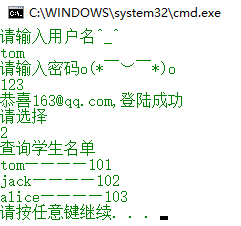
这个例子是小白跟着学习代码记录,模拟用户登陆功能,并可以查询所有学生信息。
二、代码
共4个文件,如下
App.config
<?xml version="1.0" encoding="utf-8" ?>

<configuration>

  <connectionStrings>

    <add name="MyschoolConnectionString" connectionString="Data Source=.;Initial Catalog=Mydata;Persist Security Info=True;User ID=XLJ;Pooling=False;MultipleActiveResultSets=False;Encrypt=False;TrustServerCertificate=True;Password=123456;" />

  </connectionStrings>

  <startup>

    <supportedRuntime version="v4.0" sku=".NETFramework,Version=v4.7" />

  </startup>

</configuration>
Student.cs
using System;

using System.Collections.Generic;

using System.Linq;

using System.Text;

using System.Threading.Tasks;

namespace Ado.NETDemo2

{

    /// <summary>

    /// 学生实体类

    /// </summary>

    public class Student

    {

        /// <summary>

        /// 编号

        /// </summary>

        public string StudentNo { get; set; }

        /// <summary>

        /// 姓名

        /// </summary>

        public string StudentName { get; set; }

    }

}
StudentDao.cs
using System;

using System.Collections.Generic;

using System.Configuration;

using System.Data.SqlClient;

using System.Linq;

using System.Text;

using System.Threading.Tasks;

namespace Ado.NETDemo2

{

    public class StudentDao

    {

        // 1、编写连接字符串

        //string connectionString = "server=.;uid=XLJ;pwd=123456;database=Mydata;";

        //string connectionString = "Data Source=.;Initial Catalog=Mydata;Persist Security Info=True;User ID=XLJ;Pooling=False;MultipleActiveResultSets=False;Encrypt=False;TrustServerCertificate=True;Password=123456;";

        public static string connectionString = ConfigurationManager.ConnectionStrings["MyschoolConnectionString"].ToString();

        // 2、建立连接

        SqlConnection connection = new SqlConnection(connectionString);

        // connection.ConnectionString = connectionString;

        /// <summary>

        /// 验证用户是否存在

        /// </summary>

        /// <param name="userName"></param>

        /// <param name="password"></param>

        /// <param name="message"></param>

        /// <returns></returns>

        public bool ValidataUser(string userName, string password, ref string message)

        {

            bool result = false;

            try

            {

                // 3、打开连接

                connection.Open();

                // Console.WriteLine("连接打开成功");

                // 4、实现登陆功能

                SqlCommand command = new SqlCommand();

                //command.CommandText = string.Format("select count(*) from Student where StudentName='{0}' and LoginPwd='{1}'", userName, userPwd);

                //command.CommandText = $"select count(*) from Student where StudentName='{userName}' and LoginPwd='{password}'";

                StringBuilder sb = new StringBuilder("select count(*) from Student");

                sb.AppendFormat(" where StudentName='{0}' and LoginPwd='{1}'", userName, password);

                command.CommandText = sb.ToString();

                command.Connection = connection;

                // 5、执行命令

                int num = (int)command.ExecuteScalar();

                if (num > )

                {

                    result = true;

                    message = "登陆成功";

                }

                else

                {

                    message = "用户名或者密码有误";

                }

            }

            catch (SqlException sqlException)

            {

                Console.WriteLine("数据库访问异常~" + sqlException.Message);

            }

            catch (Exception ex)

            {

                Console.WriteLine("程序出现问题,请联系管理员。" + ex.Message);

            }

            finally

            {

                // 6、关闭连接

                connection.Close();

                //Console.WriteLine("连接关闭成功");

            }

            return result;

        }

        /// <summary>

        /// 实现登陆获取邮箱

        /// </summary>

        /// <param name="userName"></param>

        /// <param name="password"></param>

        /// <returns></returns>

        public string Login(string userName, string password)

        {

            // 2、建立连接

            SqlConnection connection = new SqlConnection(connectionString);

            // connection.ConnectionString = connectionString;

            string result = string.Empty;

            try

            {

                // 3、打开连接

                connection.Open();

                // Console.WriteLine("连接打开成功");

                // 4、实现登陆功能

                SqlCommand command = new SqlCommand();

                //command.CommandText = string.Format("select count(*) from Student where StudentName='{0}' and LoginPwd='{1}'", userName, userPwd);

                command.CommandText = $"select * from Student where StudentName='{userName}' and LoginPwd='{password}'";

                command.Connection = connection;

                // 5、执行命令

                SqlDataReader reader = command.ExecuteReader();

                reader.Read();

                result = reader["email"].ToString();

            }

            catch (SqlException sqlException)

            {

                Console.WriteLine("数据库访问异常~" + sqlException.Message);

            }

            catch (Exception ex)

            {

                Console.WriteLine("程序出现问题,请联系管理员。" + ex.Message);

            }

            finally

            {

                // 6、关闭连接

                connection.Close();

                //Console.WriteLine("连接关闭成功");

            }

            return result;

        }

        /// <summary>

        /// 获取所有学生

        /// </summary>

        /// <returns></returns>

        public List<Student> GetStudentList()

        {

            List<Student> students = new List<Student>();

            StringBuilder sql = new StringBuilder("select StudentNo,StudentName from Student");

            // 打开连接

            connection.Open();

            SqlCommand command = new SqlCommand(sql.ToString(), connection);

            SqlDataReader reader = command.ExecuteReader();

            while (reader.Read())

            {

                Student student = new Student();

                student.StudentNo = reader["StudentNo"].ToString();

                student.StudentName = reader["StudentName"].ToString();

                // 组装到学生集合列表中

                students.Add(student);

            }

            // 关闭读取器

            reader.Close();

            // 关闭连接

            connection.Close();

            return students;

        }

    }

}
Program.cs
using System;

using System.Collections.Generic;

using System.Linq;

using System.Text;

using System.Threading.Tasks;

namespace Ado.NETDemo2

{

    class Program

    {

        static void Main(string[] args)

        {

            Console.WriteLine("请输入用户名^_^");

            string userName = Console.ReadLine();

            Console.WriteLine("请输入密码o(* ̄︶ ̄*)o");

            string userPwd = Console.ReadLine();

            StudentDao dao = new StudentDao();

            string msg = string.Empty;

            if (dao.ValidataUser(userName, userPwd, ref msg))

            {

                string email = dao.Login(userName, userPwd);

                Console.WriteLine("恭喜{0},{1}", email, msg);

                // 选择

                Console.WriteLine("请选择");

                int choice = int.Parse(Console.ReadLine());

                switch (choice)

                {

                    case :

                        Console.WriteLine("统计学生人数");

                        break;

                    case :

                        Console.WriteLine("查询学生名单");

                        List<Student> students = dao.GetStudentList();

                        foreach (var student in students)

                        {

                            Console.WriteLine(student.StudentName + "————" + student.StudentNo);

                        }

                        break;

                    default:

                        break;

                }

            }

            else

            {

                Console.WriteLine(msg);

            }

        }

    }

}
三、效果
ADO.NET_02的更多相关文章
- ADO.NET对象的详解
1. Connection 类 和数据库交互,必须连接它.连接帮助指明数据库服务器.数据库名字.用户名.密码,和连接数据库所需要的其它参数.Connection对象会被Command对象使用,这样就能 ...
- WebForm获取GET或者POST参数到实体的转换,ADO.NET数据集自动转换实体
最近在修改维护以前的webform项目(维护别人开发的.....)整个aspx没有用到任何的控件,这个我也比较喜欢不用控件所以在提交信息的时候需要自己手动的去Request.QueryString[] ...
- ADO.NET编程之美----数据访问方式(面向连接与面向无连接)
最近,在学习ADO.NET时,其中提到了数据访问方式:面向连接与面向无连接.于是,百度了一下,发现并没有很好的资料,然而,在学校图书馆中发现一本好书(<ASP.NET MVC5 网站开发之美&g ...
- ADO.NET一小记-select top 参数问题
异常处理汇总-后端系列 http://www.cnblogs.com/dunitian/p/4523006.html 最近使用ADO.NET的时候,发现select top @count xxxx 不 ...
- .NET基础拾遗(6)ADO.NET与数据库开发基础
Index : (1)类型语法.内存管理和垃圾回收基础 (2)面向对象的实现和异常的处理 (3)字符串.集合与流 (4)委托.事件.反射与特性 (5)多线程开发基础 (6)ADO.NET与数据库开发基 ...
- 升讯威ADO.NET增强组件(源码):送给喜欢原生ADO.NET的你
目前我们所接触到的许多项目开发,大多数都应用了 ORM 技术来实现与数据库的交互,ORM 虽然有诸多好处,但是在实际工作中,特别是在大型项目开发中,容易发现 ORM 存在一些缺点,在复杂场景下,反而容 ...
- ADO.NET Entity Framework 在哪些场景下使用?
在知乎回答了下,顺手转回来. Enity Framework已经是.NET下最主要的ORM了.而ORM从一个Mapping的概念开始,到现在已经得到了一定的升华,特别是EF等对ORM框架面向对象能力的 ...
- ADO.NET 核心对象简介
ADO.NET是.NET中一组用于和数据源进行交互的面向对象类库,提供了数据访问的高层接口. ADO.NOT类库在System.Data命名空间内,根据我们访问的不同数据库选择命名空间,System. ...
- ODBC、OLE DB、 ADO的区别
转自:http://blog.csdn.net/yinjingjing198808/article/details/7665577 一.ODBC ODBC的由来 1992年Microsoft和Syba ...
随机推荐
- LA3905 Meteor
https://vjudge.net/problem/UVALive-3905 计算出每个点在相框中的时间段,扫描线做即可 关键在如何快速计算每个点在相框中的时间段.对每个点进行运动分解,进入的时间L ...
- 常见问题:MongoDB基础知识
常见问题:MongoDB基础知识 ·MongoDB支持哪些平台? ·MongoDB作为托管服务提供吗? ·集合(collection)与表(table)有何不同? ·如何创建数据库(database) ...
- 【python之路35】FTP文件断电续传作业
开发一个支持多用户在线FTP程序: 要求: 1.用户MD5加密认证 2.允许同时多用户登陆(socketserver) 3.执行命令 4.上传文件 文件传输过程中显示进度条 支持文件的断点续传
- 利用Nginx轻松实现Ajax的跨域请求(前后端分离开发调试必备神技)
利用Nginx轻松实现浏览器中Ajax的跨域请求(前后端分离开发调试必备神技) 前言 为什么会出现跨域? 造成跨域问题的原因是因为浏览器受到同源策略的限制,也就是说js只能访问和操作自己域下的资源,不 ...
- 使用Python进行文件操作
作为高级语言,对文件进行操作时必不可少的功能.那么,Python是怎么对文件进行操作的呢? 1.什么是文件? 文件是一个存储在辅助存储器上的数据序列,可以包含任何数据内容. 文件包括两种类型:文本文件 ...
- java习题-集合框架-泛型
集合框架 一 去除List集合中的重复元素. 思路: 1,先创建一个临时容器.用于存储唯一性的元素.2,遍历原容器,将遍历到的元素到临时容器中去判断,是否存在.3,如果存在,不存储到临时容器,如果不存 ...
- 洛谷P1855 榨取kkksc03 [2017年4月计划 动态规划 09]
P1855 榨取kkksc03 题目描述 洛谷的运营组决定,如果一名oier向他的教练推荐洛谷,并能够成功的使用(成功使用的定义是:该团队有20个或以上的成员,上传10道以上的私有题目,布置过一次作业 ...
- 安装 Composer
参考百度经验:http://jingyan.baidu.com/article/4f34706ed04013e386b56d72.html Composer下载:https://getcomposer ...
- selenium(5):常用的8种元素定位
selenium的webdriver提供了18种(注意不是8种)的元素定位方法,比较常用的定位方法是如下8种,xpath和css定位更加灵活,需要重点掌握其中一个. 经常会用到的8种定位:1.id定位 ...
- hdu 1251 统计难题(trie树入门)
统计难题 Time Limit: 4000/2000 MS (Java/Others) Memory Limit: 131070/65535 K (Java/Others)Total Submi ...