
常见任务&基本工具 1 软件包管理
打包系统主要有两个阵营
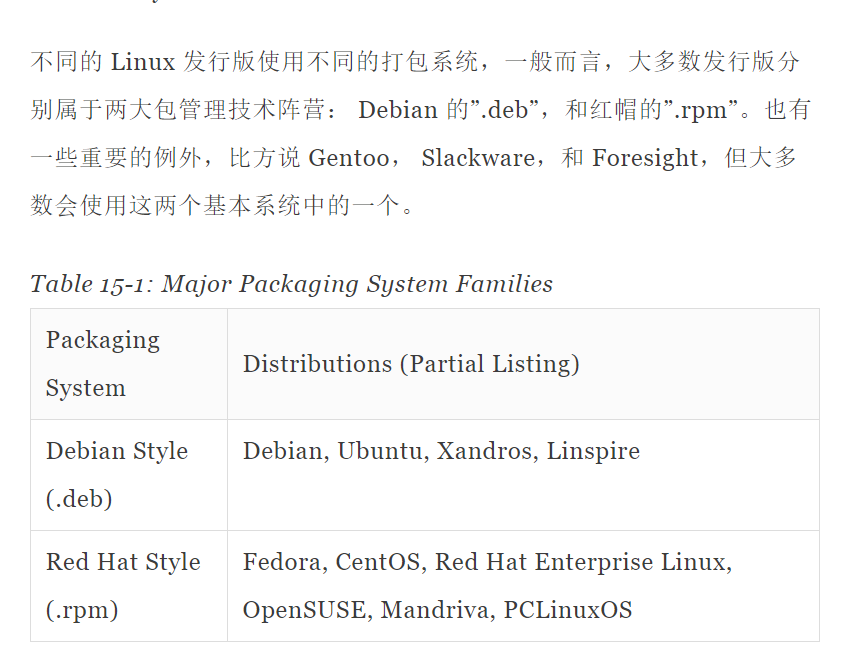
包文件的简介
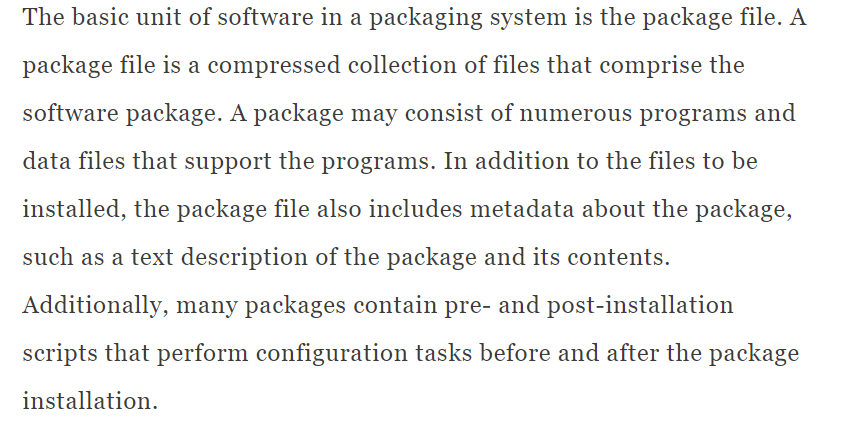
Package files are created by a person known as a package maintainer, often (but not always) an employee of the distribution vendor. The package maintainer gets the software in source code form from the upstream provider (the author of the program), compiles it, and creates the package metadata and any necessary installation scripts. Often, the package maintainer will apply modifications to the original source code to improve the program’s integration with the other parts of the Linux distribution.
资源库
While some software projects choose to perform their own packaging and distribution, most packages today are created by the distribution vendors and interested third parties. Packages are made available to the users of a distribution in central repositories that may contain many thousands of packages, each specially built and maintained for the distribution.
测试资源库
A distribution may maintain several different repositories for different stages of the software development life cycle. For example, there will usually be a “testing” repository that contains packages that have just been built and are intended for use by brave souls who are looking for bugs before they are released for general distribution. A distribution will often have a “development” repository where work-in-progress packages destined for inclusion in the distribution’s next major release are kept.
第三方资源库(法律原因)
A distribution may also have related third-party repositories. These are often needed to supply software that, for legal reasons such as patents or DRM anti-circumvention issues, cannot be included with the distribution. Perhaps the best known case is that of encrypted DVD support, which is not legal in the United States. The third-party repositories operate in countries where software patents and anti-circumvention laws do not apply. These repositories are usually wholly independent of the distribution they support and to use them, one must know about them and manually include them in the configuration files for the package management system.
依赖性
Programs seldom “standalone;” rather they rely on the presence of other software components to get their work done. Common activities, such as input/output for example, are handled by routines shared by many programs. These routines are stored in what are called shared libraries, which provide essential services to more than one program. If a package requires a shared resource such as a shared library, it is said to have a dependency. Modern package management systems all provide some method of dependency resolution to ensure that when a package is installed, all of its dependencies are installed, too.
上层和底层软件包工具
Package management systems usually consist of two types of tools: low-level tools which handle tasks such as installing and removing package files, and high-level tools that perform metadata searching and dependency resolution. In this chapter, we will look at the tools supplied with Debian-style systems (such as Ubuntu and many others) and those used by recent Red Hat products. While all Red Hat-style distributions rely on the same low-level program (rpm), they use different high-level tools. For our discussion, we will cover the high-level program yum, used by Fedora, Red Hat Enterprise Linux, and CentOS. Other Red Hat-style distributions provide high-level tools with comparable features.
Low level and high level

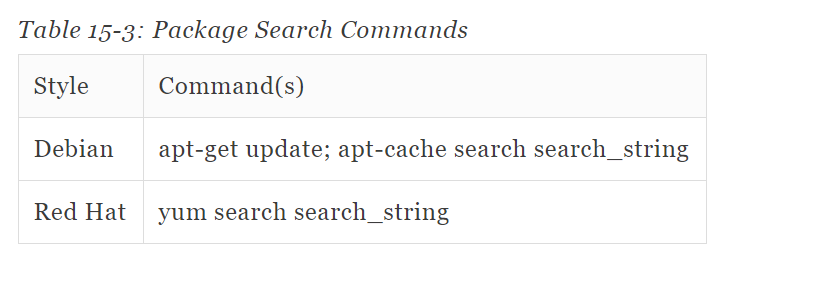
Packge Search Commands
如果下载了没有安装
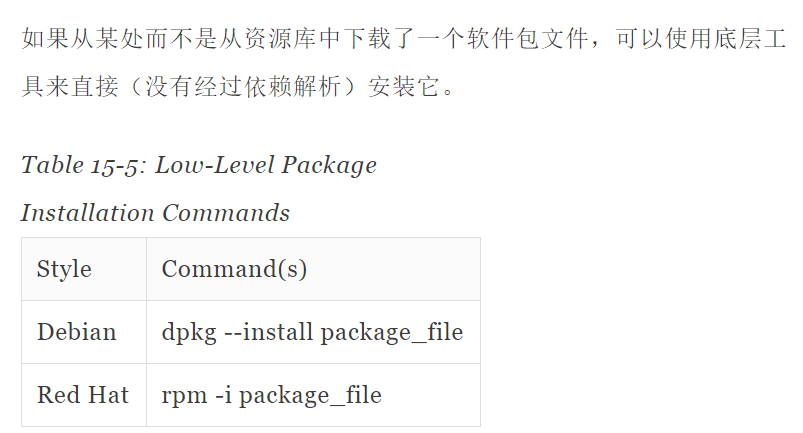
注意这种方法没有解析依赖

上层工具卸载软件

一步更新所需的文件
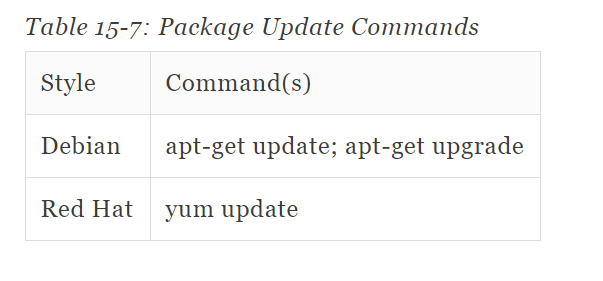
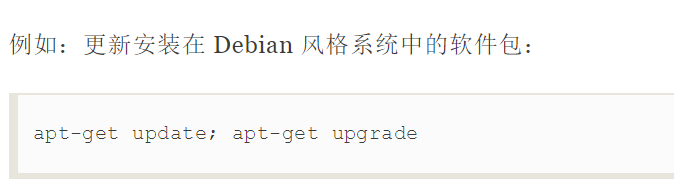
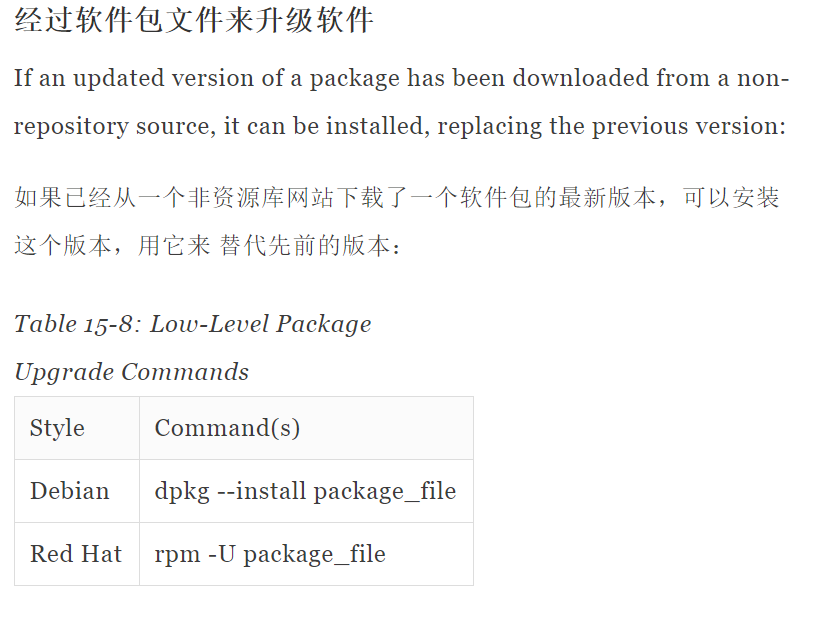
软件包升级软件实现更新

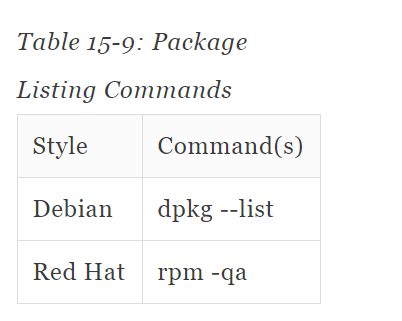
显示现在有的软件
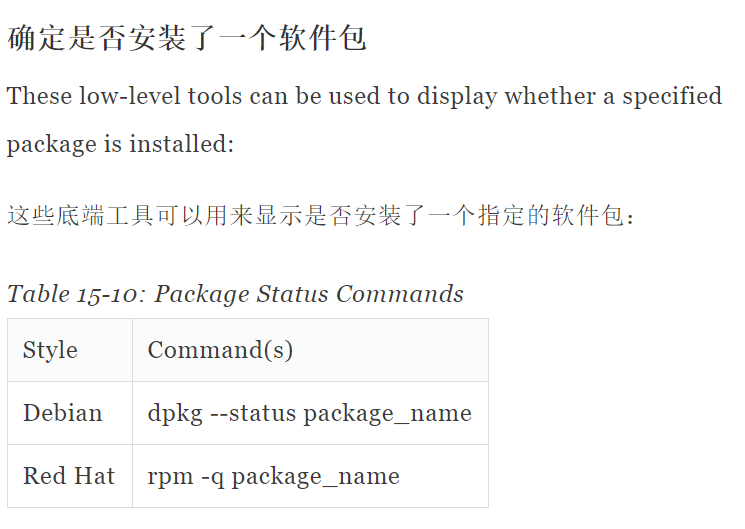
显示该软件的状态
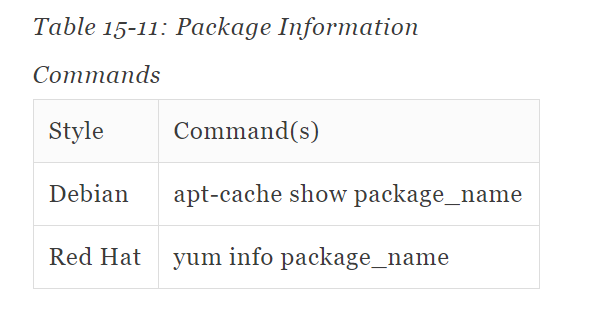
获取软件包的信息
那个软件对该文件负责

常见任务&基本工具 1 软件包管理的更多相关文章
- Debian的软件包管理工具命令 (dpkg,apt-get)详解
本文转载于:http://blog.chinaunix.net/uid-20769502-id-106056.html 1.dpkg包管理工具 dpkg --info "软件包名&quo ...
- Mac OSX上的软件包管理工具,brew 即 Homebrew
brew 即 Homebrew,是Mac OSX上的软件包管理工具,能在Mac中方便的安装软件或者卸载软件, 只需要一个命令, 非常方便. brew类似ubuntu系统下的apt-get的功能. 安装 ...
- Mac Pro 安装 Homebrew 软件包管理工具
Linux系统有个让人蛋疼的通病,软件包依赖,好在当前主流的两大发行版本都自带了解决方案,Red hat有 yum,Ubuntu有 apt-get. Mac os 中没有类似的东东,不过有第三方库支持 ...
- brew mac osx 上软件包管理工具
今天推荐 Mac OSX 下,方便高效的包管理工具 brew brew 的全名叫做 Homebrew 它的功能类似于 ubuntu 下同下 apt-get ,或者 Cent OS 下的 yum 等包管 ...
- RPM是RedHat Package Manager(RedHat软件包管理工具)
RPM是RedHat Package Manager(RedHat软件包管理工具)类似Windows里面的“添加/删除程序” rpm 执行安装包二进制包(Binary)以及源代码包(Source)两种 ...
- mac os x 10.9.1 安装 Homebrew软件包管理工具及brew安装maven3.1.1
Mac OSX上的软件包管理工具,安装软件或者卸载软件. 打开终端输入(如不行,可参考homebrew官网): ruby -e "$(curl -fsSL https://raw.githu ...
- 【one day one linux】linux下的软件包管理工具
Linux 下的软件包管理工具 linux下的软件安装可以通过两种方式,一种是直接使用自带的软件包管理工具安装,另外一种通过编译源码安装. 1.软件包的种类 Red Hat和Fedora:redhat ...
- Mac安装软件包管理工具Homebrew
PS:最近开始学习groovy,打算去官网下载SDK Bundle,可是官网半天加载不出来,而且莫名其妙就是下载不下来,Folx一直提示 "无效的HTTP相应:禁止",可能是插件和 ...
- linux的Yum软件包管理工具
Yum(全称为 Yellow dog Updater, Modified)是一个在Fedora和RedHat以及CentOS中的Shell前端软件包管理器.基于RPM包管理,能够从指定的服务器自动下载 ...
随机推荐
- 0809NOIP模拟测试赛后总结
终于有点脸单独建一个随笔写一下考试总结了…… T1一眼组合数学,推了一会儿式子发现恐怕是容斥.突然害怕,于是开始大力dp. 然后骗了70分走人hhh. T2挂了……又读错题了……以为必须相邻,然后就原 ...
- OCCT 7.4.0 beta version is available
OpenCASCADE 7.4.0测试版本发布 OCC在9月16号发布了opencascade740 beta测试版本,新版本里面做了如下一些重点修改如下: 造型算法部分主要对网格化算法BRepMes ...
- kafka分析
目录 1,kafka简介 2, Kafka Server 2.1,kafka中zookeeper的作用 2.2, Broker 2.2.1,Broker高性能设计 2.2.2,Broker选举机制 2 ...
- 11-1-break-continue
<!DOCTYPE html> <html lang="en"> <head> <meta charset="UTF-8&quo ...
- (Eclipse) 安装Subversion1.82(SVN)插件
简介 :SVN是团队开发的代码管理工具,它使我们得以进行多人在同一平台之下的团队开发. 解决问题:Eclipse下的的SVN插件安装. 学到 :Eclipse下的的SVN插件安装. 资源地 ...
- 堆,栈,内存管理, 拓展补充-Geekband
8, 堆,栈,内存管理 栈: local objects 在离开作用域之后就会被消除. 堆: new MyClass 一直会存在 静态对象: static local object 作用域在 ...
- 转载https://www.luogu.org/problemnew/solution/P1665,http://bailian.openjudge.cn/practice/2002/的新解法
不知道为什么O(n^4)O(n4)的玄学方法能过,正解显然是O(n^2)O(n2)的,枚举对角线,然后算出另外两点判断存不存在. 关键就在怎么通过对角线算出另外两点的坐标. 先贴公式. int mid ...
- C语言中常用的字符串处理函数总结
C语言中字符串处理函数备注 此文仅用于自己研究和记录 字符串处理函数 1. char *gets(char *s); #include<stdio.h> 功能: 从标准输入读入字符,并保存 ...
- MaxCompute问答整理之8月
本文是基于对MaxCompute产品的学习进度,再结合开发者社区里面的一些问题,进而整理成文.希望对大家有所帮助. 问题一.通过数据源数据增量同步后,如何查看某一条数据具体被同步到MaxCompute ...
- gitlab merge request
分支提了mr之后, 又有commit 不用重新提mr,mr中会自动更新 要保证项目下的.git目录中有hooks这个目录(如果是从github迁移到gitlab的项目, 可能没有这个目录, 导致mr不 ...