
常见任务&基本工具 1 软件包管理
打包系统主要有两个阵营
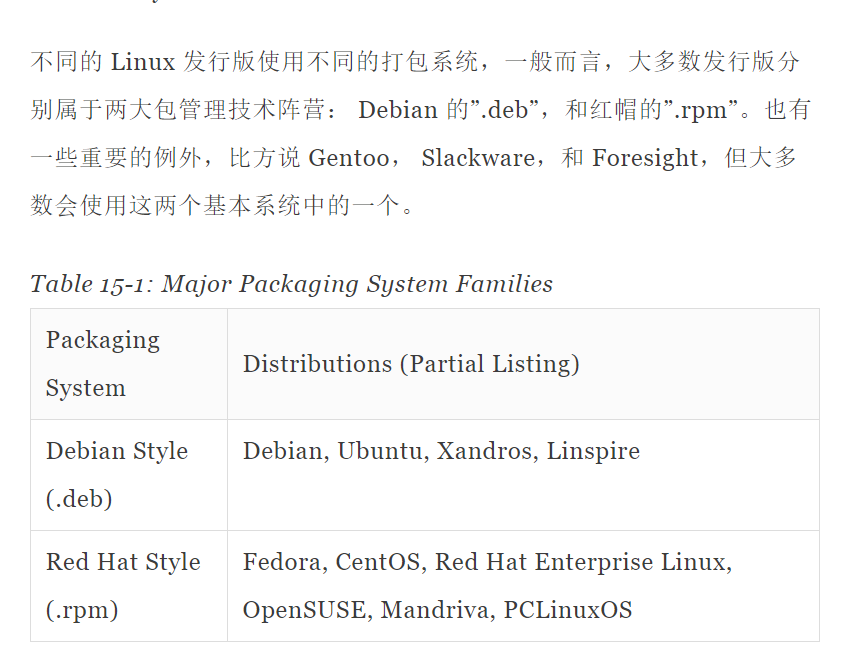
包文件的简介
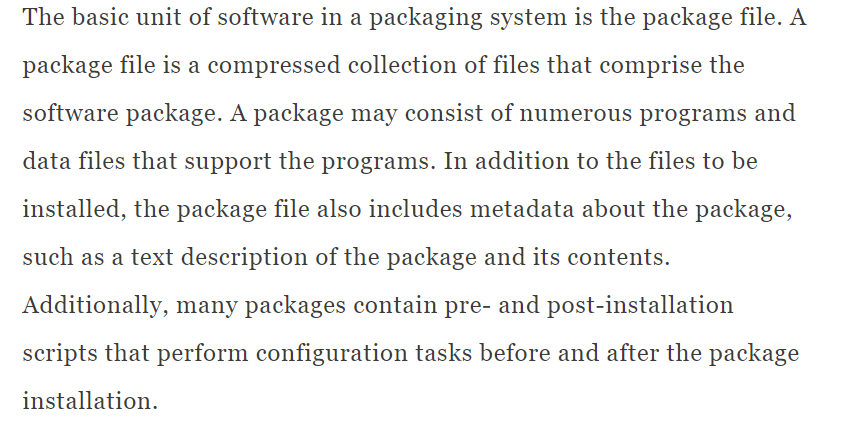
Package files are created by a person known as a package maintainer, often (but not always) an employee of the distribution vendor. The package maintainer gets the software in source code form from the upstream provider (the author of the program), compiles it, and creates the package metadata and any necessary installation scripts. Often, the package maintainer will apply modifications to the original source code to improve the program’s integration with the other parts of the Linux distribution.
资源库
While some software projects choose to perform their own packaging and distribution, most packages today are created by the distribution vendors and interested third parties. Packages are made available to the users of a distribution in central repositories that may contain many thousands of packages, each specially built and maintained for the distribution.
测试资源库
A distribution may maintain several different repositories for different stages of the software development life cycle. For example, there will usually be a “testing” repository that contains packages that have just been built and are intended for use by brave souls who are looking for bugs before they are released for general distribution. A distribution will often have a “development” repository where work-in-progress packages destined for inclusion in the distribution’s next major release are kept.
第三方资源库(法律原因)
A distribution may also have related third-party repositories. These are often needed to supply software that, for legal reasons such as patents or DRM anti-circumvention issues, cannot be included with the distribution. Perhaps the best known case is that of encrypted DVD support, which is not legal in the United States. The third-party repositories operate in countries where software patents and anti-circumvention laws do not apply. These repositories are usually wholly independent of the distribution they support and to use them, one must know about them and manually include them in the configuration files for the package management system.
依赖性
Programs seldom “standalone;” rather they rely on the presence of other software components to get their work done. Common activities, such as input/output for example, are handled by routines shared by many programs. These routines are stored in what are called shared libraries, which provide essential services to more than one program. If a package requires a shared resource such as a shared library, it is said to have a dependency. Modern package management systems all provide some method of dependency resolution to ensure that when a package is installed, all of its dependencies are installed, too.
上层和底层软件包工具
Package management systems usually consist of two types of tools: low-level tools which handle tasks such as installing and removing package files, and high-level tools that perform metadata searching and dependency resolution. In this chapter, we will look at the tools supplied with Debian-style systems (such as Ubuntu and many others) and those used by recent Red Hat products. While all Red Hat-style distributions rely on the same low-level program (rpm), they use different high-level tools. For our discussion, we will cover the high-level program yum, used by Fedora, Red Hat Enterprise Linux, and CentOS. Other Red Hat-style distributions provide high-level tools with comparable features.
Low level and high level

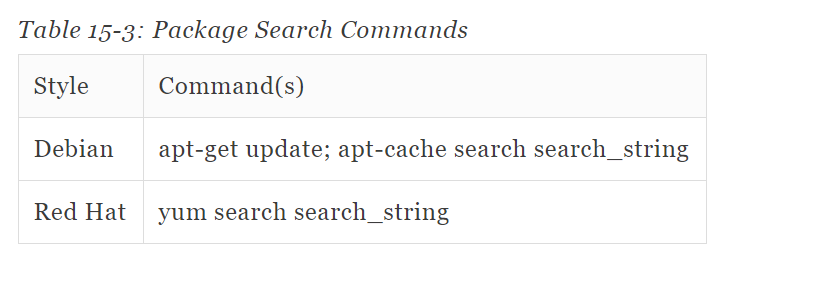
Packge Search Commands
如果下载了没有安装
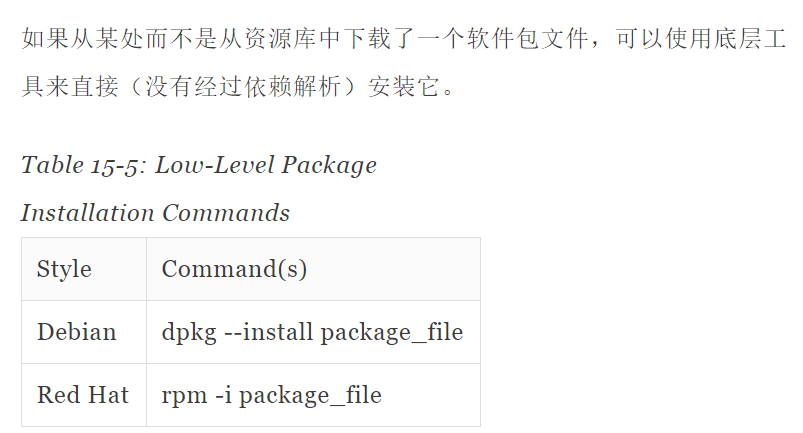
注意这种方法没有解析依赖

上层工具卸载软件

一步更新所需的文件
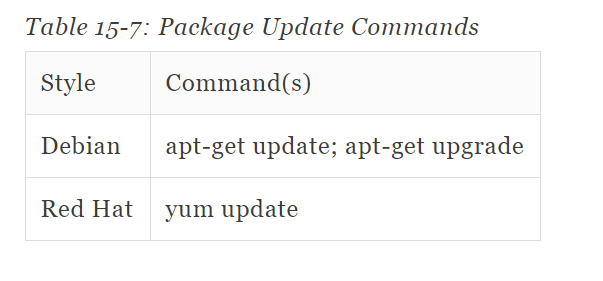
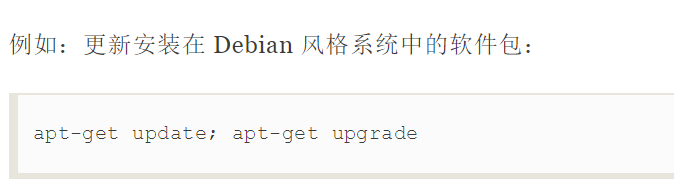
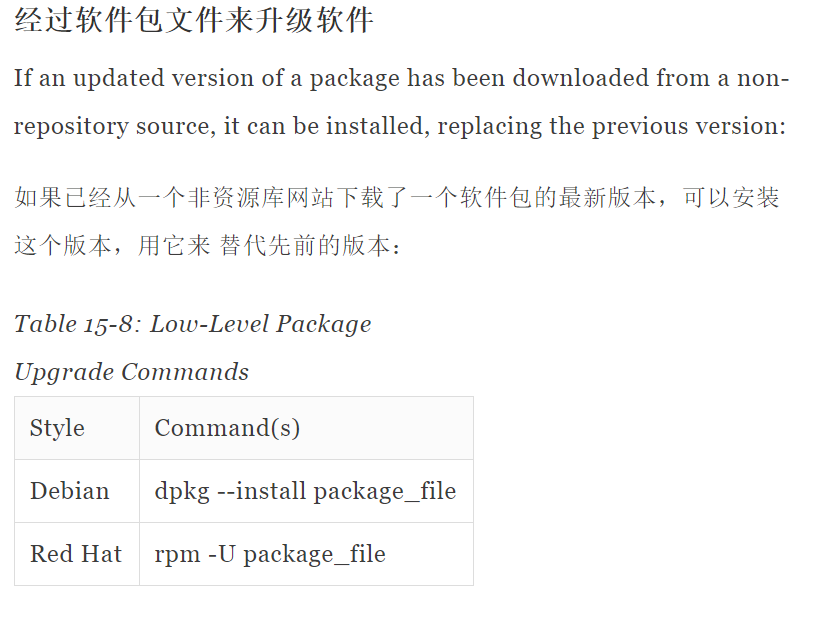
软件包升级软件实现更新

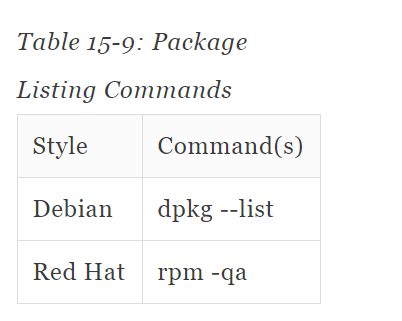
显示现在有的软件
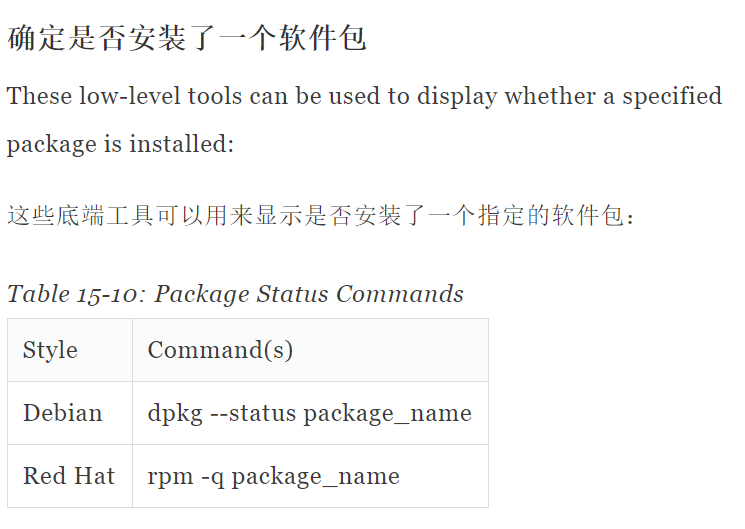
显示该软件的状态
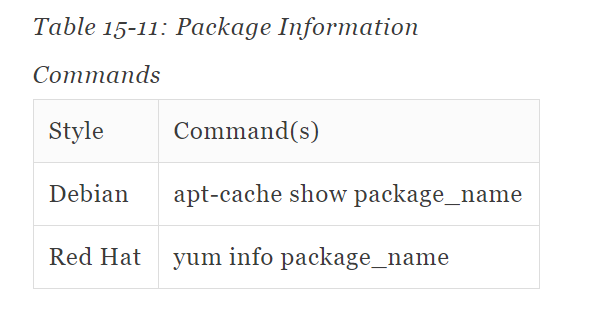
获取软件包的信息
那个软件对该文件负责

常见任务&基本工具 1 软件包管理的更多相关文章
- Debian的软件包管理工具命令 (dpkg,apt-get)详解
本文转载于:http://blog.chinaunix.net/uid-20769502-id-106056.html 1.dpkg包管理工具 dpkg --info "软件包名&quo ...
- Mac OSX上的软件包管理工具,brew 即 Homebrew
brew 即 Homebrew,是Mac OSX上的软件包管理工具,能在Mac中方便的安装软件或者卸载软件, 只需要一个命令, 非常方便. brew类似ubuntu系统下的apt-get的功能. 安装 ...
- Mac Pro 安装 Homebrew 软件包管理工具
Linux系统有个让人蛋疼的通病,软件包依赖,好在当前主流的两大发行版本都自带了解决方案,Red hat有 yum,Ubuntu有 apt-get. Mac os 中没有类似的东东,不过有第三方库支持 ...
- brew mac osx 上软件包管理工具
今天推荐 Mac OSX 下,方便高效的包管理工具 brew brew 的全名叫做 Homebrew 它的功能类似于 ubuntu 下同下 apt-get ,或者 Cent OS 下的 yum 等包管 ...
- RPM是RedHat Package Manager(RedHat软件包管理工具)
RPM是RedHat Package Manager(RedHat软件包管理工具)类似Windows里面的“添加/删除程序” rpm 执行安装包二进制包(Binary)以及源代码包(Source)两种 ...
- mac os x 10.9.1 安装 Homebrew软件包管理工具及brew安装maven3.1.1
Mac OSX上的软件包管理工具,安装软件或者卸载软件. 打开终端输入(如不行,可参考homebrew官网): ruby -e "$(curl -fsSL https://raw.githu ...
- 【one day one linux】linux下的软件包管理工具
Linux 下的软件包管理工具 linux下的软件安装可以通过两种方式,一种是直接使用自带的软件包管理工具安装,另外一种通过编译源码安装. 1.软件包的种类 Red Hat和Fedora:redhat ...
- Mac安装软件包管理工具Homebrew
PS:最近开始学习groovy,打算去官网下载SDK Bundle,可是官网半天加载不出来,而且莫名其妙就是下载不下来,Folx一直提示 "无效的HTTP相应:禁止",可能是插件和 ...
- linux的Yum软件包管理工具
Yum(全称为 Yellow dog Updater, Modified)是一个在Fedora和RedHat以及CentOS中的Shell前端软件包管理器.基于RPM包管理,能够从指定的服务器自动下载 ...
随机推荐
- Django常用组件之分页器
目录 循环插入数据测试 实现分页器 视图层使用 模板层使用 循环插入数据测试 # ORM 帮我们提供了循环插入数据更快捷的方法: book_list = [] for i in range(1000) ...
- 如何使用C++获取 进程的 绝对路径
DWORD GetProcessId(IN PCHAR szExeName) { DWORD dwRet = 0; DWORD dwCount = 0; HANDLE hSnapshot = Crea ...
- vue的无缝滚动插件vue-seamless-scroll的使用
https://chenxuan0000.github.io/component-document/index_prod.html#/component/seamless-others 在vue环境下 ...
- iframe跨域数据传递
项目中需要和其他单位合作开发,方案采用iframe嵌入页面,开发过程中设计到了跨域数据的传递,初步方案决定使用html5 API postMessage进行iframe跨域数据传递: 域名A下的页面 ...
- Java-MyBatis-MyBatis3-XML映射文件:XML映射文件
ylbtech-Java-MyBatis-MyBatis3-XML映射文件:XML映射文件 1. XML 映射文件 MyBatis 的真正强大在于它的映射语句,这是它的魔力所在.由于它的异常强大,映射 ...
- Mysql 增加rownum
Mysql 增加rownum 实现(极度推荐) mysql本身不像oracle那样使用 rownum 来显示行号的功能.但是可以使用设置变量的方式来实现这一功能. mysql使用 @ 定义用户变量, ...
- Activiti历史查看
流程执行完毕后,究竟去了哪里有些疑问. 虽然已完成的任务在act_ru_task和act_ru_execution表中都已被删除,但是这些数据还存在activiti的数据库中,作为历史改由Histor ...
- HLog工作原理
- 你真的了解cookies吗?
互联网隐私安全,直接放链接吧,这一篇非常好的文章,详细,全面,专业. http://www.freebuf.com/articles/web/127266.html 浅谈Web客户端追踪 一. W ...
- 构建工具Bazel入门
Bazel入门 原文:http://bazel.io/docs/getting-started.html 译者:chai2010 安装 安装过程请参考: http://bazel.io/docs/ ...