
iOS屏幕尺寸和分辨率了解
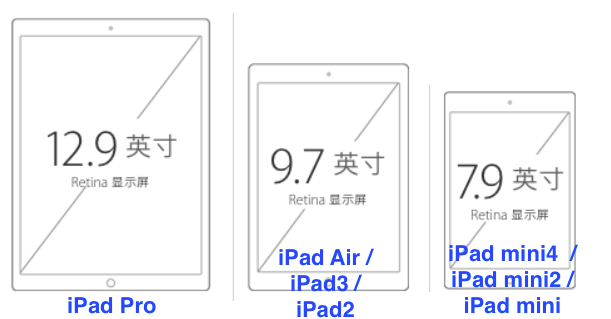
1、截至目前为止,主流的iOS设备屏幕有以下几种:
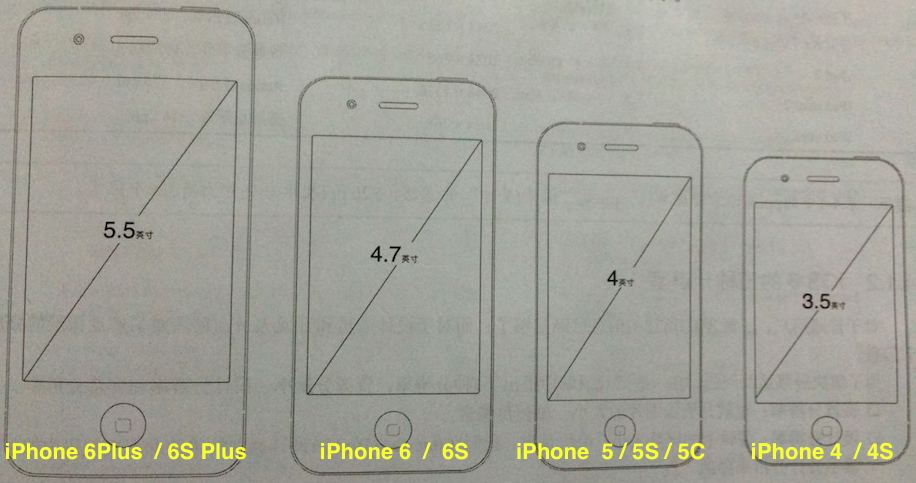
--------------- iPhone ---------- -------- iPad ------------
2、iOS设备屏幕分辨率:(ppi是像素密度单位【像素/英寸】,401ppi表示每英寸上有401个像素)
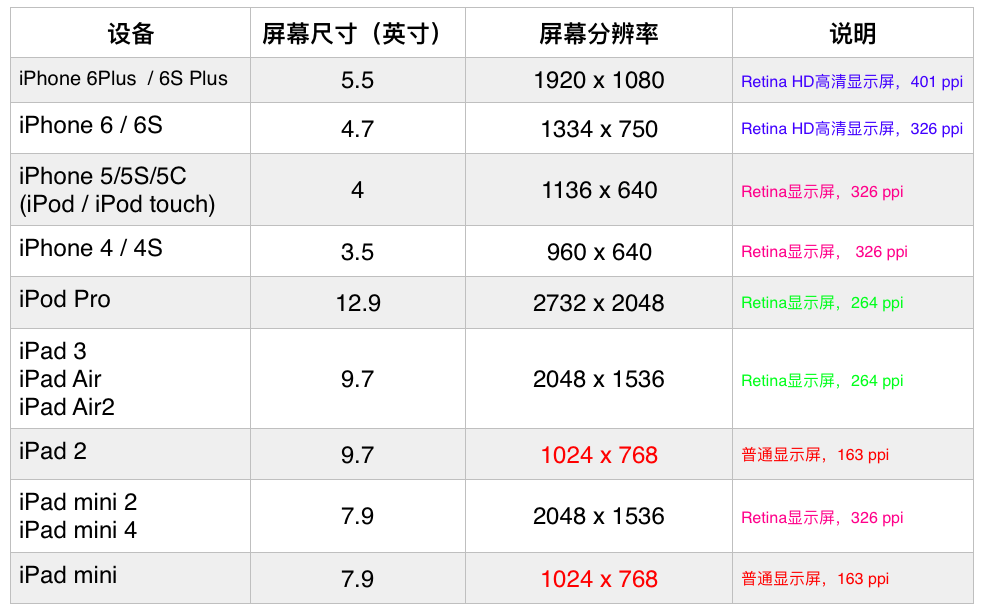
ppi(pixel per inch)计算,以6Plus为例:
屏幕分辨率1920 x 1080, 屏幕尺寸5.5英寸(手机屏幕对角物理线的长度),
1920 x 1920 + 1080 x 1080 = 4852800, 开根号为:2202.907...
2202.907 / 5.5 = 400.528 ppi, 大约就是401ppi
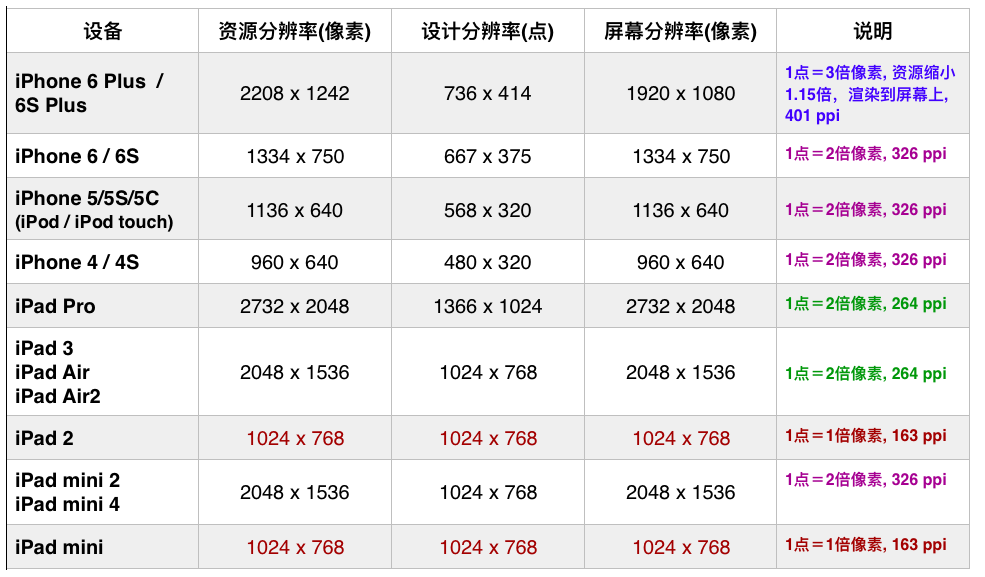
3、iOS的三种分辨率
1)、资源分辨率:资源图片的大小,单位是像素。
2)、设计分辨率:逻辑上的屏幕大小,单位是点。我们在Interface Builder设计器中的单位和程序代码中的单位都是设计分辨率中的“点”。
3)、是以像素为单位的屏幕大小,所有的应用都会渲染到这个屏幕上展示给用户。
iPhone 6 Plus和 6S Plus是最为特殊的设备,资源分辨率与屏幕分辨率的比例是1.15 : 1, 而其他的设备比例是1 : 1。不同的人群关注的分辨率也是不同的,UI设计人员主要关注的是资源分辨率,开发人员主要关注的是设计分辨率,而一般用户主要关注的屏幕分辨率。
4、获取设备屏幕信息
获取当前移动设备对象:[UIDevice currentDevice]
UIDevice类所有信息
NS_CLASS_AVAILABLE_IOS(2_0) @interface UIDevice : NSObject

+ (UIDevice *)currentDevice;

@property(nonatomic,readonly,strong) NSString    *name;              // e.g. "My iPhone"

@property(nonatomic,readonly,strong) NSString    *model;             // e.g. @"iPhone", @"iPod touch"

@property(nonatomic,readonly,strong) NSString    *localizedModel;    // localized version of model

@property(nonatomic,readonly,strong) NSString    *systemName;        // e.g. @"iOS"

@property(nonatomic,readonly,strong) NSString    *systemVersion;     // e.g. @"4.0"

@property(nonatomic,readonly) UIDeviceOrientation orientation __TVOS_PROHIBITED;       // return current device orientation.  this will return UIDeviceOrientationUnknown unless device orientation notifications are being generated.

@property(nullable, nonatomic,readonly,strong) NSUUID      *identifierForVendor NS_AVAILABLE_IOS(6_0);      // a UUID that may be used to uniquely identify the device, same across apps from a single vendor.

@property(nonatomic,readonly,getter=isGeneratingDeviceOrientationNotifications) BOOL generatesDeviceOrientationNotifications __TVOS_PROHIBITED;

- (void)beginGeneratingDeviceOrientationNotifications __TVOS_PROHIBITED;      // nestable

- (void)endGeneratingDeviceOrientationNotifications __TVOS_PROHIBITED;

@property(nonatomic,getter=isBatteryMonitoringEnabled) BOOL batteryMonitoringEnabled NS_AVAILABLE_IOS(3_0) __TVOS_PROHIBITED;  // default is NO

@property(nonatomic,readonly) UIDeviceBatteryState          batteryState NS_AVAILABLE_IOS(3_0) __TVOS_PROHIBITED;  // UIDeviceBatteryStateUnknown if monitoring disabled

@property(nonatomic,readonly) float                         batteryLevel NS_AVAILABLE_IOS(3_0) __TVOS_PROHIBITED;  // 0 .. 1.0. -1.0 if UIDeviceBatteryStateUnknown

@property(nonatomic,getter=isProximityMonitoringEnabled) BOOL proximityMonitoringEnabled NS_AVAILABLE_IOS(3_0); // default is NO

@property(nonatomic,readonly)                            BOOL proximityState NS_AVAILABLE_IOS(3_0);  // always returns NO if no proximity detector

@property(nonatomic,readonly,getter=isMultitaskingSupported) BOOL multitaskingSupported NS_AVAILABLE_IOS(4_0);

@property(nonatomic,readonly) UIUserInterfaceIdiom userInterfaceIdiom NS_AVAILABLE_IOS(3_2);

- (void)playInputClick NS_AVAILABLE_IOS(4_2);  // Plays a click only if an enabling input view is on-screen and user has enabled input clicks.

@end
ios移动设备类型枚举判断:
typedef NS_ENUM(NSInteger, UIUserInterfaceIdiom) {

    UIUserInterfaceIdiomUnspecified = -,

    UIUserInterfaceIdiomPhone NS_ENUM_AVAILABLE_IOS(3_2), // iPhone and iPod touch style UI

    UIUserInterfaceIdiomPad NS_ENUM_AVAILABLE_IOS(3_2), // iPad style UI

    UIUserInterfaceIdiomTV NS_ENUM_AVAILABLE_IOS(9_0), // Apple TV style UI

};
[UIDevice currentDevice].userInterfaceIdiom == UIUserInterfaceIdiomPhone // 表示iPhone设备
[UIDevice currentDevice].userInterfaceIdiom == UIUserInterfaceIdiomPad // 表示iPad设备
[UIDevice currentDevice].userInterfaceIdiom == UIUserInterfaceIdiomTV // 表示Apple TV设备
[UIDevice currentDevice].userInterfaceIdiom == UIUserInterfaceIdiomUnspecified // 表示未知设备
//示例:详细判断iPhone设备类型
//详细判断iPhone设备信息, 区分横屏和竖屏

    if ([UIDevice currentDevice].userInterfaceIdiom == UIUserInterfaceIdiomPhone){

        //获取屏幕尺寸信息

        CGSize screenSize = [UIScreen mainScreen].bounds.size;

        //竖屏情况

        if (screenSize.height > screenSize.width){

            if (screenSize.height == ){

                //iPhone 5/5S/5C (iPod / iPod touch) 等设备

            }

            else if (screenSize.height == ){

                //iPone 6 / 6S 等设备

            }

            else if (screenSize.height == ){

                //iPone 6 Plus / 6S Plus 等设备

            }

            else{

                //iPhone 4 / 4S 等设备

            }

        }

        //横屏情况

        if (screenSize.width > screenSize.height){

            if (screenSize.width == ){

                //iPhone 5/5S/5C (iPod / iPod touch) 等设备

            }

            else if (screenSize.width == ){

                //iPone 6 / 6S 等设备

            }

            else if (screenSize.width == ){

                //iPone 6 Plus / 6S Plus 等设备

            }

            else{

                //iPhone 4 / 4S 等设备

            }

        }

    }
//说明:在iPad和iPhone屏幕中,一般会有状态栏、标签栏、导航栏(或工具栏)以及内容视图部分,它们的尺寸也是固定的。状态栏占20点,导航栏占44点,标签栏占49点。
ppi(pixel per inch): 表示每英寸所包含的像素点数目,数值越高,屏幕能以更高密度显示图像
dpr(device pixel ratio): 设备像素比,设备像素 / 设备独立像素,表示设备独立像素到设备像素的转换关系
版权声明
作者:TDX
出处:博客园TDX的技术博客--http://www.cnblogs.com/tandaxia
您的支持是对博主最大的鼓励,感谢您的认真阅读。
本文版权归作者和博客园共有,欢迎转载,但未经作者同意必须保留此段声明,且在文章页面明显位置给出原文连接,否则保留追究法律责任的权利。
iOS屏幕尺寸和分辨率了解的更多相关文章
- iOS屏幕尺寸和分辨率
iOS平台家族成员主要包括iPhone.iPod Touch和iPad,但是各类设备的分辨率各不相同,目前存在的尺寸主要有: iOS设备的尺寸多种多样,此外,屏幕的分辨率也有多种,总结如下表所示: 其 ...
- IOS 屏幕尺寸、分辨率、点之间的相互关系
iOS 设备现有的分辨率如下:iPhone/iPod Touch普通屏 320像素 x 480像素 iPhone 1.3G.3GS,iPod ...
- IOS 判断设备屏幕尺寸、分辨率
根据屏幕尺寸和分辨率,ios现在数起来有6个版本. iOS 设备现有的分辨率如下: iPhone/iPod Touch 普通屏 320像素 x 480像素 iPhone .3G.3GS,iPod To ...
- ios设备屏幕尺寸与分辨率
iOS 设备的屏幕尺寸.分辨率及其屏幕边长比例详细情况是怎样的? 根据屏幕尺寸和分辨率,ios现在数起来有6个版本.一,3GS:二,4s为代表:三,iphone5:四,ipad2为代表:五,ipad4 ...
- iosiPhone屏幕尺寸、分辨率及适配
iosiPhone屏幕尺寸.分辨率及适配 1.iPhone尺寸规格 设备 iPhone 宽 Width 高 Height 对角线 Diagonal 逻辑分辨率(point) Scale Fac ...
- iPhone屏幕尺寸、分辨率及适配
转:http://blog.csdn.net/phunxm/article/details/42174937 目录(?)[+] 1.iPhone尺寸规格 设备 iPhone 宽 Width 高 H ...
- 【转】iPhone屏幕尺寸、分辨率及适配
原文网址:http://blog.csdn.net/phunxm/article/details/42174937 1.iPhone尺寸规格 设备 iPhone 宽 Width 高 Height 对角 ...
- iPhone手机的屏幕尺寸、分辨率及适配
1.iPhone尺寸规格 设备 iPhone 宽 Width 高 Height 对角线 Diagonal 逻辑分辨率(point) Scale Factor 设备分辨率(pixel) PPI 3GS ...
- 【转载】iPhone屏幕尺寸、分辨率及适配
iPhone屏幕尺寸.分辨率及适配 转载http://m.blog.csdn.net/article/details?id=42174937 1.iPhone尺寸规格 iPhone 整机宽度Width ...
随机推荐
- nodejs 批量修改、删除
aaarticlea/png;base64,iVBORw0KGgoAAAANSUhEUgAAB4AAAAQhCAIAAABDaAVHAAAgAElEQVR4nOydeXxU5aH359733vd9b/ ...
- ASP.NET Core的配置(3): 将配置绑定为对象[下篇]
我们在<读取配置信息>通过实例的形式演示了如何利用Options模型以依赖注入的方式直接获取由指定配置节绑定生成的Options对象,我们再次回顾一下当初我们编写的程序.如下面的代码片段所 ...
- Javascript与ECMAScript
我们经常习惯性认为Javascript就是ECMAScript,但其实不是这样的. ECMAScript是一种脚本在语法和语义上的标准. 主要包括:语法.类型.语句.关键字.保留字.操作符.对象. 它 ...
- iOS开发之使用XMPPFramework实现即时通信(二)
上篇的博客iOS开发之使用XMPPFramework实现即时通信(一)只是本篇的引子,本篇博客就给之前的微信加上即时通讯的功能,主要是对XMPPFramework的使用.本篇博客中用到了Spark做测 ...
- PHP精选数组函数
编程怎么能少的了数组呢,以下是学习PHP时常用的数组处理函数.在编程中要遵循一个原则就是DRY(Don`t Repeat Yourself)原则,PHP中有大量的函数,都记住这些函数不太现实,但常用的 ...
- js ES6 对字符的操作注意事项
1.codePointAt方法是测试一个字符由两个字节还是由四个字节组成的最简单方法. function is32Bit(c) { return c.codePointAt(0) > 0xFFF ...
- 使用phpize安装php扩展
环境: CentOs 6.3 php 7 nginx 举例: 安装ssh2扩展 1.登陆http://pecl.php.net,搜索ssh2,如下图所示,注意版本的选择要根据php的版本来 2.下载s ...
- C# 操作数据库表和数据库
<1>c#创建数据库表: private void CreatTable(string name) //创建数据库源数据表,name为表名 { con.ConnectionStr ...
- Node.js、Express、Socket.io 入门
前言 周末断断续续的写了第一个socket.io Demo.初次接触socket.io是从其官网看到的,看着get started做了一遍,根据官网的Demo能提供简单的服务端和客户端通讯. 这个De ...
- javascript判断元素存在和判断元素存在于实时的dom中的方法
今天(周六)下午我在公司加班时不知道要干什么,就打开公司的一个wordpress项目网站,想看下之前自己做的一个网页是否有问题. 打开网站首页,我习惯性的打开了chrome的调试工具,然后鼠标开始滚动 ...