
lvs-nat 模式-piranha
系统: redhat 6.5 mini
|
机器名 |
ip |
vip |
gw |
|
lvs01(主lvs) |
192.168.10.10(外网) 192.168.20.10(内网) |
192.168.10.254 |
|
|
lvs02(备lvs) |
192.168.20.10(外网) 192.168.20.20(内网) |
192.168.10.254 |
|
|
rs01 (web) |
192.168.20.100 |
192.168.20.254 |
192.168.20.254 |
|
rs02 (web) |
192.168.20.200 |
192.168.20.254 |
192.168.20.254 |
1、 在各个机器上配置ip地址,机器名,关闭selinux,同步时间
[root@lvs01 ~]# hostname
lvs01
[root@lvs01 ~]# getenforce
Disabled
[root@lvs02 ~]# hostname
lvs02
[root@lvs02 ~]# getenforce
Disabled
[root@rs01 ~]# hostname
rs01
[root@rs01 ~]# getenforce
Disabled
[root@rs02 ~]# hostname
rs02
[root@rs02 ~]# getenforce
Disabled
[root@lvs01 yum.repos.d]# cat /etc/hosts
192.168.20.10 lvs01
192.168.20.20 lvs02
192.168.20.100 rs01
192.168.20.200 rs02
[root@lvs01 yum.repos.d]# ntpdate 0.rhel.pool.ntp.org
[root@lvs02 yum.repos.d]# ntpdate 0.rhel.pool.ntp.org
[root@rs01 yum.repos.d]# ntpdate 0.rhel.pool.ntp.org
[root@rs02 yum.repos.d]# ntpdate 0.rhel.pool.ntp.org
2、 在各个机器关闭防火墙,配置yum源
[root@lvs01 yum.repos.d]# service iptables stop
[root@lvs01 yum.repos.d]# chkconfig iptables off
[root@lvs02 ~]# service iptables stop
[root@lvs02 ~]# chkconfig iptables off
[root@rs01 ~]# service iptables stop
[root@rs01 ~]# chkconfig iptables off
[root@rs02 ~]# service iptables stop
[root@rs02 ~]# chkconfig iptables off
[root@lvs01 yum.repos.d]# service iptables stop
[root@lvs01 yum.repos.d]# chkconfig iptables off
[root@lvs01 yum.repos.d]# cat rhel-source.repo
[base]
name=base
baseurl=file:///mnt
enabled=1
gpgcheck=0
[LB]
name=LB
baseurl=file:///mnt/LoadBalancer
enabled=1
gpgcheck=0
[HA]
name=HA
baseurl=file:///mnt/HighAvailability
enabled=1
gpgcheck=0
[RS]
name=RS
baseurl=file:///mnt/ResilientStorage
enabled=1
gpgcheck=0
[root@lvs01 yum.repos.d]# scp rhel-source.repo lvs02:/etc/yum.repos.d/rhel-source.repo
3、 在rs01.rs02上部署web服务
[root@rs01 ~]# yum install -y httpd
[root@rs01 ~]# echo "rs01">/var/www/html/index.html
[root@rs01 ~]# service httpd restart
[root@rs01 ~]# chkconfig httpd on
[root@rs02 ~]# yum install -y httpd
[root@rs02 ~]# echo "rs02">/var/www/html/index.html
[root@rs02 ~]# service httpd restart
[root@rs02 ~]# chkconfig httpd on
4、 在lvs01,lvs02安装LB,开启路由转发功能,在lvs01上配置lvs集群登录用户和密码
[root@lvs01 yum.repos.d]# yum groupinstall "Load Balancer"
[root@lvs02 yum.repos.d]# yum groupinstall "Load Balancer"
[root@lvs01 yum.repos.d]# vi /etc/sysctl.conf
net.ipv4.ip_forward = 1
[root@lvs01 yum.repos.d]# sysctl –p
[root@lvs02 yum.repos.d]# vi /etc/sysctl.conf
net.ipv4.ip_forward = 1
[root@lvs02 yum.repos.d]# sysctl –p
[root@lvs01 yum.repos.d]# piranha-passwd
New Password:
Verify:
Adding password for user piranha
[root@lvs01 yum.repos.d]# /etc/init.d/piranha-gui start
[root@lvs01 yum.repos.d]# chkconfig piranha-gui on
5、 通过浏览器来配置lvs集群
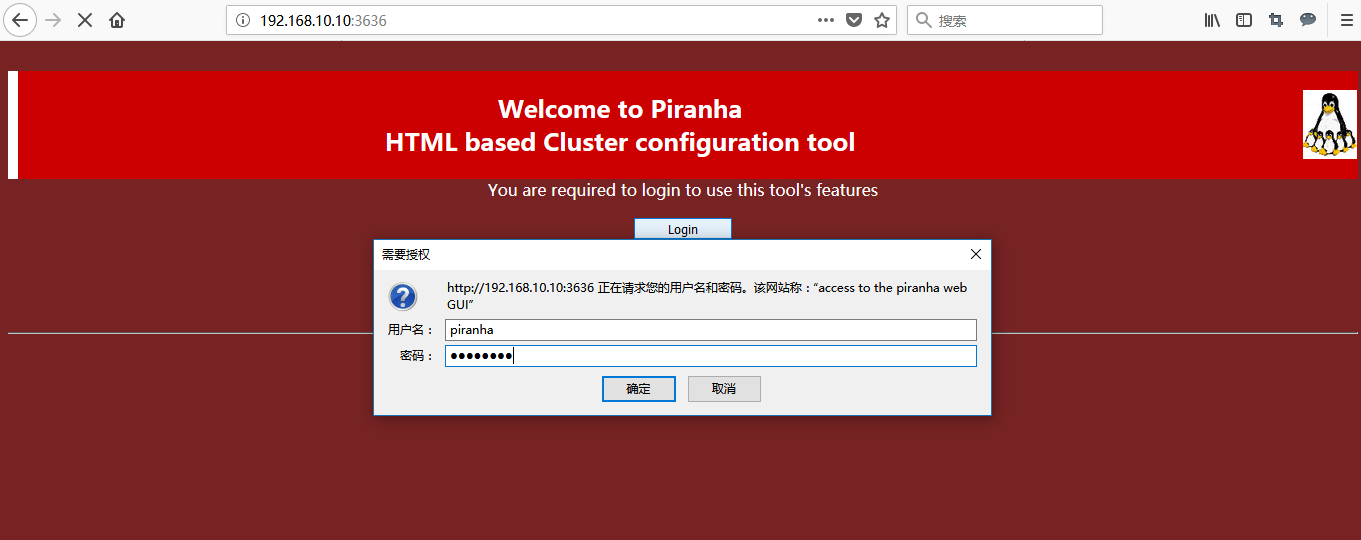
5.1 在浏览器输入http://192.168.10.10:3636,点击login,输入用户名和密码
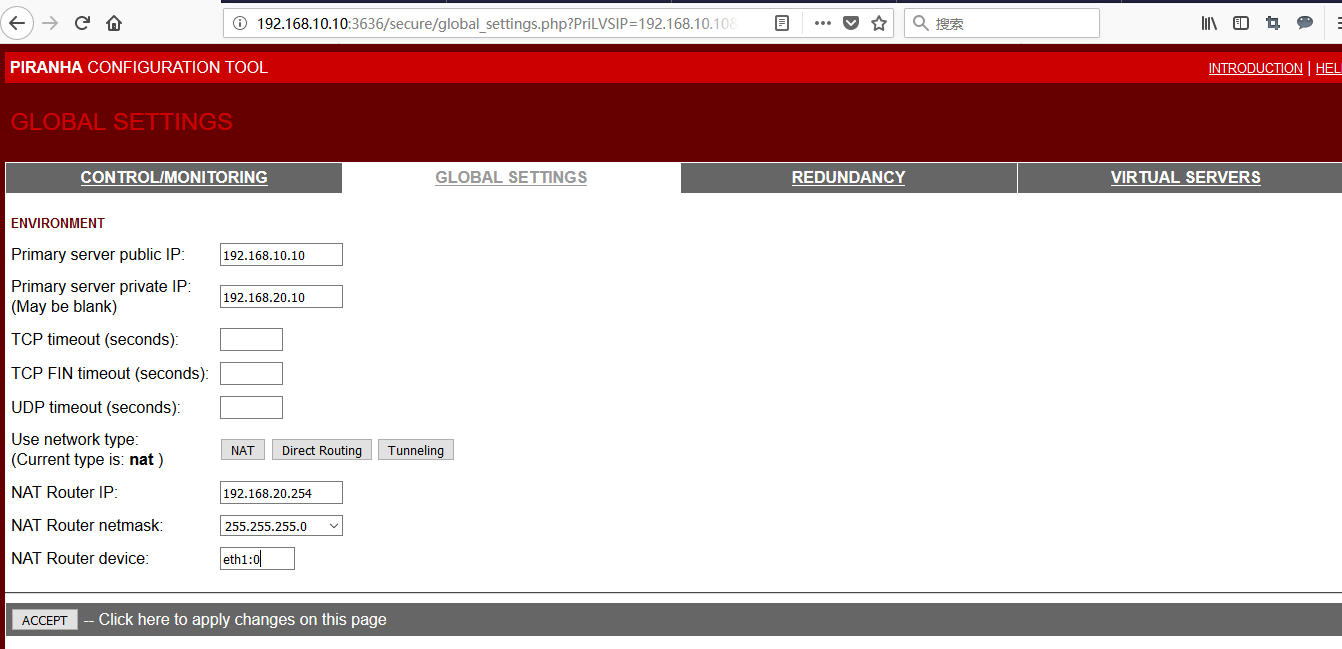
5.2 配置lvs01,选择nat 模式,最后点击accept
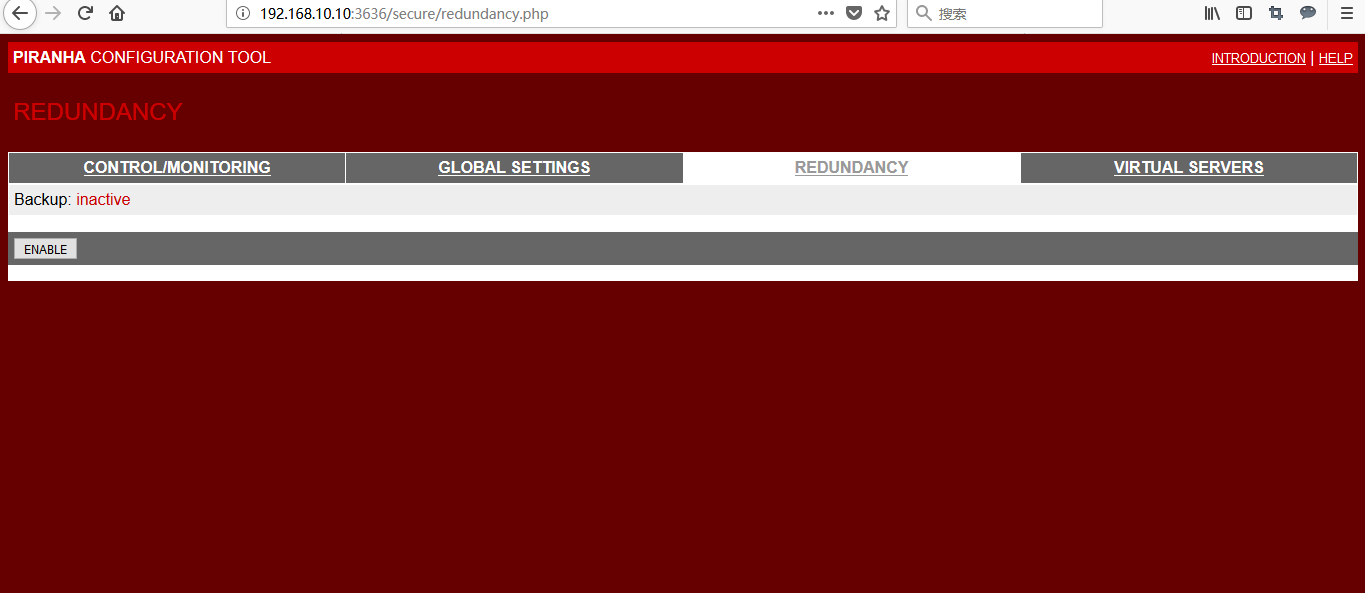
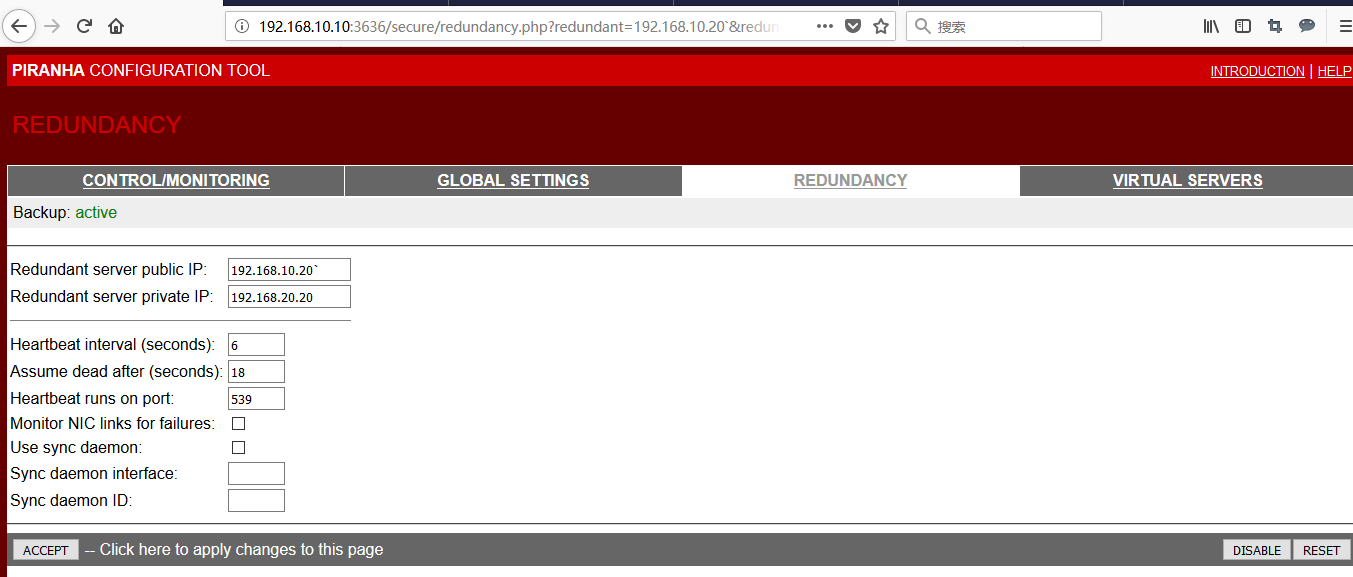
5.3 配置lvs02的ip,先点击ENABLE,配置ip 后,最后点击accept确定
5.4 配置对外的服务,点击add->edit->accept
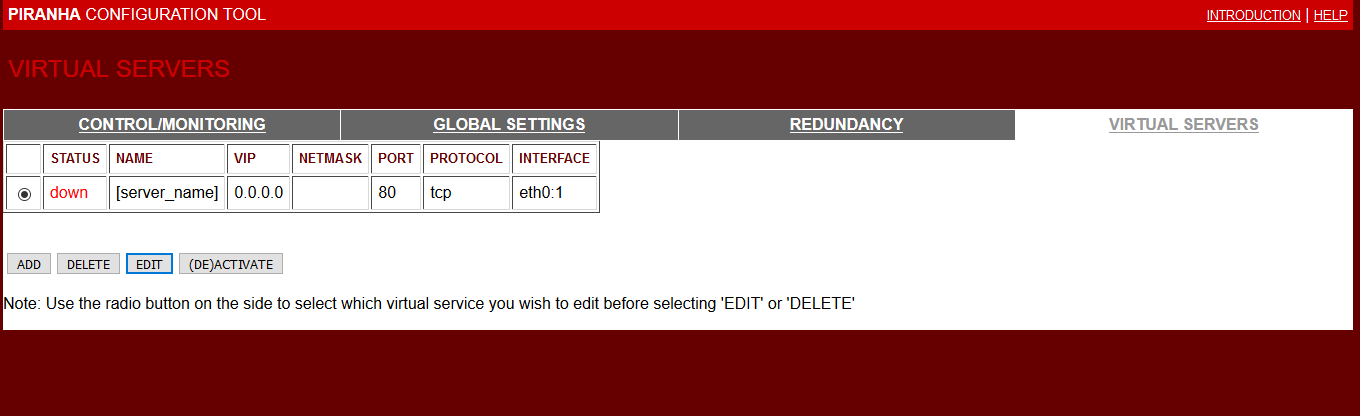
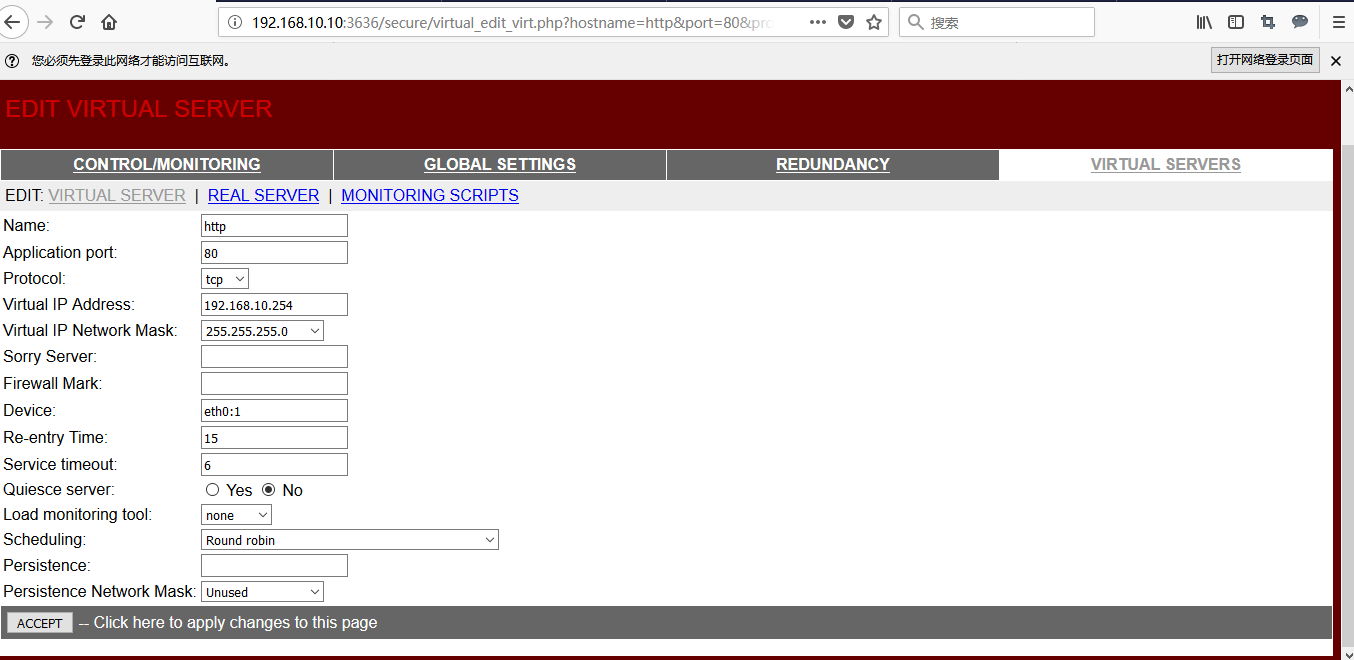
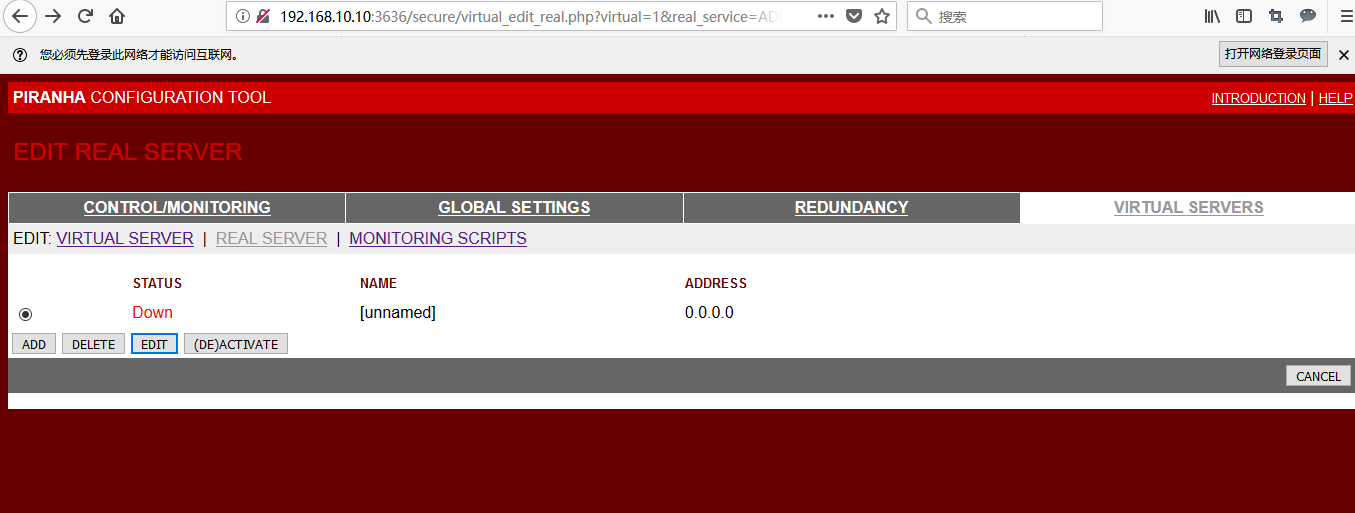
5.5 配置真实服务器(rs01和rs02)步骤add->edit->accept->active


5.6 up对外服务的vip

5.7 将在lvs01 上的配置文件复制到lvs02 上,
[root@lvs01 ~]# scp /etc/sysconfig/ha/lvs.cf lvs02:/etc/sysconfig/ha/lvs.cf
root@lvs02's password:
lvs.cf 100% 865 0.8KB/s 00:00
[root@lvs01 ~]# cat /etc/sysconfig/ha/lvs.cf
serial_no = 17
primary = 192.168.10.10
primary_private = 192.168.20.10
service = lvs
backup_active = 1
backup = 192.168.10.20
backup_private = 192.168.20.20
heartbeat = 1
heartbeat_port = 539
keepalive = 6
deadtime = 18
network = nat
nat_router = 192.168.20.254 eth1:0
nat_nmask = 255.255.255.0
debug_level = NONE
monitor_links = 0
syncdaemon = 0
virtual http {
active = 1
address = 192.168.10.254 eth0:1
vip_nmask = 255.255.255.0
port = 80
send = "GET / HTTP/1.0\r\n\r\n"
expect = "HTTP"
use_regex = 0
load_monitor = none
scheduler = rr
protocol = tcp
timeout = 6
reentry = 15
quiesce_server = 0
server rs01 {
address = 192.168.20.100
active = 1
weight = 1
}
server rs02 {
address = 192.168.20.200
active = 1
weight = 2
}
}
5.8 在lvs01,lvs02 上启动负载均衡的监控进程
[root@lvs01 ~]# /etc/init.d/pulse restart
Shutting down pulse: [失败]
Starting pulse: [确定]
[root@lvs01 ~]# chkconfig pulse on
[root@lvs02 ~]# /etc/init.d/pulse restart
Shutting down pulse: [失败]
Starting pulse: [确定]
[root@lvs02 ~]# chkconfig pulse on
5.9 查看lvs的正常运行状态
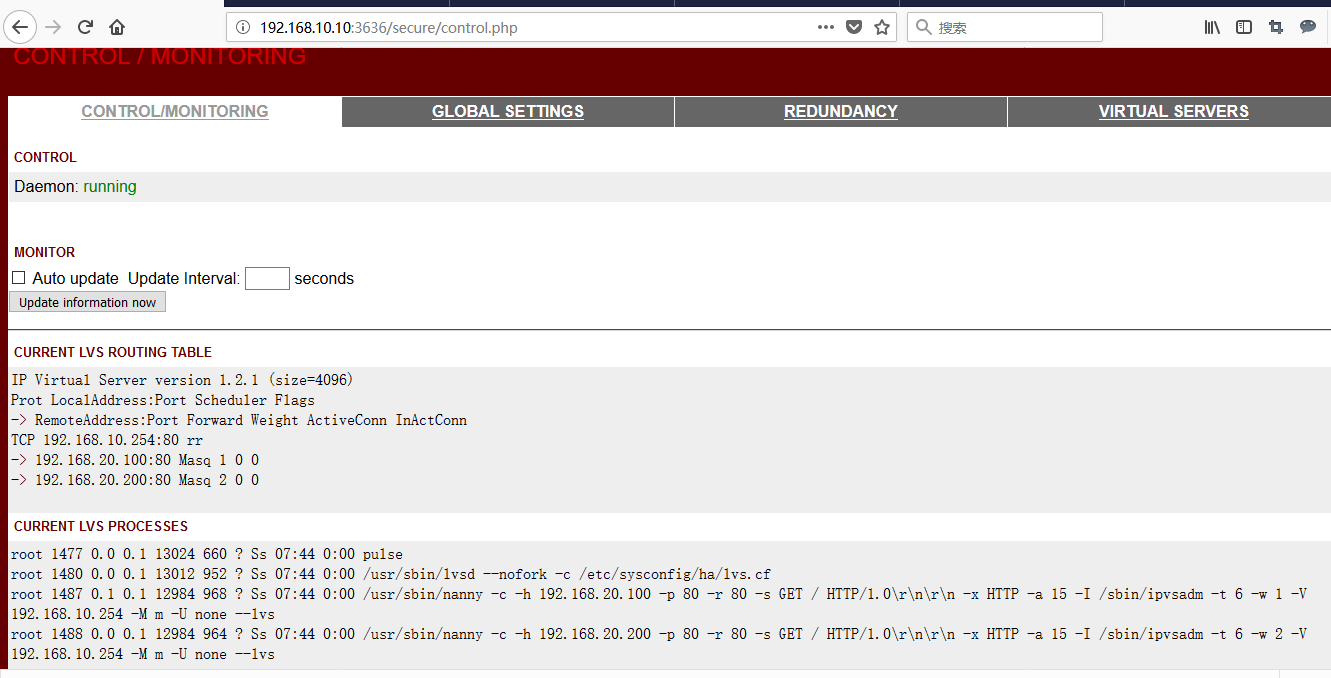
6、 测试
6.1 访问vip,web的内容是后台两台真实服务器网页内容,轮替提供服务
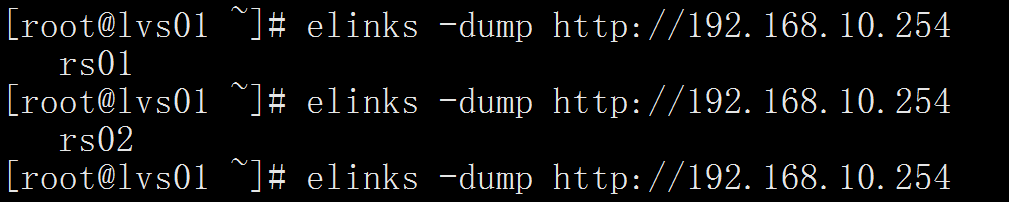
6.2 lvs01失效的情况下服务依然可用(我直接把lvs01关机了)
[root@lvs02 ~]# elinks -dump http://192.168.10.254
rs01
lvs-nat 模式-piranha的更多相关文章
- Vmware虚拟机配置LVS/NAT模式遇到的坑。
这两天在研究LVS的负载均衡,先从最简单的LVS/NAT模式开始入手. 最后配置完之后能够相互之间Ping通,并且能够直接访问real服务器提供的web服务,而且防火墙也已经关闭了. 但是通过访问LV ...
- 负载均衡集群相关、LVS介绍、LVS调度算法、LVS NAT模式搭建
1.负载均衡集群相关 2.LVS的三种模式:NAT.DR .IP tunnel 3. LVS的调度算法(共有8种) 4.LVS NAT模式搭建准备条件: 在分发服务器上安装:yum install ...
- 负载均衡集群介绍、LVS介绍、LVS调度算法、LVS NAT模式搭建
7月4日任务 18.6 负载均衡集群介绍18.7 LVS介绍18.8 LVS调度算法18.9/18.10 LVS NAT模式搭建 扩展lvs 三种模式详解 http://www.it165.net/a ...
- Linux centosVMware 负载均衡集群介绍、LVS介绍、LVS调度算法、LVS NAT模式搭建
一.负载均衡集群介绍 主流开源软件LVS.keepalived.haproxy.nginx等 其中LVS属于4层(网络OSI 7层模型),nginx属于7层,haproxy既可以认为是4层,也可以当做 ...
- 负载均衡集群介绍 LVS介绍 LVS调度算法 LVS NAT模式搭建
LVS BAT模式搭建 更改主机名: hostnamectl set-hostname centos7-three bash 准备工作 • 三台机器 • 分发器,也叫调度器(简写为dir) • 内网: ...
- [LVS] 用keepalived实现LVS NAT模式高可用性
默认前提是LVS已经可以正常工作了. 因为是NAT模式,RS的路由要指向LVS的接口地址,所以需要一个统一的后台浮动地址,使得RS都指向这个浮动IP.否则在切换时,会导致RS回包到DOWN掉的LVS上 ...
- LVS NAT模式实践
client:192.168.4.10/24 proxy:192.168.2.5/24 192.168.4.5/24 web1:192.168.4.100/24 web2:192.168.4.200/ ...
- 负载均衡 Lvs nat 模式笔记
nat技术(网络地址转换) 缺点就是进入和返回都通过调度器的服务器,未来可能会成为瓶颈 实验:nat 模式 先在调度器安装ipvsadm 后再添加网卡,后面就连不上网了(yum -y install ...
- LVS NAT模式
LVS-NAT 三台虚拟机都是centos 6.5 关闭防火墙和selinux 角色 IP地址 备注 LVS负载调度器 eth0:192.168.119.128(内网) eth1:192.168.94 ...
- CentOS 6.3下部署LVS(NAT模式)+keepalived实现高性能高可用负载均衡
一.简介 VS/NAT原理图: 二.系统环境 实验拓扑: 系统平台:CentOS 6.3 Kernel:2.6.32-279.el6.i686 LVS版本:ipvsadm-1.26 keepalive ...
随机推荐
- C# 使用 Lotus notes 公共邮箱发送邮件
公司的邮件系统用的是反人类的 Lotus notes, 你敢信? 最近要实现一个功能,邮件提醒功能,就是通过自动发送提醒邮件 前前后后这个问题搞了2天,由于公司的诸多条件限制,无法直接调用到公司发送邮 ...
- DirectSound---简易Wav播放器
这篇文章主要给大家介绍下如何用DirectSound打造一个简易播放器,因为篇幅有限且代码逻辑较为复杂,我们只介绍下核心技术内容.该播放器主要包括以下功能: 播放.暂停 播放进度提示. 1. Dire ...
- 为Android添加JNI支持
起因 今天在进行Android原生开发时,需要通过JNI调用C++代码实现一些处理.以前没有做过类似的东西,在网上找了很久才解决问题,特记录下来以便以后翻阅. Eclipse无cygwin编译so的方 ...
- SpringMVC之使用requestMapping映射请求、映射参数、映射头
1. 映射请求 作用:使用requestMapping可以指定处理器可以处理那些请求 地方:类和方法前面都可以 @requestMapping 类定义处: 提供初步的请求映射信息,相对于web应用的根 ...
- python数据分析工具包(2)——Numpy(二)
上一篇文章简单地介绍了numpy的一些基本数据类型,以及生成数组和矩阵的操作.下面我们来看一下矩阵的基本运算.在线性代数中,常见的矩阵运算包括,计算行列式.求逆矩阵.矩阵的秩等.下面我们来一一实现. ...
- java程序设计原则
前言: 前言:java这种面向对象的的语言其实是很符合人的生活思维模式的,因为它以对象作为自己的研究对象,所谓"万物皆对象".一个人.一颗苹果.一只蚂蚁都是对象.所以它的设计原则和 ...
- git服务器配置http请求
使用apache 配置http协议的git库 在CentOS上基于Apache http服务搭建git远程仓库(一) 基于http方式的git服务器搭建 搭建http协议的git服务器 Linux g ...
- window.location的路径
1 相对路径 window.location.href='add_affiche.php'; 或 window.location.href='./add_affiche.php'; 2 绝对路径 wi ...
- PHP生成图片验证码、点击切换实例
http://www.jb51.net/article/51506.htm 现在让我们来看下 PHP 代码 复制代码代码如下: <?php session_start();function ra ...
- Python使用Mysql官方驱动(取出dict类型的数据)
简介 虽然Python有很多连接mysql的库,比如mysqldb, pymysql~这些都很方便,现在就教大家使用mysql的官方库来操作mysql. 安装 windows: 下载链接 选择自己的w ...