
自定义用户认证(继承django的)
1、在app下创建一个自己用户认证文件,文件名随意,记得为.py文件
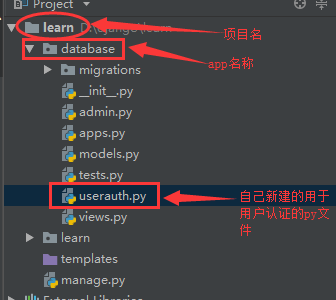
2、编辑该userauth.py文件
 #!/usr/bin/env python

 #coding:utf-8

 from django.db import models

 from django.contrib.auth.models import (

     BaseUserManager, AbstractBaseUser

 )

 import django

 class UserManager(BaseUserManager):

     def create_user(self, email, name, password=None):

         """

         Creates and saves a User with the given email, date of

         birth and password.

         """

         if not email:

             raise ValueError('Users must have an email address')

         user = self.model(

             email=self.normalize_email(email),

             name=name,

             #token=token,

             #department=department,

             #tel=tel,

             #memo=memo,

         )

         user.set_password(password)

         user.save(using=self._db)

         return user

     def create_superuser(self, email, name ,password):

         """

         Creates and saves a superuser with the given email, date of

         birth and password.

         """

         user = self.create_user(email,

             password=password,

             name=name,

             #token=token,

             #department=department,

             #tel=tel,

             #memo=memo,

         )

         user.is_admin = True

         user.save(using=self._db)

         return user

 class UserProfile(AbstractBaseUser):

     email = models.EmailField(

         verbose_name='email address',

         max_length=255,

         unique=True,

     )

     is_active = models.BooleanField(default=True)

     is_admin = models.BooleanField(default=False)

     name = models.CharField(u'名字', max_length=32)

     token = models.CharField(u'token', max_length=128,default=None,blank=True,null=True)

     department = models.CharField(u'部门', max_length=32,default=None,blank=True,null=True)

     mobile = models.CharField(u'手机', max_length=32,default=None,blank=True,null=True)

     memo = models.TextField(u'备注', blank=True,null=True,default=None)

     date_joined = models.DateTimeField(blank=True, auto_now_add=True)

     valid_begin_time = models.DateTimeField(default=django.utils.timezone.now)

     valid_end_time = models.DateTimeField(blank=True,null=True)

     USERNAME_FIELD = 'email'  #定义email为用户名

     #REQUIRED_FIELDS = ['name','token','department','tel','mobile','memo']

     REQUIRED_FIELDS = ['name']

     def get_full_name(self):

         # The user is identified by their email address

         return self.email

     def get_short_name(self):

         # The user is identified by their email address

         return self.email

     def __str__(self):              # __unicode__ on Python 2

         return self.email

     def has_perm(self, perm, obj=None):

         "Does the user have a specific permission?"

         # Simplest possible answer: Yes, always

         return True

     def has_perms(self, perm, obj=None):

         "Does the user have a specific permission?"

         # Simplest possible answer: Yes, always

         return True

     def has_module_perms(self, app_label):

         "Does the user have permissions to view the app `app_label`?"

         # Simplest possible answer: Yes, always

         return True

     @property

     def is_staff(self):

         "Is the user a member of staff?"

         # Simplest possible answer: All admins are staff

         return self.is_admin

     class Meta:

         verbose_name = u'用户信息'

         verbose_name_plural = u"用户信息"

     def __unicode__(self):

         return self.name

     objects = UserManager()
3、在models中导入该文件中的UserProfile类

4、admin中注册
编辑admin.py文件
 #_*_coding:utf8_*_

 from django.contrib import admin

 # Register your models here.

 from django import forms

 from django.contrib import admin

 from django.contrib.auth.models import Group

 from django.contrib.auth.admin import UserAdmin

 from django.contrib.auth.forms import ReadOnlyPasswordHashField

 import models

 from userauth import UserProfile

 from django.contrib.auth import  forms as auth_form

 class UserCreationForm(forms.ModelForm):

     """A form for creating new users. Includes all the required

     fields, plus a repeated password."""

     password1 = forms.CharField(label='Password', widget=forms.PasswordInput)

     password2 = forms.CharField(label='Password confirmation', widget=forms.PasswordInput)

     class Meta:

         model = UserProfile

         fields = ('email','token')

     def clean_password2(self):

         # Check that the two password entries match

         password1 = self.cleaned_data.get("password1")

         password2 = self.cleaned_data.get("password2")

         if password1 and password2 and password1 != password2:

             raise forms.ValidationError("Passwords don't match")

         return password2

     def save(self, commit=True):

         # Save the provided password in hashed format

         user = super(UserCreationForm, self).save(commit=False)

         user.set_password(self.cleaned_data["password1"])

         if commit:

             user.save()

         return user

 class UserChangeForm(forms.ModelForm):

     """A form for updating users. Includes all the fields on

     the user, but replaces the password field with admin's

     password hash display field.

     """

     password = ReadOnlyPasswordHashField(label="Password",

         help_text=("Raw passwords are not stored, so there is no way to see "

                     "this user's password, but you can change the password "

                     "using <a href=\"password/\">this form</a>."))

     class Meta:

         model = UserProfile

         fields = ('email', 'password','is_active', 'is_admin')

     def clean_password(self):

         # Regardless of what the user provides, return the initial value.

         # This is done here, rather than on the field, because the

         # field does not have access to the initial value

         return self.initial["password"]

 class UserProfileAdmin(UserAdmin):

     # The forms to add and change user instances

     form = UserChangeForm

     add_form = UserCreationForm

     # The fields to be used in displaying the User model.

     # These override the definitions on the base UserAdmin

     # that reference specific fields on auth.User.

     list_display = ('id','email','is_admin','is_active')

     list_filter = ('is_admin',)

     fieldsets = (

         (None, {'fields': ('email', 'password')}),

         ('Personal info', {'fields': ('department','name','mobile','memo')}),

         ('API TOKEN info', {'fields': ('token',)}),

         ('Permissions', {'fields': ('is_active','is_admin')}),

         ('账户有效期', {'fields': ('valid_begin_time','valid_end_time')}),

     )

     # add_fieldsets is not a standard ModelAdmin attribute. UserAdmin

     # overrides get_fieldsets to use this attribute when creating a user.

     add_fieldsets = (

         (None, {

             'classes': ('wide',),

             'fields': ('email',  'password1', 'password2','is_active','is_admin')}

         ),

     )

     search_fields = ('email',)

     ordering = ('email',)

     filter_horizontal = ()

 # Now register the new UserAdmin...

 admin.site.register(models.UserProfile,UserProfileAdmin)

 admin.site.unregister(Group)
 #这里需注意,第51行

"using <a href=\"password/\">this form</a>."))

#这是django1.8的写法,如果>1.8的话需要修改成

"using <a href=\"../password/\">this form</a>."))

否则在admin后台点击修改密码的话会提示404找不到页面
5、在settings告诉django使用我们自己定义的用户认证系统
修改settings,结尾添加
AUTH_USER_MODEL = 'database.UserProfile'
#database为app名称

#UserProfile为我们刚才在userauth.py中创建的类名称
6、同步数据库
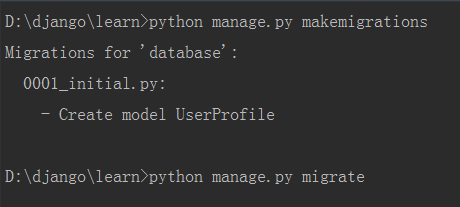
可以看到创建了UserProfile表,这样就可以直接使用django的用户认证功能
7、创建超级用户

可以看到提示已经跟django默认的不一样了,以email地址作为用户名
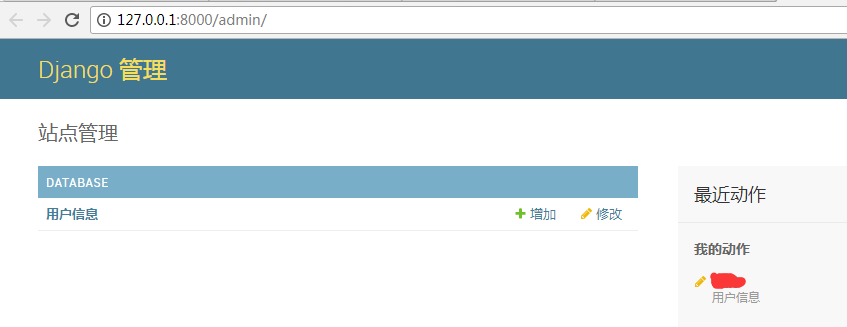
8、此时访问django admin
自定义用户认证(继承django的)的更多相关文章
- 使用django实现自定义用户认证
参考资料:https://docs.djangoproject.com/en/1.10/topics/auth/customizing/ 直接拉到最后看栗子啦 django自定义用户认证(使用自 ...
- Django自定义用户认证
自定义一个用户认证 详细参考官方文档: https://docs.djangoproject.com/en/1.9/topics/auth/customizing/#django.contrib.au ...
- Django自定义用户认证系统之自定义用户模型
参考文档:http://python.usyiyi.cn/django/topics/auth/customizing.html Django 自带的认证系统足够应付大多数情况,但你或许不打算使用现成 ...
- CMDB资产管理系统开发【day25】:Django 自定义用户认证
官方文档:https://docs.djangoproject.com/en/1.10/topics/auth/customizing/#substituting-a-custom-user-mode ...
- Django--分页器(paginator)、Django的用户认证、Django的FORM表单
分页器(paginator) >>> from django.core.paginator import Paginator >>> objects = ['joh ...
- 43)django-用户认证,授权,自定义用户认证
##用户认证 django自带用户认证系统,包括认证和授权.用户认证系统由用户,权限,用户组,密码,cookie和session给组成. ###用户认证系统设置 #settings.py INSTAL ...
- YII2中自定义用户认证模型,完成登陆和注册
有些时候我们需要自已定义用户类,操作自已建的用户表,来完成登陆和注册功能. 用户表结构如下,当然可以根据自已的需要添加或删除: CREATE TABLE `tb_user` ( `id` int(11 ...
- spring Security的自定义用户认证
首先我需要在xml文件中声明.我要进行自定义用户的认证类,也就是我要自己从数据库中进行查询 <http pattern="/*.html" security="no ...
- Django自定义用户认证系统Customizing authentication
扩展已有的用户模型Extending the existing User model 有两种方法来扩展默认的User Model而不用重写自己的模型.如果你不需要改变存储在数据库中的字段,而只是需要改 ...
随机推荐
- 盘点:2016中国百强地产CIO高峰论坛的8大看点
2016年中国百强地产CIO高峰论坛将于2016年6月16日至18日在浙江湖州举行,届时百余位地产公司CIO将出席大会,共同探讨新形势下如何重塑IT价值,增强地产公司的市场竞争力和盈利能力. 此次大会 ...
- JAVA之旅(二十二)——Map概述,子类对象特点,共性方法,keySet,entrySet,Map小练习
JAVA之旅(二十二)--Map概述,子类对象特点,共性方法,keySet,entrySet,Map小练习 继续坚持下去吧,各位骚年们! 事实上,我们的数据结构,只剩下这个Map的知识点了,平时开发中 ...
- EFI怎么装系统? UEFI BIOS
关于EFI的介绍,就不赘述了. 大家可以看看这个帖子 http://benyouhui.it168.com/thread-2488583-1-1.html 总之,新电脑都是这玩意,win8也做了相应E ...
- linux服务器批量部署应用系统shell脚本(Tomcat/jetty)
linux服务器批量部署应用系统shell脚本: 1.请更换代码内的服务器地址(Tomcat或jetty服务器) serverRoot=/home/undoner/java_tool/apache-t ...
- 【Unity Shaders】Using Textures for Effects——打包和混合textures
本系列主要参考<Unity Shaders and Effects Cookbook>一书(感谢原书作者),同时会加上一点个人理解或拓展. 这里是本书所有的插图.这里是本书所需的代码和资源 ...
- 认证模式之Spnego模式
Spnego模式是一种由微软提出的使用GSS-API接口的认证模式,它扩展了Kerberos协议,在了解Spnego协议之前必须先了解Kerberos协议,Kerberos协议主要解决身份认证及通信密 ...
- 【翻译】对于Ext JS 5,你准备好了吗?
原文:Are You Ready for Ext JS 5? Ext JS 5:准备升级 对于Ext JS 5加入Sencha的大家庭,我们感到非常高兴!作为一个主要版本,在Ext JS 5引入了一堆 ...
- 01_MUI之Boilerplate中:HTML5示例,动态组件,自定义字体示例,自定义字体示例,图标字体示例
1安装HBuilder5.0.0,安装后的界面截图如下: 2 按照https://www.muicss.com/docs/v1/css-js/boilerplate-html中的说明,创建上图的 ...
- 【Qt编程】设计ColorBar颜色栏
画过图的都知道,我们常常用颜色的深浅来表示值的大小,在Matlab作图中,我们使用的是colorbar这个函数来给出颜色的直观参考.下面给出Matlab的示例:在Matlab命令窗口输入: figur ...
- linux上 java 使用 javasqlite
linux上 java 使用 javasqlite http://www.ch-werner.de/javasqlite/ 1) 下载: http://www.ch-werner.de/javasql ...