
SharePoint 开发TimerJob 介绍
项目需要写TimerJob,以前也大概知道原理,不过,开发过程中,还是遇到一些问题,网上看了好多博客,也有写的灰常好的,不过,自己还是想再写一下,也算是给自己一个总结,也算给大家多一个参考吧。
TimerJob项目结构,主要有两个Class,一个是用来定义TimerJob功能的,一个是用来部署开发好的TimerJob的,分别继承两个不同的类。如下图,先建一个如下结构的项目:
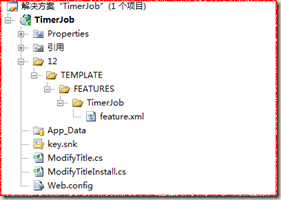
文件描述:
TimerJob定义类:ModifyTitle.cs(继承自SPJobDefinition)
TimerJob安装类:ModifyTitleInstall.cs(继承自SPFeatureReceiver)
激活TimerJob的Feature.xml
添加强命名,因为将来生成的dll是要放到GAC里面去的
添加引用:
引用Microsoft.SharePoint.dll文件,两个Class都需要添加下面命名空间
using Microsoft.SharePoint;
using Microsoft.SharePoint.Administration;
ModifyTitleInstall类
|
public class ModifyTitleInstall : SPFeatureReceiver { const string TimerJobName = "ModifyTitleTimerJob";//TimerJob的标题 //激活TimerJob的方法 public override void FeatureActivated(SPFeatureReceiverProperties properties) { SPSite site = properties.Feature.Parent as SPSite; foreach (SPJobDefinition job in site.WebApplication.JobDefinitions) { //如果有相同的TimerJob,先删除 if (job.Title == TimerJobName) { job.Delete(); } } ModifyTitle modifyTitle = new ModifyTitle(TimerJobName, site.WebApplication); SPMinuteSchedule minuteSchedule = new SPMinuteSchedule();//计时器对象 minuteSchedule.BeginSecond = 0; minuteSchedule.EndSecond = 59; minuteSchedule.Interval = 1; modifyTitle.Schedule = minuteSchedule; modifyTitle.Update(); //throw new NotImplementedException(); } public override void FeatureDeactivating(SPFeatureReceiverProperties properties) { SPSite site = properties.Feature.Parent as SPSite; foreach (SPJobDefinition job in site.WebApplication.JobDefinitions) { if (job.Title == TimerJobName) { job.Delete(); } } //throw new NotImplementedException(); } public override void FeatureInstalled(SPFeatureReceiverProperties properties) { //throw new NotImplementedException(); } public override void FeatureUninstalling(SPFeatureReceiverProperties properties) { //throw new NotImplementedException(); } |
ModifyTitle类
|
public class ModifyTitle : SPJobDefinition { public ModifyTitle():base(){} public ModifyTitle(string TimerName, SPWebApplication webapp) : base(TimerName, webapp, null, SPJobLockType.ContentDatabase) { //TimerJob的标题 this.Title = "定期修改Title的TimerJob"; } public override void Execute(Guid targetInstanceId) { SPWebApplication webapp = this.Parent as SPWebApplication; SPContentDatabase contentDB=webapp.ContentDatabases[targetInstanceId]; foreach (SPItem item in contentDB.Sites[0].RootWeb.Lists["TimerJob"].Items) { DateTime dt = Convert.ToDateTime(item["创建时间"].ToString()); item["标题"] = "今天是这个月的第" + dt.Day.ToString() + "天"; item.Update(); } //base.Execute(targetInstanceId); } } |
Feature.xml(Id是需要重新生成的Guid)
|
<?xml version="1.0" encoding="utf-8" ?> <Feature xmlns="http://schemas.microsoft.com/sharepoint/" Id="f0c813e8-68e0-4ad2-82cd-292b1b7222cd" Title="Modify Title Timer Job" Description="Modify Title Timer Job" Scope="Site" Hidden="TRUE" Version="1.0.0.0" ReceiverAssembly="TimerJob, Version=1.0.0.0, Culture=neutral, PublicKeyToken=f7436af6afb9480b" ReceiverClass="TimerJob.ModifyTitleInstall"> </Feature> |
添加结果:
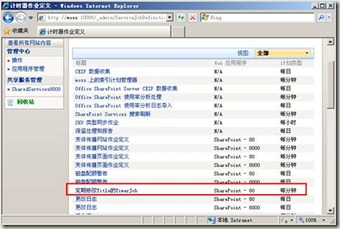
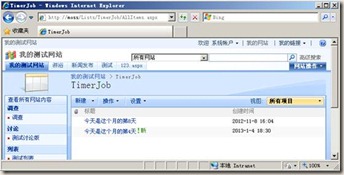
运行结果:无论标题是什么,都改成今天是这个月的第N天。
添加配置文件:
|
<?xml version="1.0" encoding="utf-8" ?> <configuration> <appSettings> <add key="AAString" value="http://localhost"/> </appSettings> </configuration> |
获取配置文件:
string AAString = ConfigurationManager.AppSettings.Get("AAString");
注:配置文件格式不对的话,可能造成Timer服务启动错误,所以,可以拷一个控制台程序debug下面的Consoleapp.exe.config文件,然后改成OWSTIMER.exe.config,然后放到12/bin(C:\Program Files\Common Files\Microsoft Shared\Web Server Extensions\12\BIN)下就可以了
部署TimerJob脚本:
|
@echo off SET TEMPLATE="c:\program files\common files\microsoft shared\web server extensions\12\Template" Echo Copying files to TEMPLATES directory xcopy /e /y 12\TEMPLATE\* %TEMPLATE% Echo Copying TimerJob.dll to GAC "C:\Program Files\Microsoft SDKs\Windows\v6.0A\Bin\gacutil.exe" -if bin\TimerJob.dll iisreset "C:\Program Files\Common Files\Microsoft Shared\Web Server Extensions\12\bin\stsadm" -o installfeature -filename TimerJob\feature.xml -force "C:\Program Files\Common Files\Microsoft Shared\Web Server Extensions\12\bin\stsadm" -o deactivatefeature -filename TimerJob\feature.xml -url http://localhost -force "C:\Program Files\Common Files\Microsoft Shared\Web Server Extensions\12\bin\stsadm" -o activatefeature -filename TimerJob\feature.xml -url http://localhost -force net stop SPTimerV3 net start SPTimerV3 PAUSE |
注:新的TimerJob运行一定要重启SPTimerV3服务,在windows服务里面,如下图:
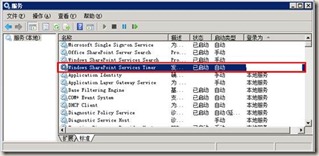
调试:TimerJob程序和WebPart等SharePoint程序,运行的进程不一样,如果需要调试,需要重新安装TimerJob,然后附加到SharePoint计时器进程(下图),进行调试!

体会:
开发完TimerJob感觉,和SharePoint的东西有一样的特点,就是代码开发比较简单,但是杂七杂八的事情很多,部署、调试起来比较麻烦,而且非常需要细心,如果其间遇到各种bug,可以建议重启下机器(我就是头天晚上,各种报错,转天就好了)。
还有就是,我的代码是SharePoint2007环境开发的,如果在2010或者更高版本,代码基本是类似的,注意目录即可,部署方式可能需要PowerShell,可以网上查一下。
SharePoint 开发TimerJob 介绍的更多相关文章
- SharePoint开发 - TimerJob简单实例讲解
博客地址 http://blog.csdn.net/foxdave SharePoint中的TimerJob类似于Windows系统的计划任务,可以实现定时执行指定操作的功能. 本篇所述的实例为在Sh ...
- SharePoint Server 2013开发之旅(一):新的开发平台和典型开发场景介绍
我终于开始写这个系列文章,实际上确实有一段时间没有动笔了.最近重新安装了一套SharePoint Server 2013的环境,计划利用工作之余的时间为大家写一点新的东西. SharePoint Se ...
- [转]SharePoint开发中可能用到的各种Context(上下文)
SharePoint是一个B/S结构的产品,所以在开发过程中会使用到各种各样的上下文(Context)信息,借此机会来总结一下.特别是Javascript的Ctx非常实用,这里记录一下! 一.Http ...
- SharePoint开发中可能用到的各种Context(上下文)
转载: http://www.cnblogs.com/erucy/archive/2012/08/25/2655600.html 电脑正在以无比慢的速度从微软网站上安装Office Component ...
- SharePoint Add-in Model 介绍 - 引文(先导篇)
1. SharePoint 平台 如果你已经很熟悉 SharePoint 平台,可跳过本章节. 1.1 SharePoint 是什么 在介绍 Add-in Model 之前,简要提一下 SharePo ...
- SharePoint常用目录介绍
SharePoint常用目录介绍 stsadm命令管理程序目录:C:\Program Files\Common Files\Microsoft Shared\web server extensions ...
- cWeb开发框架,基于asp.net的cWeb应用开发平台介绍(二)
cWeb是基于微软的.Net Framework 4框架,数据库是sql server 2008 r2. cWeb开发框架下载,点击这里去下载. cWeb开发框架借鉴三层架构理论分为三层,分别是:cD ...
- cWeb开发框架,基于asp.net的cWeb应用开发平台介绍(一)
cWeb开发框架是基于asp.net的B/S应用开发平台,采用三层架构理论,应用简单.代码简洁.运行快速. cWeb是bubufx提供,是分享资源,无任何版权限制,bubufx继续传承互联网精神,可随 ...
- [推荐]WebService开发知识介绍
[推荐]WebService开发知识介绍 WebService开发手册 http://wenku.baidu.com/view/df3992ce050876323112128a.html WebSe ...
随机推荐
- 分布式内存文件系统Tachyon
UCBerkeley研发的Tachyon(超光子['tækiːˌɒn],名字要不要这么太嚣张啊:)是一款为各种集群并发计算框架提供内存数据管理的平台,也可以说是一种内存式的文件系统吧.如下图,它就处于 ...
- 【Netty源码分析】发送数据过程
前面两篇博客[Netty源码分析]Netty服务端bind端口过程和[Netty源码分析]客户端connect服务端过程中我们分别介绍了服务端绑定端口和客户端连接到服务端的过程,接下来我们分析一下数据 ...
- javascript之Style对象
Background 属性 属性 描述 background 在一行中设置所有的背景属性 ba ...
- quartz 时间设置(定时任务scheduler)
quartz用来设置定时任务的作业调度程序.在linux的crontab中用到. 格式为: * * * * * * * 其从左到右顺序代表 :[秒] [分] [小时] [日] [月] [周] [年] ...
- (NO.00004)iOS实现打砖块游戏(十二):伸缩自如,我是如意金箍棒(上)!
大熊猫猪·侯佩原创或翻译作品.欢迎转载,转载请注明出处. 如果觉得写的不好请告诉我,如果觉得不错请多多支持点赞.谢谢! hopy ;) 通用的星星类已经完成了,下面我们来实现具体的变长和缩短道具. 变 ...
- JQuery EasyUI combobox(下拉列表框)
下拉列表框 继承 $.fn.combo.defaults. 重写 $.fn.combobox.defaults. 组合框显示一个可编辑的文本框和下拉列表,用户选择一个或多个值.用户可以直接输入文 ...
- Android初级教程之内容提供者获取联系人信息
内容提供折详细理论知识请参考之前的博文:http://blog.csdn.net/qq_32059827/article/details/51646513 这里新建了三个联系人信息,通过查看系统联系人 ...
- 《java入门第一季》之Socket编程通信和TCP协议通信图解
Socket编程通信图解原理: TCP协议通信图解
- TCP模型及其重点协议总结
概述 TCP/IP协议族,作为最早的协议模型(后来OSI七层也是在该基础上细分而来),每层都有一些重点的协议,面试时也会被询问,快要找工作,得做一些总结了 [1]TCP4层协议模型概述 [2]各层重点 ...
- linux下重启weblogic(关闭和启动)
ssh远程连接Linux服务器! 开启weblogic: 1.找到/Oracle/Middleware/user_projects/domains/用户_domain目录, 2.执行nohup ...