
SharePoint 开发TimerJob 介绍
项目需要写TimerJob,以前也大概知道原理,不过,开发过程中,还是遇到一些问题,网上看了好多博客,也有写的灰常好的,不过,自己还是想再写一下,也算是给自己一个总结,也算给大家多一个参考吧。
TimerJob项目结构,主要有两个Class,一个是用来定义TimerJob功能的,一个是用来部署开发好的TimerJob的,分别继承两个不同的类。如下图,先建一个如下结构的项目:
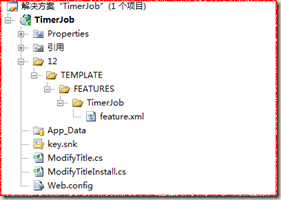
文件描述:
TimerJob定义类:ModifyTitle.cs(继承自SPJobDefinition)
TimerJob安装类:ModifyTitleInstall.cs(继承自SPFeatureReceiver)
激活TimerJob的Feature.xml
添加强命名,因为将来生成的dll是要放到GAC里面去的
添加引用:
引用Microsoft.SharePoint.dll文件,两个Class都需要添加下面命名空间
using Microsoft.SharePoint;
using Microsoft.SharePoint.Administration;
ModifyTitleInstall类
|
public class ModifyTitleInstall : SPFeatureReceiver { const string TimerJobName = "ModifyTitleTimerJob";//TimerJob的标题 //激活TimerJob的方法 public override void FeatureActivated(SPFeatureReceiverProperties properties) { SPSite site = properties.Feature.Parent as SPSite; foreach (SPJobDefinition job in site.WebApplication.JobDefinitions) { //如果有相同的TimerJob,先删除 if (job.Title == TimerJobName) { job.Delete(); } } ModifyTitle modifyTitle = new ModifyTitle(TimerJobName, site.WebApplication); SPMinuteSchedule minuteSchedule = new SPMinuteSchedule();//计时器对象 minuteSchedule.BeginSecond = 0; minuteSchedule.EndSecond = 59; minuteSchedule.Interval = 1; modifyTitle.Schedule = minuteSchedule; modifyTitle.Update(); //throw new NotImplementedException(); } public override void FeatureDeactivating(SPFeatureReceiverProperties properties) { SPSite site = properties.Feature.Parent as SPSite; foreach (SPJobDefinition job in site.WebApplication.JobDefinitions) { if (job.Title == TimerJobName) { job.Delete(); } } //throw new NotImplementedException(); } public override void FeatureInstalled(SPFeatureReceiverProperties properties) { //throw new NotImplementedException(); } public override void FeatureUninstalling(SPFeatureReceiverProperties properties) { //throw new NotImplementedException(); } |
ModifyTitle类
|
public class ModifyTitle : SPJobDefinition { public ModifyTitle():base(){} public ModifyTitle(string TimerName, SPWebApplication webapp) : base(TimerName, webapp, null, SPJobLockType.ContentDatabase) { //TimerJob的标题 this.Title = "定期修改Title的TimerJob"; } public override void Execute(Guid targetInstanceId) { SPWebApplication webapp = this.Parent as SPWebApplication; SPContentDatabase contentDB=webapp.ContentDatabases[targetInstanceId]; foreach (SPItem item in contentDB.Sites[0].RootWeb.Lists["TimerJob"].Items) { DateTime dt = Convert.ToDateTime(item["创建时间"].ToString()); item["标题"] = "今天是这个月的第" + dt.Day.ToString() + "天"; item.Update(); } //base.Execute(targetInstanceId); } } |
Feature.xml(Id是需要重新生成的Guid)
|
<?xml version="1.0" encoding="utf-8" ?> <Feature xmlns="http://schemas.microsoft.com/sharepoint/" Id="f0c813e8-68e0-4ad2-82cd-292b1b7222cd" Title="Modify Title Timer Job" Description="Modify Title Timer Job" Scope="Site" Hidden="TRUE" Version="1.0.0.0" ReceiverAssembly="TimerJob, Version=1.0.0.0, Culture=neutral, PublicKeyToken=f7436af6afb9480b" ReceiverClass="TimerJob.ModifyTitleInstall"> </Feature> |
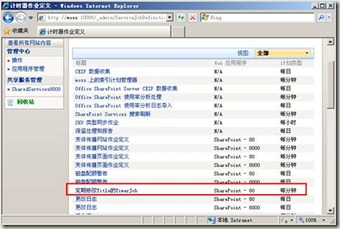
添加结果:
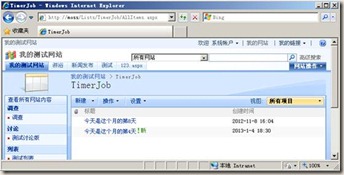
运行结果:无论标题是什么,都改成今天是这个月的第N天。
添加配置文件:
|
<?xml version="1.0" encoding="utf-8" ?> <configuration> <appSettings> <add key="AAString" value="http://localhost"/> </appSettings> </configuration> |
获取配置文件:
string AAString = ConfigurationManager.AppSettings.Get("AAString");
注:配置文件格式不对的话,可能造成Timer服务启动错误,所以,可以拷一个控制台程序debug下面的Consoleapp.exe.config文件,然后改成OWSTIMER.exe.config,然后放到12/bin(C:\Program Files\Common Files\Microsoft Shared\Web Server Extensions\12\BIN)下就可以了
部署TimerJob脚本:
|
@echo off SET TEMPLATE="c:\program files\common files\microsoft shared\web server extensions\12\Template" Echo Copying files to TEMPLATES directory xcopy /e /y 12\TEMPLATE\* %TEMPLATE% Echo Copying TimerJob.dll to GAC "C:\Program Files\Microsoft SDKs\Windows\v6.0A\Bin\gacutil.exe" -if bin\TimerJob.dll iisreset "C:\Program Files\Common Files\Microsoft Shared\Web Server Extensions\12\bin\stsadm" -o installfeature -filename TimerJob\feature.xml -force "C:\Program Files\Common Files\Microsoft Shared\Web Server Extensions\12\bin\stsadm" -o deactivatefeature -filename TimerJob\feature.xml -url http://localhost -force "C:\Program Files\Common Files\Microsoft Shared\Web Server Extensions\12\bin\stsadm" -o activatefeature -filename TimerJob\feature.xml -url http://localhost -force net stop SPTimerV3 net start SPTimerV3 PAUSE |
注:新的TimerJob运行一定要重启SPTimerV3服务,在windows服务里面,如下图:
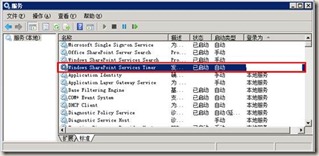
调试:TimerJob程序和WebPart等SharePoint程序,运行的进程不一样,如果需要调试,需要重新安装TimerJob,然后附加到SharePoint计时器进程(下图),进行调试!

体会:
开发完TimerJob感觉,和SharePoint的东西有一样的特点,就是代码开发比较简单,但是杂七杂八的事情很多,部署、调试起来比较麻烦,而且非常需要细心,如果其间遇到各种bug,可以建议重启下机器(我就是头天晚上,各种报错,转天就好了)。
还有就是,我的代码是SharePoint2007环境开发的,如果在2010或者更高版本,代码基本是类似的,注意目录即可,部署方式可能需要PowerShell,可以网上查一下。
SharePoint 开发TimerJob 介绍的更多相关文章
- SharePoint开发 - TimerJob简单实例讲解
博客地址 http://blog.csdn.net/foxdave SharePoint中的TimerJob类似于Windows系统的计划任务,可以实现定时执行指定操作的功能. 本篇所述的实例为在Sh ...
- SharePoint Server 2013开发之旅(一):新的开发平台和典型开发场景介绍
我终于开始写这个系列文章,实际上确实有一段时间没有动笔了.最近重新安装了一套SharePoint Server 2013的环境,计划利用工作之余的时间为大家写一点新的东西. SharePoint Se ...
- [转]SharePoint开发中可能用到的各种Context(上下文)
SharePoint是一个B/S结构的产品,所以在开发过程中会使用到各种各样的上下文(Context)信息,借此机会来总结一下.特别是Javascript的Ctx非常实用,这里记录一下! 一.Http ...
- SharePoint开发中可能用到的各种Context(上下文)
转载: http://www.cnblogs.com/erucy/archive/2012/08/25/2655600.html 电脑正在以无比慢的速度从微软网站上安装Office Component ...
- SharePoint Add-in Model 介绍 - 引文(先导篇)
1. SharePoint 平台 如果你已经很熟悉 SharePoint 平台,可跳过本章节. 1.1 SharePoint 是什么 在介绍 Add-in Model 之前,简要提一下 SharePo ...
- SharePoint常用目录介绍
SharePoint常用目录介绍 stsadm命令管理程序目录:C:\Program Files\Common Files\Microsoft Shared\web server extensions ...
- cWeb开发框架,基于asp.net的cWeb应用开发平台介绍(二)
cWeb是基于微软的.Net Framework 4框架,数据库是sql server 2008 r2. cWeb开发框架下载,点击这里去下载. cWeb开发框架借鉴三层架构理论分为三层,分别是:cD ...
- cWeb开发框架,基于asp.net的cWeb应用开发平台介绍(一)
cWeb开发框架是基于asp.net的B/S应用开发平台,采用三层架构理论,应用简单.代码简洁.运行快速. cWeb是bubufx提供,是分享资源,无任何版权限制,bubufx继续传承互联网精神,可随 ...
- [推荐]WebService开发知识介绍
[推荐]WebService开发知识介绍 WebService开发手册 http://wenku.baidu.com/view/df3992ce050876323112128a.html WebSe ...
随机推荐
- JVM基础知识GC
在网上看到一篇很不错的讲解JVM GC的文章,看完之后觉得可以留着以后多看几遍便转载了下来.但是找了半天也没有找到原作者地址.抱歉不能标明原文地址了.以下是文章内容. 几年前写过一篇关于JVM调优的文 ...
- Android必知必会-带列表的地图POI周边搜索
如果移动端访问不佳,请尝试–> Github版 2016-08-22 更新 注意:在 Activity 代码中的onPoiSearched(PoiResult result, int rCode ...
- AndroidManifest.xml中的application中的name属性
被这个不起眼的属性折磨了一天,终于解决了. 由于项目需要,要合并两个android应用,于是拷代码,拷布局文件,拷values,所有的都搞定之后程序还是频频崩溃,一直没有找到原因,学android时间 ...
- UNIX网络编程——带外数据小结
TCP没有真正的带外数据,不过提供紧急模式和紧急指针.一旦发送端进入紧急模式,紧急指针就出现在发送到对端的分节中的TCP首部中.连接的对端收取该指针是在告知接收进程发送端已经进入紧急模式,而且该指针指 ...
- 从Storm和Spark 学习流式实时分布式计算的设计
0. 背景 最近我在做流式实时分布式计算系统的架构设计,而正好又要参加CSDN博文大赛的决赛.本来想就写Spark源码分析的文章吧.但是又想毕竟是决赛,要拿出一些自己的干货出来,仅仅是源码分析貌似分量 ...
- 如何使用EasyUI显示表格界面
还记得前面有篇博客叫---使用TT模板+mvc+wcf实现简单查询,这篇博文的末尾,小编贴了一张查询出来的结果图,那么这篇博客的中新来了,如何使用EasyUI显示出表格样式的界面,以前学习CS的时候, ...
- open_links_per_instance 和 open_links 参数说明
1.1 OPEN_LINKS Property Description Parameter type Integer Default value 4 Modifiable No --即修改需要重启实 ...
- 用 Freemarker 生成 word 文档
阅读目录 添加图片 自定义载入模板 1. 用word写一个需要导出的word模板,然后存为xml格式. 2. 将xml中需要动态修改内容的地方,换成freemarker的 ...
- Linux IPC实践(8) --共享内存/内存映射
概述 共享内存区是最快的IPC形式.一旦这样的内存映射到共享它的进程的地址空间,这些进程间数据传递不再涉及到内核,换句话说是进程不再通过执行进入内核的系统调用来传递彼此的数据(如图). 共享内存 VS ...
- JAVA之旅(十二)——Thread,run和start的特点,线程运行状态,获取线程对象和名称,多线程实例演示,使用Runnable接口
JAVA之旅(十二)--Thread,run和start的特点,线程运行状态,获取线程对象和名称,多线程实例演示,使用Runnable接口 开始挑战一些难度了,线程和I/O方面的操作了,继续坚持 一. ...