
CORS 实战 专题
本文会代码层面对CORS问题进行剖析
CORS相关相关概念可参考http://www.cnblogs.com/softidea/p/5496719.html
ERROR info:
XMLHttpRequest cannot load http://localhost:8080/jsonp/scene1/user/1. No 'Access-Control-Allow-Origin' header is present on the requested resource. Origin 'http://localhost' is therefore not allowed access.

JSONP(Javascript Object Notation With Padding)需要客户端和服务器支持
JSONP解释
在解释JSONP之前,我们需要了解下”同源策略“这个概念,这对理解跨域有帮助。
基于安全的原因,浏览器是存在同源策略机制的,同源策略阻止从一个源加载的文档或脚本获取或设置另一个源加载额文档的属性。有点绕,说的简单点就是浏览器限制脚本只能和同协议、同域名、同端口的脚本进行交互。
什么是jsonp格式呢?
API原文:
如果获取的数据文件存放在远程服务器上(域名不同,也就是跨域获取数据),则需要使用jsonp类型。
使用这种类型的话,会创建一个查询字符串参数 callback=? ,这个参数会加在请求的URL后面。
服务器端应当在JSON数据前加上回调函数名,以便完成一个有效的JSONP请求。
意思就是远程服务端需要对返回的数据做下处理,根据客户端提交的callback的参数,返回一个callback(json)的数据,而客户端将会用script的方式处理返回数据,来对json数据做处理。JQuery.getJSON也同样支持jsonp的数据方式调用。
JSONP就是为了解决这一问题的,JSONP是英文JSON with Padding的缩写,是一个非官方的协议。他允许服务端生成script tags返回值客户端,通过JavaScript callback的形式来实现站点访问。JSONP是一种script tag的注入,将server返回的response添加到页面是实现特定功能。
简而言之,JSONP本身不是复杂的东西,就是通过scirpt标签对javascript文档的动态解析绕过了浏览器的同源策略。
JSONP原理及实现
接下来,来实际模拟一个跨域请求的解决方案。后端为spring MVC架构的,前端则通过Ajax进行跨域访问。
1、首先客户端需要注册一个callback(服务端通过该callback(jsonp)可以得到js函数名(jsonpCallback)),然后以JavaScript语
法的方式,生成一个function
2、接下来,将JSON数据直接以入参的方式,放置到function中,这样就生成了一段js语法文档,返回给客户端。
3、最后客户端浏览器动态的解析script标签,并执行返回的JavaScript语法文档片段,此时数据作为参数传入到了预先定义好的
回调函数里(动态执行回调函数)。
这种动态解析js文档和eval函数是类似的。
客户端的支持:
This is how I'm using JSONP with Spring MVC, just modify it according to your needs:
on Server Side:
下例中服务器端处理参数名为“callback"的客户端数据,此数据在客户端的JS代码必须存在,可以指定参数值,也不可以不指定,如果不指定,会由浏览器自动生成
类似下面这种格式:
http://localhost:8080/jsonp/scene1/user/1?callback=jQuery3210430263573155826_1502264239363&time=1502265440209&_=1502264239364
@RequestMapping(value="/notes/callback.json", method=RequestMethod.GET)

public void jsonpCallback(@RequestParam("callback") String callback, HttpServletResponse response) {

   response.setContentType("text/javascript; charset=UTF-8");

   PrintWriter out = response.getWriter();

   out.print(callback + "(" + jsonDataString + ")");

}
On client side:
<script src="http://code.jquery.com/jquery-1.6.2.min.js"></script>

<script type="text/javascript">

function yourfunction() {

    jQuery.getJSON("http://localhost:8080/notes/callback.json?callback=?",

        function(data) {

            alert(data.someParam);

        });

}

</script>
指定callback参数对应的值:
$.ajax({

    url: "http://tonghuashuo.github.io/test/jsonp.txt",

    dataType: 'jsonp',

    jsonp: "callback",

    jsonpCallback: "dosomething"

})

.done(function(res) {

    console.log("success");

    console.log(res);

})

.fail(function(res) {

    console.log("error");

    console.log(res);

});
后端关键代码(以PHP为例)
$result   = "{'data':'JSONP Works'}"; // 这里省略了数据库查询等操作,直接给出返回值

$callback = $_GET['callback'];        // 最好加上判空和默认值,以防拿不到参数

echo $callback."(".$result.")";

// 返回的结果

// dosomething({"data":"JSONP Works"});
将上述代码放到你本地localhost中,尝试运行一下,顺利的话应该会在浏览器的控制台中得到以下的内容:
> success

> Object {data: "JSONP Works"}
实际发送出来的完整请求长这样:http://tonghuashuo.github.io/test/jsonp.txt?callback=dosomething&_=1471419449018。,后面的随机字符串是jQuery加上的。
区别于常规的 AJAX 请求,这里真正需要关心的参数有以下 3 个:
- dataType: 'jsonp',用于表示这是一个 JSONP 请求。
- jsonp: 'callback',用于告知服务器根据这个参数获取回调函数的名称,通常约定就叫 callback。
- jsonpCallback: 'dosomething',指定我们自己的回调函数名称,也是前面callback参数的值。远程服务接受callback参数的值就不再是自动生成的回调名
其中jsonpCallback参数是可以省略的,jQuery 会自动生成一个随机字符串作为函数名,推荐这么做,以减少不必要的命名工作,同时排除潜在的安全隐患。这里由于Github Page没有后台服务,我们只能指定一个名字。注意:省略jsonpCallback的同时,jsonp参数必须指明,不能为false。
jQuery 还支持将jsonp设置为false以避免callback参数出现在请求 URL 中,但这需要前后端配合,前端必须要指定jsonpCallback的值为一个函数名,后端由于无法从请求中获取回调函数的名称,因此也必须固定使用同名的字符串进行拼接。
Spring 4 MVC + JSONP Example with REST, @ResponseBody and ResponseEntity
客户端代码示例:
$("#but1").click(function(){

     $.ajax({

        url:'http://127.0.0.1:8080/DevInfoWeb/get',

        type: "get",

        async: false,

        dataType: "jsonp",

        jsonp: "callbackparam", //服务端用于接收callback调用的function名的参数

        jsonpCallback: "success_jsonpCallback", //callback的function名称,服务端会把名称和data一起传递回来

        success: function(json) {

         alert(json);

        },

        error: function(){alert('Error');}

});

});
或
<script language="JavaScript">

$(document).ready(function() {

    $.ajax({

        url:'http://localhost:8080/test/getPopularity',

        dataType:'jsonp',

        success:function(data){

            console.log("返回Json:")

            console.log(data)

        }

    });

});

</script>
或
http://localhost:8080/test/getPopularity?callback=jsonp
In this page we will provide Spring 4 MVC and JSONP example with REST, @ResponseBody and ResponseEntity. JSONP is JSON with padding. It supports JavaScript code running in web browser to request data from a server in different domain which is normally prohibited because of same-origin policy. According to this policy a web browser can allow the script code of one web browser to access data from another web browser within the same domain. Same-origin policy is because of web application security model. But this policy is not forced to <script> tag by web browser. From here the role of JSONP comes into picture. JSONP allows to access data from different domain using <script> tag by web browser. If we have a URL as
http://localhost:8080/concretepage-1/book1?callback=myfunction
and if it throws the JSONP response as
myfunction({"bookName":"Godan","writer":"Premchand"});
then in another domain, we can use it as
<script src=" http://localhost:8080/concretepage-1/book1?callback=myfunction " type="application/javascript"> </script>
In our client code to access JSONP, there should already be a function named myfunction() defined in script code.
To throw the JSONP response using spring, it provides AbstractJsonpResponseBodyAdvice class which is implemented by a class annotated with @ControllerAdvice.
Spring 4 Support for JSONP with AbstractJsonpResponseBodyAdvice
Find the our class which will support JSONP response.
JsonpAdvice.java
@ControllerAdvice

public class JsonpAdvice extends AbstractJsonpResponseBodyAdvice {

    public JsonpAdvice() {

        super("callback");

    }

}
In the constructor, we need to call super method passing a key. This key will be used in query string of URL while requesting JSONP data. The above method facilitates REST web service to respond JSONP data and also controller method which respond using @ResponseBody and ResponseEntity.
JSONP with Spring REST
Find the bean being used in the example to generate JSON.
Book.java
public class Book {

        private String bookName;

        private String writer;

    public String getBookName() {

        return bookName;

    }

    public void setBookName(String bookName) {

        this.bookName = bookName;

    }

    public String getWriter() {

        return writer;

    }

    public void setWriter(String writer) {

        this.writer = writer;

    }

}
We are creating a web service which will respond JSONP.
BookService.java
@RestController

class BookService {

    @RequestMapping(value= "/book1", produces = MediaType.APPLICATION_JSON_VALUE)

    Book bookInfo1() {

        Book book = new Book();

        book.setBookName("Godan");

        book.setWriter("Premchand");

        return book;

    }

}
When we access the URL http://localhost:8080/concretepage-1/book1?callback=functionCall, it will throw the response as
functionCall({"bookName":"Godan","writer":"Premchand"});
JSONP with @ResponseBody and ResponseEntity
Now find a controller in which we have created methods that will return @ResponseBody and ResponseEntity.
@Controller

class BookController {

    @RequestMapping(value ="/book2", produces =MediaType.APPLICATION_JSON_VALUE )

    @ResponseBody

    Book bookInfo2() {

        Book book = new Book();

        book.setBookName("Ramcharitmanas");

        book.setWriter("TulasiDas");

        return book;

    }

    @RequestMapping(value ="/book3", produces =MediaType.APPLICATION_JSON_VALUE )

    public ResponseEntity<Book> bookInfo3() {

        Book book = new Book();

        book.setBookName("Ramayan");

        book.setWriter("Valmiki");

        return ResponseEntity.accepted().body(book);

    }

}
When we access the URL http://localhost:8080/concretepage-1/book2?callback=functionCall, we will get the output in browser as
functionCall({"bookName":"Ramcharitmanas","writer":"TulasiDas"});
And for the URL http://localhost:8080/concretepage-1/book3?callback=functionCall , the output will be
functionCall({"bookName":"Ramayan","writer":"Valmiki"});
JSONP Client Code
Now we will write client code which can be used in any other domain.
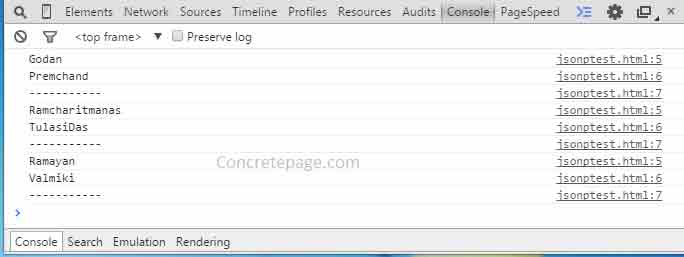
jsonptest.html
<html>

 <head>

   <script>

     function functionCall(data) {

        console.log(data.bookName);

        console.log(data.writer);

        console.log('-----------');

     }

   </script>

  </head>

  <body>

        <!-- Using REST URL-->

        <script src="http://localhost:8080/concretepage-1/book1?callback=functionCall" type="application/javascript"> </script>

    <!--Using @ResponseBody -->

    <script src="http://localhost:8080/concretepage-1/book2?callback=functionCall" type="application/javascript"> </script>

    <!--Using ResponseEntity -->

    <script src="http://localhost:8080/concretepage-1/book3?callback=functionCall" type="application/javascript"> </script>

  </body>

</html>
Run this page and check the output in console.
在Firefox,chrome,opera,safari,ie9,ie8等高级浏览器直接可以用JSON对象的stringify()和parse()方法。
JSON.stringify(obj)将JSON转为字符串。JSON.parse(string)将字符串转为JSON格式;
上面的转换可以这么写:
var a={"name":"tom","sex":"男","age":"24"};
var b='{"name":"Mike","sex":"女","age":"29"}';
var aToStr=JSON.stringify(a);
var bToObj=JSON.parse(b);
alert(typeof(aToStr)); //string
alert(typeof(bToObj));//object
代码示例:
https://github.com/helloworldtang/cors-demo
参考:
http://www.cnblogs.com/softidea/p/3907113.html
http://blog.csdn.net/u010537398/article/details/52012548
https://en.wikipedia.org/wiki/JSONP
https://stackoverflow.com/questions/10323625/how-to-support-jsonp-with-spring-mvc-and-multiple-response-types
https://tonghuashuo.github.io/blog/jsonp.html
http://www.concretepage.com/spring-4/spring-4-mvc-jsonp-example-with-rest-responsebody-responseentity
http://blog.csdn.net/caiwenfeng_for_23/article/details/45300739
http://www.jianshu.com/p/983642ad125a
http://www.codesnoopy.com/2016/07/09/%E7%94%A8Spring-MVC-4%E5%AE%9E%E7%8E%B0jsonp%E8%B7%A8%E5%9F%9F%E8%B0%83%E7%94%A8/
https://my.oschina.net/u/130771/blog/52912
CORS 实战 专题的更多相关文章
- arcpy.mapping实战-专题图制图自动化
arcpy.mapping实战-专题图制图自动化 by 李远祥 最初对arcpy.mapping感兴趣是因为一次大规模的专题地图调整的需要,由于某某单位利用ArcEngine编写的专题图出图系统,出现 ...
- Linux日志分析的实战专题
来自 日志也是用户应该注意的地方之一.不要低估日志文件对网络安全的重要作用,因为日志文件能够详细记录系统每天发生的各种各样的事件.用户可以通过日志文件 检查错误产生的原因,或者在受到攻击和黑客入侵 ...
- 【朝夕Net社区技术专刊】Core3.1 WebApi集群实战专题---WebApi环境搭建运行发布部署篇
欢迎大家阅读<朝夕Net社区技术专刊>第1期 原文是我在知乎发表的,现在在这里分享! 我们致力于.NetCore的推广和落地,为更好的帮助大家学习,方便分享干货,特创此刊!很高兴你能成为首 ...
- 🏆【Java技术专区】「开发实战专题」Lombok插件开发实践必知必会操作!
前言 在目前众多编程语言中,Java 语言的表现还是抢眼,不论是企业级服务端开发,还是 Andorid 客户端开发,都是作为开发语言的首选,甚至在大数据开发领域,Java 语言也能占有一席之地,如Ha ...
- JEECG3.8 全套实战视频全部开放,免费下载!
JEECG快速开发平台V3.8版本自去年10月份发布以来,下载使用数屡创新高,并受到众多开发者积极反馈.为帮助更多初学者能够快速上手,JEECG V3.8版本实战教程现已全面开放,免费下载!本教程深入 ...
- ASP.Net教程系列:多线程编程实战(一)
Web开发中使用多线程可以增强用户体验,尤其是多用户.多任务.海量数据和资源紧张的情况下.所以我们的ASP.Net教程设立多线程编程实战专题.下面这些代码范例都是入门级的,希望对对大家学习ASP.Ne ...
- Kurento实战之一:KMS部署和体验
欢迎访问我的GitHub https://github.com/zq2599/blog_demos 内容:所有原创文章分类汇总及配套源码,涉及Java.Docker.Kubernetes.DevOPS ...
- 148_赠送300家门店260亿销售额的零售企业Power BI实战示例数据
焦棚子的文章目录 一背景 2022年即将到来之际,笔者准备在Power BI中做一个实战专题,作为实战专题最基础的就是demo数据,于是我们赠送大家一个300家门店,260亿+销售额,360万行+的零 ...
- 【资源】C++学习资料 - 逆天整理 - 精华无密版【最新】
再失效就太无语了,链接都是多份的~~—————————————————基础——————————————C++环境搭建(全套)http://pan.baidu.com/s/1o6y0smY链接:http ...
随机推荐
- FFMPEG类库打开流媒体的方法(需要传参数的时候)
使用ffmpeg类库进行开发的时候,打开流媒体(或本地文件)的函数是avformat_open_input(). 其中打开网络流的话,前面要加上函数avformat_network_init(). 一 ...
- JSP 知识基本
from:http://blog.csdn.net/caipeichao2/article/details/38589293 more:http://www.2cto.com/kf/web/jsp/4 ...
- 【Android 应用开发】BluetoothAdapter解析
这篇文章将会详细解析BluetoothAdapter的详细api, 包括隐藏方法, 每个常量含义. 一 BluetoothAdapter简介 1.继承关系 该类仅继承了Object类; 2.该类作用 ...
- windows from 手风琴
public class OutlookBar : Panel { private int SelectedBandHeight { get; set; } public int ButtonHeig ...
- rcp perspective 添加9个视图均匀排列
PageLayout布局方法 pageLayout.addView("NodePMTSStream" + ":1", IPageLayout.TOP, 0.5f ...
- Jquery的过滤选择器分为哪几种?
Jquery的过滤选择器分为哪几种? 转载▼ 标签: jquery 过滤选择器 分类 分类: JQuery 所有的过滤选择器分为哪几种: 一.基本过滤选择器(重点掌握下列八个) :first 选取第一 ...
- java并发包分析之———Atomic类型
一.何谓Atomic? Atomic一词跟原子有点关系,后者曾被人认为是最小物质的单位.计算机中的Atomic是指不能分割成若干部分的意思.如果一段代码被认为是Atomic,则表示这段代码在执行过 ...
- 教你一步步发布一个开源库到 JCenter
今天想来分享下,如何一步步自己发布一个开源库到 JCenter 这方面的博客网上已经特别多了,所以本篇并不打算仅仅只是记录流程步骤而已,而是尽可能讲清楚,为什么需要有这个步骤,让大伙知其然的同时还知其 ...
- Scala编程入门---面向对象编程之Trait
Scala中Trait是一种特殊概念 首先我们可以将Triat做为接口来使用,此时的Triat就与java中的接口非常相似 在Triat中可以定义抽象方法,就与抽象类中的抽象方法一样,只要不给出具体的 ...
- SpringBoot框架Scheduled注入参数说明
注解 @Scheduled(cron = "0/5 * * * * ?") @Scheduled(fixedDelay = 1000 * 7,initialDelay=1000*1 ...