
Unity插件系列之二维码
1.二维码常见的生成与识别途径
1.草料二维码 https://cli.im/text
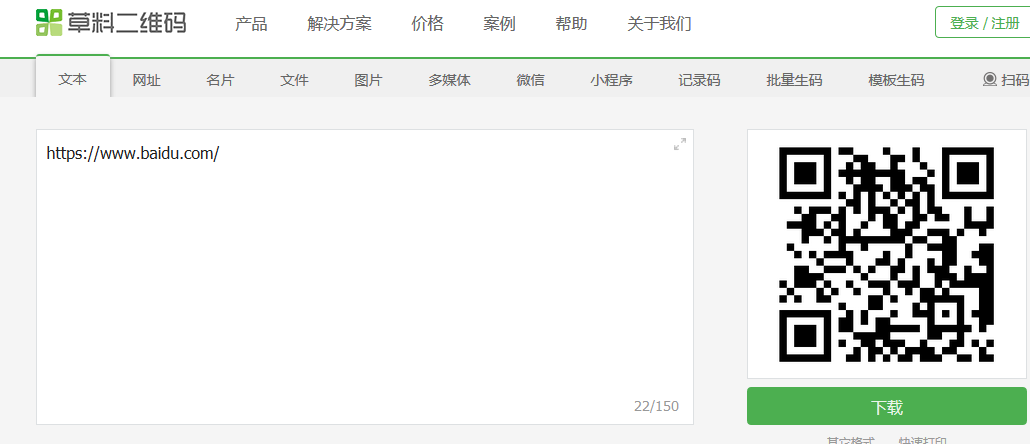
2.在软件中实现生成和扫描二维码 使用zxing实现
zxing是一个用java写的开源项目,zxing.net是移植到.net工程上的。
https://github.com/micjahn/ZXing.Net

2.实现二维码的识别
1.Unity工程

2.让RawImage显示摄像头内容
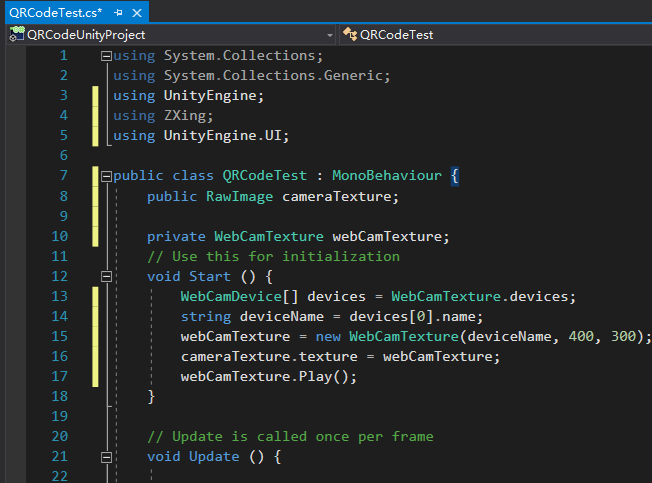
using System.Collections;

using System.Collections.Generic;

using UnityEngine;

using ZXing;

using UnityEngine.UI;

public class QRCodeTest : MonoBehaviour {

    public RawImage cameraTexture;

    private WebCamTexture webCamTexture;

	// Use this for initialization

	void Start () {

        WebCamDevice[] devices = WebCamTexture.devices;

        string deviceName = devices[0].name;

        webCamTexture = new WebCamTexture(deviceName, 400, 300);

        cameraTexture.texture = webCamTexture;

        webCamTexture.Play();

	}

	// Update is called once per frame

	void Update () {

	}

}

3.扫描功能实现代码(代码有点长,慢慢看)
using System.Collections;

using System.Collections.Generic;

using UnityEngine;

using ZXing;

using UnityEngine.UI;

public class QRCodeTest : MonoBehaviour {

    public RawImage cameraTexture;//存储摄像头拍到的内容

    private WebCamTexture webCamTexture;//摄像头的内容

    Color32[] data;

    BarcodeReader barcodeReader;//Zxing提供的读取摄像头内容的方法

    float interval = 0f;//做定时器用

	// Use this for initialization

	void Start () {

        //打开了摄像头

        WebCamDevice[] devices = WebCamTexture.devices;

        string deviceName = devices[0].name;

        webCamTexture = new WebCamTexture(deviceName, 400, 300);

        cameraTexture.texture = webCamTexture;

        webCamTexture.Play();

        barcodeReader = new BarcodeReader();

	}

	// Update is called once per frame

	void Update () {

        interval += Time.deltaTime;

        if (interval >= 3f) {

            ScanQRCode();

            interval = 0f;

        }

	}

    void ScanQRCode()

    {

        //GetPixels32是把格式转换为Color32的方法

        data = webCamTexture.GetPixels32();

        //result存储读取的内容

        var result = barcodeReader.Decode(data, webCamTexture.width, webCamTexture.height);

        if (result != null) {

            Debug.Log(result.Text);

        }

    }

}
3.实现二维码的生成 (注:我关掉网络也能成功识别生成的二维码,说明这东西是离线的)
1.新建一个RawImage存储生成的识别图
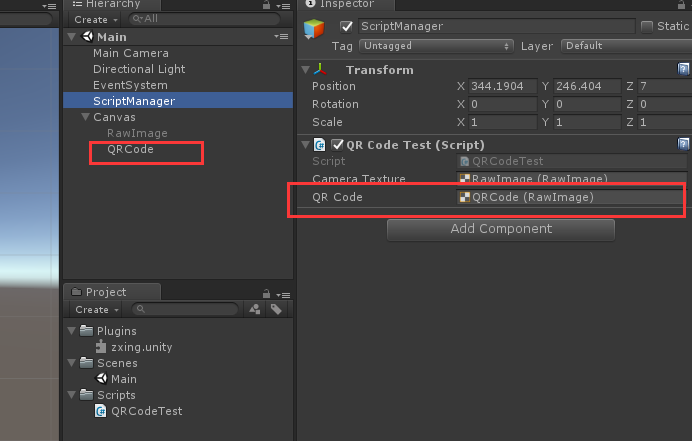
2.添加了生成二维码的方法:
using System.Collections;

using System.Collections.Generic;

using UnityEngine;

using ZXing;

using UnityEngine.UI;

public class QRCodeTest : MonoBehaviour {

    public RawImage cameraTexture;//存储摄像头拍到的内容

    public RawImage QRCode;//存储生成的二维码

    private WebCamTexture webCamTexture;//摄像头的内容

    Color32[] data;

    BarcodeReader barcodeReader;//Zxing提供的读取摄像头内容的方法

    BarcodeWriter barcodeWriter;//Zxing提供的写内容的方法

    float interval = 0f;//做定时器用

	// Use this for initialization

	void Start () {

        //打开了摄像头

        WebCamDevice[] devices = WebCamTexture.devices;

        string deviceName = devices[0].name;

        webCamTexture = new WebCamTexture(deviceName, 400, 300);

        cameraTexture.texture = webCamTexture;

        webCamTexture.Play();

        barcodeReader = new BarcodeReader();

	}

	// Update is called once per frame

	void Update () {

        interval += Time.deltaTime;

        if (interval >= 3f) {

            ScanQRCode();

            interval = 0f;

        }

        //按下空格键生成二维码

        if (Input.GetKeyDown(KeyCode.Space))

        {

            //在这种写法里 只能填入256

            ShowQRCode("我爱学习", 256, 256);

            //如果想要其他大小的二维码呢?见文章底部链接

        }

	}

    //扫描二维码方法

    void ScanQRCode()

    {

        //GetPixels32是从一张图片上获取颜色的方法

        data = webCamTexture.GetPixels32();

        //result存储读取的内容

        var result = barcodeReader.Decode(data, webCamTexture.width, webCamTexture.height);

        if (result != null) {

            Debug.Log(result.Text);

        }

    }

    //显示生成的二维码

    void ShowQRCode(string str,int width,int height) {

        //定义texture2d并且填充

        Texture2D t = new Texture2D(width, height);

        t.SetPixels32(GeneQRCode(str, width, height));

        t.Apply();

        QRCode.texture = t;

    }

    //返回Color32图片颜色的方法

    Color32[] GeneQRCode(string formatStr,int width,int height) {

        ZXing.QrCode.QrCodeEncodingOptions options = new ZXing.QrCode.QrCodeEncodingOptions();

        options.CharacterSet = "UTF-8";//设置字符编码,否则中文不能显示

        options.Width = width;

        options.Height = width;

        options.Margin = 1;//二维码距离边缘的空白

        barcodeWriter = new BarcodeWriter { Format = ZXing.BarcodeFormat.QR_CODE, Options = options };

        return barcodeWriter.Write(formatStr);

    }

}
更多:

ZXing 二维码生成的坑 http://blog.sina.com.cn/s/blog_6ad33d350102xj8l.html
zxing.net读取和保存二维码,设置中文字符集,读取中文二维码 https://bbs.csdn.net/topics/391950715?page=1
Unity插件系列之二维码的更多相关文章
- jquery.qrcode二维码插件生成彩色二维码
jquery.qrcode.js 是居于jquery类库的绘制二维码的插件,用它来实现二维码图形渲染支持canvas和table两种绘图方式. (jquery.qrcode.js 设置显示方式为tab ...
- 草料Chrome浏览器插件,让二维码更好用
安装插件草料chrome插件,是专为chrome核心的浏览器开发的一个二维码应用增强工具插件. 自动将地址栏链接生成二维码 以谷歌原生的chrome浏览器为例,插件安装成功后会在浏览器地址栏旁边出现一 ...
- 使用jQuery的插件qrcode生成二维码(静态+动态生成)及常见问题解决方法
一.简介 1.说明 qrcode其实是通过使用jQuery实现图形渲染,画图,支持canvas(HTML5)和table两种方式,您可以到https://github.com/jeromeetienn ...
- jquery插件生成简单二维码
除了利用第三方网站生成二维码外,这是一个比较简单的办法吧. <script src="/Scripts/jquery.qrcode.min.js" type="te ...
- jQuery.qrcode二维码插件生成网页二维码
如果是一个固定的二维码,我们只需要在网上找个地方生成图片,然后放上图片就可以了.但如果是地址不固定需要根据页面来生成的话.就有两种做法,一个是后端根据页面做一个动态的二维码.一种是前端使用插件生成. ...
- CorelDRAW 二维码插件
随着智能手机的流行,二维码在各个领域大量应用,这个插件在补CorelDRAW这方面的不足: 这个插件是 cpg 格式,安装请看这篇博客:http://www.cnblogs.com/o594cql/p ...
- Unity生成简易二维码
最近项目需求,需要在Unity中动态生成二维码.所以就研究了一下,下面把动态生成二维码的方法向大家分享一下. 第一种方法 需要一个 ZXing.dll文件. 下载地址我会在文章结尾给出. 直接将下载好 ...
- C#运用GmaQrCode生成二维码
项目中需要生成二维码,方法比较多,可以采用JS插件,也可以采用第三方插件后台生成二维码,在后台方法中可以采用QRCode或者GmaQrCode,现在介绍一种C#在后台生成二维码的方法: /// < ...
- 为jquery qrcode生成的二维码嵌入图片
在一次微信项目中,需要实现通过扫描二维码来进行会议签到,二维码的生成选择了qrcode.js的版本,然后使用jquery.qrcode.js插件来绘制二维码. <script type=&quo ...
随机推荐
- Spring Cloud Alibaba 新版本发布:众多期待内容整合打包加入!
在Nacos 1.0.0 Release之后,Spring Cloud Alibaba也终于发布了最新的版本.该版本距离上一次发布,过去了整整4个月!下面就随我一起看看,这个大家期待已久的版本都有哪些 ...
- Java基础-异常、断言
处理错误 如果Java程序运行期间出现了错误,并且由于出现错误导致某些操作没有完成,程序应该能够返回到一种安全状态,并能够让用户执行一些其他的命令:或者允许用户保存所有操作结果,并以妥善的方式终止程序 ...
- log4j日志框架的使用
java.util.logging.Logger——java 中提供的日志类 实际开发 90% 都是使用 log4j 记录日志,而 Log4j 底层就是 java.util.logging.Logge ...
- glibc溢出提权CVE-2018-1000001总结
遇到了好几个centos6.5,一直尝试想提权.暂未成功,靶机内核:2.6.32-696.18.7.el6.x86_64. glibc版本:ldd (GNU libc) 2.12 目前编译过程中都发现 ...
- ES6系列之变量声明let const
ES6也出来好久了,最近闲来无事就想着吧es6做一个系统的总结,巩固自己的知识,丰富一下博客. 为什么叫ES6 实际上是ECMA的一个打的标准,这个标准是在2015年6月发布的,正式的名字实际是es2 ...
- 20190329-盒尺寸、boder-
目录 1.盒尺寸四家庭 width:宽度 height:高度 margin:外边距 padding:内边距 盒模型: 2.border边框 border简写:border-position(top | ...
- wordpress 图片上传冲突
网上常见的wordpress图片上传 jQuery('#upload_image_button').click(function() { //formfield并未用上,可能代码遗漏了一段,怀疑和类的 ...
- 从APP跳转到微信指定联系人聊天页面功能的实现与采坑之旅
起因: 最近做的APP中有一个新功能:已知用户微信号,可点击直接跳转到当前用户微信聊天窗口页面. 当时第一想法是使用无障碍来做,并且觉得应该不难,只是逻辑有点复杂.没想到最终踩了好多坑,特地把踩过的坑 ...
- java或Jmeter实现两个日期相加减(2003-06-01-2003-05-01)
在beanshell中写入如下代码, import java.io.FileInputStream; SimpleDateFormat myFormatter = new SimpleDateForm ...
- 解决Failed to execute goal org.apache.maven.plugins:maven-compiler-plugin:3.7.0:compile
原因: 由于项目所需jdk版本和你当前使用的jdk版本不一致导致的,因为我项目的pom.xml中定义了java版本为1.8,但是我实际idea中run这个项目却是1.7 解决方案: 更换当前jdk版本 ...