
Unity插件系列之二维码
1.二维码常见的生成与识别途径
1.草料二维码 https://cli.im/text
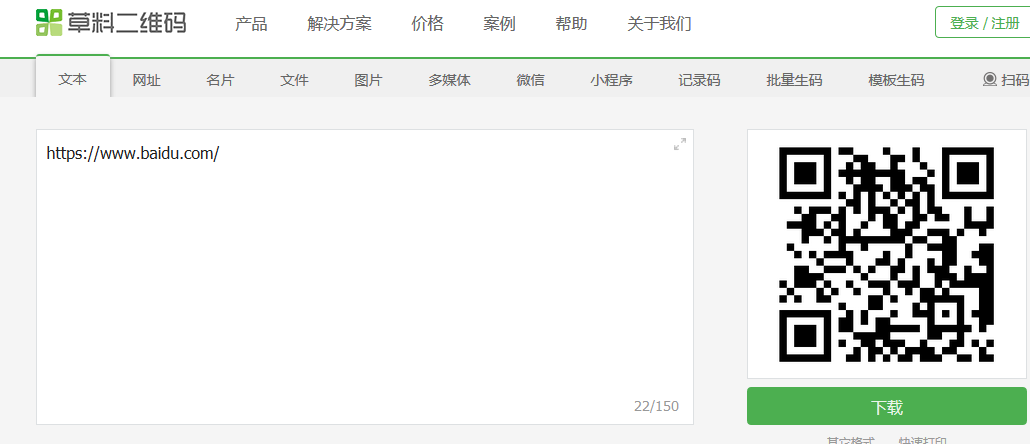
2.在软件中实现生成和扫描二维码 使用zxing实现
zxing是一个用java写的开源项目,zxing.net是移植到.net工程上的。
https://github.com/micjahn/ZXing.Net

2.实现二维码的识别
1.Unity工程

2.让RawImage显示摄像头内容
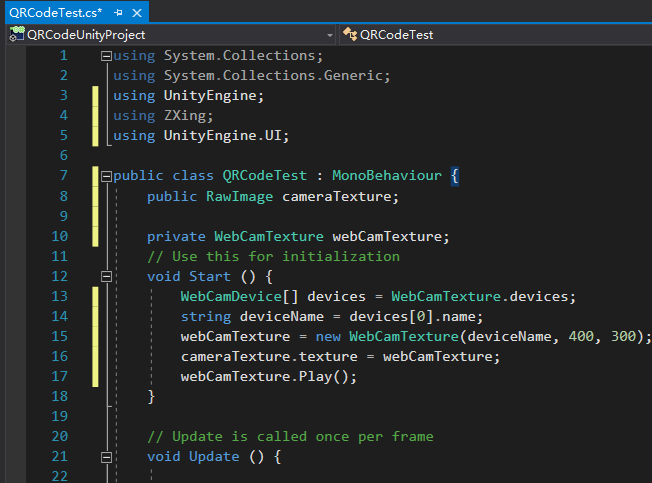
using System.Collections;

using System.Collections.Generic;

using UnityEngine;

using ZXing;

using UnityEngine.UI;

public class QRCodeTest : MonoBehaviour {

    public RawImage cameraTexture;

    private WebCamTexture webCamTexture;

	// Use this for initialization

	void Start () {

        WebCamDevice[] devices = WebCamTexture.devices;

        string deviceName = devices[0].name;

        webCamTexture = new WebCamTexture(deviceName, 400, 300);

        cameraTexture.texture = webCamTexture;

        webCamTexture.Play();

	}

	// Update is called once per frame

	void Update () {

	}

}

3.扫描功能实现代码(代码有点长,慢慢看)
using System.Collections;

using System.Collections.Generic;

using UnityEngine;

using ZXing;

using UnityEngine.UI;

public class QRCodeTest : MonoBehaviour {

    public RawImage cameraTexture;//存储摄像头拍到的内容

    private WebCamTexture webCamTexture;//摄像头的内容

    Color32[] data;

    BarcodeReader barcodeReader;//Zxing提供的读取摄像头内容的方法

    float interval = 0f;//做定时器用

	// Use this for initialization

	void Start () {

        //打开了摄像头

        WebCamDevice[] devices = WebCamTexture.devices;

        string deviceName = devices[0].name;

        webCamTexture = new WebCamTexture(deviceName, 400, 300);

        cameraTexture.texture = webCamTexture;

        webCamTexture.Play();

        barcodeReader = new BarcodeReader();

	}

	// Update is called once per frame

	void Update () {

        interval += Time.deltaTime;

        if (interval >= 3f) {

            ScanQRCode();

            interval = 0f;

        }

	}

    void ScanQRCode()

    {

        //GetPixels32是把格式转换为Color32的方法

        data = webCamTexture.GetPixels32();

        //result存储读取的内容

        var result = barcodeReader.Decode(data, webCamTexture.width, webCamTexture.height);

        if (result != null) {

            Debug.Log(result.Text);

        }

    }

}
3.实现二维码的生成 (注:我关掉网络也能成功识别生成的二维码,说明这东西是离线的)
1.新建一个RawImage存储生成的识别图
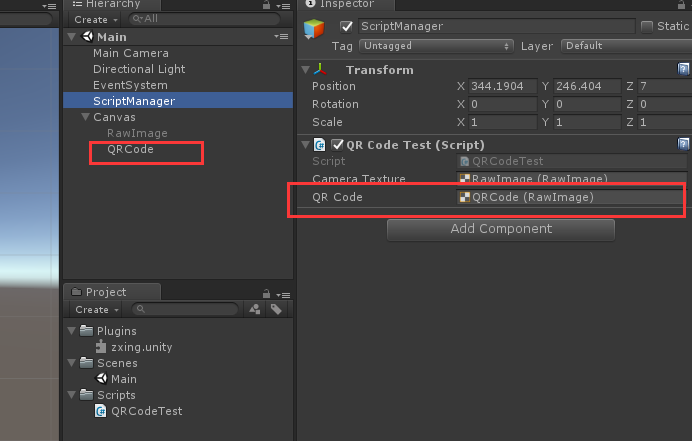
2.添加了生成二维码的方法:
using System.Collections;

using System.Collections.Generic;

using UnityEngine;

using ZXing;

using UnityEngine.UI;

public class QRCodeTest : MonoBehaviour {

    public RawImage cameraTexture;//存储摄像头拍到的内容

    public RawImage QRCode;//存储生成的二维码

    private WebCamTexture webCamTexture;//摄像头的内容

    Color32[] data;

    BarcodeReader barcodeReader;//Zxing提供的读取摄像头内容的方法

    BarcodeWriter barcodeWriter;//Zxing提供的写内容的方法

    float interval = 0f;//做定时器用

	// Use this for initialization

	void Start () {

        //打开了摄像头

        WebCamDevice[] devices = WebCamTexture.devices;

        string deviceName = devices[0].name;

        webCamTexture = new WebCamTexture(deviceName, 400, 300);

        cameraTexture.texture = webCamTexture;

        webCamTexture.Play();

        barcodeReader = new BarcodeReader();

	}

	// Update is called once per frame

	void Update () {

        interval += Time.deltaTime;

        if (interval >= 3f) {

            ScanQRCode();

            interval = 0f;

        }

        //按下空格键生成二维码

        if (Input.GetKeyDown(KeyCode.Space))

        {

            //在这种写法里 只能填入256

            ShowQRCode("我爱学习", 256, 256);

            //如果想要其他大小的二维码呢?见文章底部链接

        }

	}

    //扫描二维码方法

    void ScanQRCode()

    {

        //GetPixels32是从一张图片上获取颜色的方法

        data = webCamTexture.GetPixels32();

        //result存储读取的内容

        var result = barcodeReader.Decode(data, webCamTexture.width, webCamTexture.height);

        if (result != null) {

            Debug.Log(result.Text);

        }

    }

    //显示生成的二维码

    void ShowQRCode(string str,int width,int height) {

        //定义texture2d并且填充

        Texture2D t = new Texture2D(width, height);

        t.SetPixels32(GeneQRCode(str, width, height));

        t.Apply();

        QRCode.texture = t;

    }

    //返回Color32图片颜色的方法

    Color32[] GeneQRCode(string formatStr,int width,int height) {

        ZXing.QrCode.QrCodeEncodingOptions options = new ZXing.QrCode.QrCodeEncodingOptions();

        options.CharacterSet = "UTF-8";//设置字符编码,否则中文不能显示

        options.Width = width;

        options.Height = width;

        options.Margin = 1;//二维码距离边缘的空白

        barcodeWriter = new BarcodeWriter { Format = ZXing.BarcodeFormat.QR_CODE, Options = options };

        return barcodeWriter.Write(formatStr);

    }

}
更多:

ZXing 二维码生成的坑 http://blog.sina.com.cn/s/blog_6ad33d350102xj8l.html
zxing.net读取和保存二维码,设置中文字符集,读取中文二维码 https://bbs.csdn.net/topics/391950715?page=1
Unity插件系列之二维码的更多相关文章
- jquery.qrcode二维码插件生成彩色二维码
jquery.qrcode.js 是居于jquery类库的绘制二维码的插件,用它来实现二维码图形渲染支持canvas和table两种绘图方式. (jquery.qrcode.js 设置显示方式为tab ...
- 草料Chrome浏览器插件,让二维码更好用
安装插件草料chrome插件,是专为chrome核心的浏览器开发的一个二维码应用增强工具插件. 自动将地址栏链接生成二维码 以谷歌原生的chrome浏览器为例,插件安装成功后会在浏览器地址栏旁边出现一 ...
- 使用jQuery的插件qrcode生成二维码(静态+动态生成)及常见问题解决方法
一.简介 1.说明 qrcode其实是通过使用jQuery实现图形渲染,画图,支持canvas(HTML5)和table两种方式,您可以到https://github.com/jeromeetienn ...
- jquery插件生成简单二维码
除了利用第三方网站生成二维码外,这是一个比较简单的办法吧. <script src="/Scripts/jquery.qrcode.min.js" type="te ...
- jQuery.qrcode二维码插件生成网页二维码
如果是一个固定的二维码,我们只需要在网上找个地方生成图片,然后放上图片就可以了.但如果是地址不固定需要根据页面来生成的话.就有两种做法,一个是后端根据页面做一个动态的二维码.一种是前端使用插件生成. ...
- CorelDRAW 二维码插件
随着智能手机的流行,二维码在各个领域大量应用,这个插件在补CorelDRAW这方面的不足: 这个插件是 cpg 格式,安装请看这篇博客:http://www.cnblogs.com/o594cql/p ...
- Unity生成简易二维码
最近项目需求,需要在Unity中动态生成二维码.所以就研究了一下,下面把动态生成二维码的方法向大家分享一下. 第一种方法 需要一个 ZXing.dll文件. 下载地址我会在文章结尾给出. 直接将下载好 ...
- C#运用GmaQrCode生成二维码
项目中需要生成二维码,方法比较多,可以采用JS插件,也可以采用第三方插件后台生成二维码,在后台方法中可以采用QRCode或者GmaQrCode,现在介绍一种C#在后台生成二维码的方法: /// < ...
- 为jquery qrcode生成的二维码嵌入图片
在一次微信项目中,需要实现通过扫描二维码来进行会议签到,二维码的生成选择了qrcode.js的版本,然后使用jquery.qrcode.js插件来绘制二维码. <script type=&quo ...
随机推荐
- sql server 生成数据库字典 sql语句
SELECT TOP 100 PERCENT --a.id, CASE WHEN a.colorder = 1 THEN d.name ELSE '' END AS 表名, ...
- [转]koa 实现 jwt 认证
本文转自:https://blog.csdn.net/qq673318522/article/details/78641136 关于 Token 认证机制,这里不做更多解释.不清楚的可以看我的这篇文章 ...
- sql:常用函数
1.验证是否是null,是则替换ISNULL(Weight, 50) SELECT AVG(ISNULL(Weight, 50))FROM Production.Product; 2.连接多个字符串 ...
- Java 创建、填充PDF表单域
表单域,可以按用途分为多种不同的类型,常见的有文本框.多行文本框.密码框.隐藏域.复选框.单选框和下拉选择框等,目的是用于采集用户的输入或选择的数据.下面的示例中,将分享通过Java编程在PDF中添加 ...
- Java内存区域和内存溢出异常
前言 对于java程序员来说,在虚拟机自动内存管理的机制的帮助下,不再需要为每一个new操作去写配对的delete/free代码,不容易出现内存泄漏和内存溢出的问题,由虚拟机管理内存,这一切看起来都很 ...
- 数据库学习(MySQL):JDBC的简单增删改查实现
本文为原创,转载请注明出处: https://www.cnblogs.com/Tom-shushu/p/9171896.html 这里我们先在数据库建立一个userinfo表: CREATE TABL ...
- vue 使用定时器setInterval
来自:https://www.jianshu.com/p/180957762852 侵删 beforeMount() { //车辆进出设置定时器,每3秒刷新一次 var self = this; cl ...
- SuperMap iObject入门开发系列之一组件式GIS开发平台介绍
本文是一位好友“炀炀”授权给我来发表的,介绍都是他的研究成果,在此,非常感谢.平台介绍:SuperMap iObjects Java/.NET 是面向GIS应用系统开发者的组件式GIS开发平台,具有强 ...
- Android ble蓝牙使用注意
以下均为自己在Android ble开发项目中遇到的问题 1.尽量不要在BluetoothGattCallback里面的回调函数中执行读写通知操作,最多一个,因为例如在onServicesDiscov ...
- 【书摘】一种基于Git的版本管理方案
本篇摘录自<前端工程化体系设计与实践>一书,笔者认为是一套相对合理的方案,建议团队可以根据实际情况进行调整并增加协作命名规范. master分支--主分支 存储已发布版本的源码,不能在此分 ...