
ArcGIS Overview Map(鹰眼/概览图)
一、说明
引用文件那块,可以参考我上一篇博文,arcgis api for javascript离线部署。
这篇博文中,地图占满整个body
二、运行效果
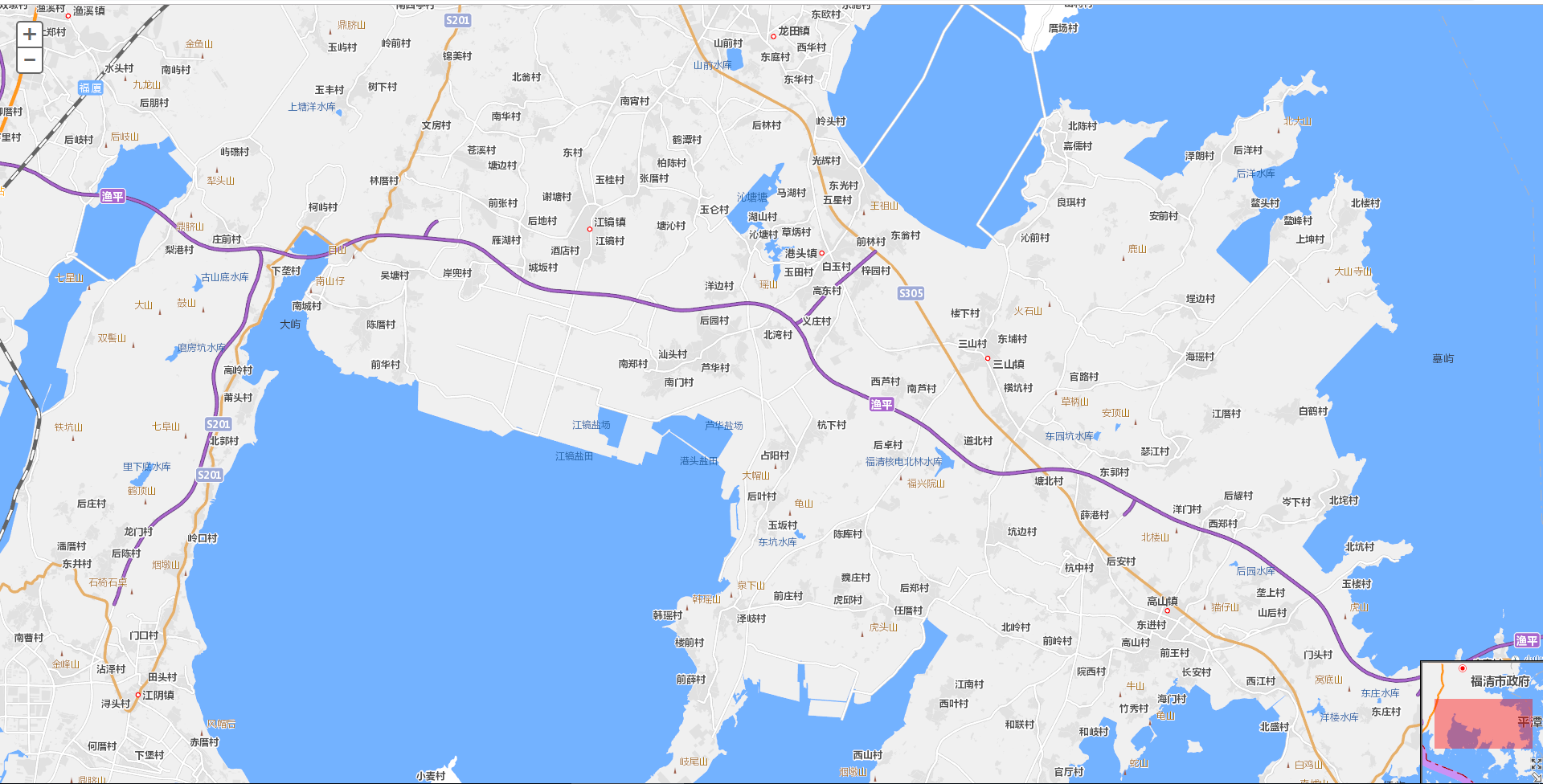
三、HTML代码
<!DOCTYPE html>

<html>

  <head>

    <meta http-equiv="Content-Type" content="text/html; charset=utf-8">

      <meta http-equiv="X-UA-Compatible" content="IE=7,IE=9">

    <!--The viewport meta tag is used to improve the presentation and behavior of the samples on iOS devices-->

    <meta name="viewport" content="initial-scale=1, maximum-scale=1,user-scalable=no">

    <title>Overview Map</title>

      <link rel="stylesheet" type="text/css" href="http://localhost/arcgis_js3_api/library/3.3/jsapi/js/dojo/dijit/themes/claro/claro.css"/>

<link rel="stylesheet" type="text/css" href="http://localhost/arcgis_js3_api/library/3.3/jsapi/js/esri/css/esri.css" />

    <style>

      html, body { height:100%; width: 100%; margin: 0; padding: 0; }

    </style>

    <script>

        var dojoConfig = {

            parseOnLoad: true

        };

    </script>

     <script type="text/Javascript" src="http://localhost/arcgis_js3_api/library/3.3/jsapi/init.js"></script>

    <script>

        // 导入必要包

        dojo.require("dijit.layout.BorderContainer");

        dojo.require("dijit.layout.ContentPane");

        dojo.require("esri.map");

        dojo.require("esri.dijit.OverviewMap");

        var map;

        function init() {

            map = new esri.Map("map", { center: [-122.445, 37.752], zoom: 4 });

            MyTiledMapServiceLayer = new esri.layers.ArcGISTiledMapServiceLayer

            ("http://localhost/arcgis/rest/services/DZDT2012/MapServer");

            map.addLayer(MyTiledMapServiceLayer);

            dojo.connect(map, "onLoad", function (theMap) {

                // 添加概览地图

                var overviewMapDijit = new esri.dijit.OverviewMap({

                    map: map,   // 必要的

                    visible: true,  // 初始化可见,默认为false

                    attachTo: "bottom-right",   // 默认右上角

                    width: 150, // 默认值是地图高度的 1/4th

                    height: 150, // 默认值是地图高度的 1/4th

                    opacity: .40,    // 透明度 默认0.5

                    maximizeButton: true,   // 最大化,最小化按钮,默认false

                    expandFactor: 3,    //概览地图和总览图上显示的程度矩形的大小之间的比例。默认值是2,这意味着概览地图将至少是两倍的大小的程度矩形。

                    color: "red"    // 默认颜色为#000000

                });

                overviewMapDijit.startup();   // 开启

            });

        }

        dojo.ready(init);

    </script>

  </head>

  <body class="claro">

    <div data-dojo-type="dijit.layout.BorderContainer"

         data-dojo-props="design:'headline', gutters:false"

         style="width: 100%; height: 100%; margin:0;">

         <div id="map"

           data-dojo-type="dijit.layout.ContentPane"

           data-dojo-props="region:'center'"

           style="padding:0">

      </div>

    </div>

  </body>

</html>
注释:这篇文章中,地图我用的是我本机的("http://localhost/arcgis/rest/services/DZDT2012/MapServer");
如果你没有自己的地图可以使用下面的HTML代码
四、HTML(另外一种形式)
<!DOCTYPE html>

<html>

  <head>

    <meta http-equiv="Content-Type" content="text/html; charset=utf-8">

      <meta http-equiv="X-UA-Compatible" content="IE=7,IE=9">

    <!--The viewport meta tag is used to improve the presentation and behavior of the samples on iOS devices-->

    <meta name="viewport" content="initial-scale=1, maximum-scale=1,user-scalable=no">

    <title>Overview Map</title>

      <link rel="stylesheet" type="text/css" href="http://localhost/arcgis_js3_api/library/3.3/jsapi/js/dojo/dijit/themes/claro/claro.css"/>

<link rel="stylesheet" type="text/css" href="http://localhost/arcgis_js3_api/library/3.3/jsapi/js/esri/css/esri.css" />

    <style>

      html, body { height:100%; width: 100%; margin: 0; padding: 0; }

    </style>

    <script>

        var dojoConfig = {

            parseOnLoad: true

        };

    </script>

     <script type="text/Javascript" src="http://localhost/arcgis_js3_api/library/3.3/jsapi/init.js"></script>

    <script>

        // 导入必要包

        dojo.require("dijit.layout.BorderContainer");

        dojo.require("dijit.layout.ContentPane");

        dojo.require("esri.map");

        dojo.require("esri.dijit.OverviewMap");

        var map;

        function init() {

           map = new esri.Map("map", {

                basemap: "topo", // 指定的地图底图.有效选项:"streets","satellite","hybrid","topo","gray","oceans","national-geographic","osm".

                center: [-122.445, 37.752],   // 居中的经纬度

                zoom: 14  // 缩放深度级别

            });

            dojo.connect(map, "onLoad", function (theMap) {

                // 添加概览地图

                var overviewMapDijit = new esri.dijit.OverviewMap({

                    map: map,   // 必要的

                    visible: true,  // 初始化可见,默认为false

                    attachTo: "bottom-right",   // 默认右上角

                    width: 150, // 默认值是地图高度的 1/4th

                    height: 150, // 默认值是地图高度的 1/4th

                    opacity: .40,    // 透明度 默认0.5

                    maximizeButton: true,   // 最大化,最小化按钮,默认false

                    expandFactor: 3,    //概览地图和总览图上显示的程度矩形的大小之间的比例。默认值是2,这意味着概览地图将至少是两倍的大小的程度矩形。

                    color: "red"    // 默认颜色为#000000

                });

                overviewMapDijit.startup();   // 开启

            });

        }

        dojo.ready(init);

    </script>

  </head>

  <body class="claro">

    <div data-dojo-type="dijit.layout.BorderContainer"

         data-dojo-props="design:'headline', gutters:false"

         style="width: 100%; height: 100%; margin:0;">

         <div id="map"

           data-dojo-type="dijit.layout.ContentPane"

           data-dojo-props="region:'center'"

           style="padding:0">

      </div>

    </div>

  </body>

</html>
注意:直接拷贝代码的时候 要把引用文件的
arcgis_js3_api修改为
arcgis_js_api
例如:
<link rel="stylesheet" type="text/css" href="http://localhost/arcgis_js3_api/library/3.3/jsapi/js/dojo/dijit/themes/claro/claro.css"/>修改为
<link rel="stylesheet" type="text/css" href="http://localhost/arcgis_js_api/library/3.3/jsapi/js/dojo/dijit/themes/claro/claro.css"/>
因为我本机IIS文件夹名称是
arcgis_js3_api
ArcGIS Overview Map(鹰眼/概览图)的更多相关文章
- ArcGIS api for js OverviewMap(鹰眼/概览图)
说明.本篇博客中主要介绍 地图显示在某个div情况 1.运行效果 2.HTML <!DOCTYPE html> <html> <head> <meta htt ...
- ArcGIS Engine开发鹰眼图的功能(基础篇)
鹰眼是用于调节全视域范围内主地图显示范围情况的副地图.它体现了地图整体与详细局部的关系. 用户可以通过鼠标单击或者画框等动作实现鹰眼与主地图的交互情况. 鹰眼功能的原理是通过主地图窗口的地图控件和鹰眼 ...
- 【UML】NO.52.EBook.5.UML.1.012-【UML 大战需求分析】- 交互概览图(Interaction Overview Diagram)
1.0.0 Summary Tittle:[UML]NO.52.EBook.1.UML.1.012-[UML 大战需求分析]- 交互概览图(Interaction Overview Diagram) ...
- ArcGIS Engine开发鹰眼图的功能(代码优化篇)
在上一篇,ArcGIS Engine开发鹰眼图的功能(基础篇) 上一篇的实现效果图如下, 如果仔细观察,会发现一个问题,即在“鹰眼”的区域,只要在红色线框内的注记会被覆盖. 如果红色框包括整张图的话, ...
- Shadow Map阴影贴图技术之探 【转】
这两天勉勉强强把一个shadowmap的demo做出来了.参考资料多,苦头可不少.Shadow Map技术是目前与Shadow Volume技术并行的传统阴影渲染技术,而且在游戏领域可谓占很大优势.本 ...
- Arcgis for Javascript之featureLayer图和属性互操作性
说明:主要实现加载FeatureLayer并显示属性表,而要实现联动属性表与地图,首先,看看实施后的效果: 显示效果 如上图所看到的,本文章主要实现了下面几个功能:1.FeatureLayer属性表的 ...
- Arcgis for Javascript之featureLayer图和属性的互操作
说明:主要实现加载FeatureLayer与显示属性表,并实现属性表与地图的联动,首先,看看实现后的效果: 显示效果 如上图所示,本文章主要实现了以下几个功能:1.FeatureLayer属性表的分页 ...
- ArcGIS Server 缓存服务切图范围
win10 + Server 10.4 + ArcMap 10.4 ArcGIS Server 缓存服务分为创建服务后手动建立缓存和创建服务时同时自动建立缓存两种. 10.2帮助文档:http:/ ...
- ArcGIS教程:树状图
摘要 构造可显示特征文件里连续合并类之间的属性距离的树示意图(树状图). 使用方法 · 输入特征文件必须採用预定的特征文件格式. 特征文件可使用 Iso 聚类或创建特征工具来创建.该文件必须至少包括两 ...
随机推荐
- BZOJ4017 小Q的无敌异或(位运算)
题目链接 小Q的无敌异或 好久之前做的这道题了……参照了别人的博客……还是没有全懂. 第一个问题维护个前缀就好了,第二个问题还要用树状数组维护…… #include <bits/stdc++.h ...
- Decrease (Judge ver.)
题目描述 We have a sequence of length N consisting of non-negative integers. Consider performing the fol ...
- NULL的学问
在数据库中存在一种特殊的值:NULL(空值).一个字段如果没有被赋值,那么它的值就是NULL,NULL并不代表没有值而是表示值未知.员工信息表中存储着身份证号.姓名.年龄等信息,其中某条记录中年龄字段 ...
- Storyboards Tutorial 02
内容中包含 base64string 图片造成字符过多,拒绝显示
- 【java】hash一致性算法的实现区别【标题暂定】
下面两个都是在生成sign签名时候用到的方式,有什么区别? 第一种: import org.apache.commons.codec.digest.DigestUtils; String sign = ...
- 人生中的那口井 z
有两个和尚住在隔壁,每天都会在同一时间下山去溪边挑水,不知不觉己经过了五年. 突然有一天,左边这座山的和尚没有下山挑水,过了一个星期,还是没有下山挑水. 直到过了一个月,右边那座山的和尚很担心就去探望 ...
- tomcat 登录时用户名和密码问题
在编程的时候我们经常在myeclipes中直接部署web程序,大多数情况下不会登陆tomcat,这样时间长了我们就忘记了tomcat的登陆用户名和密码,下面就说一下怎么找到tomcat的用户名和密码吧 ...
- 更改VS2010 工程名的方法
哇~~~~~~~啦啦啦~~~~~~~~ 太开心了,通过不断的尝试,我终于知道怎么更改VS2010的工程名了!!! 下面分享给大家: 1.打开自己想要更改名字的工程,用ctrl+h在整个项目中把想更改的 ...
- Linux USB驱动数据结构
struct usb_ctrlrequest { __u8 bRequestType; __u8 bRequest; __le16 wValue; __le16 wIndex; ...
- Shell脚本值:运算符
算术运算符 原生bash不支持简单的数学运算,但是可以通过其他命令来实现,例如 awk 和 expr,expr 最常用. expr 是一款表达式计算工具,使用它能完成表达式的求值操作. 例如:实现两个 ...