一,准备工作:首先安装jdk1.7及其以上版本,此环境安装的是jdk-1.8
二.搭建activemq
环境: 192.168.9.25 centos6.5
jdk-1.8
apache-activemq-5.14.5-bin.tar.gz
三.搭建activemq
1》解压activemq
[root@localhost soft]# tar xf apache-activemq-5.14.5-bin.tar.gz
[root@localhost soft]# cp -rf apache-activemq-5.14.5 /usr/local/
2》启动activemq
activeMQ具有三种启动方式
1、普通启动 ./activemq start
2、启动并指定日志文件 ./activemq start >tmp/smlog
3、后台启动方式
[root@localhost bin]# nohup ./activemq start >/tmp/smlog
[root@localhost soft]# cd /usr/local/apache-activemq-5.14.5/
[root@localhost apache-activemq-5.14.5]# ls
activemq-all-5.14.5.jar conf docs lib NOTICE tmp webapps-demo
bin data examples LICENSE README.txt webapps
[root@localhost apache-activemq-5.14.5]# cd bin
[root@localhost bin]# ls
activemq activemq.jar linux-x86-32 macosx wrapper.jar
activemq-diag env linux-x86-64 nohup.out
[root@localhost bin]# nohup ./activemq start //采用后台启动方式
3》检查启动
[root@localhost bin]# ps -ef | grep activemq
root 8740 1 1 23:20 pts/0 00:00:11 /usr/bin/java -Xms64M -Xmx1G -Djava.util.logging.config.file=logging.properties -Djava.security.auth.login.config=/usr/local/apache-activemq-5.14.5//conf/login.config -Dcom.sun.management.jmxremote -Djava.awt.headless=true -Djava.io.tmpdir=/usr/local/apache-activemq-5.14.5//tmp -Dactivemq.classpath=/usr/local/apache-activemq-5.14.5//conf:/usr/local/apache-activemq-5.14.5//../lib/: -Dactivemq.home=/usr/local/apache-activemq-5.14.5/ -Dactivemq.base=/usr/local/apache-activemq-5.14.5/ -Dactivemq.conf=/usr/local/apache-activemq-5.14.5//conf -Dactivemq.data=/usr/local/apache-activemq-5.14.5//data -jar /usr/local/apache-activemq-5.14.5//bin/activemq.jar start
root 8860 8839 0 23:39 pts/2 00:00:00 grep activemq
[root@localhost conf]# netstat -lnpt | grep 8161
tcp 0 0 :::8161 :::* LISTEN 8740/java
四.登陆activemq控制台
[root@localhost bin]# cd ../
[root@localhost apache-activemq-5.14.5]# ls
activemq-all-5.14.5.jar conf docs lib NOTICE tmp webapps-demo
bin data examples LICENSE README.txt webapps
[root@localhost apache-activemq-5.14.5]# cd conf/
[root@localhost conf]# ll
总用量 80
-rw-r--r--. 1 root root 5911 3月 20 23:09 activemq.xml
-rw-r--r--. 1 root root 1370 3月 20 23:09 broker.ks
-rw-r--r--. 1 root root 592 3月 20 23:09 broker-localhost.cert
-rw-r--r--. 1 root root 665 3月 20 23:09 broker.ts
-rw-r--r--. 1 root root 1357 3月 20 23:09 client.ks
-rw-r--r--. 1 root root 665 3月 20 23:09 client.ts
-rw-r--r--. 1 root root 1172 3月 20 23:09 credentials-enc.properties
-rw-r--r--. 1 root root 1121 3月 20 23:09 credentials.properties
-rw-r--r--. 1 root root 962 3月 20 23:09 groups.properties
-rw-r--r--. 1 root root 1011 3月 20 23:09 java.security
-rw-r--r--. 1 root root 1087 3月 20 23:09 jetty-realm.properties
-rw-r--r--. 1 root root 7795 3月 20 23:09 jetty.xml
-rw-r--r--. 1 root root 965 3月 20 23:09 jmx.access
-rw-r--r--. 1 root root 964 3月 20 23:09 jmx.password
-rw-r--r--. 1 root root 3084 3月 20 23:09 log4j.properties
-rw-r--r--. 1 root root 1207 3月 20 23:09 logging.properties
-rw-r--r--. 1 root root 1016 3月 20 23:09 login.config
-rw-r--r--. 1 root root 961 3月 20 23:09 users.properties
查看broker连接端口
[root@localhost conf]# vim activemq.xml
<transportConnectors>
<!-- DOS protection, limit concurrent connections to 1000 and frame size to 100MB -->
<transportConnector name="openwire" uri="tcp://0.0.0.0:61616?maximumConnections=1000&wireFormat.maxFrameSize=104857600"/>
<transportConnector name="amqp" uri="amqp://0.0.0.0:5672?maximumConnections=1000&wireFormat.maxFrameSize=104857600"/>
<transportConnector name="stomp" uri="stomp://0.0.0.0:61613?maximumConnections=1000&wireFormat.maxFrameSize=104857600"/>
<transportConnector name="mqtt" uri="mqtt://0.0.0.0:1883?maximumConnections=1000&wireFormat.maxFrameSize=104857600"/>
<transportConnector name="ws" uri="ws://0.0.0.0:61614?maximumConnections=1000&wireFormat.maxFrameSize=104857600"/>
</transportConnectors>
61616就是我们的broker连接端口
查看amq控制台的端口
[root@localhost conf]# vim jetty.xml
<property name="host" value="0.0.0.0"/>
<property name="port" value="8161"/>
五。浏览器进入控制台
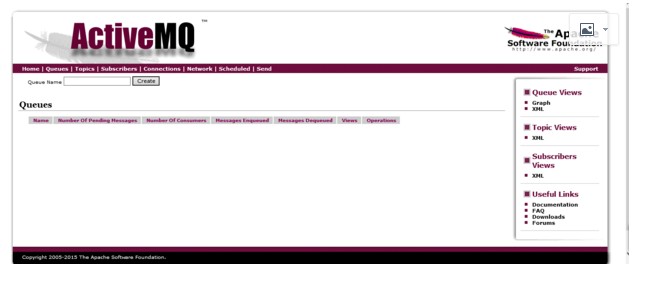
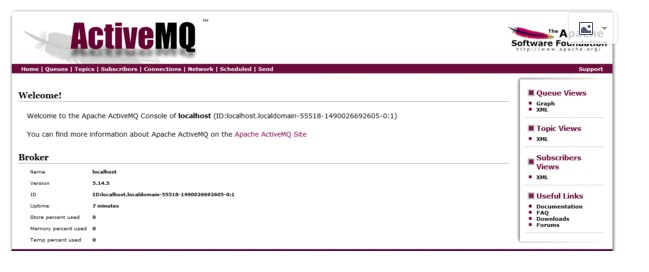
username:admin
passwd:admin
六,修改activemq控制台登陆端口
[root@localhost conf]# vim jetty.xml
。。。。。。。。。。。。。。
109 <property name="host" value="0.0.0.0"/>
110 <property name="port" value="9766"/> //控制台端口修改成9766
。。。。。。。。。。。。。。。。。
[root@localhost bin]# nohup ./activemq restart //重启activemq服务
[root@localhost bin]# ps -ef | grep activemq
root 8992 1 54 00:05 pts/0 00:00:06 /usr/bin/java -Xms64M -Xmx1G -Djava.util.logging.config.file=logging.properties -Djava.security.auth.login.config=/usr/local/apache-activemq-5.14.5//conf/login.config -Dcom.sun.management.jmxremote -Djava.awt.headless=true -Djava.io.tmpdir=/usr/local/apache-activemq-5.14.5//tmp -Dactivemq.classpath=/usr/local/apache-activemq-5.14.5//conf:/usr/local/apache-activemq-5.14.5//../lib/: -Dactivemq.home=/usr/local/apache-activemq-5.14.5/ -Dactivemq.base=/usr/local/apache-activemq-5.14.5/ -Dactivemq.conf=/usr/local/apache-activemq-5.14.5//conf -Dactivemq.data=/usr/local/apache-activemq-5.14.5//data -jar /usr/local/apache-activemq-5.14.5//bin/activemq.jar start
root 9036 8289 0 00:05 pts/0 00:00:00 grep activemq
[root@localhost bin]# netstat -lnpt | grep 9766 //查看9766端口
tcp 0 0 :::9766 :::* LISTEN 8992/java
浏览器登录测试:
username:admin
passwd:admin
七,修改activemq控制台登陆用户名和密码
[root@localhost conf]# vim jetty.xml
30 <property name="roles" value="user,admin" />
31 <!-- set authenticate=false to disable login -->
32 <property name="authenticate" value="true" /> //确认次数为“true”,说明在web登陆时会开启认证。若此处更改为“flash”,在web登陆时不需要认证
activemq用户名密码存放的位置
[root@localhost conf]# vim jetty-realm.properties
## ---------------------------------------------------------------------------
## Licensed to the Apache Software Foundation (ASF) under one or more
## contributor license agreements. See the NOTICE file distributed with
## this work for additional information regarding copyright ownership.
## The ASF licenses this file to You under the Apache License, Version 2.0
## (the "License"); you may not use this file except in compliance with
## the License. You may obtain a copy of the License at
##
## http://www.apache.org/licenses/LICENSE-2.0
##
## Unless required by applicable law or agreed to in writing, software
## distributed under the License is distributed on an "AS IS" BASIS,
## WITHOUT WARRANTIES OR CONDITIONS OF ANY KIND, either express or implied.
## See the License for the specific language governing permissions and
## limitations under the License.
## ---------------------------------------------------------------------------
# Defines users that can access the web (console, demo, etc.)
# username: password [,rolename ...]
#admin: admin, admin
#user: user, user
zxjr: zxjr123, admin //此处用户名修改成“zxjr” 密码修改成“zxjr123”。值得注意的是用户名和密码的格式是:用户名 : 密码 ,角色名。
user: user, user
重启activemq 服务
[root@localhost conf]# ps -ef | grep activemq
root 9188 1 1 00:07 pts/0 00:00:10 /usr/bin/java -Xms64M -Xmx1G -Djava.util.logging.config.file=logging.properties -Djava.security.auth.login.config=/usr/local/apache-activemq-5.14.5//conf/login.config -Dcom.sun.management.jmxremote -Djava.awt.headless=true -Djava.io.tmpdir=/usr/local/apache-activemq-5.14.5//tmp -Dactivemq.classpath=/usr/local/apache-activemq-5.14.5//conf:/usr/local/apache-activemq-5.14.5//../lib/: -Dactivemq.home=/usr/local/apache-activemq-5.14.5/ -Dactivemq.base=/usr/local/apache-activemq-5.14.5/ -Dactivemq.conf=/usr/local/apache-activemq-5.14.5//conf -Dactivemq.data=/usr/local/apache-activemq-5.14.5//data -jar /usr/local/apache-activemq-5.14.5//bin/activemq.jar start
root 9303 8289 0 00:17 pts/0 00:00:00 grep activemq
[root@localhost conf]# kill 9188
[root@localhost bin]# nohup ./activemq start //后台启动activemq服务
[root@localhost bin]# netstat -lnpt | grep 9766
tcp 0 0 :::9766 :::* LISTEN 9347/java
web网页登陆测试:
username:zxjr
passwd:zxjr123
八,在搭建过程中可能会出现的问题
问题1:当在同一台机器上安装activemq和rabbitmq时,如果是先安装rabbitmq,后安装activmq,在启动activemq时会报错,查看activemq日志,报错内容为: Error creating bean with name 'org.apache.activemq.xbean.XBeanBrokerService#0' defined in class path resource [activemq.xml]: Invocation of init method failed; nested exception is java.io.IOException: Transport Connector could not be registered in JMX: java.io.IOException: Failed to bind to server socket: amqp://0.0.0.0:5672?maximumConnections=1000&wireFormat.maxFrameSize=104857600 due to: java.net.BindException: 地址已在使用 (Bind failed) | org.apache.activemq.xbean.XBeanBrokerFactory$1 | main
次报错信息为activmq 5672的端口被占用,更改5672的端口即可
[root@bongo conf]#vim /usr/local/apache-activemq-5.14.4/conf/activemq.xml
111 <transportConnectors>
112 <!-- DOS protection, limit concurrent connections to 1000 and frame size to 100MB -->
113 <transportConnector name="openwire" uri="tcp://127.0.0.1:61616?maximumConnections=1000&wireFormat.maxFrameSize=104 857600"/>
114 <transportConnector name="amqp" uri="amqp://127.0.0.1:9766?
maximumConnections=1000&wireFormat.maxFrameSize=1048576 00"/> //5672的端口更改为9766
115 <transportConnector name="stomp" uri="stomp://127.0.0.1:61613?maximumConnections=1000&wireFormat.maxFrameSize=1048 57600"/>
116 <transportConnector name="mqtt" uri="mqtt://127.0.0.1:1883?maximumConnections=1000&wireFormat.maxFrameSize=1048576 00"/>
117 <transportConnector name="ws" uri="ws://127.0.0.1:61614?maximumConnections=1000&wireFormat.maxFrameSize=104857600" />
118 </transportConnectors>
重启启动activemq:
[root@bongo conf]# cd ../bin/
[root@bongo bin]# nohup ./activemq restart
[root@bongo bin]# ps -ef | grep activemq
root 14617 14196 0 14:46 pts/2 00:00:00 tail -f activemq.log
root 15196 1 61 15:01 pts/0 00:00:06 /usr/bin/java -Xms64M -Xmx1G -Djava.util.logging.config.file=logging.properties -Djava.security.auth.login.config=/usr/local/apache-activemq-5.14.4//conf/login.config -Dcom.sun.management.jmxremote -Djava.awt.headless=true -Djava.io.tmpdir=/usr/local/apache-activemq-5.14.4//tmp -Dactivemq.classpath=/usr/local/apache-activemq-5.14.4//conf:/usr/local/apache-activemq-5.14.4//../lib/: -Dactivemq.home=/usr/local/apache-activemq-5.14.4/ -Dactivemq.base=/usr/local/apache-activemq-5.14.4/ -Dactivemq.conf=/usr/local/apache-activemq-5.14.4//conf -Dactivemq.data=/usr/local/apache-activemq-5.14.4//data -jar /usr/local/apache-activemq-5.14.4//bin/activemq.jar start
问题2:Error creating bean with name 'org.apache.activemq.xbean.XBeanBrokerService#0' defined in class path resource [activemq.xml]: Invocation of init method failed; nested exception is java.lang.IllegalArgumentException: port out of range:-1 | org.apache.activemq.xbean.XBeanBrokerFactory$1 | main
报次错误时,可以把[root@bongo conf]#vim /usr/local/apache-activemq-5.14.4/conf/activemq.xml,的ip地址修改为127.0.0.1,如上错误已被修改。
- Java JMS 程序基础 与 ActiveMQ 安装(一)
一 ActiveMQ安装 从Apache官网上下载 ActivieMQ的安装包 apache-activemq-5.9.1-bin.tar.gz, 并拷贝到linux的安装目录解压 # tar -zx ...
- ActiveMQ安装配置及使用 转发 https://www.cnblogs.com/hushaojun/p/6016709.html
ActiveMQ安装配置及使用 ActiveMQ介绍 ActiveMQ 是Apache出品,最流行的,能力强劲的开源消息总线.ActiveMQ 是一个完全支持JMS1.1和J2EE 1.4规范的 JM ...
- ActiveMQ安装配置及使用
ActiveMQ介绍 ActiveMQ 是Apache出品,最流行的,能力强劲的开源消息总线.ActiveMQ 是一个完全支持JMS1.1和J2EE 1.4规范的 JMS Provider实现,尽管J ...
- ActiveMQ安装与入门程序 & JMS的消息结构
1.Activemq安装 直接到官网下载:记住apache的官网是域名反过来,比如我们找activemq就是activemq.apache.org. 最新版本要求最低的JDK是8,所以最好在电脑装多个 ...
- activeMQ 安装及启动异常处理
一.环境: [root@centos_6 ~]# cat /etc/system-release CentOS release 6.5 (Final) [root@centos_6 ~]# uname ...
- Windows下ActiveMq安装与使用
一.activeMq安装与启动 Apache Active MQ的官网 :http://activemq.apache.org/ 下载地址: http://activemq.apache.org/ac ...
- linux下activemq安装与配置activemq-5.15.2
linux下activemq安装与配置 前提 配置好jdk环境 一.下载:apache-activemq-5.15.2-bin.tar.gz https://archive.apache.org/ ...
- springboot之activemq安装与实践
环境:腾讯云centos7 注意:activemq安装插件,可能会报错.本人是主机名的问题,所以修改了主机名. vim /etc/hosts vim /etc/hostname 修改这两个文件,并重启 ...
- 开源消息服务中间件ActiveMQ安装部署
1.下载ActiveMQ 去官方网站下载:http://activemq.apache.org/ 2.运行ActiveMQ 解压缩apache-activemq-5.5.1-bin.zip 启动Act ...
随机推荐
- hdu 5698(杨辉三角的性质+逆元)
---恢复内容开始--- 瞬间移动 Accepts: 1018 Submissions: 3620 Time Limit: 4000/2000 MS (Java/Others) Memory Limi ...
- Python包管理工具pip的基本使用
1.简介 pip 是一个Python包管理工具,主要是用于安装 PyPI 上的软件包,可以替代 easy_install 工具. 2.pip安装 如果你安装的Python 2 >=2.7.9 或 ...
- 列表的 sort
题目:输入三个整数x,y,z,请把这三个数由小到大输出. 实例 #!/usr/bin/python # -*- coding: UTF-8 -*- l = [] for i in range(3): ...
- Akka之Circuit Breaker
这周在项目中遇到了一个错误,就是Circuit Breaker time out.以前没有接触过,因此学习了下akka的断路器. 一.为什么使用Circuit Breaker 断路器是为了防止分布式系 ...
- 【转】java:多网卡环境下获取MAC地址
http://blog.csdn.net/10km/article/details/78569962 JDK6以后 java.net.NetworkInterface提供了完整的方法用于获取网络设备信 ...
- Jenkins里邮件插件触发器配置和Send to Developers到底是什么意思(转)
邮件触发类型介绍(Triggers) By default, the onlytrigger configured is the "Failure" trigger. To ad ...
- lua 的一些常用概念
1 a={} //定义了一个table a a[10000]=1 //这里的table中只有一个元素,10000,而不是有10000个元素 2 x=math.pi //定义了x等于π print( ...
- 安装xz
原地址: http://jingyan.baidu.com/album/8cdccae9416720315413cd9e.html 1 获取XZ的安装文件,网络下载xz-5.0.3.tar.bz2安装 ...
- dedecms让channelartlist标签支持currentstyle属性方
把dedecms中用channelartlist当导航的站很普遍,但是有的站需要用到当前页中导航样,就是随着不同的页面,导航样式也随着变化. 首先打开include\taglib\channelart ...
- EasyMvc入门教程-基本控件说明(3)时间线
我们有时候经常看到如下的页面: 或者快递物流信息图标,那么利用EasyMvc如何实现呢?很简单,看下面的例子: @{ var data=new List<TimeLineItem>() { ...