
Kendo UI 单页面应用(二) Router 类
Kendo UI 单页面应用(二) Router 类
Route 类负责跟踪应用的当前状态和支持在应用的不同状态之间切换。Route 通过 Url 的片段功能(#url)和流量器的浏览历史功能融合在一起。从而可以支持把应用的某个状态作为书签添加到浏览器中。Route 也支持通过代码在应用的不同状态之间切换。
Router 根路径回调函数
<script>

    var router = new kendo.Router();

    router.route("/", function() {

        console.log("/ url was loaded");

    });

    $(function() {

        router.start();

    });

</script>
缺省情况下,如果 URL fragment 为空,将使用缺省的“/”的根路径,此时对于的回调函数被调用,不管初始 URL 是什么,这个初始化的回调函数总会调用。如果使用 IE,按 F12 可以打开 Developer Window,选择 Console 可以看到 console.log 的打印信息。

参数
Router 支持 bound parameters, optional segments, 和 route globbing,类似于绑定参数,可选参数,匹配符匹配参数等。例如:绑定参数
<script>

    var router = new kendo.Router();

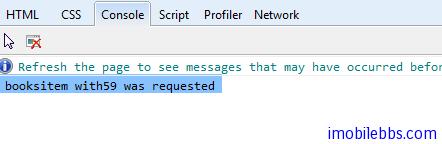
    router.route("/items/:category/:id", function(category, id) {

        console.log(category, "item with", id, " was requested");

    });

    $(function() {

        router.start();

        // ...

        router.navigate("/items/books/59");

    });

</script>
当运行这个页面时,注意地址栏中的地址为:
<http://localhost:53223/Index.html#/items/books/59 –> #/items/books/59>
可选参数
如果 URL 的部分参数为可选的,此时 Route 的规则为使用”()”,将可选参数放在括号内。
<script>

    var router = new kendo.Router();

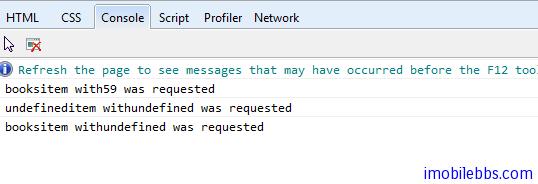
    router.route("/items(/:category)(/:id)", function(category, id) {

        console.log(category, "item with", id, " was requested");

    });

    $(function() {

        router.start();

        // ...

        router.navigate("/items/books/59");

        // ...

        router.navigate("/items");

        // ...

        router.navigate("/items/books");

    });

</script>
使用×通配符匹配参数
<script>

    var router = new kendo.Router();

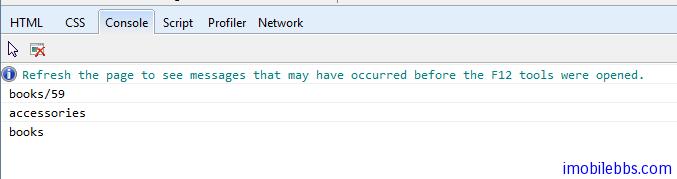
    router.route("/items/*suffix", function(suffix) {

        console.log(suffix);

    });

    $(function() {

        router.start();

        // ...

        router.navigate("/items/books/59");

        // ...

        router.navigate("/items/accessories");

        // ...

        router.navigate("/items/books");

    });

</script>
页面切换
navigation 方法可以用来切换应用,对应的路径的回调方法被调用, navigation 方法修改 URL 的 fragment 部分(#后面部分)。比如:
<a href="#/foo">Foo</a>

<script>

    var router = new kendo.Router();

    router.route("/foo", function() {

        console.log("welcome to foo");

    });

    $(function() {

        router.start();

        router.navigate("/foo");

    });

</script>
这个例子,将在地址栏显示 http://xxx/index.html#/foo。如果对应的路径不存在,Router 类触发 routeMissing 事件,并把 URL 作为参数传入。
<script>

var router = new kendo.Router({ routeMissing: function(e) { console.log(e.url) } });

$(function() {

    router.start();

    router.navigate("/foo");

});

</script>
你可以通过 change 事件来截获这种页面之间的切换,然后调用 preventDefault 阻止页面切换。
<script>

var router = new kendo.Router({

    change: function(e) {

        console.log(url);

        e.preventDefault();

    }

});

$(function() {

    router.start();

    router.navigate("/foo");

});

</script>
Kendo UI 单页面应用(二) Router 类的更多相关文章
- Kendo UI开发教程(24): 单页面应用(二) Router 类
Route类负责跟踪应用的当前状态和支持在应用的不同状态之间切换.Route通过Url的片段功能(#url)和流量器的浏览历史功能融合在一起.从而可以支持把应用的某个状态作为书签添加到浏览器中.Rou ...
- Kendo UI 单页面应用(四) Layout
Kendo UI 单页面应用(四) Layout Layout 继承自 View,可以用来包含其它的 View 或是 Layout.下面例子使用 Layout 来显示一个 View <div i ...
- Kendo UI 单页面应用(三) View
Kendo UI 单页面应用(三) View view 为屏幕上某个可视部分,可以处理用户事件. View 可以通过 HTML 创建或是通过 script 元素.缺省情况下 View 将其所包含的内容 ...
- Oracle JET 单页面应用程序Router 使用(上)
单页面应用程序:使用一个进加载一次的网页,如果页面由于用户的交互而改变,则仅绘制更改的页面部分. 要创建单页面应用程序需要使用 oj.Router 的虚拟导航来支持,ojModule 用来响应页面的重 ...
- Asp.net mvc Kendo UI Grid的使用(二)
上一篇文章对Kendo UI做了一些简单的介绍以及基本环境,这篇文章来介绍一下Grid的使用 先上效果图: 要实现这个效果在Controller在要先导入Kendo.Mvc.UI,Kendo.Mvc. ...
- [置顶] Kendo UI开发教程: Kendo UI 示例及总结
前面基本介绍完Kendo UI开发的基本概念和开发步骤,Kendo UI的示例网站为http://demos.kendoui.com/ ,包含了三个部分 Web DemoMobile DemoData ...
- HTML5 UI框架Kendo UI Web自定义组件(一)
Kendo UI Web包含数百个创建HTML5 web app的必备元素,包括UI组件.数据源.验证.一个MVVM框架.主题.模板等.在Kendo UI Web中如何创建自定义组件呢,在下面的文章中 ...
- [转]Upgrading to Async with Entity Framework, MVC, OData AsyncEntitySetController, Kendo UI, Glimpse & Generic Unit of Work Repository Framework v2.0
本文转自:http://www.tuicool.com/articles/BBVr6z Thanks to everyone for allowing us to give back to the . ...
- vue 单页面(SPA) history模式调用微信jssdk 跳转后偶尔 "invalid signature"错误解决方案
项目背景 vue-cli生成的单页面项目,router使用history模式.产品会在公众号内使用,需要添加微信JSSDK,做分享相关配置. 遇到的问题 相关配置与JS接口安全域名都已经ok,发布后, ...
随机推荐
- jmeter 开发自己的java请求 二次开发
package test; import org.apache.commons.httpclient.HttpClient; import org.apache.commons.httpclient. ...
- Modbus通讯协议学习 - 认识篇
转自:http://www.cnblogs.com/luomingui/archive/2013/06/14/Modbus.html 什么是Modbus? Modbus 协议是应用于电子控制器上的一种 ...
- PPI协议详解 ppi通讯协议 ppi通信协议 vb与ppi协议通讯
转自:http://blog.csdn.net/vbvcde/article/details/7660497 我们提供 PPI协议的官方文档,协议更新时间为2005年,下面是我们根据文档解析的PPI读 ...
- [CentOS] 结合Nginx部署DotNetCore的demo项目【转载】
部署前准备 1.VisualStudio2017+.netcore2.0SDK 2.Centos7.2 3.SecureCRT,Xftp(根据自己喜好) 创建WebApi项目 修改Program.cs ...
- cnblogs开源合集
http://www.cnblogs.com/davytitan/p/4135151.html
- Uncommon Words from Two Sentences
https://leetcode.com/problems/uncommon-words-from-two-sentences We are given two sentences A and B. ...
- (六)编写基类BaseDao
在action中继承了ActionSupport和其它一些公共属性,如selectedRow等:可能以后还会产生更多公共的内容,所以应该把这些共有的抽取出来,放入到一个基本action中,我们命名为B ...
- ARP欺骗(完全版)
在讲ARP欺骗之前先讲讲什么是ARP以及ARP欺骗的原理吧. 一. 什么是ARP? arp英文全称: address resolution protocol 中文:地址解析协议 它的作用:是根 ...
- HRBUST - 1214 NOIP2000提高组 方格取数(多线程dp)
方格取数 设有N*N的方格图(N<=10),我们将其中的某些方格中填入正整数,而其他的方格中则放人数字0.如下图所示(见样例 ,黄色和蓝色分别为两次走的路线,其中绿色的格子为黄色和蓝色共同走过的 ...
- java反射机制应用之动态代理
1.静态代理类和动态代理类区别 静态代理:要求被代理类和代理类同时实现相应的一套接口:通过代理类的对象调用重写接口的方法时,实际上执行的是被代理类的同样的 方法的调用. 动态代理:在程序运行时,根据被 ...