
iOS学习笔记33-UICollectionView入门
一、UICollectionView介绍
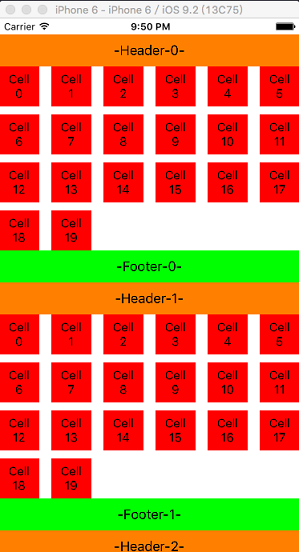
UICollectionView和UICollectionViewController类是iOS6新引进的API,用于展示集合视图,布局更加灵活,可实现多列布局,用法类似于UITableView和UITableViewController类,但也有所不同。UICollectionView可以实现如下效果,也是一个常用的控件: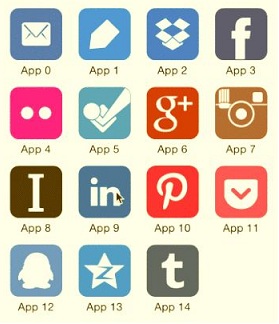
二、UICollectiomView使用
UICollectionView的创建和UITableView的创建有所不同:
UITableView的创建只需要设置frame即可使用UICollectionView除了需要frame,还需要一个布局参数-(id)initWithFrame:(CGRect)frame /* 尺寸 */
collectionViewLayout:(UICollectionViewLayout *)layout;/* 布局参数 */UITableView可以不需要注册Cell视图类,手动创建Cell视图类UICollectionView必须注册视图类,才能显示,不需要手动创建
UICollectionView的布局参数:
- 是一个
UICollectionViewLayout类的对象,
但我们一般使用它的子类UICollectionViewFlowLayout 设置布局对象的滚动方向属性
scrollDirection:typedef NS_ENUM(NSInteger, UICollectionViewScrollDirection) {
UICollectionViewScrollDirectionVertical, /*垂直滚动*/
UICollectionViewScrollDirectionHorizontal /* 水平滚动 */
};- 垂直滚动,表示Cell方块布局是从左往右,从上到下排列的布局
- 水平滚动,表示Cell方块布局是从上往下,从左到右排列的布局
- 和
UITableView不同,UICollectionView只能在这里设置顶部视图和底部视图的大小 - 设置为垂直滚动时,顶部和底部视图的宽度为
UICollectionView的宽度,无法设置 设置为水平滚动时,顶部和底部视图的高度为
UICollectionView的高度,无法设置
UICollectionView的常用对象方法
/* 向容器视图注册Cell方块视图,有2种方式,一种是类名注册,一种是Xib注册 */

- (void)registerClass:(Class)cellClass /* 视图类 */

        forCellWithReuseIdentifier:(NSString *)identifier;/* 绑定标识 */

- (void)registerNib:(UINib *)nib /* Xib */

        forCellWithReuseIdentifier:(NSString *)identifier;/* 绑定标识 */

/* 从缓存池中取出Cell方块视图对象,如果缓存池没有,自动调用alloc/initWithFrame创建 */

- (UICollectionViewCell *)dequeueReusableCellWithReuseIdentifier:(NSString *)identifier

                          forIndexPath:(NSIndexPath *)indexPath;

/* kind参数设置 */

NSString *const UICollectionElementKindSectionHeader;/* 顶部视图用这个 */

NSString *const UICollectionElementKindSectionFooter;/* 底部视图用这个 */

/* 向容器视图注册顶部视图或者底部视图,有2种方式,一种是类名注册,一种是Xib注册 */

- (void)registerClass:(Class)viewClass

        forSupplementaryViewOfKind:(NSString *)kind /* 参考上面 */

               withReuseIdentifier:(NSString *)identifier;/* 绑定标识 */

- (void)registerNib:(UINib *)nib

        forSupplementaryViewOfKind:(NSString *)kind /* 参考上面 */

               withReuseIdentifier:(NSString *)identifier;/* 绑定标识 */

/* 从缓存池中取出顶部视图对象或者底部视图对象,如果缓存池没有,自动调用alloc/initWithFrame创建 */

- (UICollectionReusableView *)dequeueReusableSupplementaryViewOfKind:(NSString *)kind

                              withReuseIdentifier:(NSString *)identifier

                                     forIndexPath:(NSIndexPath *)indexPath;
UICollectionView的数据源方法
@required

/* 设置容器视图各个组都有多少个Cell方块 */

- (NSInteger)collectionView:(UICollectionView *)collectionView

     numberOfItemsInSection:(NSInteger)section;

/* 设置Cell方块视图,类似于UITableViewCell的设置 */

- (UICollectionViewCell *)collectionView:(UICollectionView *)collectionView

                  cellForItemAtIndexPath:(NSIndexPath *)indexPath;

@optional

/* 容器视图有多少个组,默认返回1 */

- (NSInteger)numberOfSectionsInCollectionView:(UICollectionView *)collectionView;

/* 设置顶部视图和底部视图,通过kind参数分辨是设置顶部还是底部 */

- (UICollectionReusableView *)collectionView:(UICollectionView *)collectionView

           viewForSupplementaryElementOfKind:(NSString *)kind

                                 atIndexPath:(NSIndexPath *)indexPath;
UICollectionViewDelegate的常用方法
/* 选中Cell方块时调用 */

- (void)collectionView:(UICollectionView *)collectionView

        didSelectItemAtIndexPath:(NSIndexPath *)indexPath;

/* 取消选中Cell方块时调用 */

- (void)collectionView:(UICollectionView *)collectionView

didDeselectItemAtIndexPath:(NSIndexPath *)indexPath;我们使用更多的是UICollectionViewDelegate子协议UICollectionViewDelegateFlowLayout
该协议不仅包含父协议所有方法,还可以进行一些布局设置
UICollectionViewDelegateFlowLayout的常用布局方法
/* 设置每个方块的尺寸大小 */

- (CGSize)collectionView:(UICollectionView *)collectionView

                  layout:(UICollectionViewLayout*)collectionViewLayout

  sizeForItemAtIndexPath:(NSIndexPath *)indexPath;

/* 设置方块视图和边界的上下左右间距 */

- (UIEdgeInsets)collectionView:(UICollectionView *)collectionView

                        layout:(UICollectionViewLayout*)collectionViewLayout

        insetForSectionAtIndex:(NSInteger)section;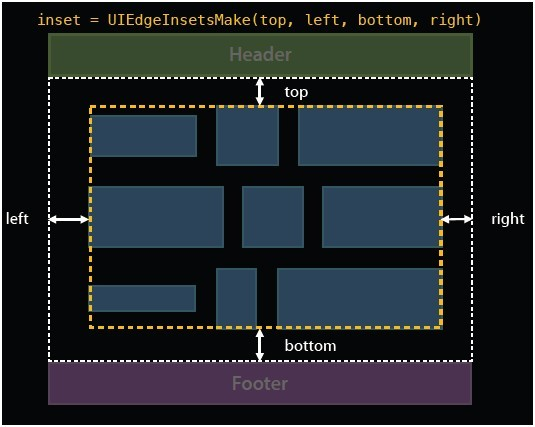
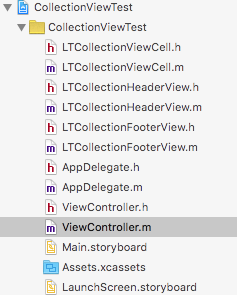
下面是我自定义的Cell视图类、顶部视图类、底部视图类,目录结构如下:
方块视图LTCollectionViewCell.h
#import <UIKit/UIKit.h>

@interface LTCollectionViewCell : UICollectionViewCell

@property (strong, nonatomic) UILabel *textLabel;

/* 方块视图的缓存池标示 */

+ (NSString *)cellIdentifier;

/* 获取方块视图对象 */

+ (instancetype)cellWithCollectionView:(UICollectionView *)collectionView

                          forIndexPath:(NSIndexPath *)indexPath;

@end
方块视图LTCollectionViewCell.m
#import "LTCollectionViewCell.h"

@implementation LTCollectionViewCell

/* 方块视图的缓存池标示 */

+ (NSString *)cellIdentifier{

    static NSString *cellIdentifier = @"CollectionViewCellIdentifier";

    return cellIdentifier;

}

/* 获取方块视图对象 */

+ (instancetype)cellWithCollectionView:(UICollectionView *)collectionView

                          forIndexPath:(NSIndexPath *)indexPath

{

    //从缓存池中寻找方块视图对象,如果没有,该方法自动调用alloc/initWithFrame创建一个新的方块视图返回

    LTCollectionViewCell *cell =

        [collectionView dequeueReusableCellWithReuseIdentifier:[LTCollectionViewCell cellIdentifier]

                                                  forIndexPath:indexPath];

    return cell;

}

/* 注册了方块视图后,当缓存池中没有底部视图的对象时候,自动调用alloc/initWithFrame创建 */

- (instancetype)initWithFrame:(CGRect)frame{

    if (self = [super initWithFrame:frame]) {

        //创建label

        UILabel *textLabel = [[UILabel alloc] init];

        //设置label尺寸

        CGFloat x = 5;

        CGFloat y = 5;

        CGFloat width = frame.size.width - 10;

        CGFloat height = frame.size.height - 10;

        textLabel.frame = CGRectMake(x, y, width, height);

        //设置label属性

        textLabel.numberOfLines = 0;

        textLabel.textAlignment = NSTextAlignmentCenter;

        textLabel.font = [UIFont systemFontOfSize:15];

        //添加到父控件

        [self.contentView addSubview:textLabel];

        self.textLabel = textLabel;

    }

    return self;

}

@end
顶部视图LTCollectionHeaderView.h
#import <UIKit/UIKit.h>

@interface LTCollectionHeaderView : UICollectionReusableView

@property (strong, nonatomic) UILabel *textLabel;

/* 顶部视图的缓存池标示 */

+ (NSString *)headerViewIdentifier;

/* 获取顶部视图对象 */

+ (instancetype)headerViewWithCollectionView:(UICollectionView *)collectionView

                                forIndexPath:(NSIndexPath *)indexPath;

@end
顶部视图LTCollectionHeaderView.m
#import "LTCollectionHeaderView.h"

@implementation LTCollectionHeaderView

/* 顶部视图的缓存池标示 */

+ (NSString *)headerViewIdentifier{

    static NSString *headerIdentifier = @"headerViewIdentifier";

    return headerIdentifier;

}

/* 获取顶部视图对象 */

+ (instancetype)headerViewWithCollectionView:(UICollectionView *)collectionView

                                forIndexPath:(NSIndexPath *)indexPath

{

    //从缓存池中寻找顶部视图对象,如果没有,该方法自动调用alloc/initWithFrame创建一个新的顶部视图返回

    LTCollectionHeaderView *headerView =

        [collectionView dequeueReusableSupplementaryViewOfKind:UICollectionElementKindSectionHeader

                                           withReuseIdentifier:[LTCollectionHeaderView headerViewIdentifier]

                                                  forIndexPath:indexPath];

    return headerView;

}

/* 注册了顶部视图后,当缓存池中没有顶部视图的对象时候,自动调用alloc/initWithFrame创建 */

- (instancetype)initWithFrame:(CGRect)frame{

    if (self = [super initWithFrame:frame]) {

        //创建label

        UILabel *textLabel = [[UILabel alloc] init];

        //设置label尺寸

        CGFloat x = 5;

        CGFloat y = 5;

        CGFloat width = frame.size.width - 10;

        CGFloat height = frame.size.height - 10;

        textLabel.frame = CGRectMake(x, y, width, height);

        //设置label属性

        textLabel.numberOfLines = 0;

        textLabel.textAlignment = NSTextAlignmentCenter;

        //添加到父控件

        [self addSubview:textLabel];

        self.textLabel = textLabel;

    }

    return self;

}

@end
底部视图LTCollectionFooterView.h
#import <UIKit/UIKit.h>

@interface LTCollectionFooterView : UICollectionReusableView

@property (strong, nonatomic) UILabel *textLabel;

/* 底部视图的缓存池标示 */

+ (NSString *)footerViewIdentifier;

/* 获取底部视图对象 */

+ (instancetype)footerViewWithCollectionView:(UICollectionView *)collectionView

                                forIndexPath:(NSIndexPath *)indexPath;

@end
底部视图LTCollectionFooterView.m
#import "LTCollectionFooterView.h"

@implementation LTCollectionFooterView

/* 底部视图的缓存池标示 */

+ (NSString *)footerViewIdentifier{

    static NSString *footerIdentifier = @"footerViewIdentifier";

    return footerIdentifier;

}

/* 获取底部视图对象 */

+ (instancetype)footerViewWithCollectionView:(UICollectionView *)collectionView

                                forIndexPath:(NSIndexPath *)indexPath

{

    //从缓存池中寻找底部视图对象,如果没有,该方法自动调用alloc/initWithFrame创建一个新的底部视图返回

    LTCollectionFooterView *footerView =

            [collectionView dequeueReusableSupplementaryViewOfKind:UICollectionElementKindSectionFooter

                                               withReuseIdentifier:[LTCollectionFooterView footerViewIdentifier]

                                                      forIndexPath:indexPath];

    return footerView;

}

/* 注册了底部视图后,当缓存池中没有底部视图的对象时候,自动调用alloc/initWithFrame创建 */

- (instancetype)initWithFrame:(CGRect)frame{

    if (self = [super initWithFrame:frame]) {

        //创建label

        UILabel *textLabel = [[UILabel alloc] init];

        //设置label尺寸

        CGFloat x = 5;

        CGFloat y = 5;

        CGFloat width = frame.size.width - 10;

        CGFloat height = frame.size.height - 10;

        textLabel.frame = CGRectMake(x, y, width, height);

        //设置label属性

        textLabel.numberOfLines = 0;

        textLabel.textAlignment = NSTextAlignmentCenter;

        //添加到父控件

        [self addSubview:textLabel];

        self.textLabel = textLabel;

    }

    return self;

}

@end
下面是使用实例:
1. 视图控制器属性和相关方法
#import "ViewController.h"

#import "LTCollectionViewCell.h"

#import "LTCollectionHeaderView.h"

#import "LTCollectionFooterView.h"

@interface ViewController () <UICollectionViewDataSource,

                              UICollectionViewDelegateFlowLayout>

@property (strong, nonatomic) UICollectionView *collectionView;/*< 容器视图 */

@end

@implementation ViewController

- (void)viewDidLoad {

    [super viewDidLoad];

    //初始化容器视图

    [self initCollectionView];

}
2. 初始化容器视图
/* 初始化容器视图 */

- (void)initCollectionView

{

    CGFloat x = 0;

    CGFloat y = 20;

    CGFloat width = self.view.frame.size.width;

    CGFloat height = self.view.frame.size.height - 20;

    //创建布局对象

    UICollectionViewFlowLayout *layout = [[UICollectionViewFlowLayout alloc] init];

    //设置滚动方向为垂直滚动,说明方块是从左上到右下的布局排列方式

    layout.scrollDirection = UICollectionViewScrollDirectionVertical;

    //设置顶部视图和底部视图的大小,当滚动方向为垂直时,设置宽度无效,当滚动方向为水平时,设置高度无效

    layout.headerReferenceSize = CGSizeMake(100, 40);

    layout.footerReferenceSize = CGSizeMake(100, 40);

    //创建容器视图

    CGRect frame = CGRectMake(x, y, width, height);

    UICollectionView *collectionView = [[UICollectionView alloc] initWithFrame:frame

                                                          collectionViewLayout:layout];

    collectionView.delegate = self;//设置代理

    collectionView.dataSource = self;//设置数据源

    collectionView.backgroundColor = [UIColor whiteColor];//设置背景,默认为黑色

    //添加到主视图

    [self.view addSubview:collectionView];

    self.collectionView = collectionView;

    //注册容器视图中显示的方块视图

    [collectionView registerClass:[LTCollectionViewCell class]

            forCellWithReuseIdentifier:[LTCollectionViewCell cellIdentifier]];

    //注册容器视图中显示的顶部视图

    [collectionView registerClass:[LTCollectionHeaderView class]

       forSupplementaryViewOfKind:UICollectionElementKindSectionHeader

              withReuseIdentifier:[LTCollectionHeaderView headerViewIdentifier]];

    //注册容器视图中显示的底部视图

    [collectionView registerClass:[LTCollectionFooterView class]

       forSupplementaryViewOfKind:UICollectionElementKindSectionFooter

              withReuseIdentifier:[LTCollectionFooterView footerViewIdentifier]];

}
3. UICollectionViewDataSource数据源方法
#pragma mark - UICollectionViewDataSource

/* 设置容器中有多少个组 */

- (NSInteger)numberOfSectionsInCollectionView:(UICollectionView *)collectionView{

    return 10;

}

/* 设置每个组有多少个方块 */

- (NSInteger)collectionView:(UICollectionView *)collectionView

     numberOfItemsInSection:(NSInteger)section

{

    return 20;

}

/* 设置方块的视图 */

- (UICollectionViewCell *)collectionView:(UICollectionView *)collectionView

                  cellForItemAtIndexPath:(NSIndexPath *)indexPath

{

    //获取cell视图,内部通过去缓存池中取,如果缓存池中没有,就自动创建一个新的cell

    LTCollectionViewCell *cell =

            [LTCollectionViewCell cellWithCollectionView:collectionView

                                            forIndexPath:indexPath];

    //设置cell属性

    cell.contentView.backgroundColor = [UIColor redColor];

    cell.textLabel.text = [NSString stringWithFormat:@"Cell %2ld",indexPath.row];

    return cell;

}

/* 设置顶部视图和底部视图 */

- (UICollectionReusableView *)collectionView:(UICollectionView *)collectionView

           viewForSupplementaryElementOfKind:(NSString *)kind

                                 atIndexPath:(NSIndexPath *)indexPath

{

    if ( [kind isEqualToString:UICollectionElementKindSectionHeader] ) {//顶部视图

        //获取顶部视图

        LTCollectionHeaderView *headerView =

            [LTCollectionHeaderView headerViewWithCollectionView:collectionView

                                                    forIndexPath:indexPath];

        //设置顶部视图属性

        headerView.backgroundColor = [UIColor orangeColor];

        headerView.textLabel.text = [NSString stringWithFormat:@"-Header-%ld-",indexPath.section];

        return headerView;

    } else if( [kind isEqualToString:UICollectionElementKindSectionFooter] ) {//底部视图

        //获取底部视图

        LTCollectionFooterView *footerView =

             [LTCollectionFooterView footerViewWithCollectionView:collectionView

                                                     forIndexPath:indexPath];

        //设置底部视图属性

        footerView.backgroundColor = [UIColor greenColor];

        footerView.textLabel.text = [NSString stringWithFormat:@"-Footer-%ld-",indexPath.section];

        return footerView;

    }

    return nil;

}
4. UICollectionViewDelegateFlowLayout布局代理方法
#pragma mark - UICollectionViewDelegateFlowLayout

/* 设置各个方块的大小尺寸 */

- (CGSize)collectionView:(UICollectionView *)collectionView

                  layout:(UICollectionViewLayout*)collectionViewLayout

  sizeForItemAtIndexPath:(NSIndexPath *)indexPath

{

    CGFloat width = 50;

    CGFloat height = 50;

    return CGSizeMake(width, height);

}

/* 设置每一组的上下左右间距 */

- (UIEdgeInsets)collectionView:(UICollectionView *)collectionView

                        layout:(UICollectionViewLayout*)collectionViewLayout

        insetForSectionAtIndex:(NSInteger)section

{

    return UIEdgeInsetsMake(10, 10, 10, 10);

}
5. 父协议UICollectionViewDelegate的代理方法
#pragma mark - UICollectionViewDelegate

/* 方块被选中会调用 */

- (void)collectionView:(UICollectionView *)collectionView

        didSelectItemAtIndexPath:(NSIndexPath *)indexPath

{

    NSLog(@"点击选择了第%ld组第%ld个方块",indexPath.section,indexPath.row);

}

/* 方块取消选中会调用 */

- (void)collectionView:(UICollectionView *)collectionView

        didDeselectItemAtIndexPath:(NSIndexPath *)indexPath

{

    NSLog(@"取消选择第%ld组第%ld个方块",indexPath.section,indexPath.row);

}

@end
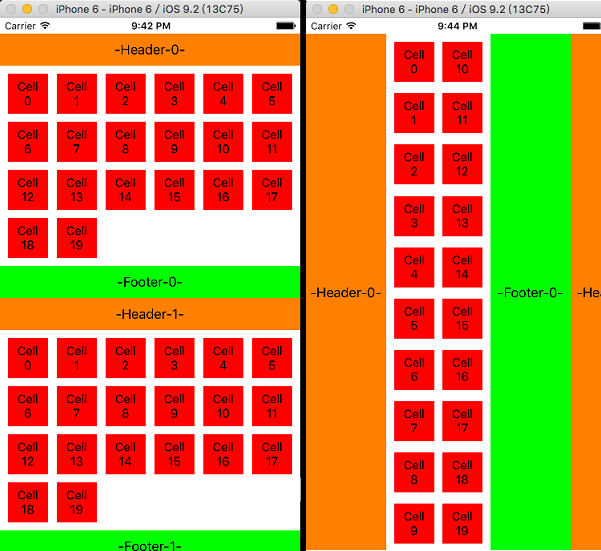
效果图如下,左边为垂直滚动效果,右边为水平滚动效果
如果修改下布局代理方法的上下左右边界距离:
/* 设置每一组的上下左右间距 */

- (UIEdgeInsets)collectionView:(UICollectionView *)collectionView

                        layout:(UICollectionViewLayout*)collectionViewLayout

        insetForSectionAtIndex:(NSInteger)section

{

    return UIEdgeInsetsMake(0, 0, 0, 0);

}
iOS学习笔记33-UICollectionView入门的更多相关文章
- iOS学习笔记-地图MapKit入门
代码地址如下:http://www.demodashi.com/demo/11682.html 这篇文章还是翻译自raywenderlich,用Objective-C改写了代码.没有逐字翻译,如有错漏 ...
- iOS学习笔记11-多线程入门
一.iOS多线程 iOS多线程开发有三种方式: NSThread NSOperation GCD iOS在每个进程启动后都会创建一个主线程,更新UI要在主线程上,所以也称为UI线程,是其他线程的父线程 ...
- IOS学习笔记48--一些常见的IOS知识点+面试题
IOS学习笔记48--一些常见的IOS知识点+面试题 1.堆和栈什么区别? 答:管理方式:对于栈来讲,是由编译器自动管理,无需我们手工控制:对于堆来说,释放工作由程序员控制,容易产生memor ...
- iOS学习笔记——AutoLayout的约束
iOS学习笔记——AutoLayout约束 之前在开发iOS app时一直以为苹果的布局是绝对布局,在IB中拖拉控件运行或者直接使用代码去调整控件都会发上一些不尽人意的结果,后来发现iOS在引入了Au ...
- IOS学习笔记25—HTTP操作之ASIHTTPRequest
IOS学习笔记25—HTTP操作之ASIHTTPRequest 分类: iOS2012-08-12 10:04 7734人阅读 评论(3) 收藏 举报 iosios5网络wrapper框架新浪微博 A ...
- IOS学习笔记之关键词@dynamic
IOS学习笔记之关键词@dynamic @dynamic这个关键词,通常是用不到的. 它与@synthesize的区别在于: 使用@synthesize编译器会确实的产生getter和setter方法 ...
- iOS学习笔记-精华整理
iOS学习笔记总结整理 一.内存管理情况 1- autorelease,当用户的代码在持续运行时,自动释放池是不会被销毁的,这段时间内用户可以安全地使用自动释放的对象.当用户的代码运行告一段 落,开始 ...
- iOS学习笔记10-UIView动画
上次学习了iOS学习笔记09-核心动画CoreAnimation,这次继续学习动画,上次使用的CoreAnimation很多人感觉使用起来很繁琐,有没有更加方便的动画效果实现呢?答案是有的,那就是UI ...
- iOS学习笔记总结整理
来源:http://mobile.51cto.com/iphone-386851_all.htm 学习IOS开发这对于一个初学者来说,是一件非常挠头的事情.其实学习IOS开发无外乎平时的积累与总结.下 ...
- iOS学习笔记之Category
iOS学习笔记之Category 写在前面 Category是类别(也称为类目或范畴),使用Category,程序员可以为任何已有的类添加方法.使用类别可以对框架提供的类(无法获取源码,不能直接修改) ...
随机推荐
- 使用工具Source Monitor测量您Java代码的环复杂度
代码的环复杂度(Cyclomatic complexity,有时也翻译成圈复杂度)是一种代码复杂度的衡量标准,在1976年由Thomas J. McCabe, Sr. 提出. 来看看计算公式. 代码环 ...
- Python学习——1113
在命令界面直接输入python,进入交互模式,相当于启动了Python解释器,需要一行一行的输入,输入一行,执行一行. 在命令界面直接运行.py文件,相当于直接启动了Python解释器,一次性把.py ...
- UVA 1614 - Hell on the Markets 奇怪的股市(贪心,结论)
先证明一个结论吧,对于1≤ai≤i+1,前面ai个数一定可以凑出1~sum[i]中的任意一个数. 对于i=1显然成立, 假设对于i=k结论成立,那么对于i=k+1来说,只要证明sum[k]+i,1≤i ...
- 设置DdtaGridView控件中网格线的样式
实现效果: 知识运用: DataGridView控件的GridColor属性 //用来获取或设置网格线的颜色 public Color GridColor { get; set; } //属性值: C ...
- websocket+订阅发布者模式模拟实现股票价格实时刷新
1.新建文件夹 2.文件夹中新建index.html 和 index.js index.html <!DOCTYPE html> <html lang="en"& ...
- sklearn 学习之分类树
概要 基于 sklearn 包自带的 iris 数据集,了解一下分类树的各种参数设置以及代表的意义. iris 数据集介绍 iris 数据集包含 150 个样本,对应数据集的每行数据,每行数据包含 ...
- 01_8_Struts用DomainModel接收参数
01_8_Struts用DomainModel接收参数 1. 配置struts.xml文件 <package name="user" namespace="/use ...
- Android读书笔记二
本章讲到需要Android应用程序以及Android NDK程序来测试Linux驱动,所以所需要的工具都必须配备好.而且对工具的版本也是有一些要求,JDK,Eclipse,ADT,CDT,Androi ...
- C++ string头文件
转载自https://blog.csdn.net/superna666/article/details/52809007/ 作者 zhenzhenjiajia888 标准c++中string类函数介绍 ...
- mysql EOF
mysql shell 执行脚本 #!/bin/bash export PATH=/sbin:/bin:/usr/sbin:/usr/bin:/usr/local/mysql-5.6/bin:/usr ...