
Ubuntu搭建Http服务器用于下载Ubuntu文件
首先安装Apache
$ sudo apt-get install apache2
Apache2的默认访问端口为80,当端口被占用时需要更改其访问端口
进入apache2的安装目录 /etc/apache2/,修改器ports.conf文件
# If you just change the port or add more ports here, you will likely also

# have to change the VirtualHost statement in

# /etc/apache2/sites-enabled/-default.conf

#Listen

Listen

<IfModule ssl_module>

        Listen

</IfModule>

<IfModule mod_gnutls.c>

        Listen

</IfModule>

# vim: syntax=apache ts= sw= sts= sr noet
进入 目录 /etc/apache2/sites-available, 修改000-default.conf文件
#<VirtualHost *:>

<VirtualHost *:>

        # The ServerName directive sets the request scheme, hostname and port that

        # the server uses to identify itself. This is used when creating

        # redirection URLs. In the context of virtual hosts, the ServerName

        # specifies what hostname must appear in the request's Host: header to

        # match this virtual host. For the default virtual host (this file) this

        # value is not decisive as it is used as a last resort host regardless.

        # However, you must set it for any further virtual host explicitly.

        #ServerName www.example.com

        ServerAdmin webmaster@localhost

        DocumentRoot /var/www/html

        # Available loglevels: trace8, ..., trace1, debug, info, notice, warn,

        # error, crit, alert, emerg.

        # It is also possible to configure the loglevel for particular

        # modules, e.g.

        #LogLevel info ssl:warn

        ErrorLog ${APACHE_LOG_DIR}/error.log

        CustomLog ${APACHE_LOG_DIR}/access.log combined

        # For most configuration files from conf-available/, which are

        # enabled or disabled at a global level, it is possible to

        # include a line for only one particular virtual host. For example the

        # following line enables the CGI configuration for this host only

        # after it has been globally disabled with "a2disconf".

        #Include conf-available/serve-cgi-bin.conf

</VirtualHost>

# vim: syntax=apache ts= sw= sts= sr noet
然后重启apache服务器
$ sudo /etc/init.d/apache2 restart
apache服务器的默认目录在/var/www/html,如果想利用http服务器下载文件,需要删除其index.html文件,然后把文件放在该目录即可
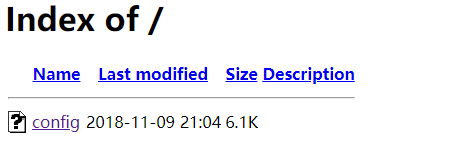
但是点击以后又出现一个新问题

You don't have permission to access /config on this server,意识到没有把文件压缩,它是打开了这个网页。把文件压缩就可以下载了
Ubuntu搭建Http服务器用于下载Ubuntu文件的更多相关文章
- Git版本控制之ubuntu搭建Git服务器
Git是一个开源的分布式版本控制系统,可以有效.高效的处理从很小到非常大的项目版本管理.使得开发者可以通过克隆(git clone),在本地机器上拷贝一个完整的Git仓库,也可以将代码提交到Git服务 ...
- ubuntu搭建svn服务器并htpp访问版本库并svn与web同步
Ubuntu搭建SVN服务器多版本库 1 介绍 Subversion是一个自由,开源的版本控制系统,这个版本库就像一个普通的文件服务器,不同的是,它可以记录每一次文件和目录的修改情况.这样就可 ...
- Ubuntu搭建Anki服务器
Ubuntu搭建Anki服务器 第一步安装Anki 阿里云的服务器,xshell远程登录上 #以root用户进行操作 #安装Akni服务 easy_install AnkiServer #添加名为an ...
- Ubuntu搭建NFS服务器,NFS协议详细分析
目录 1. Ubuntu搭建NFS服务器 2. NFS协议分析 2.1 实验拓扑: 2.2 在kali抓包分析 1. Ubuntu搭建NFS服务器 NFS(Network FileSystem,网 ...
- Ubuntu 搭建Web服务器(MySQL+PHP+Apache)详细教程
Ubuntu 搭建Web服务器(MySQL+PHP+Apache)详细教程 看了好多人的博客,有的不全 or 有问题,整理了一下,适合小白 新手先整理几个小问题 1.为啥使用 Linux 搭建服务器? ...
- Ubuntu 搭建 LAMP 服务器
/******************************************************************** * Ubuntu 搭建 LAMP 服务器 * 说明: * 想 ...
- ubuntu 搭建samba服务器&挂载(mount)代码到本地
一.搭建samba服务器 1.下载: sudo apt-get install samba samba-common 2.创建共享文件夹MyShare: mkdir /home/user/MyShar ...
- ubuntu 搭建ftp服务器,可以通过浏览器访问,filezilla上传文件等功能
搭建ftp服务器 1:首先,更新软件源,保证源是最新的,这样有利于下面在线通过apt-get install命令安装ftp. 2:使用sudo apt-get install vsftp命令安装vsf ...
- [Ubuntu] Ubuntu搭建VPN服务器pptpd
在 Ubuntu 上搭建 VPN 服务器的方法非常多,比较著名的有 PPTP, L2TP/IPSec 和 OpenVPN. 这三种方式中后两者的安全性比较好,但配置较麻烦.其中 OpenVPN 在 W ...
随机推荐
- ActiveX、OLE和COM/DCOM
ActiveX:开放的集成平台 为开发人员. 用户和 Web生产商提供了一个快速而简便的在 Internet 和 Intranet 创建程序集成和内容的方法(就是提供了一个方法). 使用 Active ...
- [学习笔记] C++ 历年试题解析(二)--程序题
发现程序题也挺有价值的. 顺便记录下来几道. 1.题目 #include <iostream> #include <cstring> using namespace ① std ...
- Verilog设计分频器(面试必看)
分频器是指使输出信号频率为输入信号频率整数分之一的电子电路.在许多电子设备中如电子钟.频率合成器等,需要各种不同频率的信号协同工作,常用的方法是以稳定度高的晶体振荡器为主振源,通过变换得到所需要的各种 ...
- leetcode 105. Construct Binary Tree from Preorder and Inorder Traversal,剑指offer 6 重建二叉树
不用迭代器的代码 class Solution { public: TreeNode* reConstructBinaryTree(vector<int> pre,vector<in ...
- python_104_面向对象总结
参考(都要认真看看):http://www.cnblogs.com/alex3714/articles/5188179.html http://www.cnblogs.com/alex3714/art ...
- angular设置反向代理
本地调试,需要用到服务器的api,发现chrome安全问题,需要解决跨域问题.现给出解决方案: 1.增加proxy.conf.json文件 位置与package.json文件同级(可指定) 2.pac ...
- C++内联函数、宏定义和普通函数的区别
C++内联函数.宏定义和普通函数的区别? 宏定义:在预处理阶段进行简单的文本替换,不会进行参数类型检查: 内联函数:在编译器的时候进行代码插入,编译器会在每次调用内联函数的地方直接将内联函数的内容展开 ...
- axios的post请求方法---以Vue示例
Axios向后端提交数据的参数格式是json,而并非用的是form传参,post表单请求提交时,使用的Content-Type是application/x-www-form-urlencoded,而使 ...
- java基础——冒泡排序
最近开始准备面试,所以将Java基础复习一遍,又学习了冒泡排序 冒泡排序的基本思想是,对相邻的元素进行两两比较,顺序相反则进行交换,这样,每一趟会将最小或最大的元素“浮”到顶端,最终达到完全有序 ja ...
- Factorialize a Number-freecodecamp算法题目
Factorialize a Number(计算一个整数的阶乘) 要求 给定一个整数,求其阶乘(用字母n来代表一个整数,阶乘代表着所有小于或等于n的整数的乘积) 思路 确定乘的次数 用for循环进行累 ...