
【概念】SVG(1)
ok,我们讲讲svg
学习前提:懂HTML和基本的XML
SVG简介:
1.SVG全称Scable Vector Graphic,可伸缩的矢量图
2.SVG用于定义针对于Web的基于矢量的图形
3.SCG用XML的形式定义了图片
4.SVG在缩放中永远不会失真
5.每个SVG中的元素和属性都可以进行动画设置
5.SVG是W3C大大推荐的!
6.SVG结合了W3C的标准,比如DOM和XSL
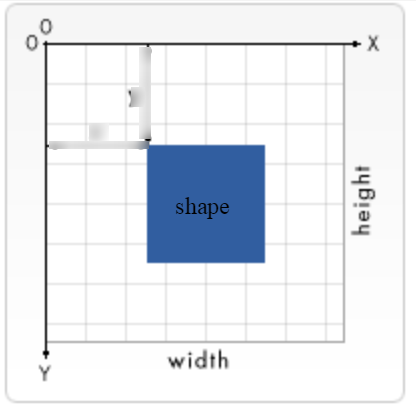
<svg width="widthpx" height="heightpx" viewBox="x1 x2 y1 y2">
注意上图起点是左上角,viewBox则表示了可见的画布区域。
SVG Shapes
SVG 有以下预定义的形状元素:
- Rectangle <rect>
- Circle <circle>
- Ellipse <ellipse>
- Line <line>
- Polyline <polyline>
- Polygon <polygon>
- Path <path>
<svg width="400" height="180">

  <rect x="50" y="20" rx="20" ry="20" width="150" height="150" style="fill:red;stroke:black;stroke-width:5;stroke-opacity:0.5;fill-opacity:0.9">

  Sorry, your browser does not support inline SVG.

</svg>
效果:
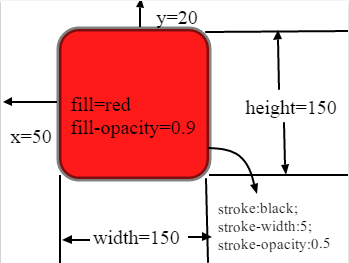
rx和ry表示圆角的轴半径,类似于css 中的 border-radius
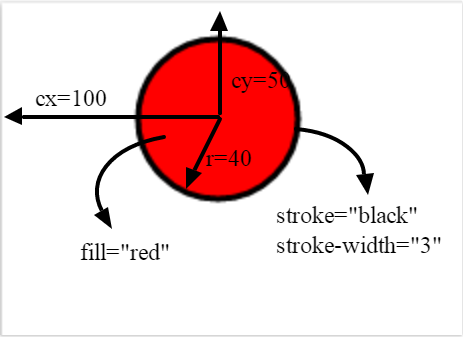
<svg height="100" width="200">

  <circle cx="100" cy="50" r="40" stroke="black" stroke-width="3" fill="red" />

  Sorry, your browser does not support inline SVG.

</svg>
<svg height="140" width="500">

  <ellipse cx="200" cy="80" rx="100" ry="50" style="fill:yellow;stroke:purple;stroke-width:2" />

  Sorry, your browser does not support inline SVG.

</svg>

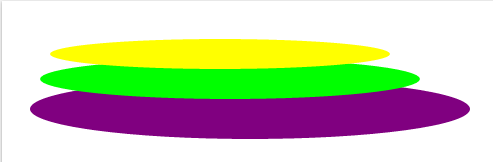
多个椭圆会叠加
<svg height="150" width="500">

  <ellipse cx="240" cy="100" rx="220" ry="30" style="fill:purple" />

  <ellipse cx="220" cy="70" rx="190" ry="20" style="fill:lime" />

  <ellipse cx="210" cy="45" rx="170" ry="15" style="fill:yellow" />

  Sorry, your browser does not support inline SVG.

</svg>
line
<svg height="210" width="500">

  <line x1="0" y1="0" x2="200" y2="200" style="stroke:rgb(255,0,0);stroke-width:2" />

  Sorry, your browser does not support inline SVG.

</svg>
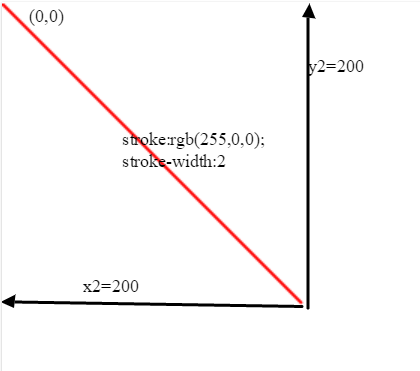
<svg height="210" width="500">

  <polygon points="100,10 40,198 190,78 10,78 160,198" style="fill:lime;stroke:purple;stroke-width:5;fill-rule:nonzero;"/>

  Sorry, your browser does not support inline SVG.

</svg>
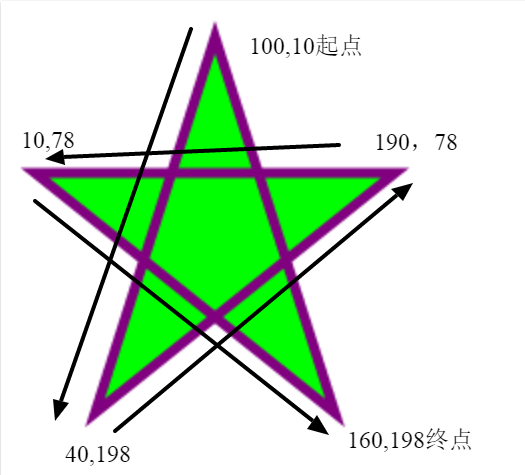
<svg height="210" width="400">

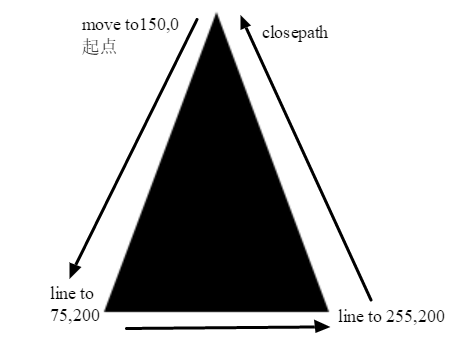
  <path d="M150 0 L75 200 L225 200 Z" />

</svg>
The following commands are available for path data:
- M = moveto
- L = lineto
- H = horizontal lineto
- V = vertical lineto
- C = curveto
- S = smooth curveto
- Q = quadratic Bézier curve
- T = smooth quadratic Bézier curveto
- A = elliptical Arc
- Z = closepath
Note: 上面大写代表绝对位置,小写代表相对位置
<svg height="60" width="200">

  <text x="0" y="15" fill="red" transform="rotate(30 20,40)">I love SVG</text>

  Sorry, your browser does not support inline SVG.

</svg>
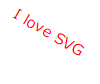
stroke
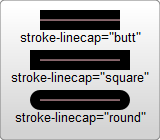
<?xml version="1.0" standalone="no"?>

<svg width="160" height="140" xmlns="http://www.w3.org/2000/svg" version="1.1">

  <line x1="40" x2="120" y1="20" y2="20" stroke="black" stroke-width="20" stroke-linecap="butt"/>

  <line x1="40" x2="120" y1="60" y2="60" stroke="black" stroke-width="20" stroke-linecap="square"/>

  <line x1="40" x2="120" y1="100" y2="100" stroke="black" stroke-width="20" stroke-linecap="round"/>

</svg>
<?xml version="1.0" standalone="no"?>

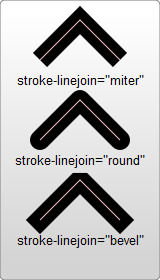
<svg width="160" height="280" xmlns="http://www.w3.org/2000/svg" version="1.1">

  <polyline points="40 60 80 20 120 60" stroke="black" stroke-width="20"

      stroke-linecap="butt" fill="none" stroke-linejoin="miter"/>

  <polyline points="40 140 80 100 120 140" stroke="black" stroke-width="20"

      stroke-linecap="round" fill="none" stroke-linejoin="round"/>

  <polyline points="40 220 80 180 120 220" stroke="black" stroke-width="20"

      stroke-linecap="square" fill="none" stroke-linejoin="bevel"/>

</svg>
<svg width="200" height="150">

  <path d="M 10 75 Q 50 10 100 75 T 190 75" stroke="black"

    stroke-linecap="round" stroke-dasharray="5,15,8" fill="none"/>

  <path d="M 10 75 L 190 75" stroke="red"

    stroke-linecap="round" stroke-width="1" stroke-dasharray="5,5" fill="none"/>

</svg>
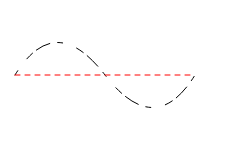
stroke-dasharray="实线段距离,空白线段距离" 如果有多个值,比如5,15,8那么将按照实线,空白这样不断循环。
所以,第一个例子是5实线,15空白,8实线,5空白,15实线,8空白,5实线。。。。。
【概念】SVG(1)的更多相关文章
- HTML5中的SVG
* SVG * 基本内容 * SVG并不属于HTML5专有内容 * HTML5提供有关SVG原生的内容 * 在HTML5出现之前,就有SVG内容 * SVG,简单来说就是矢量图 * SVG文件的扩展名 ...
- SVG 学学就会了。
SVG 随便学学就会了 这两天闲来没事把 Echart 换成 Rechart 感觉世界都清爽了.因为 rechart 使用 svg 来渲染,所以顺带学了下 SVG 感觉很轻松哦. 概念 SVG 是 w ...
- android studio集成融云 SDK 后在部分机型启动对话时崩溃
最初构建项目是 eclipse, 后来切换到 android studio来做开发. 后来多个用户反馈在android4.4机型上存在启动对话崩溃的问题.但是IOS 版工程从来没有重现. 调试报错信息 ...
- H5小内容(四)
SVG 基本内容 SVG并不属于HTML5专有内容 HTML5提供有关SVG原生的内容 在HTML5出现之前,就有SVG内容 SVG,简单来说就是矢量图 ...
- Android Vector曲折的兼容之路
Android Vector曲折的兼容之路 两年前写书的时候,就在研究Android L提出的Vector,可研究下来发现,完全不具备兼容性,相信这也是它没有被广泛使用的一个原因,经过Google的不 ...
- Android Drawable Mipmap Vector使用及Vector兼容
原文地址:http://blog.csdn.net/eclipsexys/article/details/51838119 http://blog.csdn.net/qq_15545283/artic ...
- 【概念】SVG(2)
Style <svg width="200" height="200" xmlns="http://www.w3.org/2000/svg&qu ...
- 关于SVG的viewBox
在SVG中,通过svg标记的 width和height可以规定这段SVG代码所表达的数据在绘制时所占用的空间大小 如下代码svg设置了宽度与高度,rect同样,所以结果自然是全屏 <svg wi ...
- SVG Path高级教程
课程分为四个方面: 1. Path概述 2. 移动和直线命令 3. 弧线命令 4. 贝塞尔曲线命令 Path概述 <path> 标签用来定义路径,Path字符串是由命令及其参数组组成的字符 ...
随机推荐
- Unix domain socket
转载:http://www.cnblogs.com/chekliang/p/3222950.html socket API原本是为网络通讯设计的,但后来在socket的框架上发展出一种IPC机制,就是 ...
- 邁向IT專家成功之路的三十則鐵律 鐵律二十三:IT人的成家之道-樸實
根據內政部一份2013年最新的調查報告指出台灣人的離婚率位居全球第三,想想看如果這是經濟成長率的排名表現那該有多好.然而究竟為何在台灣這塊小小的土地上,不僅離婚非常高而且晚婚的人也非常的多,其原因肯定 ...
- Mac -- 安装及使用Docker
安装这三个软件. 有两个安装包: 和 安装完使用挺简的. 更多内容官网查看: https://docs.docker.com/
- VirtualApp技术黑产利用研究报告
一. 前言 VirtualApp(以下称VA)是一个App虚拟化引擎(简称VA).VirtualApp创建了一个虚拟空间,你可以在虚拟空间内任意的安装.启动和卸载APK,这一切都与外部隔离,如同一个沙 ...
- DICOM医学图像处理:深入剖析Orthanc的SQLite,了解WADO & RESTful API
背景: 上一篇博文简单翻译了Orthanc官网给出的CodeProject上“利用Orthanc Plugin SDK开发WADO插件”的博文,其中提到了Orthanc从0.8.0版本之后支持快速查询 ...
- Solaris磁盘配额
磁盘配额:就跟汽车行驶速度一样.我们设定. 添加rq标志,使其支持配额功能. 命令:quota ,打开就是quotaon 对ZFS文件系统进行设置配额: 当设置quota=none 则可以取消配额设置 ...
- C#编译器选项(目标平台)
用vs编译C#项目的设置中,“属性-生成-目标平台”有anycpu,x86,x64等选项. anycpu(默认值)将编译程序集为使其在任意平台上都可以运行. 在任何可能的时候,应用程序作为 64 位进 ...
- soapUI学习笔记--用例字段参数化
字段参数化的简单操作 1.把Request新增一个TestCase 增加TestCase,下方会出现: 2.案例中,请求参数只有一个.先运行下请求,可以运行成功(保证接口是通的) 3.添加参数.见图中 ...
- upstart man
man upstart nit(8) init(8) NAME init - Upstart process management daemon SYNOPSIS init [OPTION]... D ...
- Terminal emulator
http://en.wikipedia.org/wiki/Terminal_emulator Terminal emulator From Wikipedia, the free encycloped ...