
高效vim插件
目录[-]
高效vim插件
如果不熟悉vim的,请在使用vim插件之前,请先阅读 Vim学习指南, 建议通过前3个层次。以及有一个有趣的vim练习游戏http://vim-adventures.com/。
插件管理利器
vim的插件原始安装容易混乱,而且管理起来,不方便。那么就渴望一个插件管理工具:pathogen
简单安装:
|
1
2
3
|
mkdir -p ~/.vim/autoload ~/.vim/bundle; \curl -Sso ~/.vim/autoload/pathogen.vim \ https://raw.github.com/tpope/vim-pathogen/master/autoload/pathogen.vim |
详细请查看:https://github.com/tpope/vim-pathogen
配置:
在vimrc文件的filetype plugin之前·「没有的就在最前面」添加:
|
1
2
|
call pathogen#infect()filetype plugin indent on |
,记住,一定是vimrc,而不是gvimrc。可以参考我的vimrc配置
高效插件集
- jedi-vim [python]
- eclim [java]
- c.vim[C/C++]
- vim-colorschemes
请将这插件安装在$HOME/.vim/bundle目录下:
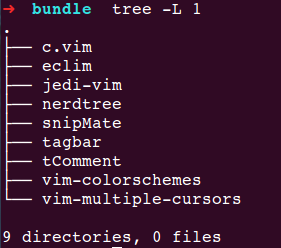
NerdTree
The NERD tree allows you to explore your filesystem and to open files and directories. It presents the filesystem to you in the form of a tree which you manipulate with the keyboard and/or mouse. It also allows you to perform simple filesystem operations.
你可以使用Git这样安装:
|
1
2
|
cd $HOME/.vim/bundlegit clone https://github.com/scrooloose/nerdtree.git |
snipMate
这个可以有。想快速写或者减少重复写代码,那么code snippets就是必须的,而对于vim来说,snipMate,你值得拥有。[ps:你可以在其snippets目录下找到对应语言的snippets,可以修改相应的snippets]。请到vim官网下载http://www.vim.org/scripts/script.php?script_id=2540。
tagbar
如果你使用过eclipse,那么它右边有个叫做Outline函数列表,对,tagbar就是这个效果。

你可以使用Git这样安装:
|
1
2
|
cd $HOME/.vim/bundlegit clone https://github.com/majutsushi/tagbar.git |
这个插件具有Sublime Text的多光标编辑功能哟。

你可以使用Git这样安装:
|
1
2
|
cd $HOME/.vim/bundlegit clone https://github.com/terryma/vim-multiple-cursors.git |
jedi-vim
如果使用python的,有了它,爽歪歪。它拥有强大的提示能力。
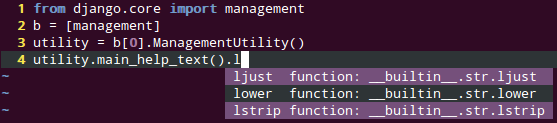
注意,刚开始我安装这个插件,总是报错,主要是vim没有--enable-pythoninterp 和没有安装jedi·「pip install jedi」,而且后来 在jedi-vim开发者David Halter提示下,在.bashrc中设置·「export PYTHONSTARTUP="$(python -m jedi repl)" 」就可以让python具有ipython的功能。很强大!
你可以使用Git这样安装:
|
1
2
|
cd $HOME/.vim/bundlegit clone https://github.com/davidhalter/jedi-vim.git |
eclim
eclim 就是 eclipse 和 vim的有机结合。它充分利用了eclipse强大的提示功能,快捷键<c-x><c-u>
按照官网安装之后,它会在.vim目录下生成eclim和plugin目录,请在bundle目录新建一个目录eclim,然后将这两个目录剪切到bundle/eclim目录中.这时它没有启动,还需要执行ECLIPSE目录中的eclimd。这个并没有列举出来。
其实还可以加一个supertab插件,但是我习惯使用tab来代替空格,实际上一个tab是4个空格。所以并没有列举出来。
你可以使用git这样安装:
|
1
2
|
cd $HOME/.vim/bundlegit clone https://github.com/ervandew/supertab.git |
c.vim
请到这里去下载,这个不解释,很强大,官网有很详细的解释和帮助文档,对于c/c++来说不可缺少。
vim-colorschemes
保护视力,请从一个好的主题开始。那么vim-colorschemes中集成了很多的主题,个人比较爱好cobalt,不过有些主题只能在gvim中才能显示效果,而在vim中没有背景颜色等等问题。github去下载
|
1
2
|
cd $HOME/.vim/bundlegit clone https://github.com/upsuper/vim-colorschemes.git |
vim配置
|
1
2
3
4
5
6
7
8
9
10
11
12
13
14
15
16
17
18
19
20
21
22
23
24
25
26
27
28
29
30
31
32
33
34
35
36
37
38
39
40
41
42
43
44
45
46
47
48
49
50
51
52
53
54
55
56
57
58
59
60
61
62
63
64
65
66
67
68
69
70
71
72
73
74
75
76
77
78
79
80
81
82
83
84
85
86
87
88
89
90
91
92
93
94
95
96
97
98
99
100
101
102
103
104
105
106
107
108
109
110
111
112
113
114
115
116
117
118
|
" Uncomment the next line to make Vim more Vi-compatible" NOTE: debian.vim sets 'nocompatible'. Setting 'compatible' changes numerous" options, so any other options should be set AFTER setting 'compatible'."set compatibleset nocompatible" Vim5 and later versions support syntax highlighting. Uncommenting the next" line enables syntax highlighting by default.if has("syntax") syntax onendif" If using a dark background within the editing area and syntax highlighting" turn on this option as well"set background=dark" Uncomment the following to have Vim jump to the last position when" reopening a file"if has("autocmd")" au BufReadPost * if line("'\"") > 1 && line("'\"") <= line("$") | exe "normal! g'\"" | endif"endif" Uncomment the following to have Vim load indentation rules and plugins" according to the detected filetype."if has("autocmd")" filetype plugin indent on"endifcall pathogen#infect()filetype plugin indent on" The following are commented out as they cause vim to behave a lot" differently from regular Vi. They are highly recommended though.set showcmd " Show (partial) command in status line."set showmatch " Show matching brackets."set ignorecase " Do case insensitive matchingset smartcase " Do smart case matching"set incsearch " Incremental search"set autowrite " Automatically save before commands like :next and :make"set hidden " Hide buffers when they are abandonedset mouse=a " Enable mouse usage (all modes)set nuset tabstop=4set softtabstop=4" set shiftwidth=4set expandtab " use whitespace instead of tabset autoindentset smartindentset cindent shiftwidth=4" set autoindent shiftwidth=4set foldmethod=indentset backspace=indent,eol,startset colorcolumn=80" === tagbar setting =======nmap <F4> :TagbarToggle<CR> " shortcutlet g:tagbar_width = 20 " tagbar's width, default 20autocmd VimEnter * nested :call tagbar#autoopen(1) "automate to open tagbarlet g:tagbar_left = 1 " on the left side"let g:tagbar_right = 1 " on the right sidelet NERDTreeIgnore=['\.pyc', '\.pyo', '\.swp', '\~'] " ignore *.py[co], *.swp and *~" =======end==================" switch windownnoremap <c-h> <c-w>hnnoremap <c-j> <c-w>jnnoremap <c-k> <c-w>knnoremap <c-l> <c-w>l" ===== brace autocompletion =========inoremap ( ()<Esc>iinoremap [ []<Esc>iinoremap { {<CR>}<Esc>Oautocmd Syntax html,vim inoremap < <lt>><Esc>i| inoremap > <c-r>=ClosePair('>')<CR>inoremap ) <c-r>=ClosePair(')')<CR>inoremap ] <c-r>=ClosePair(']')<CR>inoremap } <c-r>=CloseBracket()<CR>inoremap " <c-r>=QuoteDelim('"')<CR>inoremap ' <c-r>=QuoteDelim("'")<CR>function ClosePair(char) if getline('.')[col('.') - 1] == a:char return "\<Right>" else return a:char endifendffunction CloseBracket() if match(getline(line('.') + 1), '\s*}') < 0 return "\<CR>}" else return "\<Esc>j0f}a" endifendffunction QuoteDelim(char) let line = getline('.') let col = col('.') if line[col - 2] == "\\" "Inserting a quoted quotation mark into the string return a:char elseif line[col - 1] == a:char "Escaping out of the string return "\<Right>" else "Starting a string return a:char.a:char."\<Esc>i" endifendf" Source a global configuration file if availableif filereadable("/etc/vim/vimrc.local") source /etc/vim/vimrc.localendif |
|
1
2
3
4
5
6
7
8
9
10
11
12
13
14
|
<span></span> <div> </div> |
一个实例
这是我在写python nose插件nose-colorxunit时截图:
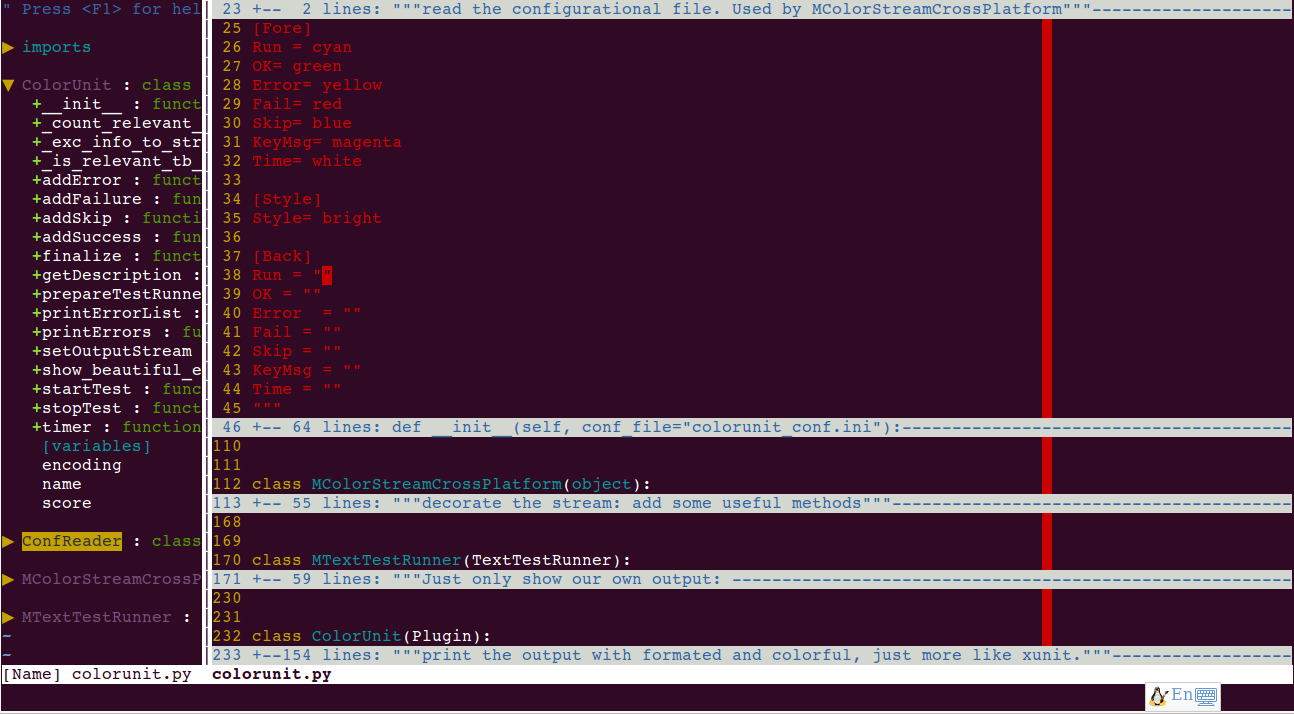
http://my.oschina.net/swuly302/blog/156784
高效vim插件的更多相关文章
- 常用vim插件的安装、使用和管理
1.Ctags Ctags工具是用来遍历源代码文件生成tags文件,这些tags文件能被编辑器或者其他工具用来快速查找定位源代码中的符号,入变量名,函数名等.比如,tags文件就是Taglist和 ...
- 【转载】跟我一起学习VIM - vim插件
目录 写在前面:Life Changing Editor 什么是VIM 为什么选VIM 为什么选其它 为什么犹豫选择它们 VIM >= SUM(现代编辑器) 如何学习VIM 一秒钟变记事本 VI ...
- 跟我一起学习VIM - vim插件合集
2016-06-14 15:04 13333人阅读 评论(0) 收藏 举报 分类: Linux(104) 目录(?)[+] 前两天同事让我在小组内部分享一下VIM,于是我花了一点时间写了个简短的教 ...
- [vundle]利用vundle工具来管理vim插件
转自:http://os.51cto.com/art/201507/484174.htm Vim是Linux上一款用途广泛的轻量级文本编辑工具.虽然对普通的Linux用户来说开始学用起来难度相当大,但 ...
- VIM插件攻略
工欲善其事,必先利其器.一个强大的开发环境可以大大提高工作效率.好吧,我知道这是废话...不过,我想一定有很多跟我一样打算进入Linux平台开发的新手,一开始都为找不到一个像Windows下的VS那样 ...
- [Tools] Vim插件管理
我们在使用插件的时候,都不希望插件安装的很杂乱,它不是一个看不见的黑盒,也为了下次方便在其它地方安装. 由于要方便插件管理,于是有了 Vundle,以下做些介绍: 1. 一个插件管理器, 自己本身也是 ...
- Vim插件管理——Vundle
Vim插件管理--Vundle 都说Vim时程序员写给自己的编辑器,其中的情结可想而知.身为一只程序狗CodingDoge,今天就让我带各位学习Vim的使用. vim因为其庞大而强劲的插件受到无比的推 ...
- vim 插件管理
1 进入自己的vim mkdir ./bundle/vundle 2 在vimrc同级中执行 git clone https://github.com/gmarik/vundle.git ./bund ...
- 「个人vim插件+配置」
2016.10.4 filetype indent on syntax on set nu ai ci si set sw= ts= set autochdir set backspace= colo ...
随机推荐
- CodeForces 1103E. Radix sum
题目简述:对任意两个(正)十进制数$a = \overline{a_{k-1}\dots a_1a_0}$和$b = \overline{b_{k-1}\dots b_1b_0}$,定义其[十进制按位 ...
- Number()、parseInt()、parseFloat()的区别:
Number().parseInt().parseFloat()的区别: Number()的强制类型转换与parseInt()和parseFloat()方法的处理方式相似,只是它转换的是整个值,而不是 ...
- LeetCode:104 Maximum Depth of Binary Tree(easy)
题目: Given a binary tree, find its maximum depth. The maximum depth is the number of nodes along the ...
- Qt-MVC图形视图框架初识
使用QPushButton.QLabel.QCheckBox等构成GUI的控件或自定义图形时,开发应用程序会变得很简单.但是如果想在GUI中使用数十个或者数百个图形对象,向用户完美展示控制场景,则会受 ...
- 1079 Total Sales of Supply Chain (25 分)
A supply chain is a network of retailers(零售商), distributors(经销商), and suppliers(供应商)-- everyone invo ...
- Spring Cloud:使用Ribbon实现负载均衡详解(上)
1. 什么是 Ribbon? Spring Cloud Ribbon 是一套实现客户端负载均衡的工具.注意是客户端,当然也有服务端的负载均衡工具,我们后面再介绍.可以认为 Ribbon 就是一个负载均 ...
- UITableView以及cell属性
在ios的UI中UITableView是个常用且强大的控件 基本使用: 1>设置代理,一般把控制器设为代理:self.tableView.delegate = self; 2>遵守代理的协 ...
- Tinghua Data Mining 2
数据预处理 https://www.bilibili.com/video/av23933161/?p=11 http://www.xuetangx.com/courses/course-v1:Tsin ...
- UVa12186:Another Crisis(树形DP)
一道简单的树形DP送给你. A couple of years ago, a new world wide crisis started, leaving many people with econo ...
- @Results( 中 params 怎么用
http://blog.csdn.net/z69183787/article/details/16342553 struts2的@Result annotation 如何添加params,并且在页面取 ...